
wagtail-custom-code-editor

A Wagtail Custom Code Editor Field for your own editor field.
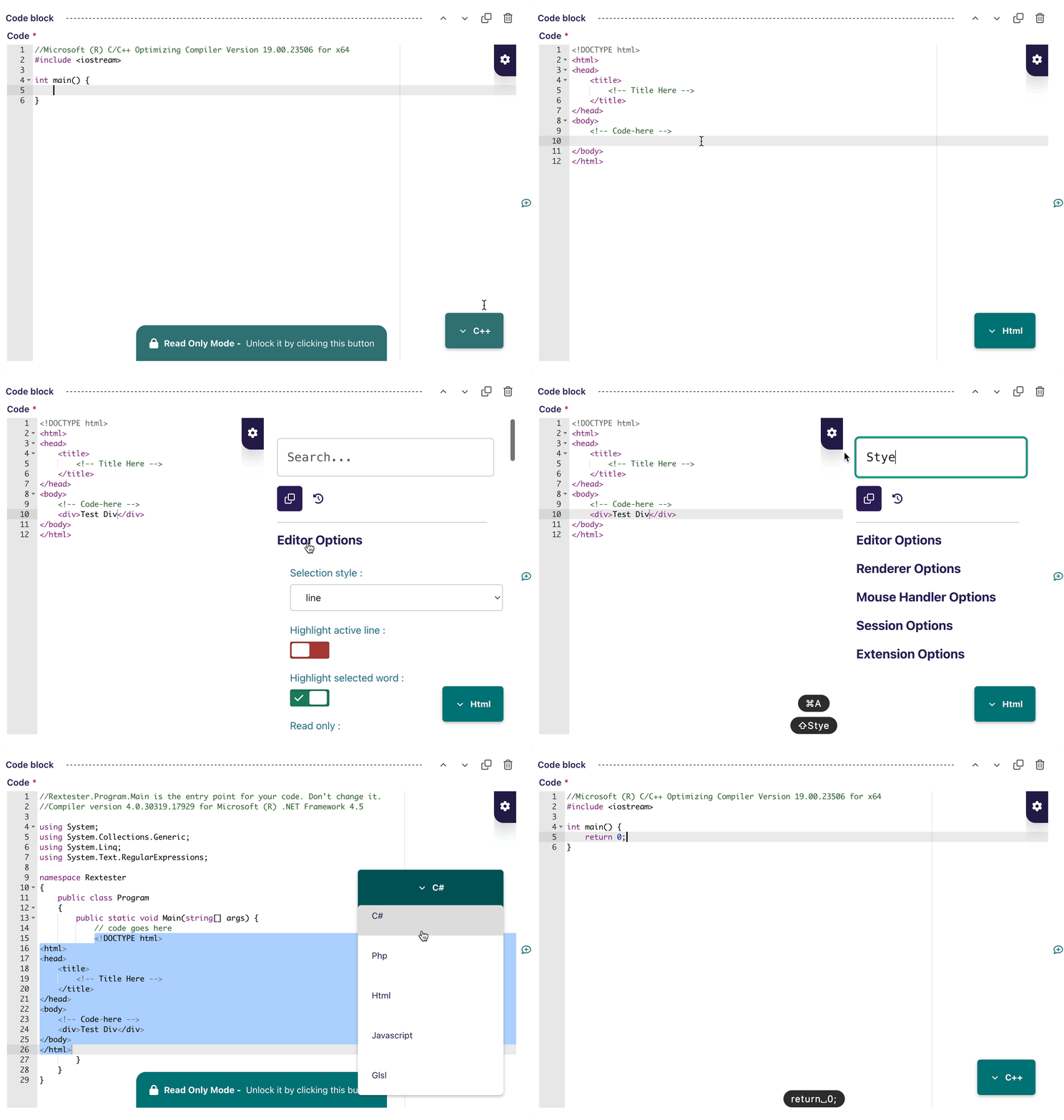
This package adds a full-featured code editor that is perfect for coding tutorials, documentation containing code examples, or any other type of page that needs to display code.
This field uses the open-source Ace Editor library that you may found here Ace Editor
Features
- Replace traditional textarea to Ace Editor that you can easily check the linting of the codes.
- Add snippet for better re-usable small region of source code, or any text format.
- Configure your own Ace Editor Options to your own editor preferences.
- Easily change mode available on your own default/custom mode's setup.
- You can save any code highlights so that it can retain the same highlight's code when you change to different mode.
Documentation
Install
Simply install in your project:
pip install wagtail-custom-code-editor
In your settings, add the package in INSTALLED_APPS:
INSTALLED_APPS = [
    ...
    "wagtail_custom_code_editor",
    ...
]
Usage
Field
You can easily add the CustomCodeEditorField to your model fields like this:
from wagtail_custom_code_editor.fields import CustomCodeEditorField

class MyPage(Page):
    code = CustomCodeEditorField()
    ...
The field is using Django's JSONField
Panel
Then you add CustomCodeEditorPanel like this:
from wagtail_custom_code_editor.panels import CustomCodeEditorPanel
from wagtail_custom_code_editor.fields import CustomCodeEditorField

class MyPage(Page):
    code = CustomCodeEditorField()

    content_panels = Page.content_panels + [
        CustomCodeEditorPanel('code')
    ]
Block
You can also add as CustomCodeEditorBlock like this:
from wagtail_custom_code_editor.blocks import CustomCodeEditorBlock
from wagtail.blocks import (
    StructBlock,
)

class CodeBlock(StructBlock):
    code = CustomCodeEditorBlock()
Frontend
You can easily grab the JSON value like this:
<pre><code>{{ page.code.code }}</code></pre>
The JSON returns this two key value:
{
  "code": "Any Code here",
  "mode": "html"
}
License
wagtail-custom-code-editor is released under the MIT License.
1 maintainer

Download files
Download the file for your platform. If you're not sure which to choose, learn more about installing packages.
Source Distribution
File details
Details for the file wagtail_custom_code_editor-1.0.6.tar.gz.
File metadata
- Download URL: wagtail_custom_code_editor-1.0.6.tar.gz
- Upload date:
- Size: 3.0 MB
- Tags: Source
- Uploaded using Trusted Publishing? No
- Uploaded via:
twine/6.2.0 CPython/3.13.5
File hashes
| Algorithm | Hash digest | |
|---|---|---|
| SHA256 |
e83d6ce93b2035c48e5a42f4db321a53c95d02b41d30aebe58909bd5aa06911d
|
|
| MD5 |
29595cb1462ceab3b9413d4a42f967cb
|
|
| BLAKE2b-256 |
2374e890a9b064874d730e1c75c883e82e20972b64e886f14a5922c780019d1e
|














