
Wagtail Google tag
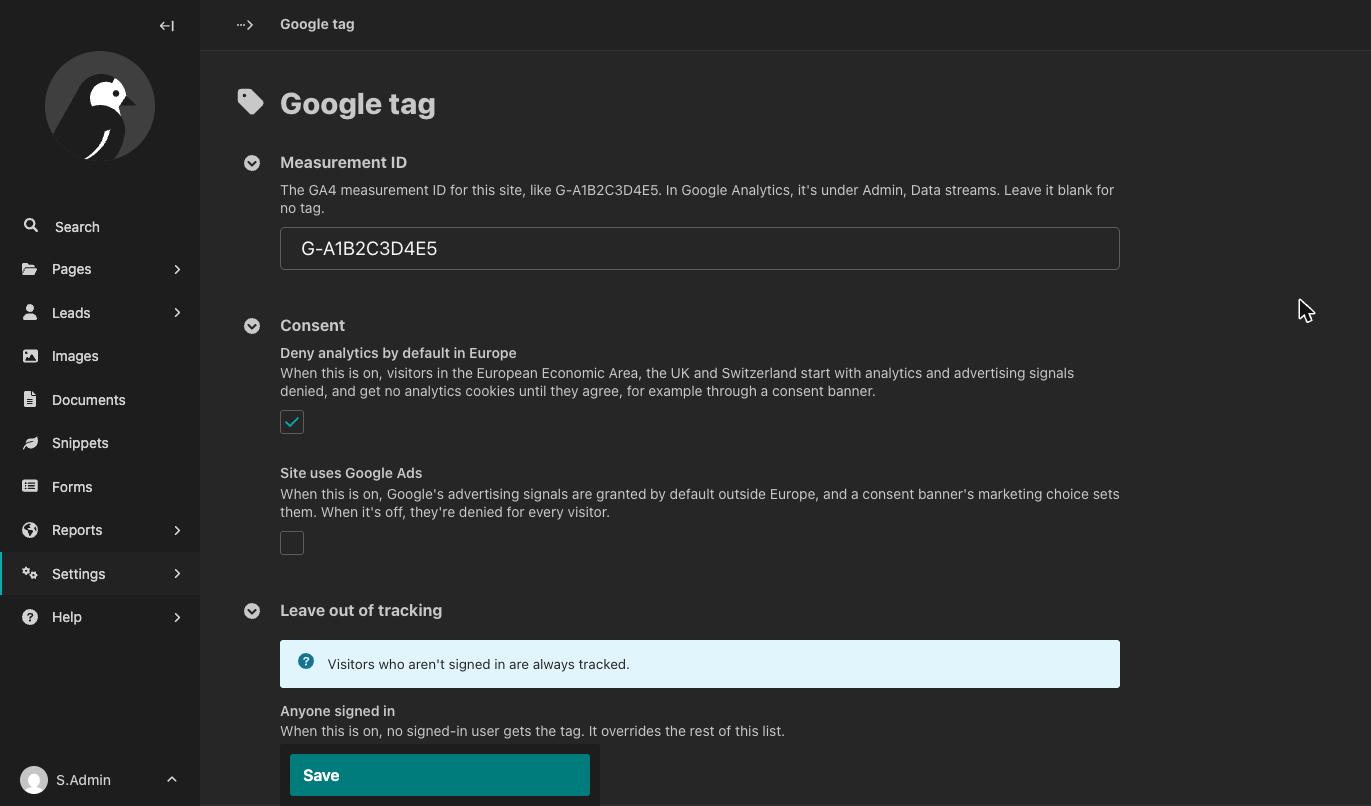
Google tag configuration UI (GA4) for Wagtail. Our ultimate goal is everything you need to do to set up GA, you do through the Wagtail admin.
Claude Code was used with oversight by the maintainer.
Summary of Purpose
“Wagtail Google tag” adds Google tags for Google Analytics 4 to a Wagtail site, exposing as much setup and configuration as possible via the admin UI and providing a clear checklist of what has to be done outside that. The focus is on sending data to GA.
It doesn't bring Google Analytics into the Wagtail admin: reports stay in Google Analytics, and so do its own settings, such as data retention and key events. It also doesn't load a Tag Manager container of your own.
Progress so far
- A
page_viewfor every page, sent by Google's tag - Google Analytics' enhanced measurement (scrolls, outbound clicks and site search), per your setup in Google Analytics
- Tag is kept out of preview views automatically (non-configurable)
- Settings available under Settings → Google tag: see the settings reference
- In your templates, add an HTML attribute to a link or button to enable click events.
- For visitors your site knows, a User-ID of your own on their events
- For a page whose address holds a secret, such as a signed download or unsubscribe link, an address of your choosing in Google Analytics: Keep secrets out of page addresses
Requirements
- Wagtail 7.4, 8.0 or 8.1, with the Python and Django versions each of them supports
wagtail.contrib.settings, which comes with Wagtaildjango.template.context_processors.requestin your template settings. Wagtail's project template has it. Without it, the tag loads nothing.
Installation
-
Install the package:
pip install wagtail-google-tag
-
Add it to
INSTALLED_APPS, withwagtail.contrib.settings:INSTALLED_APPS = [ # ... "wagtail.contrib.settings", "wagtail_google_tag", # ... ]
-
Create its tables:
python manage.py migrate
-
Add the tag near the top of
<head>in your base template:{% load wagtail_google_tag %} <!doctype html> <html> <head> <meta charset="utf-8"> {% google_tag %} ...
-
In the Wagtail admin, go to Settings → Google tag and enter your GA4 measurement ID. In Google Analytics, it's under Admin → Data streams, in your web stream.
The tag's script is one of the package's static files. On a deployed site, run collectstatic after you install or upgrade the package, as for any app's static files.
Then follow Getting started to see your first visit and send your first event.
Documentation
The documentation is in four parts:
- Tutorial: Getting started.
- How-to guides: set up Google Analytics, send events, connect a consent banner, set a User-ID, keep secrets out of page addresses, add the tag to other templates, allow the tag in a Content Security Policy, and test and troubleshoot.
- Reference: settings, the template tag, the script API, and HTML attributes and events.
- Explanation: consent, who is tracked, page views, and privacy.
Links
License
BSD-3-Clause. See LICENSE.
1 maintainer

Metadata
1 maintainer
Release files for wagtail-google-tag 0.4.0
For a detailed explanation of source distributions (sdists) and built distributions (wheels), please see the package formats documentation.
Source distribution (sdist)
| File | Size | Uploaded | Provenance | Actions |
|---|---|---|---|---|
| wagtail_google_tag-0.4.0.tar.gz | 11.2 kB | With provenance | Details for wagtail_google_tag-0.4.0.tar.gz |
Built distribution (wheel)
| File | Interpreter | ABI | Platform | Actions Reset |
|---|---|---|---|---|
| wagtail_google_tag-0.4.0-py3-none-any.whl | Python 3 | none | any | Details for wagtail_google_tag-0.4.0-py3-none-any.whl |
Total release size: 26.6 kB
Release files / wagtail_google_tag-0.4.0.tar.gz
| Download URL | wagtail_google_tag-0.4.0.tar.gz |
|---|---|
| Size | 11.2 kB |
| Tags | Source |
|
SHA-256 checksum How to use checksums |
316f68e816365322d94652cd53757d5cc00e5b31ab9232023da68089c9ccacba
|
|
BLAKE2b-256 checksum How to use checksums |
014d97d20af5eb0bdca216be2bc74be13d4c4ed2053d23403b330c096614de5a
|
| Upload date | |
|
Uploaded using Trusted Publishing? What is trusted publishing? |
Yes |
| Uploaded via |
twine/7.0.0 CPython/3.13.16
|
Provenance
Provenance describes where a file came from. On PyPI, provenance is shared via attestations, which provide a verifiable record of the build or publishing details. View details, limitations and caveats.


PyPI Publish Attestation
PyPI verified that this artifact, at this checksum, originated from the publisher listed below.
Signed by GitHub Actions, verified by PyPI on Nov 15, 2026.
Transparency logRelease files / wagtail_google_tag-0.4.0-py3-none-any.whl
| Download URL | wagtail_google_tag-0.4.0-py3-none-any.whl |
|---|---|
| Size | 15.4 kB |
| Tags | Python 3 |
|
SHA-256 checksum How to use checksums |
6741649ca2531409aa7df88fb79df2f53e75c42ac53279781f521225644cbac8
|
|
BLAKE2b-256 checksum How to use checksums |
024890fc4827bacc74630352c01f1f4133e9e4f199ed580b0ed9b27ceab5705f
|
| Upload date | |
|
Uploaded using Trusted Publishing? What is trusted publishing? |
Yes |
| Uploaded via |
twine/7.0.0 CPython/3.13.16
|
Provenance
Provenance describes where a file came from. On PyPI, provenance is shared via attestations, which provide a verifiable record of the build or publishing details. View details, limitations and caveats.
PyPI Publish Attestation
PyPI verified that this artifact, at this checksum, originated from the publisher listed below.
Signed by GitHub Actions, verified by PyPI on Nov 15, 2026.
Transparency logSecurity for wagtail-google-tag 0.4.0
Provenance
Provenance describes where a file came from. On PyPI, provenance is shared via attestations, which provide a verifiable record of the build or publishing details. View details, limitations and caveats.
Full provenance
Both files in this release have been uploaded with provenance metadata.
Attestation for wagtail_google_tag-0.4.0.tar.gz
PyPI Publish Attestation
PyPI verified that this artifact, at this checksum, originated from the publisher listed below.
Signed by GitHub Actions, verified by PyPI on Nov 15, 2026.
Transparency logA note on package security
PyPI is a repository for distributing packages, not a service for auditing them. While third-party security researchers and our staff do their best to detect and remove malicious packages, PyPI cannot guarantee the quality, security or suitability of any given package.
To learn more about protecting yourself from malicious actors, visit our package security documentation.














