
wagtail-html-editor






Philosophy
Wagtail's RawHTMLBlock is a simple textarea. While this simplicity is intentional, it can be limiting when editors need to write complex HTML layouts directly in the admin interface.
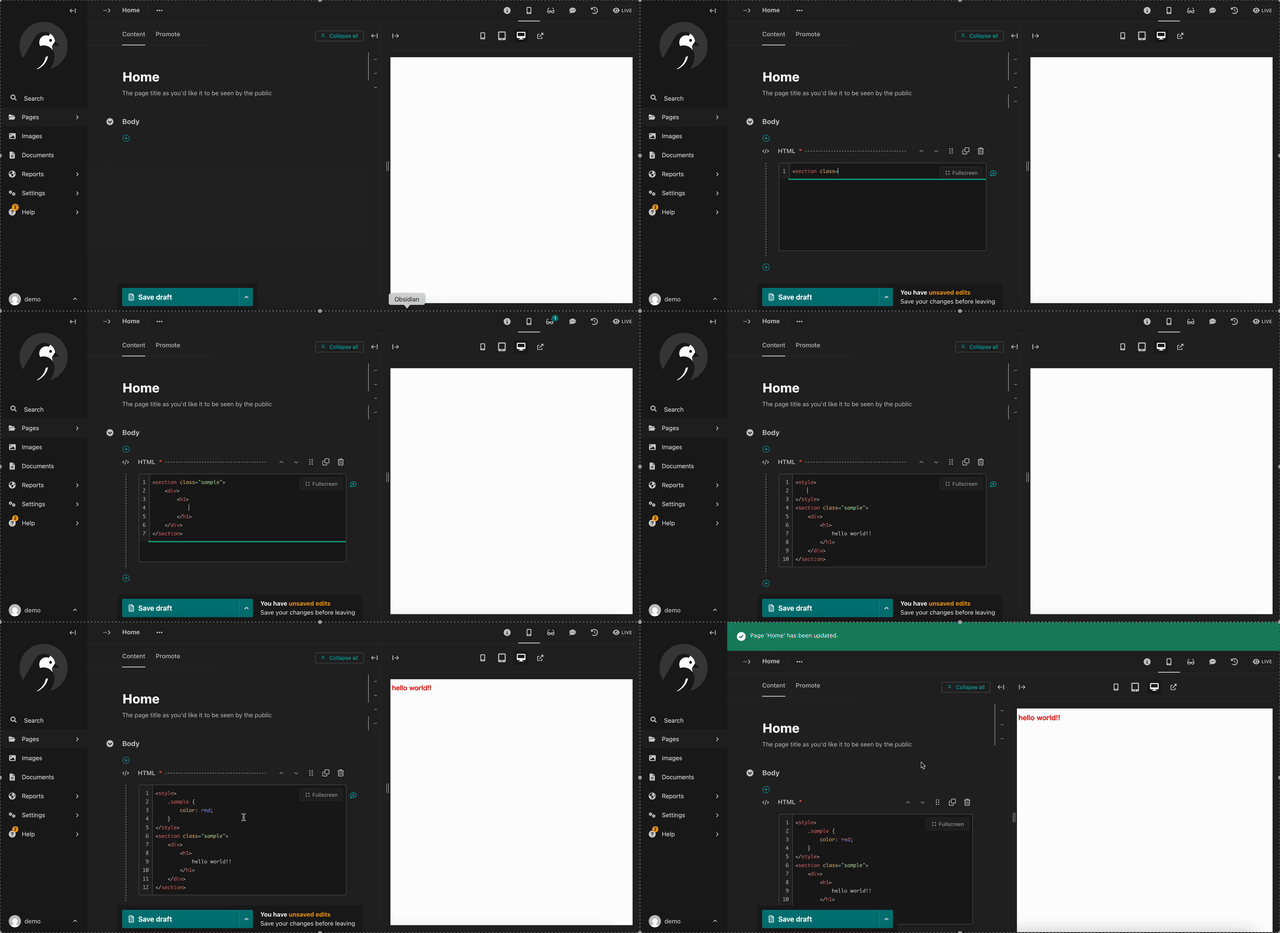
wagtail-html-editor bridges this gap by providing a VS Code-like editing experience within Wagtail's admin. Syntax highlighting, auto-indentation, Emmet support, and fullscreen mode make HTML coding in the admin not just possible, but comfortable.
This library is designed as a standalone package that enhances Wagtail's HTML editing capabilities.
Key Features
- Syntax Highlighting - HTML, CSS, and JavaScript with proper colorization
- Auto-indentation - Smart indentation like VS Code
- Dark/Light Mode - Follows Wagtail admin theme or manual toggle
- HTML Autocomplete - Tag completion, attribute suggestions
- Emmet Support - Expand abbreviations (e.g.,
div.container>ul>li*3) - Search & Replace - Find and replace text with keyboard shortcuts (Ctrl+F / Ctrl+H)
- Fullscreen Mode - Expand editor to use the full panel for comfortable coding
- Auto-closing Tags - Automatic closing tag insertion
- Lightweight - Built on CodeMirror 6 with minimal bundle size
Use Cases
- HTML Layouts - Write complex HTML directly in Wagtail admin
- Custom Widgets - Embed third-party widgets with proper syntax highlighting
- Email Templates - Create HTML email templates with visual feedback
- SVG Content - Edit inline SVG with syntax support
- Script Injection - Add custom scripts with proper code editing
Installation
pip install wagtail-html-editor
Add to your INSTALLED_APPS:
# settings.py
INSTALLED_APPS = [
    # ...
    'wagtail_html_editor',
    # ...
]
That's it! You can now use EnhancedHTMLBlock in your StreamFields.
Quick Start
1. Use in Your Page Model
from wagtail.models import Page
from wagtail.fields import StreamField
from wagtail.admin.panels import FieldPanel
from wagtail_html_editor.blocks import EnhancedHTMLBlock

class ContentPage(Page):
    body = StreamField([
        ('html', EnhancedHTMLBlock()),
        # ... other blocks
    ], blank=True, use_json_field=True)

    content_panels = Page.content_panels + [
        FieldPanel('body'),
    ]
2. Edit HTML in Admin
- Go to your page in Wagtail admin
- Add an "HTML" block to the body
- Start coding with syntax highlighting!
- Click the fullscreen button for a larger editing area
- Use Emmet abbreviations for rapid HTML creation
3. Render in Template
{% load wagtailcore_tags %}

{% for block in page.body %}
    {% include_block block %}
{% endfor %}
Migrating from RawHTMLBlock
Already using Wagtail's RawHTMLBlock? Migration is simple - just replace the import and block class:
# Before
from wagtail.blocks import RawHTMLBlock

body = StreamField([
    ('html', RawHTMLBlock()),
])

# After
from wagtail_html_editor.blocks import EnhancedHTMLBlock

body = StreamField([
    ('html', EnhancedHTMLBlock()),
])
No database migration needed! As long as the block name (e.g., 'html') stays the same, your existing content will work seamlessly with the enhanced editor.
Editor Features
Syntax Highlighting
The editor provides proper syntax highlighting for:
- HTML tags and attributes
- Inline CSS (
<style>blocks) - Inline JavaScript (
<script>blocks) - Template syntax (Django/Jinja2)
Emmet Support
Expand abbreviations with Tab:
| Abbreviation | Expansion |
|---|---|
div.container |
<div class="container"></div> |
ul>li*3 |
<ul><li></li><li></li><li></li></ul> |
a[href=#] |
<a href="#"></a> |
! |
HTML5 boilerplate |
Search & Replace
Use keyboard shortcuts to open the search panel:
| Action | Windows / Linux | macOS |
|---|---|---|
| Open search | Ctrl+F | Cmd+F |
| Open search & replace | Ctrl+H | Cmd+H |
| Next match | F3 or Ctrl+G | F3 or Cmd+G |
| Previous match | Shift+F3 or Shift+Ctrl+G | Shift+F3 or Shift+Cmd+G |
| Close panel | Escape | Escape |
When in fullscreen mode, pressing Escape closes the search panel without exiting fullscreen.
Fullscreen Mode
Click the fullscreen button at the top-right of the editor:
- Uses the full left panel (preserves preview area)
- Press ESC or click Exit button to return
- Smooth enter/exit animations
Theme Support
The editor automatically follows Wagtail's theme:
- Auto (default): Follows Wagtail admin dark/light mode
- Light: Always use light theme
- Dark: Always use dark theme
Configuration
All settings are optional. Configure via WAGTAIL_HTML_EDITOR in your Django settings:
# settings.py
WAGTAIL_HTML_EDITOR = {
    "emmet": True,           # Enable Emmet abbreviation expansion
    "indent_size": 2,        # Number of spaces per indent (2 or 4)
    "indent_with_tabs": False,  # Use tabs instead of spaces
    "theme": "auto",         # "auto", "light", or "dark"
}
Available Settings
| Setting | Default | Description |
|---|---|---|
emmet |
True |
Enable Emmet abbreviation expansion |
indent_size |
2 |
Number of spaces per indent (2 or 4) |
indent_with_tabs |
False |
Use tabs instead of spaces |
theme |
"auto" |
Color theme: "auto", "light", or "dark" |
Troubleshooting
Editor Not Loading
Issue: The editor shows a plain textarea instead of CodeMirror.
Solutions:
- Check browser console for JavaScript errors
- Ensure static files are collected:
python manage.py collectstatic - Clear browser cache (Cmd+Shift+R or Ctrl+Shift+R)
Emmet Not Working
Issue: Tab doesn't expand Emmet abbreviations.
Solutions:
- Ensure
emmetisTruein settings (default) - Check that the cursor is at the end of the abbreviation
- Some abbreviations may conflict with autocomplete - press Tab twice
Theme Not Matching Wagtail
Issue: Editor theme doesn't follow Wagtail's dark/light mode.
Solutions:
- Ensure
themeis set to"auto"in settings (default) - Reload the page after changing Wagtail's theme
- Check browser console for theme detection errors
Requirements
| Python | Django | Wagtail |
|---|---|---|
| 3.10+ | 4.2, 5.1, 5.2 | 6.4, 7.0, 7.2 |
See our CI configuration for the complete compatibility matrix.
Documentation
Project Links
Contributing
We welcome contributions! Please see our Contributing Guide for details.
License
BSD 3-Clause License. See LICENSE for details.
Inspiration
- CodeMirror 6 - The code editor powering this package
- Emmet - The essential toolkit for web-developers
- VS Code - The editing experience we aim to bring to Wagtail
1 maintainer

Metadata
1 maintainer
Release files for wagtail-html-editor 1.0.1
For a detailed explanation of source distributions (sdists) and built distributions (wheels), please see the package formats documentation.
Source distribution (sdist)
| File | Size | Uploaded | |
|---|---|---|---|
| wagtail_html_editor-1.0.1.tar.gz | 1.7 MB | Details |
Built distribution (wheel)
| File | Interpreter | ABI | Platform | Reset |
|---|---|---|---|---|
| wagtail_html_editor-1.0.1-py3-none-any.whl | Python 3 | none | any | Details |
Total release size: 3.5 MB
Release files / wagtail_html_editor-1.0.1.tar.gz
| Download URL | wagtail_html_editor-1.0.1.tar.gz |
|---|---|
| Size | 1.7 MB |
| Tags | Source |
|
SHA-256 checksum How to use checksums |
2c1fb98877dea5d64b3f3ca74d693b4107e773d39edb59e6255dfaafe47d00e5
|
|
BLAKE2b-256 checksum How to use checksums |
c51f1f30cf3e1bac3c7159c9ddd6559a2f0041fb5a1b988447a4d20089511ccd
|
| Upload date | |
|
Uploaded using Trusted Publishing? What is trusted publishing? |
Yes |
| Uploaded via |
twine/6.1.0 CPython/3.13.7
|
Provenance
Provenance describes where a file came from. On PyPI, provenance is shared via attestations, which provide a verifiable record of the build or publishing details. View details, limitations and caveats.


PyPI Publish Attestation
PyPI verified that this artifact, at this checksum, originated from the publisher listed below.
Signed by GitHub Actions, verified by PyPI on Feb 27, 2026.
Transparency logRelease files / wagtail_html_editor-1.0.1-py3-none-any.whl
| Download URL | wagtail_html_editor-1.0.1-py3-none-any.whl |
|---|---|
| Size | 1.7 MB |
| Tags | Python 3 |
|
SHA-256 checksum How to use checksums |
b316c5985edf0d28f5989db31b177ea447b361dae119f68ee7a8ba45fa0fa717
|
|
BLAKE2b-256 checksum How to use checksums |
0c4ed639c2b100cb26f8e62114f997b65faa06f912d8db09ab63fea8c9031610
|
| Upload date | |
|
Uploaded using Trusted Publishing? What is trusted publishing? |
Yes |
| Uploaded via |
twine/6.1.0 CPython/3.13.7
|
Provenance
Provenance describes where a file came from. On PyPI, provenance is shared via attestations, which provide a verifiable record of the build or publishing details. View details, limitations and caveats.
PyPI Publish Attestation
PyPI verified that this artifact, at this checksum, originated from the publisher listed below.
Signed by GitHub Actions, verified by PyPI on Feb 27, 2026.
Transparency log













