
wanna
Shell command launcher in natural language using ChatGPT
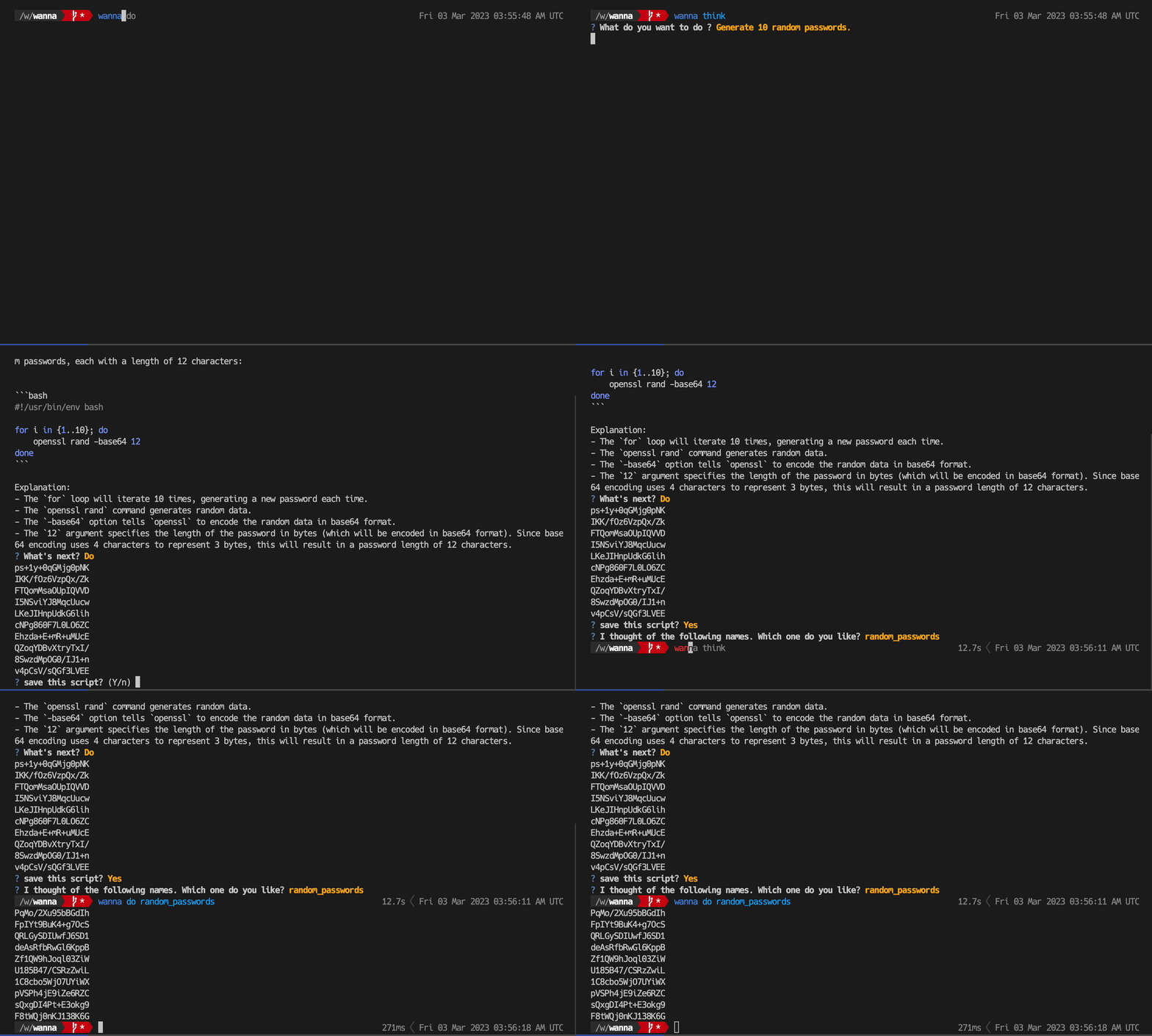
synopsis
The wanna command is a natural language shell command launcher using ChatGPT. It can generate, execute, name, and manage shell commands by natural language.
It is very convenient because you can easily do many things on the command line. However, remembering many commands and option combinations can be difficult even for experienced programmers, and often requires a Google search or the man command to remember and execute.
For example, if you want to do a task like "recursively find all .py files under this directory and output the total number of lines in them ", it is difficult to remember how to combine commands like find, xargs, and wc in a single shot. It is difficult to remember how to combine commands such as find, xargs, and wc in one shot.
wanna think
The wanna think command is used in such cases.
$ wanna think "Recursively finds all .py files under this directory and prints the sum of their line counts"
the AI assistant will automatically generate the following bash script:
#! /usr/bin/env bash
find . -name "*.py" -exec cat {} + | wc -l
You just look at it and decide to run it or not.
$ ? What's next? (Use arrow keys)
   Do
   Save
   Another Question
   Exit
In response to your request, AI will generate a script and explain it.
If you choose Do, it will actually run the proposed script and display the results.
Once you have run it and verified that it works, you can save it.
$ ? I thought of the following names. which one do you like? (Use arrow keys)
   count_py_lines
   py_line_counter
   recursive_py_counter
   py_line_sum
Phil Karlton once said, "The hardest part of computer science is naming. " This AI also suggests just the right name for the scripts it generates. All you have to do is choose a name that sounds good as a code reviewer.
wanna do
The wanna do command allows you to execute a previously saved command.
Simply type wanna do to incrementally select and execute a previously saved command.
$ wanna do
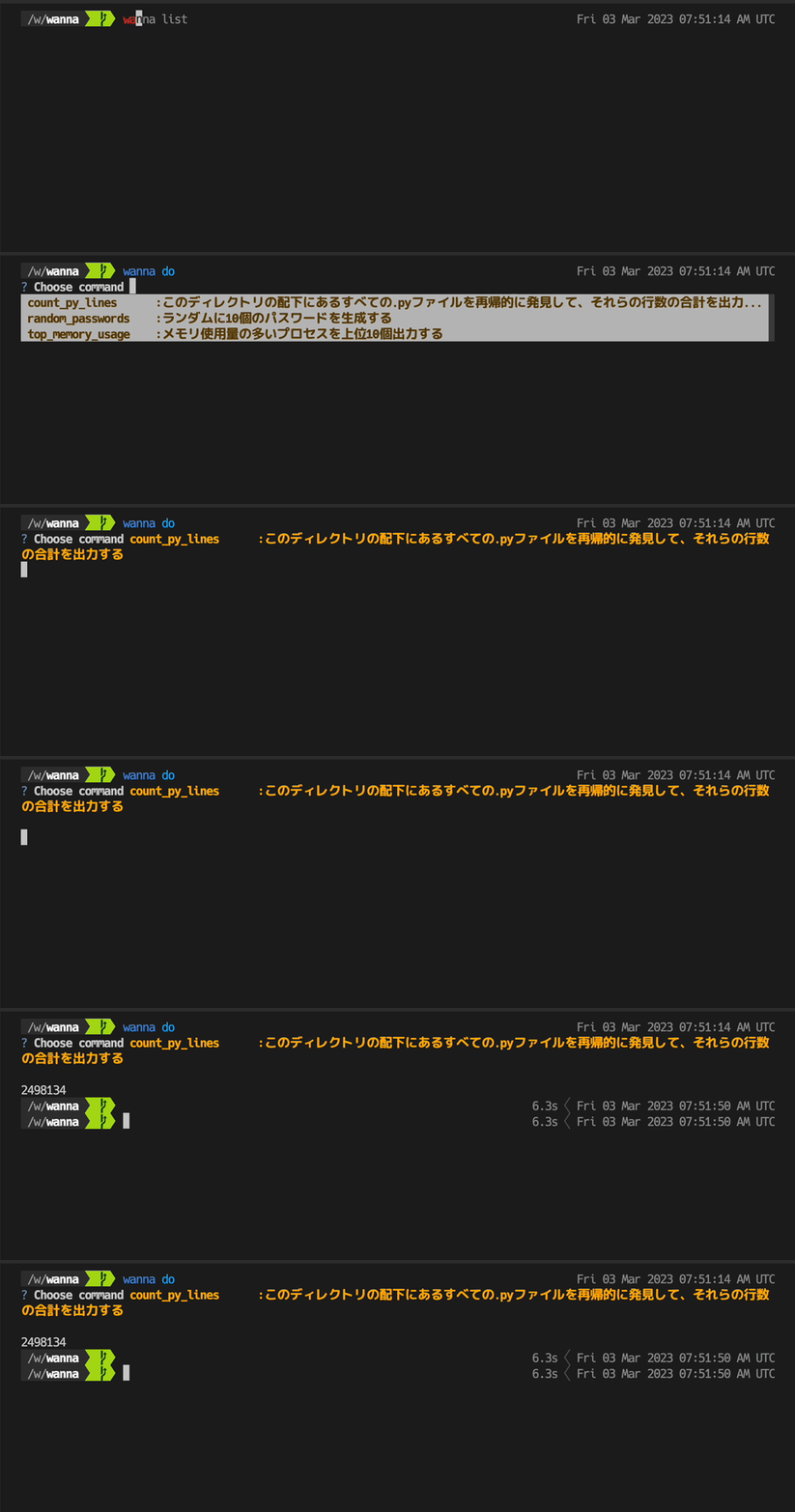
$ wanna do random_passwords
You can also run the command by typing its name directly, as in: ## wanna list
wanna list
List recorded scripts.
$ wanna list
count_py_lines :recursively find all .py files under this directory and print the total number of lines in them
top_memory_usage :Output the top 10 processes with the highest memory usage.
random_passwords :Generate 10 random passwords.
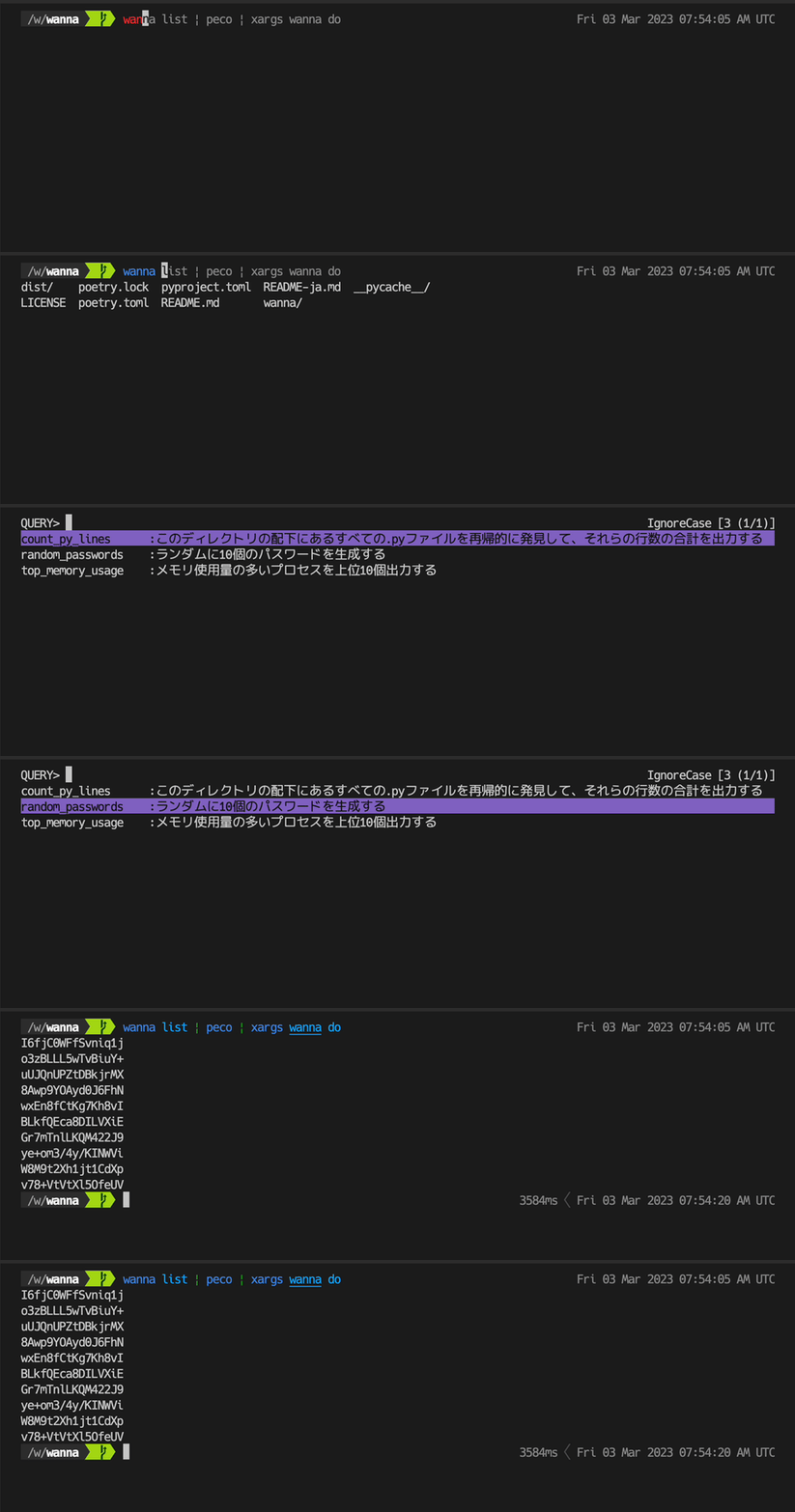
With this, you can, for example, do this.
$ wanna list | peco | xargs wanna do
Installation
Installation is easy using pip, and works with python 3.10 or higher.
pip install wanna
Also, you will need to get a token with your own account to use OEPNAI_API_KEY.
export OPENAI_API_KEY = "sk-xxxxxxxxxxxxxxxxxxxxxxxxxxxxxxxxxxxxxxxxxxxxxxxxxxxx"
1 maintainer

Release files for wanna 0.2.1
For a detailed explanation of source distributions (sdists) and built distributions (wheels), please see the package formats documentation.
Source distribution (sdist)
| File | Size | Uploaded | |
|---|---|---|---|
| wanna-0.2.1.tar.gz | 10.1 kB | Details |
Built distribution (wheel)
| File | Interpreter | ABI | Platform | Reset |
|---|---|---|---|---|
| wanna-0.2.1-py3-none-any.whl | Python 3 | none | any | Details |
Total release size: 20.6 kB
Release files / wanna-0.2.1.tar.gz
| Download URL | wanna-0.2.1.tar.gz |
|---|---|
| Size | 10.1 kB |
| Tags | Source |
|
SHA-256 checksum How to use checksums |
0ebc3406efa4d726d4c1506fffa3ca9379d6ec37b22036f5d9537464be336dc1
|
|
BLAKE2b-256 checksum How to use checksums |
0271df24a6dacf0abd67fa8b5e989ece22f88a775cd084274307ede410409dc4
|
| Upload date | |
|
Uploaded using Trusted Publishing? What is trusted publishing? |
No |
| Uploaded via |
poetry/1.4.1 CPython/3.10.6 Linux/5.10.25-linuxkit
|
Release files / wanna-0.2.1-py3-none-any.whl
| Download URL | wanna-0.2.1-py3-none-any.whl |
|---|---|
| Size | 10.5 kB |
| Tags | Python 3 |
|
SHA-256 checksum How to use checksums |
3c659df3f5158772e026449eddc68cfce8082bb507e0fcd7f7c7f9c8ab38422d
|
|
BLAKE2b-256 checksum How to use checksums |
d3b34267a987c4ed4547913db16f5495db118e6852c5839d4b2934dc07f28998
|
| Upload date | |
|
Uploaded using Trusted Publishing? What is trusted publishing? |
No |
| Uploaded via |
poetry/1.4.1 CPython/3.10.6 Linux/5.10.25-linuxkit
|














