

WatchDock
Give agents a review queue—not unchecked file moves.
WatchDock turns file-organization requests into durable, inspectable proposals.
People work through the desktop app or CLI; coding agents use portable skills and a local MCP server.





Quick start · Agent setup · Architecture · Security
One safety boundary, three interfaces
| Interface | Best for | What it can do |
|---|---|---|
| Desktop app | Visual setup and review | Configure folders, run the monitor, inspect proposals, approve, reject, and retry |
| CLI | Scripts and explicit operations | Dry-run, queue, inspect, approve, reject, retry, recover, and diagnose |
| Agent gateway | Codex, Claude Code, and MCP clients | Analyze, queue, list, inspect, reject, retry, and diagnose—with no approval or source-file execution tool |
For an agent-queued file, the expected path is deliberately asymmetric:
- The agent analyzes one file inside a configured watched root.
- WatchDock freezes the proposal and a SHA-256 source fingerprint in SQLite.
- The source stays in place while a human reviews the exact destination.
- A separate GUI or CLI approval revalidates the source and executes the move.
The agent integration is a constrained interface, not a sandbox around the agent. An agent that independently has shell or filesystem tools may have other ways to change files; see the agent trust boundary.
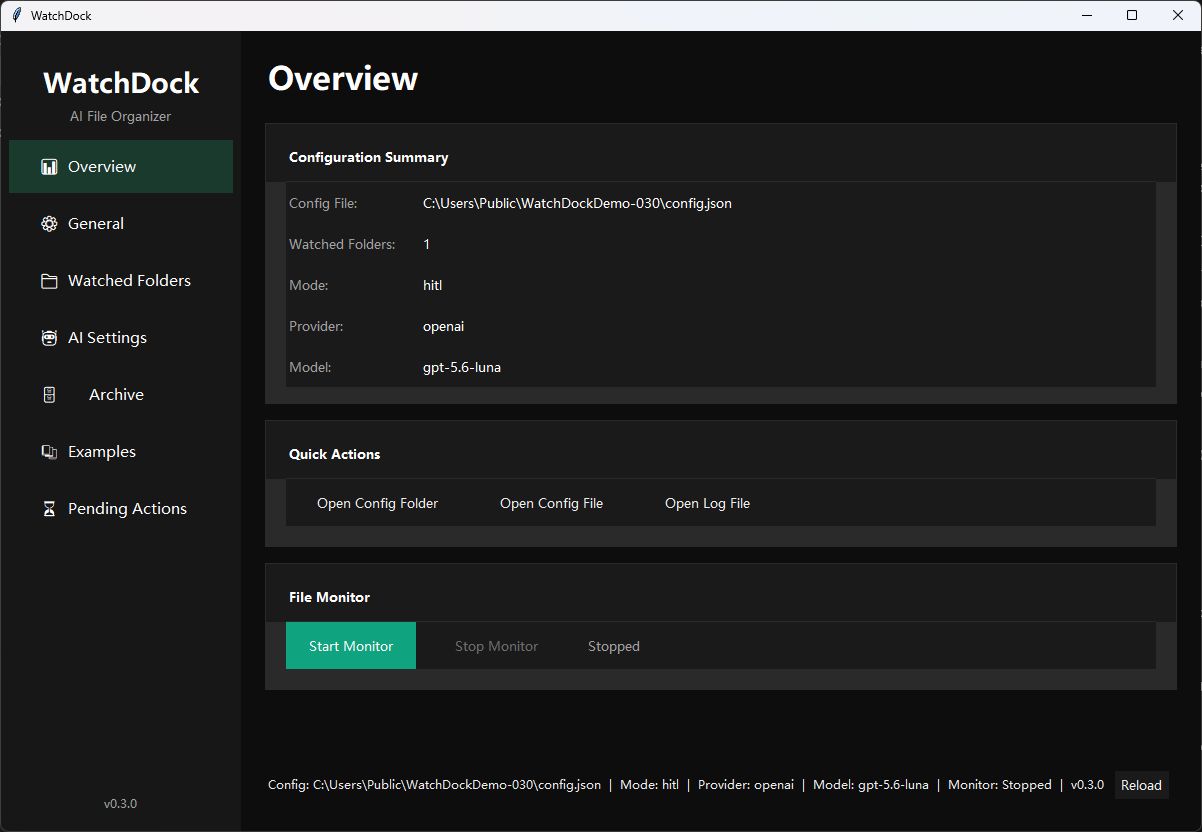
The Windows desktop app, using a generic sandbox path and the default HITL workflow.
How the default review path works
flowchart LR
    A[Desktop app / CLI / watcher] --> P[Bounded analysis]
    G[Codex / Claude Code] --> S[Skills + local stdio MCP]
    S --> P
    P --> V[Validate and freeze proposal]
    V --> Q[(SQLite review queue)]
    Q --> H{Human decision}
    H -->|Reject| X[Durable history]
    H -->|Approve in GUI or CLI| R[Revalidate source and destination]
    R --> O[Exact no-replace move or rename]
    O --> F[Archive + tag sidecar]
The diagram shows the default HITL route and every agent-queued action. Core
WatchDock also has an optional auto mode for validated, high-confidence
provider results; rules fallback results can never execute automatically.
Why this is more than a folder watcher

- Review-first by default. A proposal is not a filesystem mutation.
- Durable state. CLI, GUI, watcher, and agents share a transactional SQLite queue with lifecycle history and atomic claims.
- Fail-closed file handling. WatchDock rejects symlink sources, stale fingerprints, and occupied reviewed destinations; watcher and agent routes additionally reject escapes from currently enabled watched roots.
- Exact reviewed destinations. Approval does not silently choose a new name if the reviewed destination is no longer available.
- Bounded AI input. Supported text previews are limited; binary formats are classified from metadata rather than uploaded as extracted content.
- Offline fallback. Missing credentials, missing SDKs, provider failures, and invalid output produce deterministic review-only proposals.
- Cross-platform delivery. The project tests Python 3.10–3.14 and builds CLI and GUI applications for Windows, macOS, and Linux.
The detailed invariants and trust boundaries live in Architecture, Security, and Agent evaluations.
Installation
WatchDock requires Python 3.10 or newer.
python -m pip install --upgrade pip
python -m pip install watchdock
Choose only the optional capabilities you need:
# OpenAI, or Ollama through an OpenAI-compatible endpoint
python -m pip install "watchdock[openai]"

# Anthropic
python -m pip install "watchdock[anthropic]"

# Local MCP server for coding-agent integrations
python -m pip install "watchdock[mcp]"

# MCP plus both cloud-provider SDKs
python -m pip install "watchdock[mcp,ai]"
PowerShell and Command Prompt need the quotes around requirements containing brackets. Tkinter is included by most standard Python installers.
Agent/MCP support requires WatchDock 0.3.0 or newer. For development against the current source checkout:
git clone https://github.com/Z-MarkUs/WatchDock.git
cd WatchDock
python -m pip install -e ".[mcp]"
Standalone CLI and GUI archives are available from GitHub Releases. They are currently unsigned. WatchDock 0.3.0 and newer platform archives contain distinct CLI, GUI, and MCP applications plus published SHA-256 checksums.
Quick start
Initialization and monitoring are explicit. Running watchdock without a
subcommand shows help and does not start a watcher.
watchdock config init
watchdock config validate
watchdock doctor
watchdock gui
The generated configuration watches ~/Downloads non-recursively, archives
under ~/Documents/Archive, and uses hitl mode. Inspect it before choosing
Start Monitor in the GUI or running this foreground command:
watchdock start
To see the review boundary without starting a watcher:
watchdock process "/path/to/file.txt"          # dry run
watchdock process "/path/to/file.txt" --queue  # durable pending action
watchdock list-pending
watchdock approve ACTION_ID                     # separate human decision
For a no-credential sandbox, leave the generated provider key unset. WatchDock uses its deterministic rules fallback, marks the result review-only, and keeps the source in place until approval.
Agent quick start
Install the MCP extra, initialize WatchDock, then add the version-pinned Codex marketplace and plugin:
python -m pip install "watchdock[mcp]"
watchdock config init
codex plugin marketplace add Z-MarkUs/WatchDock --ref v0.3.0
codex plugin add watchdock-agent@watchdock
The tag pins the catalog, skills, and MCP configuration to the reviewed 0.3.0
release. A direct codex mcp add setup is documented as a development fallback.
The repository includes three portable workflows:
watchdock-organize, watchdock-review, and watchdock-doctor. The complete
guide covers the Codex and Claude Code marketplaces, direct MCP and individual
skill installation, custom configuration paths, all eight MCP tools, and their
exact side effects:
Set up WatchDock for coding agents →
Codex, Claude Code, clean-package, and protocol evidence is tracked separately from manifest presence. See Agent evaluations for the current evidence and remaining checks.
Review modes
Human-in-the-loop (hitl, default)
Every watcher result is stored as pending. Nothing is moved or renamed until
a human approves it in the CLI or GUI. Rejection records the decision without
touching the source. The agent gateway always queues for this separate review.
Automatic (auto)
Core WatchDock can automatically apply a provider result only after structured
validation and a high-confidence result. Missing credentials, unavailable SDKs,
provider errors, invalid output, and deterministic fallback results remain
review-only. Test auto mode with a sandbox before using it on real folders.
Configuration and state
The generated JSON is intentionally explicit. A portable example is available at config.example.json. Validation rejects duplicate watched paths and any enabled watched folder that contains, equals, or is contained by the archive path.
Provider credentials should come from environment variables:
| Provider | Preferred variable | Compatible fallback |
|---|---|---|
| OpenAI | WATCHDOCK_OPENAI_API_KEY |
OPENAI_API_KEY |
| Anthropic | WATCHDOCK_ANTHROPIC_API_KEY |
ANTHROPIC_API_KEY |
Default local state lives under ~/.watchdock:
| Purpose | Path |
|---|---|
| Configuration | ~/.watchdock/config.json |
| Review queue and history | ~/.watchdock/pending_actions.sqlite3 |
| Few-shot examples | ~/.watchdock/few_shot_examples.json |
| Rotating log | ~/.watchdock/logs/watchdock.log |
Set WATCHDOCK_HOME before starting WatchDock to relocate the entire default
state root. Passing --config PATH uses that configuration's parent directory
for the queue, examples, and logs.
Each non-empty tag list is written beside the organized file as
filename.ext.watchdock.json. It is a portable JSON sidecar, not an operating
system extended attribute.
CLI map
Both watchdock and wd invoke the same CLI.
watchdock --help                     watchdock --version
watchdock config init                watchdock config validate
watchdock config show                watchdock doctor
watchdock status [--json]            watchdock gui
watchdock start                      watchdock process FILE
watchdock process FILE --queue       watchdock process FILE --apply
watchdock list-pending [--all]       watchdock approve ACTION_ID
watchdock reject ACTION_ID           watchdock retry ACTION_ID
watchdock recover-stale              watchdock version --check
watchdock update                     watchdock-mcp [--config PATH]
process FILE is a dry run. --queue stores the frozen proposal. --apply
performs a new analysis and only executes a high-confidence provider result; it
refuses fallback results. retry returns a failed action to pending but does not
execute it. recover-stale marks uncertain old processing claims as failed for
manual reconciliation.
Privacy and operational limits
For supported text files, WatchDock reads at most 5,000 UTF-8 characters locally and includes at most 2,000 characters in a configured provider prompt. It does not extract content from PDF, Office, image, audio, video, or archive files.
Agent tools can reveal absolute watched paths, proposed destinations, analysis, errors, and action rows from requested lifecycle states to the connected agent client. That client may itself use a remote model. The MCP server is local stdio, but local transport does not mean the complete agent workflow is local or private.
Current limitations include no built-in undo, content deduplication, encryption, binary-document understanding, background service, tray process, or signed desktop applications. A file move and its sidecar write are not one filesystem transaction. Review the full recovery guidance and residual risks in Security and privacy.
Project documentation
- Agent integration
- Agent evaluation plan and evidence
- Architecture
- Security and privacy
- Changelog
- Contributing
Author and license
Built by Hehan Zhao and released under the MIT License.
1 maintainer

Metadata
1 maintainer
Release files for watchdock 0.3.0
For a detailed explanation of source distributions (sdists) and built distributions (wheels), please see the package formats documentation.
Source distribution (sdist)
| File | Size | Uploaded | |
|---|---|---|---|
| watchdock-0.3.0.tar.gz | 113.5 kB | Details |
Built distribution (wheel)
| File | Interpreter | ABI | Platform | Reset |
|---|---|---|---|---|
| watchdock-0.3.0-py3-none-any.whl | Python 3 | none | any | Details |
Total release size: 185.0 kB
Release files / watchdock-0.3.0.tar.gz
| Download URL | watchdock-0.3.0.tar.gz |
|---|---|
| Size | 113.5 kB |
| Tags | Source |
|
SHA-256 checksum How to use checksums |
4f4c4d483343cfcf367e8babb96c7d6c49dea611e4e5b94d5244967205db2f56
|
|
BLAKE2b-256 checksum How to use checksums |
20049f2ada2d1429a91732ddc4087bbbf4cea27925d4c7aa3cbd4f27dec27f77
|
| Upload date | |
|
Uploaded using Trusted Publishing? What is trusted publishing? |
No |
| Uploaded via |
twine/7.0.0 CPython/3.12.14
|
Release files / watchdock-0.3.0-py3-none-any.whl
| Download URL | watchdock-0.3.0-py3-none-any.whl |
|---|---|
| Size | 71.5 kB |
| Tags | Python 3 |
|
SHA-256 checksum How to use checksums |
e4b289ce18d92a99b420431874d95e0dbdffc626f306fb6a75820227410b0f7b
|
|
BLAKE2b-256 checksum How to use checksums |
909c0a04a217e271105c4e4234f8a3593a07fc4acf7b4a500fd04a701353c25c
|
| Upload date | |
|
Uploaded using Trusted Publishing? What is trusted publishing? |
No |
| Uploaded via |
twine/7.0.0 CPython/3.12.14
|














