
Install Package
pip install webapp_builder
Example Usage
# Importing the CodeGenerator and ImageProcessor classes
from webapp_builder import CodeGenerator, ImageProcessor

from dotenv import load_dotenv, find_dotenv
import os
import openai
load_dotenv(find_dotenv())
# OpenAI API Key
api_key = os.getenv("OPENAI_API_KEY")
openai.api_key = api_key
# Create instances of the classes
code_generator = CodeGenerator()
image_processor = ImageProcessor()
# Example usage of CodeGenerator
code_text = "searchbar at the top right corner, navigation menu at the header, company logo at the top left corner. "
generated_code = code_generator.generate_code(code_text)
print(generated_code)

# Example usage of ImageProcessor
image_path = '/path/to_your_web_image_here/'
image_description = image_processor.get_image_description(image_path, api_key)
print(image_description)
For running the Streamlit app, you can create a separate Python script (let's call it app_runner.py) with the following content:
# app_runner.py
from webapp_builder import main
from dotenv import load_dotenv, find_dotenv
import os
import openai
load_dotenv(find_dotenv())
# OpenAI API Key
api_key = os.getenv("OPENAI_API_KEY")
openai.api_key = api_key
if _name_ == "_main_":
    main()
Then, you can run this script to launch the Streamlit app:
streamlit run app_runner.py
Ensure you have your OpenAI API key configured in your environment variables or pass it directly when calling methods that require it.
web-app-builder--LLM
App Demo (Video Demo)
Web Builder App
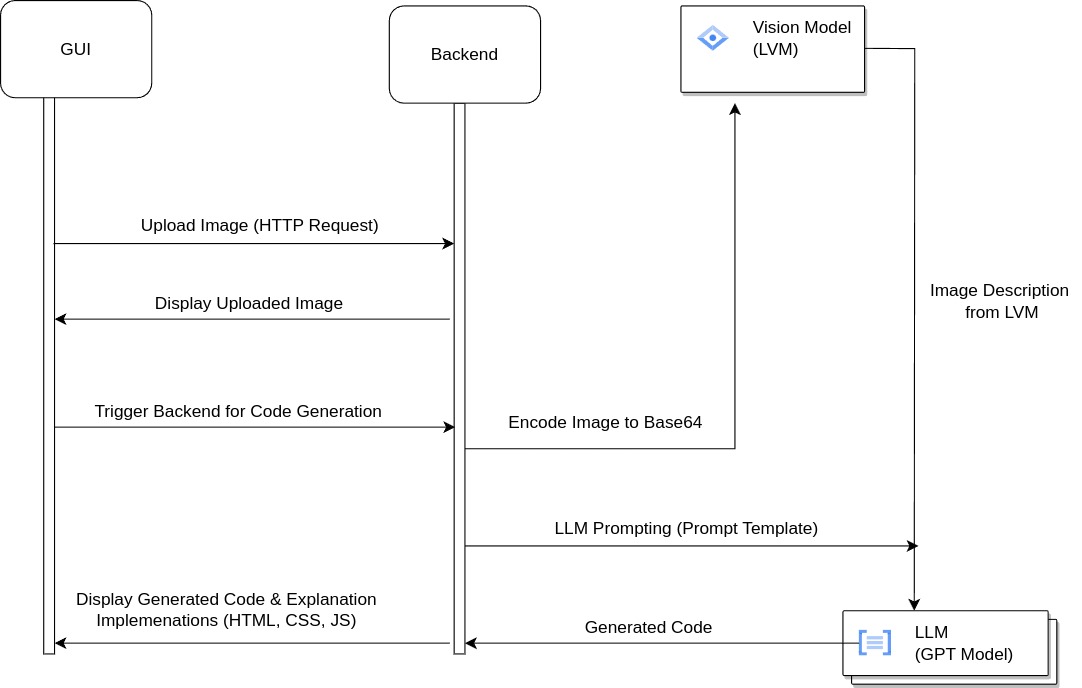
Web Builder App is a Streamlit-based application that allows users to upload an image, generate code based on the contents of the image, and view the code implementation.
Table of Contents
Data Flow Diagram
Getting Started
Prerequisites
Make sure you have the following software installed on your machine:
- Python 3.8 or later
- Pytorch Cuda: CUDA Version >=11.8. Install from here - Pytorch CUDA Installation
Installation From Github
-
Clone the repository:
git clone https://github.com/your-username/web-builder-app.git
cd web-builder-app
-
Create a virtual environment:
python -m venv env
-
Activate the virtual environment:
-
For Windows:
.\env\Scripts\activate
-
For Linux/Mac:
source env/bin/activate
-
-
Install dependencies:
pip install -r requirements.txt
-
Create .env file: Create .env file and place your API keys in the file. A sample of how to do this is seen on the .env file
-
Alternative installation from Github using pip: You can install the project using pip by running the command below:
pip install git+https://github.com/george-mountain/web-app-builder--LLM
Usage
Running the Application
To run the application locally:
streamlit run main.py
Visit the provided URL in your web browser to interact with the application.
License
This project is licensed under the MIT License - see the LICENSE file for details.
1 maintainer

Metadata
1 maintainer
Release files for webapp-builder 1.0.0
For a detailed explanation of source distributions (sdists) and built distributions (wheels), please see the package formats documentation.
Source distribution (sdist)
| File | Size | Uploaded | |
|---|---|---|---|
| webapp_builder-1.0.0.tar.gz | 6.6 kB | Details |
Release files / webapp_builder-1.0.0.tar.gz
| Download URL | webapp_builder-1.0.0.tar.gz |
|---|---|
| Size | 6.6 kB |
| Tags | Source |
|
SHA-256 checksum How to use checksums |
44678fad30cdd27fc0de061d14903bdba114c45b60a8bdf7febac67a0390e6dd
|
|
BLAKE2b-256 checksum How to use checksums |
7f73d89f7f93e1842fa2da318c981c3866281b15f47e4ffc6175974f295ce5e8
|
| Upload date | |
|
Uploaded using Trusted Publishing? What is trusted publishing? |
No |
| Uploaded via |
twine/4.0.2 CPython/3.10.12
|













