
welleng








welleng is a collection of tools for Wells/Drilling Engineers, with a focus on well trajectory design and analysis.
Features
- Survey listings — generate and interpolate well trajectories using minimum curvature or maximum curvature methods
- Well bore uncertainty — ISCWSA MWD Rev 5.11 error model (validated 35/35 sources against all three ISCWSA example workbooks), legacy Rev4 for back-compat, and OWSG gyro tool stacks (north-seeking stationary, mixed continuous, gyro-MWD) driven by the new ISCWSA JSON schema and an Excel-formula interpreter
- Clearance & Separation Factors — the standard ISCWSA separation rule (within 0.5% of ISCWSA test data), the exact combined-ellipsoid Mahalanobis method (
MahalanobisClearance— same collision/clear verdicts as the rule but up to ~1.47× less conservative, analytic and mesh-free), and a mesh-based method using the Flexible Collision Library - Well path creation — the
connectormodule builds trajectories between start/end locations automatically, backed by an analytic, vectorized closed-form curve-hold-curve (CLC) point-to-target solver (sawaryn_analytical— every solution + the minimum-measured-depth path) with radius-sweep and R1×R2 drillable-region tooling - Vertical section, TVD interpolation, project-ahead — common survey planning tools
- Torque and drag — simple torque/drag model with architecture module
- Kick tolerance — deterministic, conservative single-bubble kick-tolerance engine (drill and swab cases): the mandated NOGEPA-50 static formula, a whole-path gas-migration check over the pore–fracture envelope, and an exact analytical breakpoint solver, reproducing the published worked examples of SPE-208788-PA, SPE-202426-PA (Kiani Nassab) and Santos (SPE/IADC-140113); real-gas Z via a clean-room Hall–Yarborough backend with an optional CoolProp EOS backend for CO₂/CCUS mixtures; deviated-well aware; reports the shut-in quantities SIDP, SICP and MAASP, the last both at the shoe (the industry convention) and minimised over every exposed depth, which differ when a weak zone sits below the shoe
- Visualization — interactive 3D via vedo/VTK or browser-based via plotly (requires
easyinstall) - Data exchange — import/export Landmark .wbp files; read EDM datasets; a streaming WITSML 1.4.1.1 (
1series) reader (welleng.exchange.witsml.open_witsml) that indexes a directory or multi-GB zip of logs by decompressing only header prefixes, exposes channel discovery (find) and lazy per-logcurves(), and reads tubular/BHA component tallies — validated against the public Equinor Volve realtime export - Geomagnetic reference lookup — fetches WMM/IGRF field values from the BGS web service when not supplied (given a real well location)
Selecting an error model
Survey/SurveyHeader take an error_model name — switch models by changing the
string. The default and recommended model is "ISCWSA MWD Rev5.11": the current
ISCWSA standard, validated 35/35 sources against all three ISCWSA example workbooks.
Omit error_model (leave it None) for no uncertainty calculation.
import welleng as we

we.error.get_error_models()            # -> list every available model name

# magnetic models need a real geomagnetic reference: set b_total/dip/
# declination on the header, or give latitude/longitude (+ survey_date)
# for an automatic lookup — package defaults are refused
header = we.survey.SurveyHeader(
    name="my well", b_total=50_800., dip=72., declination=-1.5,
)
survey = we.survey.Survey(
    md, inc, azi, header=header,
    error_model="ISCWSA MWD Rev5.11",  # the standard; change this string to switch
)
cov = survey.err.errors.cov_NEVs       # NEV covariance per station
Model families (all selectable by name via error_model=):
- Canonical ISCWSA MWD —
"ISCWSA MWD Rev5.11"(default, validated),"ISCWSA MWD Rev4"(legacy, to reproduce older results). (The older"ISCWSA MWD Rev5"name has been retired — use"ISCWSA MWD Rev5.11".) - OWSG tool stacks (Set A, JSON-driven) — the toolcode library:
"MWD+SRGM","MWD+SRGM+SAG","MWD+SRGM+AX"(axial-interference correction),"MWD+IFR1"/"MWD+IFR1+AX"(in-field referencing), and the gyro stacks"GYRO-NS"(north-seeking stationary),"GYRO-NS-CT"(mixed continuous),"GYRO-MWD". A_Flsuffix is the floating-rig variant.
Revisions. welleng ships Rev5-1 / Rev5.11 as the default. The older OWSG Rev2 (2015) toolcodes can be regenerated from their workbooks with
python -m welleng.errors.tools.owsg_to_json, but are not yet shipped as a selectable revision. Validate any model only against a matching-revision reference.
Error model update (welleng 0.10.0). The MWD Rev 5 model has been brought into compliance with the ISCWSA Rev 5.11 example workbooks; select it as
"ISCWSA MWD Rev5.11"(the older"ISCWSA MWD Rev5"name has since been retired). Its covariance differs slightly from welleng ≤ 0.9.x (the Rev 5.11 corrections)."ISCWSA MWD Rev4"is unchanged for users who need to reproduce older results. Seewelleng/errors/iscwsa_validate.pyfor the validation harness used to audit against each ISCWSA example workbook.
Gyro support + JSON-driven tool models (welleng 0.11.0). ISCWSA is moving its error-model standard from the legacy Excel workbooks to a machine-readable JSON schema at
iscwsa/error-models. welleng 0.11 ships ahead of that transition: a vendored copy of the schema (pinned to upstream SHAc7af784atwelleng/errors/iscwsa_schema/), a ~95-line Excel-formula interpreter atwelleng/errors/interpreter.py, and the full OWSG Set A library (~100 tool models, including the gyro stacks) generated as ISCWSA JSON atwelleng/errors/iscwsa_json/owsg_a/. Use them viaSurvey(error_model='GYRO-NS' | 'GYRO-NS-CT' | 'GYRO-MWD' | 'MWD+SRGM' | ...). Seeexamples/gyro_survey_example.pyfor a side-by-side MWD/gyro position-uncertainty comparison.The legacy hand-coded MWD path is untouched — the canonical strings (
'ISCWSA MWD Rev4','ISCWSA MWD Rev5','ISCWSA MWD Rev5.11') still route through the production engine, so existing users see no behaviour change unless they opt in to a JSON-driven tool name.
Parallel-paths conformance harness. Every term that exists in both the legacy hand-coded dispatcher and the new JSON+interpreter path is diff-tested at machine precision in CI (
tests/test_iscwsa_json_conformance.py). The harness also catalogues schema gaps it surfaces — terms that don't evaluate against the current draft schema (cross-station references likeMDPrev/AzPrev/IncPrev, per-tool calibration constants likeNoiseReductionFactor). Runpython -m welleng.errors.conformance --summaryfor the agreement matrix. Findings are filed upstream as schema-feedback on the ISCWSA Discussions board.
Absolute validation against SPE 90408. The conformance harness above compares the two welleng paths (and so cancels any shared scale error); on top of that, the gyro weight functions are now checked against the published position covariances in SPE 90408-MS (Torkildsen et al. 2004) Appendix E — the first non-self-referential validation of welleng's gyro output. Example Models #1 (XY stationary), #3 (XY stationary→continuous hybrid), #5 (XYZ stationary→continuous) and #6 (XYZ stationary) reproduce the Appendix E covariances on ISCWSA Well #1 to within the paper's ±1% acceptance (the hybrid to ~0.1%), and Model #3 also on Well #2. See
tests/test_spe90408_appendix_e.py. The propagation engine itself is independently exact — MWDcov_NEVsmatches the ISCWSA reference to 5e-5.
Analytic curve-hold-curve solver (welleng 0.14.0). The
Connector's CLC point-to-target case is now solved in closed form (Sawaryn 2021, SPE-204111-PA) rather than iteratively —sawaryn_analyticalreturns every solution and the minimum-measured-depth path in one batched eigenvalue solve (~0.02 ms/path), with a radius sweep that maps the feasible-radius trade-off and the R1×R2 drillable region (fix one arc radius, read off the maximum usable other). Breaking: infeasible targets now raise rather than silently tightening below the design DLS; opt-inon_infeasible='max_radius'returns the gentlest feasible curve. Companion paper: doi:10.5281/zenodo.21130979.
New in 0.29
- EDM reader, expanded — the streaming Landmark EDM / COMPASS reader
(
welleng.exchange.edm_stream.open_edm) now surfaces the design tables, each opt-in and self-documenting viareader.schema: assemblies with Landmark's stored axial/burst/collapse ratings (with_assemblies), the design load-case set — load profiles + factors, per-depth custom loads, named loads, external-pressure params, dogleg overrides (with_load_cases), fluid rheology with Fann data, a geometry scenario selector, and geothermal in both point and gradient-attribute forms (with_geopressure). - Unified real-gas Z-factor —
welleng.kick_tolerance.gas_zswitches Hall-Yarborough (gas gravity) ↔ CoolProp EOS (composition), with Sutton/Standing pseudo-criticals. - Thermal unit helpers —
welleng.unitsgains temperature (offset) vs temperature-delta, specific heat, thermal conductivity/diffusivity, heat-transfer coefficient, and gradient helpers. - Light minimum-curvature interpolation —
welleng.utils.MinCurvegainsinterpolate(md)(exact arc MD→position, noSurvey),interpolate_tvd(tvd)(the reversal-robust inverse — every crossing) andtvd_turning_points();Surveynow delegates its TVD interpolation to them.
New in 0.28
- WITSML reader — a streaming WITSML 1.4.1.1 (
1series) reader,welleng.exchange.witsml.open_witsml, for the industry XML drilling-data format. Point it at a directory or a multi-GB.zipof realtime logs (it indexes by decompressing only header prefixes, so it never has to read the data blocks to build its catalogue), then discover channels withfind(mnemonic), pull them lazily withcurves()(nulls →NaN, time or depth index), and read tubular/BHA component tallies. Validated against the public Equinor Volve realtime export (18,814 logs). Few good open-source WITSML parsers exist — this is one. - EDM geopressure & geometry reader — the streaming Landmark EDM / COMPASS export reader
(
welleng.exchange.edm_stream.open_edm) grows, opt-in viawith_geopressure=True, to surface the large non-survey tables:pore_pressure/frac_gradient/temperatureprognoses (phase-filtered, pressure canonical), as-run hole/casinggeometry,formations, the per-rig dateddatum_set, and the grade/material catalogue — each with a human-readableschemaglossary so you never decode a rawCD_*code. - Directional Difficulty Index (DDI) —
Survey.directional_difficulty_index(), the Oag & Williams (IADC/SPE 59196) trajectory-complexity metric. - Kick tolerance without a thermal model — a drilling kick tolerance can be computed from a supplied influx density alone; temperature is now optional.
New in 0.26
- Interior covariance, arc-faithful —
ErrorModel.cov_nev_at(md)evaluates the ISCWSA covariance directly ON the minimum-curvature arc at any measured depth, instead of interpolating the assembled matrix between stations (which under-reports the separation factor by up to ~25% near doglegs) or inserting a fake station (which adds a spurious measurement). Exact at both station ends; read the docstring for the geometry-dependent interior accuracy before relying on a low-inclination value. Connector(direct_only=True)— arcs may turn more than 180°, so a curve-hold-curve exists at almost any dogleg severity and "does a CLC exist here?" is not a reachability test.direct_only=Truerejects long-way solutions, restoring a meaningful predicate.- Kick tolerance:
model_revision— ⚠️ the default tolerable influx changes. The A-5 closed form evaluated the influx gas at the shoe temperature, but the gas column hangs below the shoe, so the shoe is its cool end; the denser gas inflated the constant and OVERSTATED the tolerable influx (~3% on the published example, ~8% on a steep gradient) — anti-conservative. Fixed, and the model is now versioned: pinmodel_revision="spe-208788"to reproduce any number computed with an earlier release. The revision travels on the result alongside the influx temperature and column height it resolved, so a stored calculation records what produced it. SurveyComposition— tie a well's survey sections into one continuous survey with per-component-correct covariance carry across tool changes.- COMPASS/EDM error-model import — read an IPM straight out of an EDM export
(
welleng.errors.edm_ipm) and use it as a live error model, optionally normalised to self-contained term formulas. dp_basis/xcl_representation— switchable conventions for the position differential and for the XCLA/XCLH course-length terms.- Tubular catalogues — API 5CT casing and tubing dimensions/grades via
welleng.catalog.Catalog.
Using welleng in production
welleng is free and open-source (Apache-2.0) and stays that way — the engine implements public methods (ISCWSA / SPE / API), openly and inspectably validated (conformance suite + CI).
The open version is provided AS IS, without warranty — ideal for research, evaluation, and building on.
For production well engineering — a maintained, version-pinned, validated build whose results are stood behind contractually, with support/SLA — a commercial offering is available. The model is paid maintenance and support for welleng as a production dependency: kept patched, conformance-current, and supported under a commercial agreement (specific warranty and support terms are negotiated per engagement). Get in touch: jonnycorcutt@gmail.com.
The maths is open; what's commercial is the assurance, maintenance, and support around it.
Support welleng
welleng is fuelled by copious amounts of coffee, so if you wish to supercharge development please donate generously:

Cloud API
A hosted API for 3D well path planning is available at welleng.org. Solve CLC (curve-line-curve) paths via simple REST calls — no local install, no GPU required.
- Batch solving (up to 100K pairs)
- GPU-accelerated
- Free tier available
See the interactive docs to try it out.
Documentation
Documentation is available, though the library evolves quickly so the examples directory is often the best reference.
Tech
welleng uses a number of open source projects:
- trimesh — loading and using triangular meshes
- Flexible Collision Library — fast collision detection
- numpy — scientific computing
- scipy — mathematics, science, and engineering
- vedo — 3D visualization based on VTK
Installation
The default install includes core dependencies (numpy, scipy, pandas, etc.) and covers survey generation, error models, and trajectory design. Geomagnetic reference lookup (BGS web service) is built in. The easy extras add 3D visualization (vedo/VTK), network analysis, and mesh import. The all extras add mesh-based collision detection, which requires compiled dependencies.
You'll receive an ImportError with a suggested install tag if a required optional dependency is missing.
Default install (core functionality, no visualization)
pip install welleng
Easy install (recommended — adds 3D visualization, trimesh, networkx)
pip install welleng[easy]
Full install (adds mesh collision detection — requires compiled dependencies)
First install the compiled dependencies. On Ubuntu:
sudo apt-get update
sudo apt-get install libeigen3-dev libccd-dev octomap-tools
On macOS, use brew. On Windows, follow the FCL install instructions. Then:
pip install welleng[all]
Developer install
The project uses uv for dependency management:
git clone https://github.com/jonnymaserati/welleng.git
cd welleng
uv sync --all-extras
Or with plain pip:
pip install -e .[all]
Windows
On Windows, pip install welleng should work for the default and easy installs. For the full install with mesh collision detection, follow the FCL install instructions to set up the compiled dependencies first.
Colaboratory
For Google Colab, install dependencies with:
!apt-get install -y libeigen3-dev libccd-dev octomap-tools
!pip install welleng[easy] plotly
The VTK-based 3D viewer doesn't work in Colab, but plotly does. Here's a quick example:
import welleng as we
import plotly.graph_objects as go

# create a survey
s = we.survey.Survey(
    md=[0., 500., 2000., 5000.],
    inc=[0., 0., 30., 90],
    azi=[0., 0., 30., 90.]
)

# interpolate every 30 m
s_interp = s.interpolate_survey(step=30)

fig = go.Figure()
fig.add_trace(go.Scatter3d(
    x=s_interp.e, y=s_interp.n, z=s_interp.tvd,
    mode='lines', name='interpolated'
))
fig.add_trace(go.Scatter3d(
    x=s.e, y=s.n, z=s.tvd,
    mode='markers', marker=dict(color='red'), name='survey stations'
))
fig.update_scenes(zaxis_autorange="reversed")
fig.show()
Quick Start
Build a pair of well trajectories, compute error ellipses and clearance, and visualize (requires pip install welleng[all] for mesh clearance and visualization):
import welleng as we

# construct well paths
connector_reference = we.survey.from_connections(
    we.connector.Connector(
        pos1=[0., 0., 0.], inc1=0., azi1=0.,
        pos2=[-100., 0., 2000.], inc2=90, azi2=60,
    ),
    step=50
)
connector_offset = we.survey.from_connections(
    we.connector.Connector(
        pos1=[0., 0., 0.], inc1=0., azi1=225.,
        pos2=[-280., -600., 2000.], inc2=90., azi2=270.,
    ),
    step=50
)

# create surveys with error models
survey_reference = we.survey.Survey(
    md=connector_reference.md,
    inc=connector_reference.inc_deg,
    azi=connector_reference.azi_grid_deg,
    header=we.survey.SurveyHeader(name="reference", azi_reference="grid"),
    error_model='ISCWSA MWD Rev4'
)
survey_offset = we.survey.Survey(
    md=connector_offset.md,
    inc=connector_offset.inc_deg,
    azi=connector_offset.azi_grid_deg,
    start_nev=[100., 200., 0.],
    header=we.survey.SurveyHeader(name="offset", azi_reference="grid"),
    error_model='ISCWSA MWD Rev4'
)

# build well meshes
mesh_reference = we.mesh.WellMesh(survey_reference)
mesh_offset = we.mesh.WellMesh(survey_offset)

# calculate clearance
clearance_ISCWSA = we.clearance.IscwsaClearance(survey_reference, survey_offset)
clearance_mesh = we.clearance.MeshClearance(survey_reference, survey_offset, sigma=2.445)

# print minimum SF
print(f"Min SF (ISCWSA): {min(clearance_ISCWSA.sf):.2f}")
print(f"Min SF (mesh):   {min(clearance_mesh.sf):.2f}")

# visualize
lines = we.visual.get_lines(clearance_mesh)
plot = we.visual.Plotter()
plot.add(mesh_reference, c='red')
plot.add(mesh_offset, c='blue')
plot.add(lines)
plot.show()
plot.close()
This results in a quick, interactive visualization of the well meshes. What's interesting about these results is that the ISCWSA method does not explicitly detect a collision in this scenario whereas the mesh method does.
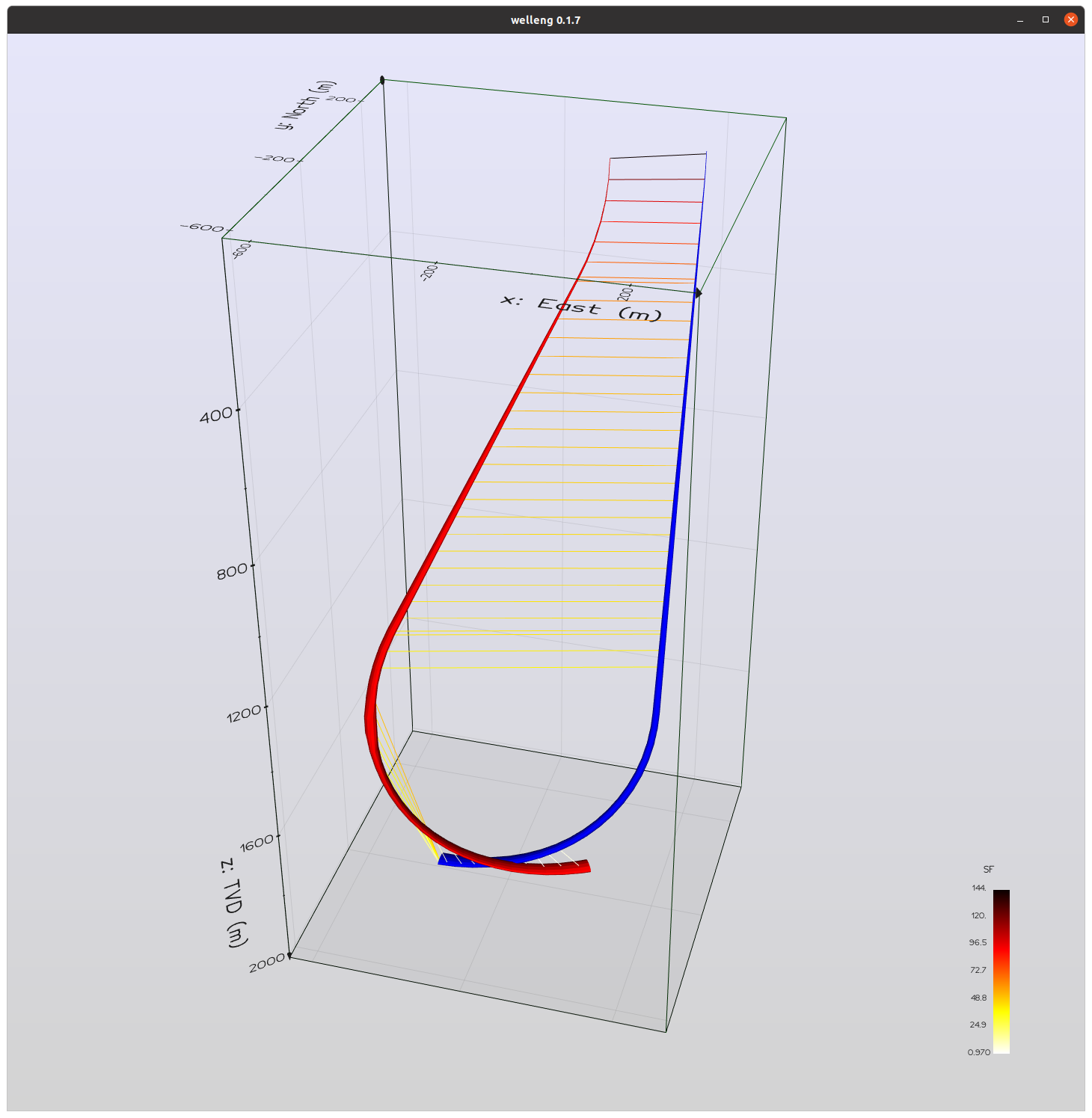
For more examples, including how to build a well trajectory by joining up a series of sections created with the welleng.connector module (see pic below), check out the examples and follow the jonnymaserati blog.
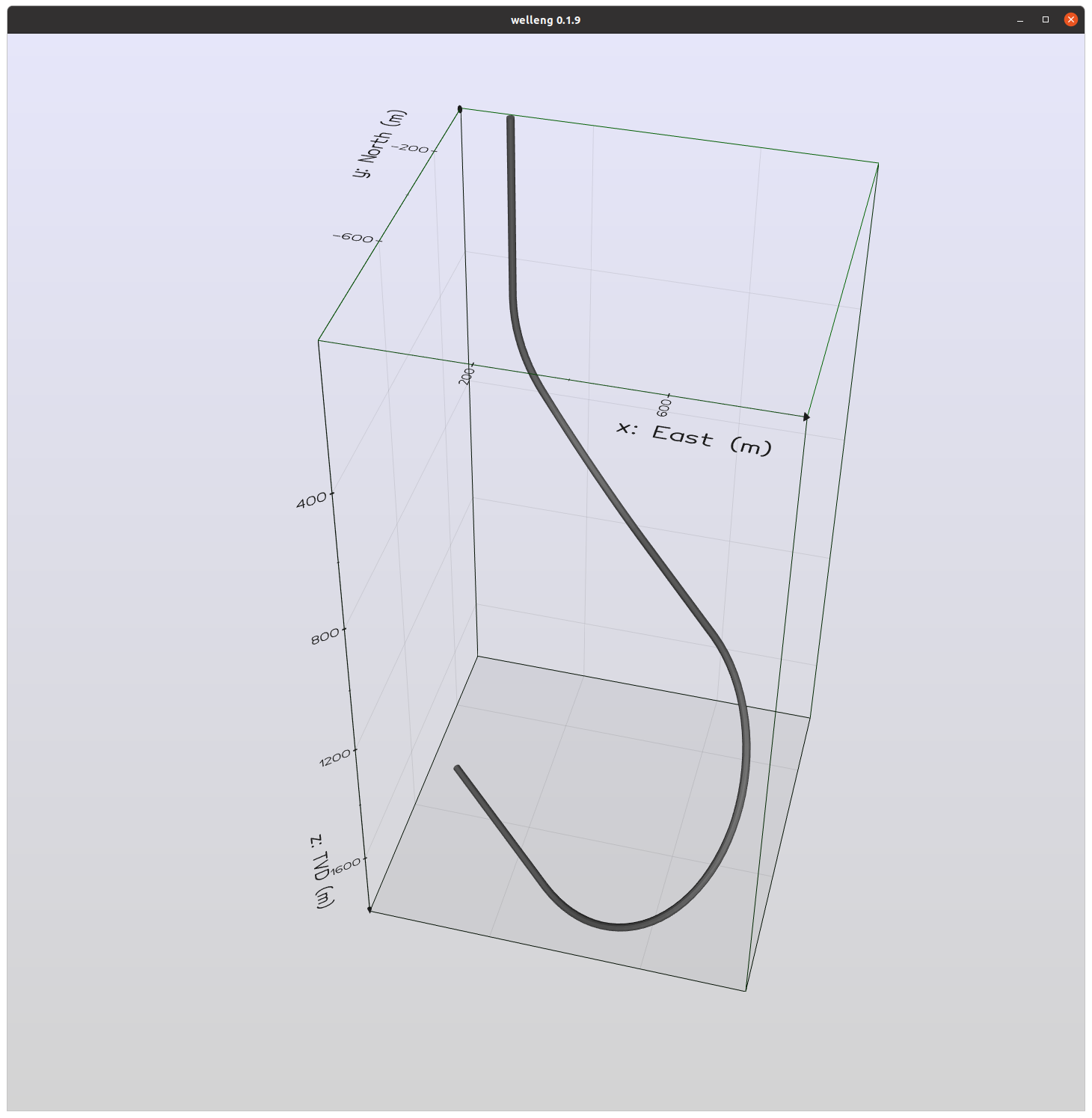
Well trajectory generated by build_a_well_from_sections.py
It's possible to generate data for visualizing well trajectories with welleng, as can be seen with the rendered scenes below.
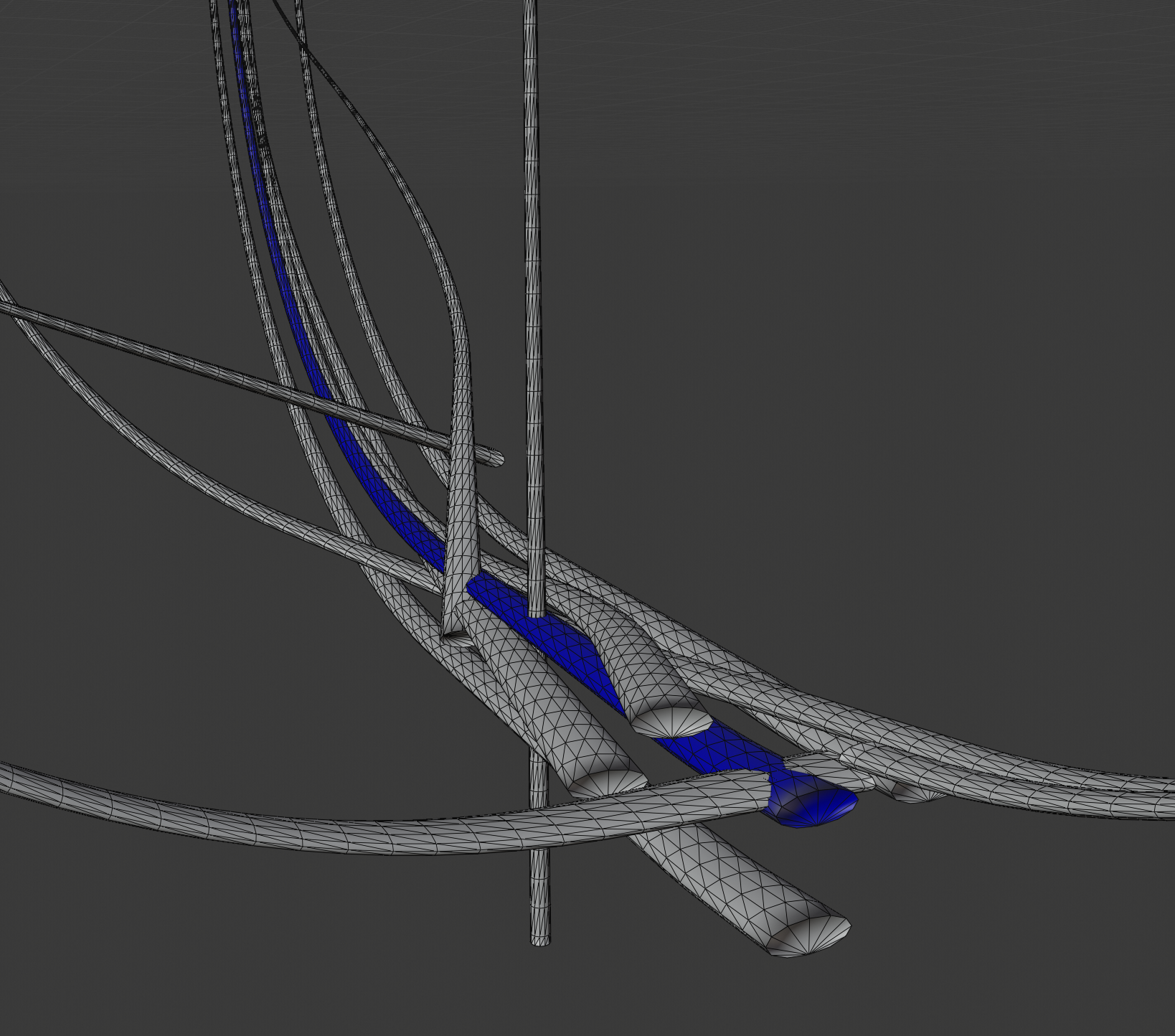
The ISCWSA standard set of well paths for evaluating clearance scenarios have been rendered in blender above. See the examples for the code used to generate a volve scene, extracting the data from the volve EDM.xml file.
Citation
Author: Jonathan Corcutt — Corcutt Beheer B.V., Wassenaar, Netherlands · ORCID 0009-0008-1953-7760.
If welleng supports your work, please cite the software (the concept DOI always resolves to the latest version):
Corcutt, J. welleng: open-source well-engineering tools. Zenodo. https://doi.org/10.5281/zenodo.20968887
@software{corcutt_welleng,
  author    = {Corcutt, Jonathan},
  title     = {welleng: open-source well-engineering tools},
  publisher = {Zenodo},
  doi       = {10.5281/zenodo.20968887},
  url       = {https://doi.org/10.5281/zenodo.20968887}
}
If your work relies on the gyro error-model validation specifically, please also cite:
Corcutt, J. (2026). Reproducing the ISCWSA Gyro Error-Model Test Cases: Implementation Clarifications, Reference-Data Inconsistencies, and an Open-Source Reference Implementation. Zenodo. https://doi.org/10.5281/zenodo.20940515
@misc{corcutt2026gyro,
  author    = {Corcutt, Jonathan},
  title     = {Reproducing the {ISCWSA} Gyro Error-Model Test Cases: Implementation Clarifications, Reference-Data Inconsistencies, and an Open-Source Reference Implementation},
  year      = {2026},
  publisher = {Zenodo},
  doi       = {10.5281/zenodo.20940515},
  url       = {https://doi.org/10.5281/zenodo.20940515}
}
If your work uses the anti-collision (exact Mahalanobis separation factor) method, please also cite:
Corcutt, J. (2026). Making the Exact Wellbore Anti-Collision Boundary Practical: an Efficient, Validated, Open Implementation, and the Cost of the Separation-Rule Approximation. Zenodo. https://doi.org/10.5281/zenodo.20976872
@misc{corcutt2026anticollision,
  author    = {Corcutt, Jonathan},
  title     = {Making the Exact Wellbore Anti-Collision Boundary Practical: an Efficient, Validated, Open Implementation, and the Cost of the Separation-Rule Approximation},
  year      = {2026},
  publisher = {Zenodo},
  doi       = {10.5281/zenodo.20976872},
  url       = {https://doi.org/10.5281/zenodo.20976872}
}
If your work uses the analytical curve-hold-curve point-to-target solver (welleng.sawaryn_analytical), please also cite:
Corcutt, J. (2026). An Open, Vectorized Closed-Form Solver for the 3D Curve-Hold-Curve Point-to-Target Problem. Zenodo. https://doi.org/10.5281/zenodo.21130979
@misc{corcutt2026clc,
  author    = {Corcutt, Jonathan},
  title     = {An Open, Vectorized Closed-Form Solver for the 3D Curve-Hold-Curve Point-to-Target Problem},
  year      = {2026},
  publisher = {Zenodo},
  doi       = {10.5281/zenodo.21130979},
  url       = {https://doi.org/10.5281/zenodo.21130979}
}
If your work uses the kick-tolerance engine (welleng.kick_tolerance), please also cite:
Corcutt, J. (2026). The welleng kick-tolerance engine: derivation, provenance and public validation against published methods. Zenodo. https://doi.org/10.5281/zenodo.21412388
@misc{corcutt2026kicktolerance,
  author    = {Corcutt, Jonathan},
  title     = {The welleng kick-tolerance engine: derivation, provenance and public validation against published methods},
  year      = {2026},
  publisher = {Zenodo},
  doi       = {10.5281/zenodo.21412388},
  url       = {https://doi.org/10.5281/zenodo.21412388}
}
If your work relies on the ISCWSA extended-course-length (XCL) own-only recast, please also cite:
Corcutt, J. (2026). The ISCWSA Extended-Course-Length Error as an Own-Only Angle Error: Reconciling the Position-Direct Form with the Standard Measurement-Error Architecture (Monte-Carlo-Consistent; a One-Field OSDU Schema Change). Zenodo. https://doi.org/10.5281/zenodo.21901641
@misc{corcutt2026xcl,
  author    = {Corcutt, Jonathan},
  title     = {The {ISCWSA} Extended-Course-Length Error as an Own-Only Angle Error: Reconciling the Position-Direct Form with the Standard Measurement-Error Architecture},
  year      = {2026},
  publisher = {Zenodo},
  doi       = {10.5281/zenodo.21901641},
  url       = {https://doi.org/10.5281/zenodo.21901641}
}
If your work uses the tortuosity index (welleng.survey TI/MTI), please also cite:
Corcutt, J. (2026). A Note on the Well Trajectory Tortuosity Index: Non-Independence of the Inclination–Azimuth Combination, and a Dimensionless Form. Zenodo. https://doi.org/10.5281/zenodo.21206271
@misc{corcutt2026tortuosity,
  author    = {Corcutt, Jonathan},
  title     = {A Note on the Well Trajectory Tortuosity Index: Non-Independence of the Inclination--Azimuth Combination, and a Dimensionless Form},
  year      = {2026},
  publisher = {Zenodo},
  doi       = {10.5281/zenodo.21206271},
  url       = {https://doi.org/10.5281/zenodo.21206271}
}
If your work concerns survey resolution, survey frequency, or torque-and-drag model fidelity, please also cite:
Corcutt, J. (2026). Survey Resolution — Not Survey Frequency or Model Order — Bounds Trajectory-Derived Fidelity: a worked, self-correcting note. Zenodo. https://doi.org/10.5281/zenodo.21906319
@misc{corcutt2026surveyresolution,
  author    = {Corcutt, Jonathan},
  title     = {Survey Resolution --- Not Survey Frequency or Model Order --- Bounds Trajectory-Derived Fidelity: a worked, self-correcting note},
  year      = {2026},
  publisher = {Zenodo},
  doi       = {10.5281/zenodo.21906319},
  url       = {https://doi.org/10.5281/zenodo.21906319}
}
Built on: welleng stands on NumPy, SciPy, pandas, trimesh, FCL and more, and implements published methods (ISCWSA, Brooks, Sawaryn, …) — see CITATIONS.md for the dependency and method references to credit.
License
Please note the terms of the license. Although this software endeavors to be accurate, it should not be used as is for real wells. If you want a production version or wish to develop this software for a particular application, then please get in touch with jonnycorcutt, but the intent of this library is to assist development.
1 maintainer

Metadata
1 maintainer
Release files for welleng 0.29.1
For a detailed explanation of source distributions (sdists) and built distributions (wheels), please see the package formats documentation.
Source distribution (sdist)
| File | Size | Uploaded | |
|---|---|---|---|
| welleng-0.29.1.tar.gz | 570.6 kB | Details |
Built distribution (wheel)
| File | Interpreter | ABI | Platform | Reset |
|---|---|---|---|---|
| welleng-0.29.1-py3-none-any.whl | Python 3 | none | any | Details |
Total release size: 1.5 MB
Release files / welleng-0.29.1.tar.gz
| Download URL | welleng-0.29.1.tar.gz |
|---|---|
| Size | 570.6 kB |
| Tags | Source |
|
SHA-256 checksum How to use checksums |
c4741735b9aa422d4c9930213c6132890a3b82c835ca4f456ed9e46483433514
|
|
BLAKE2b-256 checksum How to use checksums |
862e7d418421791ebb8467b323292f503c6036eafcd66fd5876b9d1ab7383adc
|
| Upload date | |
|
Uploaded using Trusted Publishing? What is trusted publishing? |
Yes |
| Uploaded via |
twine/7.0.0 CPython/3.13.14
|
Provenance
Provenance describes where a file came from. On PyPI, provenance is shared via attestations, which provide a verifiable record of the build or publishing details. View details, limitations and caveats.


PyPI Publish Attestation
PyPI verified that this artifact, at this checksum, originated from the publisher listed below.
Signed by GitHub Actions, verified by PyPI on Sep 1, 2026.
Transparency logRelease files / welleng-0.29.1-py3-none-any.whl
| Download URL | welleng-0.29.1-py3-none-any.whl |
|---|---|
| Size | 892.7 kB |
| Tags | Python 3 |
|
SHA-256 checksum How to use checksums |
15dd334f9ed9dfff484c2f1186e1bcd679d0b6df1a466013774e58e92bdabc78
|
|
BLAKE2b-256 checksum How to use checksums |
efbe9d8a4e4c35c2427ee7e207e12ca44044eea3f304589586c593cd536a9f8f
|
| Upload date | |
|
Uploaded using Trusted Publishing? What is trusted publishing? |
Yes |
| Uploaded via |
twine/7.0.0 CPython/3.13.14
|
Provenance
Provenance describes where a file came from. On PyPI, provenance is shared via attestations, which provide a verifiable record of the build or publishing details. View details, limitations and caveats.
PyPI Publish Attestation
PyPI verified that this artifact, at this checksum, originated from the publisher listed below.
Signed by GitHub Actions, verified by PyPI on Sep 1, 2026.
Transparency log













