
wgfrontend
A simple web frontend for configuring peers within a WireGuard configuration file to thus administer road warrior clients.
There are already a lot of user interfaces for administering WireGuard configuration files available. However, many of them have a bunch of dependencies, require root privileges to operate, or are a hassle to set up. "wgfrontend" provides a user interface that can be easily installed by just installing a package from Python's package repository PyPi (i.e. using pip).
This little tool is independent of the Towalink site connectivity solution (see https://towalink.readthedocs.io).
Features
- Web frontend for adding, modifying, and deleting WireGuard peers
- Config files for WireGuard peers can be downloaded
- Config files for WireGuard peers are shown as QR Code
- Assistant for initial set-up
- Web frontend has responsive design
- Web frontend does not run with root privileges
- Simple installation
Installation
Install using PyPi:
pip3 install wgfrontend
Note: In the case you get an error regarding the imaging library needed for generating QR Codes, try to install it via the operating system packages:
# For Alpine:
apk add py3-pillow
# For Debian:
apt install python3-pil
Quickstart
After installing "wgfrontend" as shown above, just execute the tool with root permissions to get started:
wgfrontend
An interactive set-up assistant queries for the needed configuration data and sets up the environment. Once everything is configured, "wgfrontend" drops root privileges and runs a small web server on port 8080 to serve the web frontend.
Screenshots
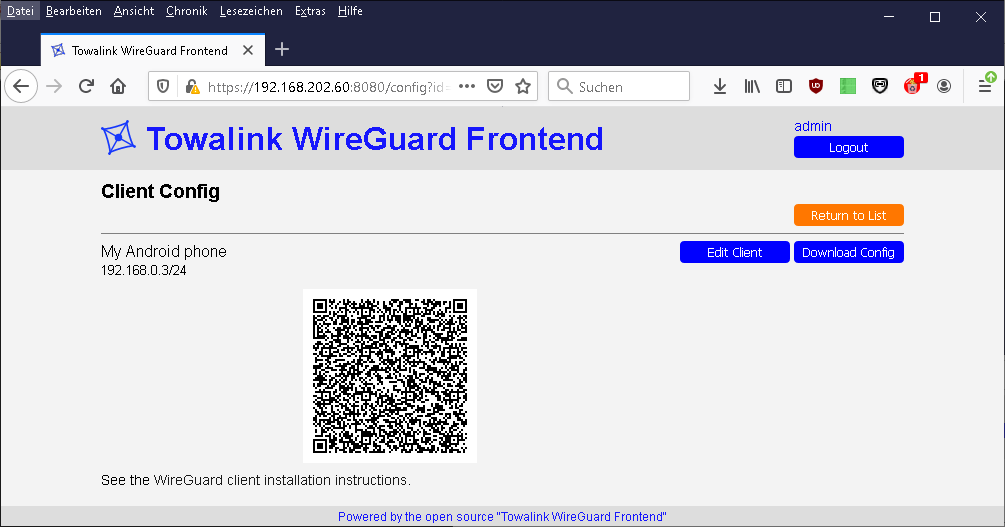
See additional screenshots in the "screenshots" folder.
Details
The wgfrontend configuration file
The interactive set-up assistant creates a configuration file with the desired information. It is located at "/etc/wgfrontend/wgfrontend.conf".
Here is an example:
### Config file of the Towalink WireGuard Frontend ###
[general]
# The WireGuard config file to read and write
wg_configfile = /etc/wireguard/wg_rw.conf

# The command to be executed when the WireGuard config has changed
on_change_command = "sudo /etc/init.d/wgfrontend_interface restart"

# The interface to bind to for the web server
socket_host = 0.0.0.0

# The port to bind to for the web server
socket_port = 8080

# The system user to be used for the frontend
user = wgfrontend

[users]
admin = dc524e423d9762830649d4d9e18f4b47a56c92f96646104dd06c71b26b54f732e8318d5b60a6b2b01b4f269407771496e879c9bf65ca9ef4f55a243ff358fc8dfea0bd9d30d766320857093eb95022822f71b098215f26f6d2644033d956bfdd
Add an additional frontend user
Create a password hash using the following command:
wgfrontend-password
Using this, you can add another user to the [users] section in the wgfrontend configuration file.
A note on security
Don't expose the web frontend to the Internet without another layer of protection.
The wgfrontend web server does not run with root permissions. That's a start and better than many other WireGuard frontends. But the web server user has the permission to write to a WireGuard configuration file. This file may reference scripts that are run with root permissions when wg-quick is run. In case of a vulnerability in wgfrontend, this can be abused for privilege escalation. Thus add an additional safeguard layer of protection.
Reporting bugs
In case you encounter any bugs, please report the expected behavior and the actual behavior so that the issue can be reproduced and fixed.
Developers
Clone repository
Clone this repo to your local machine using https://github.com/towalink/wgfrontend.git
Install the module temporarily to make it available in your Python installation:
pip3 install -e <path to directory with setup.py>
License

- AGPL3 license
- Copyright 2020 © Dirk Henrici.
- WireGuard is a registered trademark of Jason A. Donenfeld.
1 maintainer

Metadata
1 maintainer
Release files for wgfrontend 1.0.0
For a detailed explanation of source distributions (sdists) and built distributions (wheels), please see the package formats documentation.
Source distribution (sdist)
| File | Size | Uploaded | Provenance | Actions |
|---|---|---|---|---|
| wgfrontend-1.0.0.tar.gz | 36.3 kB | Without provenance | Details for wgfrontend-1.0.0.tar.gz |
Built distribution (wheel)
| File | Interpreter | ABI | Platform | Actions Reset |
|---|---|---|---|---|
| wgfrontend-1.0.0-py3-none-any.whl | Python 3 | none | any | Details for wgfrontend-1.0.0-py3-none-any.whl |
Total release size: 76.3 kB
Release files / wgfrontend-1.0.0.tar.gz
| Download URL | wgfrontend-1.0.0.tar.gz |
|---|---|
| Size | 36.3 kB |
| Tags | Source |
|
SHA-256 checksum How to use checksums |
130a8bf8c8a754298fdf00952cae0c7a0d792f635d5b76a20f327b75a5f0d0c5
|
|
BLAKE2b-256 checksum How to use checksums |
61283c4305524c5751f773866b1a4970cf253a52415d0f55b66268d93f91b876
|
| Upload date | |
|
Uploaded using Trusted Publishing? What is trusted publishing? |
No |
| Uploaded via |
twine/4.0.2 CPython/3.11.9
|
Release files / wgfrontend-1.0.0-py3-none-any.whl
| Download URL | wgfrontend-1.0.0-py3-none-any.whl |
|---|---|
| Size | 40.0 kB |
| Tags | Python 3 |
|
SHA-256 checksum How to use checksums |
9154262e0d0d00bfa73733e1510ec3292ffe54441f5876f2c0d68bb49f74a0f5
|
|
BLAKE2b-256 checksum How to use checksums |
c7756c1137131efeaa59dd9b2a5f5926b81485479e48e186e2c090f421aaa5ac
|
| Upload date | |
|
Uploaded using Trusted Publishing? What is trusted publishing? |
No |
| Uploaded via |
twine/4.0.2 CPython/3.11.9
|
Security for wgfrontend 1.0.0
Provenance
Provenance describes where a file came from. On PyPI, provenance is shared via attestations, which provide a verifiable record of the build or publishing details. View details, limitations and caveats.
No provenance found
None of the files in this release were uploaded with provenance metadata.
A note on package security
PyPI is a repository for distributing packages, not a service for auditing them. While third-party security researchers and our staff do their best to detect and remove malicious packages, PyPI cannot guarantee the quality, security or suitability of any given package.
To learn more about protecting yourself from malicious actors, visit our package security documentation.














