
whatsapp2pdf


A streaming Python library and CLI that turns a WhatsApp exported conversation into a familiar bubble-style PDF, including exported media. Everything runs locally: nothing is uploaded.
Documentation: https://jasalguero.github.io/whatsapp2pdf/
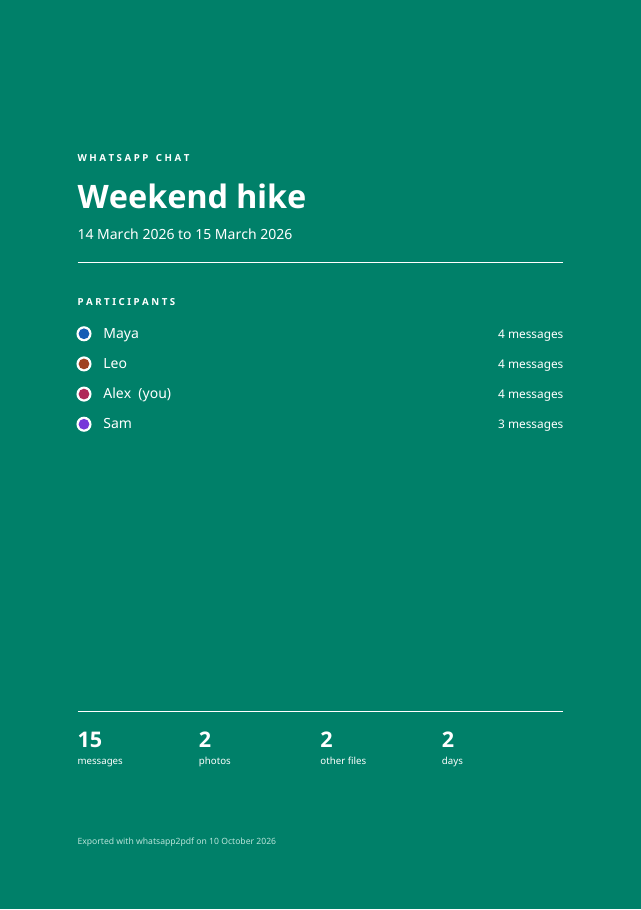
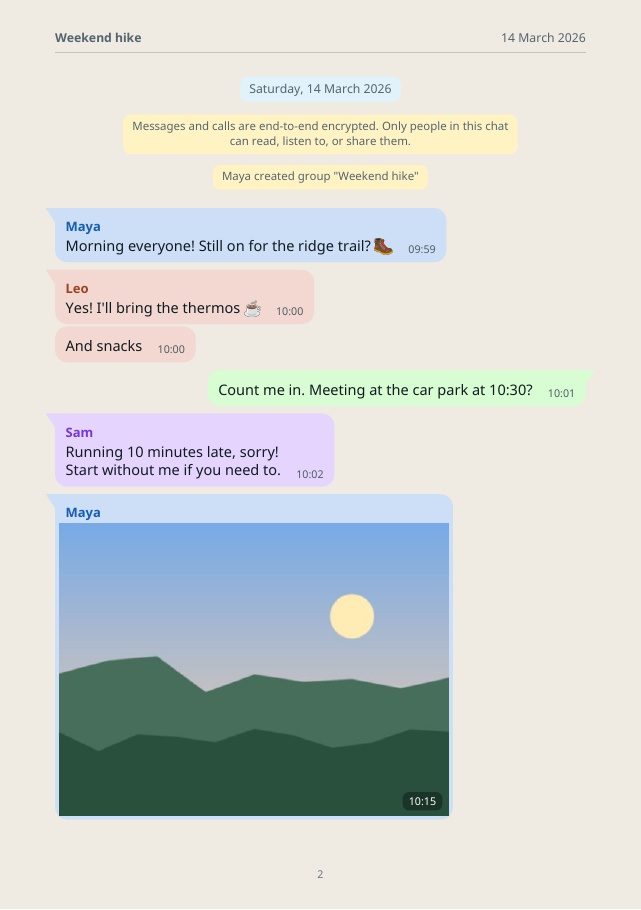
Each PDF opens with a cover page (title, date range, participants and totals), then the chat on the familiar beige background: a date pill whenever the day changes, bubbles sized to their text, a tinted bubble and name color per sender, inline photos, and large emoji for emoji-only messages. (The screenshots come from a made-up chat; see scripts/make_demo.py.)
Export a chat
- Android: open the chat, tap ⋮ → More → Export chat, then pick Include media or Without media.
- iPhone: open the chat, tap its name → Export Chat, then pick Attach Media or Without Media.
Pass the resulting .zip (or .txt) to whatsapp2pdf. You don't need to unzip it. See the export guide for details.
Why it handles large exports
- The chat text is parsed one message at a time rather than loaded into memory.
- ZIP media is opened directly and only when its message is rendered; the ZIP is never bulk-extracted.
- Images are resized individually before embedding.
- ReportLab writes compressed PDF pages incrementally.
This makes multi-gigabyte ZIPs practical, although runtime and final PDF size still depend on the number and resolution of images. Python's zipfile needs the ZIP central directory in memory, which is proportional to the number of members, not their combined byte size.
Install
pipx install whatsapp2pdf # or: pip install whatsapp2pdf
Requires Python 3.10 or newer.
CLI
whatsapp2pdf "WhatsApp Chat.zip" conversation.pdf \
  --me "Jane Doe" \
  --title "Family chat" \
  --font-size 10 \
  --bubble-width 0.70
Without --title, the title comes from the export's file name ("WhatsApp Chat - Family chat.zip" becomes "Family chat"). Other options:
--plainuses a white page background for cheaper printing.--no-coverskips the cover page.--emoji-font PATHpoints at a color emoji font when the system one isn't found.--page-size A4|A5|A6,--font-size,--marginand--bubble-widthadjust the layout.--month-firstreads ambiguous dates such as03/04/26as month/day.--font/--bold-fonttake TrueType fonts for scripts Noto Sans doesn't cover.
If the archive contains several text files, the largest is used as the chat. Override it with --chat-member.
Python API
from whatsapp2pdf import LayoutConfig, PageSize, Theme, convert

layout = LayoutConfig(
    page_size=PageSize.A5,
    font_size=10,
    margin=32,
    max_bubble_width_ratio=0.68,
    media_max_height=180,
    theme=Theme(page="#EFEAE2", outgoing="#D9FDD3"),
)

result = convert(
    "WhatsApp Chat.zip",
    "conversation.pdf",
    outgoing={"Jane Doe", "Jane"},
    title="Family chat",
    config=layout,
)
print(result.messages)
The default page layout is A4. Choose A5 or A6 from the CLI with --page-size:
whatsapp2pdf export.zip conversation-a5.pdf --me "Jane Doe" --page-size A5
whatsapp2pdf export.zip conversation-a6.pdf --me "Jane Doe" --page-size A6
The Python API accepts either the enum (PageSize.A4, PageSize.A5, or PageSize.A6) or the corresponding string. Custom (width, height) tuples remain supported.
Text uses Noto Sans, bundled with the package (SIL Open Font License, see src/whatsapp2pdf/fonts/OFL.txt), so every machine produces the same PDF. Emoji are rendered from an installed color-emoji font when available (Apple Color Emoji on macOS, Noto Color Emoji on Linux, Segoe UI Emoji on Windows, or --emoji-font). For other non-Latin scripts, provide a suitable TrueType font via font_path and bold_font_path (or --font / --bold-font). Videos, audio, contacts, and documents are represented as attachment cards with font-independent vector icons; common image formats are embedded as previews.
Supported export forms
- Android and iOS timestamp prefixes
- Localized iOS
a.m./p.m.timestamps and invisible direction markers - 12-hour and 24-hour clocks
- Day-first and month-first dates
- Multiline messages and system messages
<attached: filename>andfilename (file attached)media markers- ZIP exports and unpacked
.txtexports with sibling media
Privacy and security
Conversion happens entirely on your machine, with no network access. Exports are treated as untrusted input: nothing is extracted to disk, media is looked up by bare file name inside the ZIP, and oversized or unexpected image formats are skipped. Please report vulnerabilities privately, as described in SECURITY.md.
Development
pip install -e '.[test]'
pytest
See CONTRIBUTING.md. Please never commit or attach real chat exports.
License
MIT, see LICENSE. The bundled Noto Sans fonts are licensed under the SIL Open Font License 1.1 (src/whatsapp2pdf/fonts/OFL.txt). Emoji glyphs in generated PDFs come from your system's emoji font and remain under that font's license. See NOTICE.
This project is not affiliated with WhatsApp or Meta. "WhatsApp" is a trademark of WhatsApp LLC.
1 maintainer

Metadata
1 maintainer
Release files for whatsapp2pdf 0.1.0
For a detailed explanation of source distributions (sdists) and built distributions (wheels), please see the package formats documentation.
Source distribution (sdist)
| File | Size | Uploaded | |
|---|---|---|---|
| whatsapp2pdf-0.1.0.tar.gz | 658.5 kB | Details |
Built distribution (wheel)
| File | Interpreter | ABI | Platform | Reset |
|---|---|---|---|---|
| whatsapp2pdf-0.1.0-py3-none-any.whl | Python 3 | none | any | Details |
Total release size: 1.3 MB
Release files / whatsapp2pdf-0.1.0.tar.gz
| Download URL | whatsapp2pdf-0.1.0.tar.gz |
|---|---|
| Size | 658.5 kB |
| Tags | Source |
|
SHA-256 checksum How to use checksums |
63894af8a679035d3669b449cbf4fb9a184243e22e518247ae4a79d80be166ae
|
|
BLAKE2b-256 checksum How to use checksums |
9f1ca4dd37cdeb754e81d1cf046c576b3dd315ca3c7f7ae4f5e6891fd238163a
|
| Upload date | |
|
Uploaded using Trusted Publishing? What is trusted publishing? |
Yes |
| Uploaded via |
twine/7.0.0 CPython/3.13.14
|
Provenance
Provenance describes where a file came from. On PyPI, provenance is shared via attestations, which provide a verifiable record of the build or publishing details. View details, limitations and caveats.


PyPI Publish Attestation
PyPI verified that this artifact, at this checksum, originated from the publisher listed below.
Signed by GitHub Actions, verified by PyPI on Oct 11, 2026.
Transparency logRelease files / whatsapp2pdf-0.1.0-py3-none-any.whl
| Download URL | whatsapp2pdf-0.1.0-py3-none-any.whl |
|---|---|
| Size | 662.6 kB |
| Tags | Python 3 |
|
SHA-256 checksum How to use checksums |
4cb9c94a9c12ec82a0b5df723607b201803d03f1f42573f95f333b3dc9d35ab8
|
|
BLAKE2b-256 checksum How to use checksums |
703b26a0437b93fea3b1aa999e4c0258268ce6e16badf52607770c9e90a92ac5
|
| Upload date | |
|
Uploaded using Trusted Publishing? What is trusted publishing? |
Yes |
| Uploaded via |
twine/7.0.0 CPython/3.13.14
|
Provenance
Provenance describes where a file came from. On PyPI, provenance is shared via attestations, which provide a verifiable record of the build or publishing details. View details, limitations and caveats.
PyPI Publish Attestation
PyPI verified that this artifact, at this checksum, originated from the publisher listed below.
Signed by GitHub Actions, verified by PyPI on Oct 11, 2026.
Transparency log












