
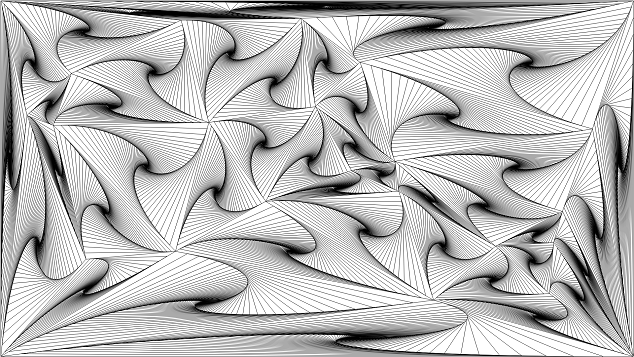
A fullscreen program that displays an animated, twisting tessellation of whirls. Click to show or hide a panel of sliders to adjust the whirls. Press Esc to exit.
Links
What is a Whirl?
Begin with an arbitrary polygon. Construct a nested polygon by joining points that are a fractional distance along each edge. Repeat this process ad infinitum.
The vertices of the whirl form a logarithmic spiral, and they approximate a pursuit curve. The center of the spiral is the centroid of the polygon.
If the constructed polygon’s vertices lie on midpoints of the base polygon, then it’s called a midpoint polygon. If the constructed polygon has an even number of sides, then it’s called a derived polygon.
Dependencies
This program was developed against:
Python 3.5
NumPy 1.10
SciPy 0.17
Matplotlib 1.5
Pygame 1.9
PGU 0.18
Older versions may or may not work.
Installation
These are minimal instructions to install and run this program on Windows 64 bit, including all dependencies. These instructions will not interfere with any other installed versions of Python and do not affect your PATH environment variable.
Download WinPython-64bit-3.5.1.3.exe and install to C:\py\WinPython-64bit-3.5.1.3
Download pygame-1.9.2a0-cp35-none-win_amd64.whl and pgu-0.18.zip.
Open Command Prompt and run the following:
C:\py\WinPython-64bit-3.5.1.3\python-3.5.1.amd64\python -m pip install C:\Users\<user>\Downloads\pygame-1.9.2a0-cp35-none-win_amd64.whl
C:\py\WinPython-64bit-3.5.1.3\python-3.5.1.amd64\python -m pip install C:\Users\<user>\Downloads\pgu-0.18.zip
C:\py\WinPython-64bit-3.5.1.3\python-3.5.1.amd64\python -m pip install whirls
C:\py\WinPython-64bit-3.5.1.3\python-3.5.1.amd64\python -m whirls
Troubleshooting
DLL load failed
ImportError: DLL load failed: The specified module could not be found.
If you installed Pygame for Python 3.5 from the link provided, then you need to install the Microsoft Visual C++ 2015 Redistributable.
SyntaxError
If you get an error like this:
  File "C:\py\WinPython-32bit-3.5.1.3\python-3.5.1\lib\site-packages\pgu\gui\container.py", line 57
    except StyleError,e:
                     ^
SyntaxError: invalid syntax
Then change that line to read:
except StyleError as e:
That file does not belong to this project.
1 maintainer

Metadata
1 maintainer
Release files for whirls 1.2
For a detailed explanation of source distributions (sdists) and built distributions (wheels), please see the package formats documentation.
Source distribution (sdist)
| File | Size | Uploaded | Provenance | Actions |
|---|---|---|---|---|
| whirls-1.2.zip | 24.3 kB | Without provenance | Details for whirls-1.2.zip |
Built distribution (wheel)
| File | Interpreter | ABI | Platform | Actions Reset |
|---|---|---|---|---|
| whirls-1.2-py3-none-any.whl | Python 3 | none | any | Details for whirls-1.2-py3-none-any.whl |
Total release size: 34.3 kB
Release files / whirls-1.2.zip
| Download URL | whirls-1.2.zip |
|---|---|
| Size | 24.3 kB |
| Tags | Source |
|
SHA-256 checksum How to use checksums |
9288908855245a597ddd27dbd4b0e0f79f16990de8973260870623b375592619
|
|
BLAKE2b-256 checksum How to use checksums |
1451b6256cffe7a5661cd6cfcbdfbcccd834836119982f825ee0a78c15005785
|
| Upload date | |
|
Uploaded using Trusted Publishing? What is trusted publishing? |
No |
Release files / whirls-1.2-py3-none-any.whl
| Download URL | whirls-1.2-py3-none-any.whl |
|---|---|
| Size | 9.9 kB |
| Tags | Python 3 |
|
SHA-256 checksum How to use checksums |
6f79d4b7bd340a77ad1d426dd1685c75e5e7f39b0184e2b0c5247391864b823b
|
|
BLAKE2b-256 checksum How to use checksums |
14c2eca25f6cd2fd246a4998e066e6bad90193607900d7e3d07d8bd5d31cb975
|
| Upload date | |
|
Uploaded using Trusted Publishing? What is trusted publishing? |
No |
Security for whirls 1.2
Provenance
Provenance describes where a file came from. On PyPI, provenance is shared via attestations, which provide a verifiable record of the build or publishing details. View details, limitations and caveats.
No provenance found
None of the files in this release were uploaded with provenance metadata.
A note on package security
PyPI is a repository for distributing packages, not a service for auditing them. While third-party security researchers and our staff do their best to detect and remove malicious packages, PyPI cannot guarantee the quality, security or suitability of any given package.
To learn more about protecting yourself from malicious actors, visit our package security documentation.














