
Whispy - Fast Speech Recognition CLI
A fast and efficient command-line interface for whisper.cpp, providing automatic speech recognition with GPU acceleration.
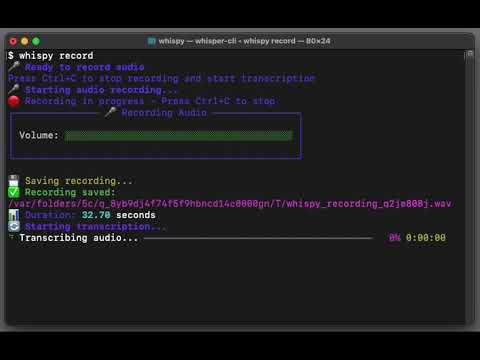
Features
- 🚀 Fast transcription using whisper.cpp with GPU acceleration (Metal on macOS, CUDA on Linux/Windows)
- 🎯 Simple CLI interface for easy audio transcription
- 📁 Multiple audio formats supported (WAV, MP3, FLAC, OGG)
- 🌍 Multi-language support with automatic language detection
- 📝 Flexible output options (stdout, file)
- 🔧 Auto-detection of models and whisper-cli binary
- 🏗️ Automatic building of whisper.cpp if needed
Installation
Quick Install (Recommended)
Install directly from GitHub with automatic setup:
pip install git+https://github.com/amarder/whispy.git
This will automatically:
- Clone whisper.cpp to
~/.whispy/whisper.cpp - Build the whisper-cli binary with GPU acceleration
- Install the whispy CLI
Manual Install
If you prefer to install manually:
Prerequisites
- Python 3.7+
- CMake 3.10+ (for building whisper.cpp)
- C++ compiler with C++17 support
- Git (for cloning whisper.cpp)
Steps
# Clone repository
git clone https://github.com/amarder/whispy.git
cd whispy

# Install whispy
pip install -e .

# Clone whisper.cpp if you don't have it
git clone https://github.com/ggerganov/whisper.cpp.git

# Build whisper-cli (or use: whispy build)
cd whisper.cpp
cmake -B build
cmake --build build -j --config Release
cd ..
Requirements
Basic requirements:
- Python 3.7+
- CMake (for building whisper.cpp)
- C++ compiler (gcc, clang, or MSVC)
- Git
For audio recording features:
- Microphone access
- Audio drivers (pre-installed on most systems)
- Additional Python packages:
sounddevice,numpy,scipy
Supported platforms:
- 🍎 macOS (Intel & Apple Silicon) with CoreAudio
- 🐧 Linux (with ALSA/PulseAudio)
- 🪟 Windows (with DirectSound)
Download a model
After installation, download a model to use for transcription:
# For pip installs from GitHub
cd ~/.whispy/whisper.cpp
sh ./models/download-ggml-model.sh base.en

# For manual installs
cd whisper.cpp
sh ./models/download-ggml-model.sh base.en

# Alternative: Download directly to models/
mkdir -p models
curl -L -o models/ggml-base.en.bin https://huggingface.co/ggerganov/whisper.cpp/resolve/main/ggml-base.en.bin
Usage
Basic transcription
# Transcribe an audio file
whispy transcribe audio.wav

# Transcribe with explicit model
whispy transcribe audio.wav --model models/ggml-base.en.bin

# Transcribe with language specification
whispy transcribe audio.wav --language en

# Save transcript to file
whispy transcribe audio.wav --output transcript.txt

# Verbose output
whispy transcribe audio.wav --verbose
Record and transcribe
Record audio from your microphone and transcribe it in real-time:
# Record and transcribe (press Ctrl+C to stop recording)
whispy record-and-transcribe

# Test microphone before recording
whispy record-and-transcribe --test-mic

# Record with specific model and language
whispy record-and-transcribe --model models/ggml-base.en.bin --language en

# Save both transcript and audio
whispy record-and-transcribe --output transcript.txt --save-audio recording.wav

# Verbose output with device information
whispy record-and-transcribe --verbose
Real-time transcription
Transcribe audio from your microphone in real-time using streaming chunks:
# Start real-time transcription (press Ctrl+C to stop)
whispy realtime

# With custom settings for faster/slower processing
whispy realtime --chunk-duration 2.0 --overlap-duration 0.5 --silence-threshold 0.02

# Show individual chunks instead of continuous output
whispy realtime --show-chunks

# Save final transcript to file
whispy realtime --output live_transcript.txt

# Test real-time setup
whispy realtime --test-setup

# Verbose mode for debugging
whispy realtime --verbose
Real-time Parameters:
--chunk-duration: Duration of each audio chunk in seconds (default: 3.0)--overlap-duration: Overlap between chunks in seconds (default: 1.0)--silence-threshold: Voice activity detection threshold (default: 0.01)--show-chunks: Show individual chunk transcripts instead of continuous mode--test-setup: Test real-time setup without starting transcription
System information
# Check system status
whispy info

# Show version
whispy version

# Build whisper-cli if needed
whispy build
Supported audio formats
- WAV
- MP3
- FLAC
- OGG
Available models
Download models using whisper.cpp's script or directly:
tiny.en,tiny- Fastest, least accuratebase.en,base- Good balance of speed and accuracysmall.en,small- Better accuracymedium.en,medium- High accuracylarge-v1,large-v2,large-v3- Best accuracy, slower
Examples
# Quick transcription with auto-detected model
whispy transcribe meeting.wav

# High-quality transcription
whispy transcribe interview.mp3 --model whisper.cpp/models/ggml-large-v3.bin

# Transcribe non-English audio
whispy transcribe spanish_audio.wav --language es

# Save results and show details
whispy transcribe podcast.mp3 --output transcript.txt --verbose

# Record and transcribe in real-time
whispy record-and-transcribe

# Record with high-quality model and save everything
whispy record-and-transcribe \
  --model whisper.cpp/models/ggml-large-v3.bin \
  --output meeting-notes.txt \
  --save-audio meeting-recording.wav \
  --verbose

# Quick voice memo transcription
whispy record-and-transcribe --language en --output memo.txt

# Real-time transcription with live output
whispy realtime

# Real-time transcription with custom settings
whispy realtime --chunk-duration 2.0 --show-chunks --output live_notes.txt
Testing
Whispy includes a comprehensive test suite to ensure the CLI works correctly with different scenarios.
Running Tests
# Install development dependencies
pip install -e ".[dev]"

# Run all tests
pytest

# Run tests with verbose output
pytest -v

# Run only unit tests
pytest tests/test_unit.py

# Run only CLI tests
pytest tests/test_cli.py

# Run tests with coverage
pytest --cov=whispy --cov-report=html

# Skip slow tests
pytest --fast
Test Categories
- Unit tests (
tests/test_unit.py): Test individual functions and modules - CLI tests (
tests/test_cli.py): Test command-line interface functionality - Integration tests: Test full workflows with real audio files
Using the Test Runner
# Use the convenience script
python run_tests.py --help

# Run unit tests only
python run_tests.py -t unit -v

# Run with coverage
python run_tests.py -c -v

# Run fast tests only
python run_tests.py -f
Test Requirements
- pytest >= 7.0.0
- pytest-cov >= 4.0.0
- pytest-mock >= 3.10.0
- Sample audio files (JFK sample from whisper.cpp)
What's Tested
- ✅ CLI commands (help, version, info, transcribe, record-and-transcribe)
- ✅ Audio file transcription with sample files
- ✅ Audio recording from microphone
- ✅ Real-time record-and-transcribe workflow
- ✅ Microphone testing functionality
- ✅ Error handling for invalid files/models/devices
- ✅ Output file generation
- ✅ Language options and verbose modes
- ✅ System requirements and binary detection
- ✅ Model file discovery and validation
Development
Project Structure
whispy/
├── whispy/
│   ├── __init__.py       # Package initialization
│   ├── cli.py           # Command-line interface
│   └── transcribe.py    # Core transcription logic
├── whisper.cpp/         # Git submodule (whisper.cpp source)
├── models/              # Model files directory
├── pyproject.toml       # Project configuration
└── README.md
How it works
Whispy works as a wrapper around the whisper-cli binary from whisper.cpp:
- Auto-detection: Finds whisper-cli binary and model files automatically
- Subprocess calls: Runs whisper-cli as a subprocess for transcription
- Output parsing: Captures and returns the transcribed text
- Performance: Gets full GPU acceleration and optimizations from whisper.cpp
Building from source
# Clone with whisper.cpp submodule
git clone --recursive https://github.com/your-username/whispy.git
cd whispy

# Install in development mode
pip install -e .

# Build whisper.cpp
whispy build
# OR manually:
# cd whisper.cpp && cmake -B build && cmake --build build -j --config Release
Adding new features
The CLI is built with Typer and can be easily extended:
@app.command()
def new_command():
    """Add a new command to the CLI"""
    console.print("New feature!")
Performance
Whispy automatically uses the best available backend:
- macOS: Metal GPU acceleration
- Linux/Windows: CUDA GPU acceleration (if available)
- Fallback: Optimized CPU with BLAS
Typical performance on Apple M1:
- ~10x faster than real-time for base.en model
- ~5x faster than real-time for large-v3 model
Troubleshooting
whisper-cli not found
# Check if whisper-cli exists
whispy info

# Build whisper-cli
whispy build

# Or build manually
cd whisper.cpp
cmake -B build && cmake --build build -j --config Release
No model found
# Download a model
cd whisper.cpp
sh ./models/download-ggml-model.sh base.en

# Or specify model explicitly
whispy transcribe audio.wav --model /path/to/model.bin
License
This project is licensed under the MIT License - see the LICENSE file for details.
Contributing
Contributions are welcome! Please feel free to submit a Pull Request.
Development setup
git clone --recursive https://github.com/your-username/whispy.git
cd whispy
pip install -e .
whispy build
Acknowledgments
- whisper.cpp - Fast C++ implementation of OpenAI's Whisper
- OpenAI Whisper - Original Whisper model
- Typer - CLI framework
1 maintainer

Metadata
1 maintainer
Release files for whisper.py 0.1.0
For a detailed explanation of source distributions (sdists) and built distributions (wheels), please see the package formats documentation.
Source distribution (sdist)
| File | Size | Uploaded | |
|---|---|---|---|
| whisper_py-0.1.0.tar.gz | 31.4 kB | Details |
Built distribution (wheel)
| File | Interpreter | ABI | Platform | Reset |
|---|---|---|---|---|
| whisper_py-0.1.0-py3-none-any.whl | Python 3 | none | any | Details |
Total release size: 52.8 kB
Release files / whisper_py-0.1.0.tar.gz
| Download URL | whisper_py-0.1.0.tar.gz |
|---|---|
| Size | 31.4 kB |
| Tags | Source |
|
SHA-256 checksum How to use checksums |
01358e2799fb69e9a4865d1de526920cd353300b8778619d441e89a2f286a7de
|
|
BLAKE2b-256 checksum How to use checksums |
d2a4bdd8ee390a1691dc17783b3f3afaca811f4c9cecb9ce406ab725b0116181
|
| Upload date | |
|
Uploaded using Trusted Publishing? What is trusted publishing? |
Yes |
| Uploaded via |
twine/6.1.0 CPython/3.12.9
|
Provenance
Provenance describes where a file came from. On PyPI, provenance is shared via attestations, which provide a verifiable record of the build or publishing details. View details, limitations and caveats.


PyPI Publish Attestation
PyPI verified that this artifact, at this checksum, originated from the publisher listed below.
Signed by GitHub Actions, verified by PyPI on Jul 9, 2025.
Transparency logRelease files / whisper_py-0.1.0-py3-none-any.whl
| Download URL | whisper_py-0.1.0-py3-none-any.whl |
|---|---|
| Size | 21.4 kB |
| Tags | Python 3 |
|
SHA-256 checksum How to use checksums |
58229f31cd3e3bd4683a4b38ed7762dd9caa771dc3cf5cefc93dd76823af9118
|
|
BLAKE2b-256 checksum How to use checksums |
314c2cb25b11b665aad7fc9cc973b37347dd7cba07a73441efa0d9b0850f5b32
|
| Upload date | |
|
Uploaded using Trusted Publishing? What is trusted publishing? |
Yes |
| Uploaded via |
twine/6.1.0 CPython/3.12.9
|
Provenance
Provenance describes where a file came from. On PyPI, provenance is shared via attestations, which provide a verifiable record of the build or publishing details. View details, limitations and caveats.
PyPI Publish Attestation
PyPI verified that this artifact, at this checksum, originated from the publisher listed below.
Signed by GitHub Actions, verified by PyPI on Jul 9, 2025.
Transparency log












