
whiteboxgui







An interactive GUI for WhiteboxTools in a Jupyter-based environment
- GitHub repo: https://github.com/giswqs/whiteboxgui
- Documentation: https://giswqs.github.io/whiteboxgui
- PyPI: https://pypi.org/project/whiteboxgui
- conda-forge: https://anaconda.org/conda-forge/whiteboxgui
- WhiteboxTools: https://github.com/jblindsay/whitebox-tools
- User Manual: https://jblindsay.github.io/wbt_book
- whitebox-python: https://github.com/giswqs/whitebox-python
- whiteboxR: https://github.com/giswqs/whiteboxR
- whitebox-ArcGIS: https://github.com/giswqs/WhiteboxTools-ArcGIS
- Free software: MIT license
Description
The whiteboxgui Python package is a Jupyter frontend for WhiteboxTools, an advanced geospatial data analysis platform developed by Prof. John Lindsay (webpage; jblindsay) at the University of Guelph's Geomorphometry and Hydrogeomatics Research Group. WhiteboxTools can be used to perform common geographical information systems (GIS) analysis operations, such as cost-distance analysis, distance buffering, and raster reclassification. Remote sensing and image processing tasks include image enhancement (e.g. panchromatic sharpening, contrast adjustments), image mosaicing, numerous filtering operations, simple classification (k-means), and common image transformations. WhiteboxTools also contains advanced tooling for spatial hydrological analysis (e.g. flow-accumulation, watershed delineation, stream network analysis, sink removal), terrain analysis (e.g. common terrain indices such as slope, curvatures, wetness index, hillshading; hypsometric analysis; multi-scale topographic position analysis), and LiDAR data processing. LiDAR point clouds can be interrogated (LidarInfo, LidarHistogram), segmented, tiled and joined, analyized for outliers, interpolated to rasters (DEMs, intensity images), and ground-points can be classified or filtered. WhiteboxTools is not a cartographic or spatial data visualization package; instead it is meant to serve as an analytical backend for other data visualization software, mainly GIS.
The WhiteboxTools currently contains 447 tools, which are each grouped based on their main function into one of the following categories: Data Tools, GIS Analysis, Hydrological Analysis, Image Analysis, LiDAR Analysis, Mathematical and Statistical Analysis, Stream Network Analysis, and Terrain Analysis. For a listing of available tools, complete with documentation and usage details, please see the WhiteboxTools User Manual.
Installation
The whiteboxgui Python package can be installed using the following command:
pip install whiteboxgui
Usage
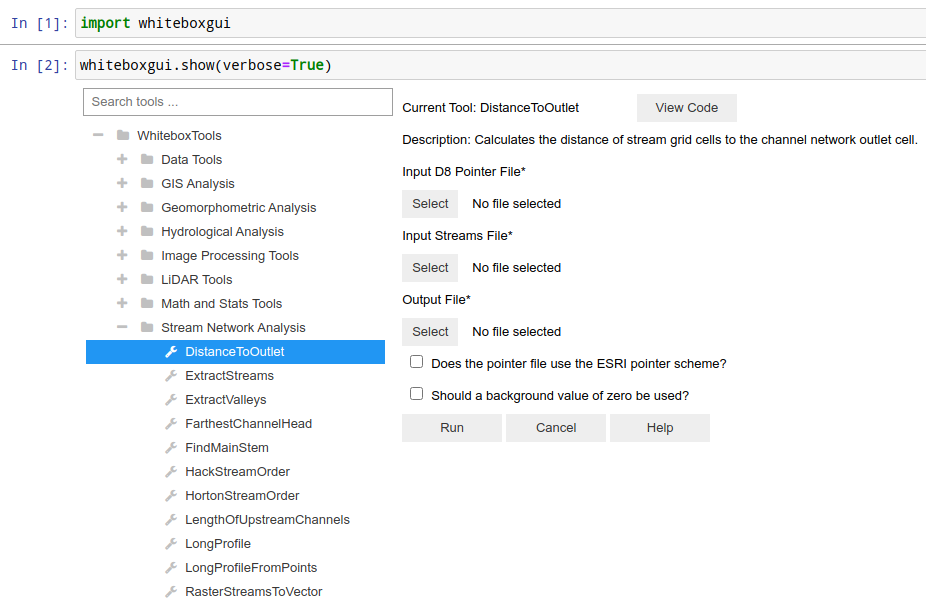
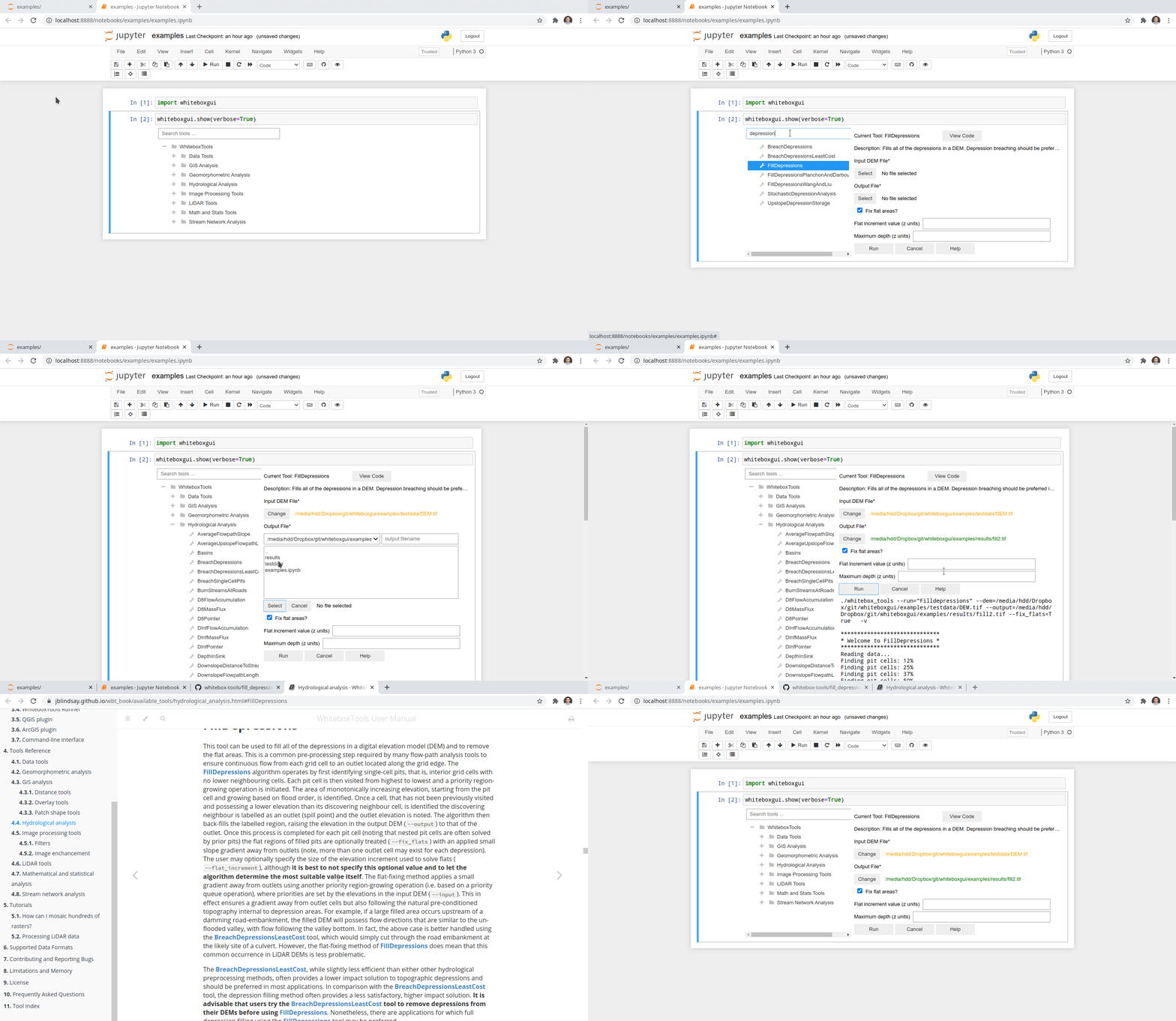
The whiteboxgui provides a Graphical User Interface (GUI) for WhiteboxTools in a Jupyter-based environment, which can be invoked using the following Python script:
import whiteboxgui
whiteboxgui.show(verbose=True)
Demo
Credits
This package was created with Cookiecutter and the giswqs/pypackage project template.
1 maintainer

Metadata
1 maintainer
Release files for whiteboxgui 0.1.5
For a detailed explanation of source distributions (sdists) and built distributions (wheels), please see the package formats documentation.
Source distribution (sdist)
| File | Size | Uploaded | |
|---|---|---|---|
| whiteboxgui-0.1.5.tar.gz | 12.1 kB | Details |
Built distribution (wheel)
| File | Interpreter | ABI | Platform | Reset |
|---|---|---|---|---|
| whiteboxgui-0.1.5-py2.py3-none-any.whl | Python 3, Python 2 | none | any | Details |
Total release size: 21.7 kB
Release files / whiteboxgui-0.1.5.tar.gz
| Download URL | whiteboxgui-0.1.5.tar.gz |
|---|---|
| Size | 12.1 kB |
| Tags | Source |
|
SHA-256 checksum How to use checksums |
1c7a830b80fdc2e088a575189e4711741e7d350d2369d52509e5fdad074f246c
|
|
BLAKE2b-256 checksum How to use checksums |
c09ad7e5888ce1627117e87656a94c8e13f4a1c86c4ab7f22377aa5acef22f72
|
| Upload date | |
|
Uploaded using Trusted Publishing? What is trusted publishing? |
No |
| Uploaded via |
twine/3.3.0 pkginfo/1.7.0 requests/2.25.1 setuptools/49.2.1 requests-toolbelt/0.9.1 tqdm/4.56.0 CPython/3.9.1
|
Release files / whiteboxgui-0.1.5-py2.py3-none-any.whl
| Download URL | whiteboxgui-0.1.5-py2.py3-none-any.whl |
|---|---|
| Size | 9.6 kB |
| Tags | Python 2 Python 3 |
|
SHA-256 checksum How to use checksums |
31a49f8d2fe755f4467e75dd126c23ab8c4db61d1e0899f7d8380bc17a2cf623
|
|
BLAKE2b-256 checksum How to use checksums |
60443b3fec56e38dab84d868adba7e8e58142eb794d348509f24c1b9077f9ae7
|
| Upload date | |
|
Uploaded using Trusted Publishing? What is trusted publishing? |
No |
| Uploaded via |
twine/3.3.0 pkginfo/1.7.0 requests/2.25.1 setuptools/49.2.1 requests-toolbelt/0.9.1 tqdm/4.56.0 CPython/3.9.1
|














