
whizzml_kernel
whizzml_kernel is a simple Jupyter kernel that allows you to run WhizzML
code in a Jupyter Notebook.
Installation
Node.js and npm are needed for the kernel to work
properly. If you need information to install those, please refer to
https://docs.npmjs.com/downloading-and-installing-node-js-and-npm. The rest of dependencies
will automatically be installed when installing whizzml_kernel from PyPI::
    pip install whizzml_kernel
    npm install xmlhttprequest
    python -m whizzml_kernel.install
WhizzML credentials
In order to access BigML using WhizzML, you'll need to provide your
credentials. Currently, the credentials are extracted from the existing
environment variables: BIGML_USERNAME, BIGML_API_KEY, BIGML_DOMAIN,
BIGML_API_VERSION, BIGML_PROJECT and BIGML_ORGANIZATION. The first two are
mandatory, while the rest can be missing. If so, BIGML_DOMAIN will be
set to https://bigml.io, the BIGML_API_VERSION will be set to the latest
version and no project or organization will be used. In order to set or
change those, you'll need to use the %env magic command, as you would
using the Python kernel.
Using the WhizzML kernel
Notebook: The New menu in the notebook should show an option for a WhizzML notebook.
Console frontends: To use it with the console frontends, add --kernel whizzml to
their command line arguments.
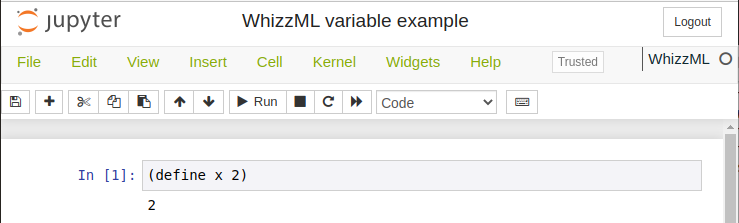
The goal of this kernel is providing a REPL to use WhizzML. As an example, you can try basic WhizzML operations, like defining a variable:
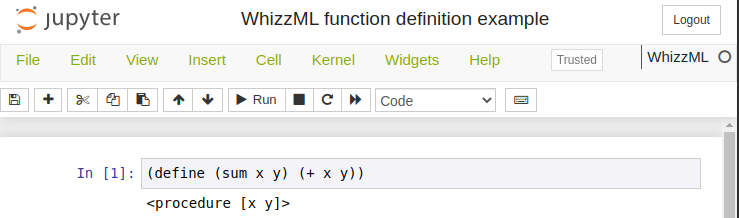
defining a function:
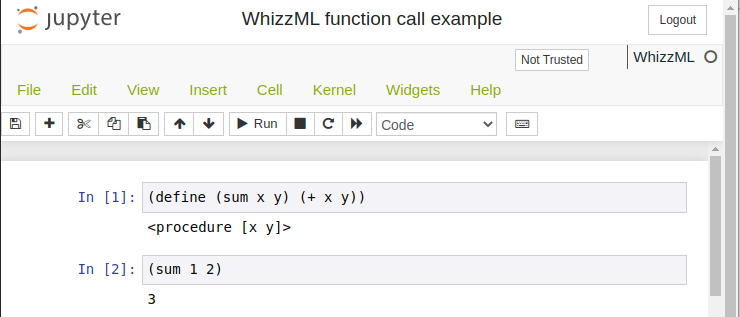
calling the function on two numbers:
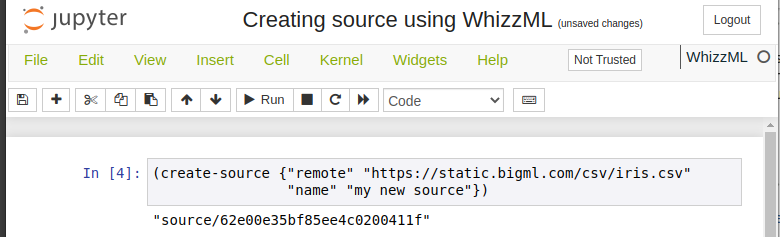
creating a source in BigML from some data:
Summarizing and storing your WhizzML
Some magics have been added to the currently available Python magics as
utilities that can help you store your WhizzML code and create a script from
it. The steps to do so are:
- Saving the notebook, so that the corresponding
.ipynbfile contains the current version of the code. - Using the
%wstoremagic command in a separated input cell. The command will callnbconvertto extract from the stored notebook the WhizzML code and will create a.whizzmlfile with it. After that, a new cell will be added to your notebook containing the%%wscriptmagic command and the JSON needed to define the name, description, inputs and outputs of the script. Inputs and outputs will be pre-populated by analizing the WhizzML variables, but their type and defaults should be modified at will. - Running the
%%wscriptcommand with the correctly formatted JSON will create a script from the code and the metadata.
If you want to see the WhizzML code retrieved from your input cells, you can
use the magic command %wsource, that will output that for you.
Also, if you want your environment (credentials, stored WhizzML code, etc.) to
be removed, you can use %wreset that will clear all the stored information
without affecting the code in the input cells of your notebook.


Release files for whizzml-kernel 0.1.2
For a detailed explanation of source distributions (sdists) and built distributions (wheels), please see the package formats documentation.
Source distribution (sdist)
| File | Size | Uploaded | |
|---|---|---|---|
| whizzml_kernel-0.1.2.tar.gz | 9.8 kB | Details |
Release files / whizzml_kernel-0.1.2.tar.gz
| Download URL | whizzml_kernel-0.1.2.tar.gz |
|---|---|
| Size | 9.8 kB |
| Tags | Source |
|
SHA-256 checksum How to use checksums |
51957bae187b9aa3a0c676084a1bc9a530e8aa76566ee3e812a2a17b900cb77c
|
|
BLAKE2b-256 checksum How to use checksums |
5e4eae23c53153405fc376327ad8a4ab13c1e62cec07d952697408afe3ecd7f4
|
| Upload date | |
|
Uploaded using Trusted Publishing? What is trusted publishing? |
No |
| Uploaded via |
twine/4.0.1 CPython/3.10.5
|














