



      __        __   ___  __   ___               __          __
|  | /  \ |\ | |  \ |__  |__) |__  |  | |       |__) | |\ | / _`
|/\| \__/ | \| |__/ |___ |  \ |    \__/ |___    |__) | | \| \__>
Intro
Tired of the wallpaper? Let’s make the change. This program is to download Bing’s picture and set as wallpaper with a notify to let you know the story behind the picture.
Requirements
Linux platform(Currently support gnome, xfce(thanks to [@jokeryu][]), mate(thanks to [@renzhn][]))
Python 2.7 && python 3.x
Libnotify-bin(for Arch: libnotify)
Install
$ (sudo) pip install wonderful_bing
$ sudo apt-get install libnotify-bin
Usage
Use bing --help to get the detailed information.
Manually
You need to set a directory(default /tmp)to save the download pictures, end with ‘/’, specify your desktop_environment(support gnome, cinnamon, xfce4).
$ bing set -d /path/to/save/pictures/ desktop_environment
Automatically(recommand)
Add it to startup application(in my Linux Mint16) if you power on your pc and power off your pc regularly, then every time you boot up your pc, this script will automatically run for you.
Or use cron. Let me give you an example:
0 8 * * * env DISPLAY=:0 /usr/local/bin/bing set -d /home/lord63/pictures/bing/ cinnamon
we need ``env DISPLAY=:0``, otherwise the notify can’t display at all, and remember the ``/`` at the end.
Or use anacron if you ofen hang up your pc instead of powering off it. but the original anacron will run the script in root, thus it may fail in setting the picture to wallpaper. Follow this to let you run anacron as normal user. Let me give you an example, add the following line in $HOME/.anacron/anacrontab:
1 1 bing env DISPLAY=:0 /usr/local/bin/bing set -d /home/lord63/pictures/bing/ cinnamon
If you find a better way, please let me know :)
Snapshots
the first time you run it:
$ bing set -d /home/lord63/pictures/bing/ cinnamon
Successfully download the picture to --> /home/lord63/pictures/bing/CascadePools.jpg
Successfully set the picture as the wallpaper. :)
get today’s picture story.
$ bing story
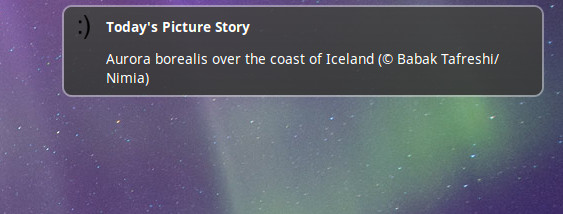
Aurora borealis over the coast of Iceland (© Babak Tafreshi/Nimia)
if the picture has been downloaded before:
$ bing set -d /home/lord63/pictures/bing/ cinnamon
You have downloaded the picture before.
Have a look at it --> /home/lord63/pictures/bing/CascadePools.jpg
if your pc doesn’t connect to the network, it will try again after 5 mins.
$ bing set -d /home/lord63/pictures/bing/ cinnamon
ConnectionError,check your network please.
Will try again after 5 minutes.
and the notify should looks like this:
notify-img
License
MIT License
1 maintainer

Metadata
1 maintainer
Release files for wonderful_bing 0.10.0
For a detailed explanation of source distributions (sdists) and built distributions (wheels), please see the package formats documentation.
Source distribution (sdist)
| File | Size | Uploaded | |
|---|---|---|---|
| wonderful_bing-0.10.0.tar.gz | 39.9 kB | Details |
Built distribution (wheel)
| File | Interpreter | ABI | Platform | Reset |
|---|---|---|---|---|
| wonderful_bing-0.10.0-py2.py3-none-any.whl | Python 2, Python 3 | none | any | Details |
Total release size: 200.7 kB
Release files / wonderful_bing-0.10.0.tar.gz
| Download URL | wonderful_bing-0.10.0.tar.gz |
|---|---|
| Size | 39.9 kB |
| Tags | Source |
|
SHA-256 checksum How to use checksums |
b6e95e712de87550d2d7fa49d97e7a43add8a4fba14175851164c83935c8059a
|
|
BLAKE2b-256 checksum How to use checksums |
cec4a83c8da60fd290ced3380b680f830268eee23b73ff9f91c34d2060fb71b3
|
| Upload date | |
|
Uploaded using Trusted Publishing? What is trusted publishing? |
No |
| Uploaded via |
Python-urllib/3.8
|
Release files / wonderful_bing-0.10.0-py2.py3-none-any.whl
| Download URL | wonderful_bing-0.10.0-py2.py3-none-any.whl |
|---|---|
| Size | 160.7 kB |
| Tags | Python 2 Python 3 |
|
SHA-256 checksum How to use checksums |
74ecca7765c7c19cdac74ff1ce6cc9f828a2ab459fa1758d0d8d6be35e1cd3ee
|
|
BLAKE2b-256 checksum How to use checksums |
9e90b55bc530adef8c30f031c501c937f4958938dae245e6a6aadb748ec6281e
|
| Upload date | |
|
Uploaded using Trusted Publishing? What is trusted publishing? |
No |
| Uploaded via |
Python-urllib/3.8
|














