







What is wxee?
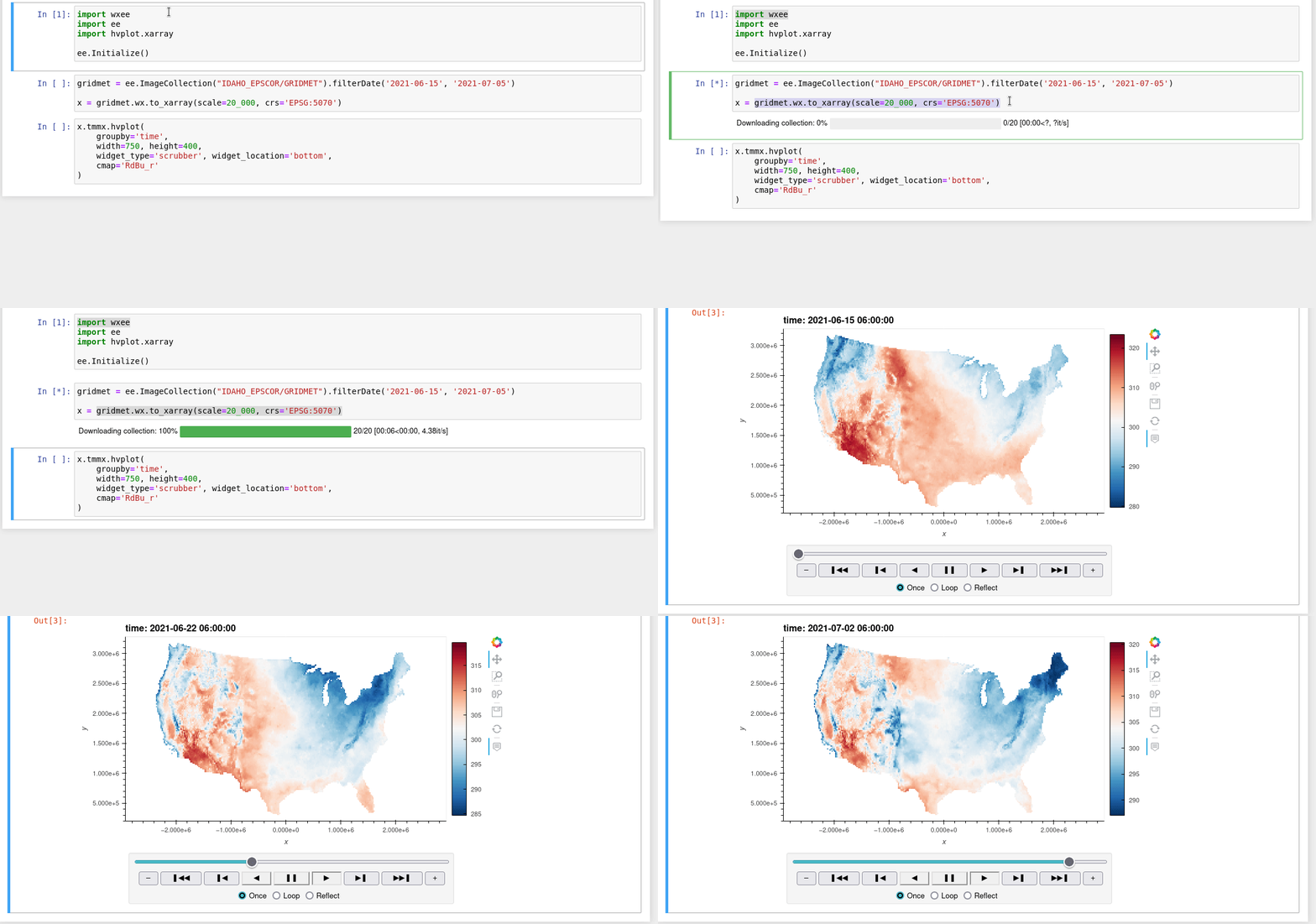
wxee was built to make processing gridded, mesoscale time series data quick and easy by integrating the data catalog and processing power of Google Earth Engine with the flexibility of xarray, with no complicated setup required. To accomplish this, wxee implements convenient methods for data processing, aggregation, downloading, and ingestion.
wxee can be found in the Earth Engine Developer Resources!
Features
Time series image collections to xarray or GeoTIFF in one line of code
Climatological anomalies and temporal aggregation, interpolation, smoothing, and gap-filling in Earth Engine
Color composite plots from xarray datasets
Parallel processing for fast downloads
To see some of the capabilities of wxee and try it yourself, check out the interactive notebooks here!
Install
Pip
pip install wxeeConda
conda install -c conda-forge wxeeQuickstart
Setup
Once you have access to Google Earth Engine, just import and initialize ee and wxee.
import ee
import wxee

wxee.Initialize()
Download Images
Download and conversion methods are extended to ee.Image and ee.ImageCollection using the
wx accessor. Just import wxee and use the wx accessor.
xarray
ee.ImageCollection("IDAHO_EPSCOR/GRIDMET").wx.to_xarray()GeoTIFF
ee.ImageCollection("IDAHO_EPSCOR/GRIDMET").wx.to_tif()Create a Time Series
Additional methods for processing image collections in the time dimension are available through the TimeSeries subclass.
A TimeSeries can be created from an existing ee.ImageCollection…
col = ee.ImageCollection("IDAHO_EPSCOR/GRIDMET")
ts = col.wx.to_time_series()
Or instantiated directly just like you would an ee.ImageCollection!
ts = wxee.TimeSeries("IDAHO_EPSCOR/GRIDMET")Aggregate Daily Data
Many weather datasets are in daily or hourly resolution. These can be aggregated to coarser resolutions using the aggregate_time
method of the TimeSeries class.
ts = wxee.TimeSeries("IDAHO_EPSCOR/GRIDMET")
monthly_max = ts.aggregate_time(frequency="month", reducer=ee.Reducer.max())
Calculate Climatological Means
Long-term climatological means can be calculated using the climatology_mean method of the TimeSeries class.
ts = wxee.TimeSeries("IDAHO_EPSCOR/GRIDMET")
mean_clim = ts.climatology_mean(frequency="month")
Contribute
Bugs or feature requests are always appreciated! They can be submitted here.
Code contributions are also welcome! Please open an issue to discuss implementation, then follow the steps below. Developer setup instructions can be found in the docs.
1 maintainer

Metadata
1 maintainer
Release files for wxee 0.5.0
For a detailed explanation of source distributions (sdists) and built distributions (wheels), please see the package formats documentation.
Source distribution (sdist)
| File | Size | Uploaded | |
|---|---|---|---|
| wxee-0.5.0.tar.gz | 21.7 kB | Details |
Built distribution (wheel)
| File | Interpreter | ABI | Platform | Reset |
|---|---|---|---|---|
| wxee-0.5.0-py3-none-any.whl | Python 3 | none | any | Details |
Total release size: 48.4 kB
Release files / wxee-0.5.0.tar.gz
| Download URL | wxee-0.5.0.tar.gz |
|---|---|
| Size | 21.7 kB |
| Tags | Source |
|
SHA-256 checksum How to use checksums |
5ad1f2e1c625e2b13ba81c50b84236bde35f7ab578791917a6c23ec0fe4e9f30
|
|
BLAKE2b-256 checksum How to use checksums |
ceb250f6c923dddd1617a6e5329a74d61cf4408f6e435537f50b7e4b1e1a83f7
|
| Upload date | |
|
Uploaded using Trusted Publishing? What is trusted publishing? |
Yes |
| Uploaded via |
twine/6.1.0 CPython/3.12.9
|
Provenance
Provenance describes where a file came from. On PyPI, provenance is shared via attestations, which provide a verifiable record of the build or publishing details. View details, limitations and caveats.


PyPI Publish Attestation
PyPI verified that this artifact, at this checksum, originated from the publisher listed below.
Signed by GitHub Actions, verified by PyPI on Aug 23, 2025.
Transparency logRelease files / wxee-0.5.0-py3-none-any.whl
| Download URL | wxee-0.5.0-py3-none-any.whl |
|---|---|
| Size | 26.7 kB |
| Tags | Python 3 |
|
SHA-256 checksum How to use checksums |
9c56cf2178c23fac7d8775a6f2eb4181c001e1b345b52a636038e3d313c0d8e8
|
|
BLAKE2b-256 checksum How to use checksums |
8c6f0f6b6e860c11beecc409befceda09cc15dfadd893d43f1179cb260e063c1
|
| Upload date | |
|
Uploaded using Trusted Publishing? What is trusted publishing? |
Yes |
| Uploaded via |
twine/6.1.0 CPython/3.12.9
|
Provenance
Provenance describes where a file came from. On PyPI, provenance is shared via attestations, which provide a verifiable record of the build or publishing details. View details, limitations and caveats.
PyPI Publish Attestation
PyPI verified that this artifact, at this checksum, originated from the publisher listed below.
Signed by GitHub Actions, verified by PyPI on Aug 23, 2025.
Transparency log













