
Pre-release
This release is a pre-release and may not be stable for production use.
XMind SDK for python
=====
**XMind SDK for python** to help Python developers to easily work with XMind files and build XMind extensions.
Install XMind SDK for python
---
Clone the repository to a local working directory
> `git clone https://github.com/xmindltd/xmind-sdk-python.git`
Now there will be a directory named `xmind-sdk-python` under the current directory. Change to the directory `xmind-sdk-python` and install **XMind SDK for python**.
> `python setup.py install`
*It is highly recommended to install __XMind SDK for python__ under an isolated python environment using [virtualenv](https://pypi.python.org/pypi/virtualenv)*
Usage
----
Open an existing XMind file or create a new XMind file and place it into a given path
> `import xmind`
>
> `workbook = xmind.load(/path/to/file/) # Requires '.xmind' extension`
Save XMind file to a path.
If the path is not given then the API will save to the path set in the workbook
> `xmind.save(workbook)`
or:
> `xmind.save(workbook, /save/file/to/path)`
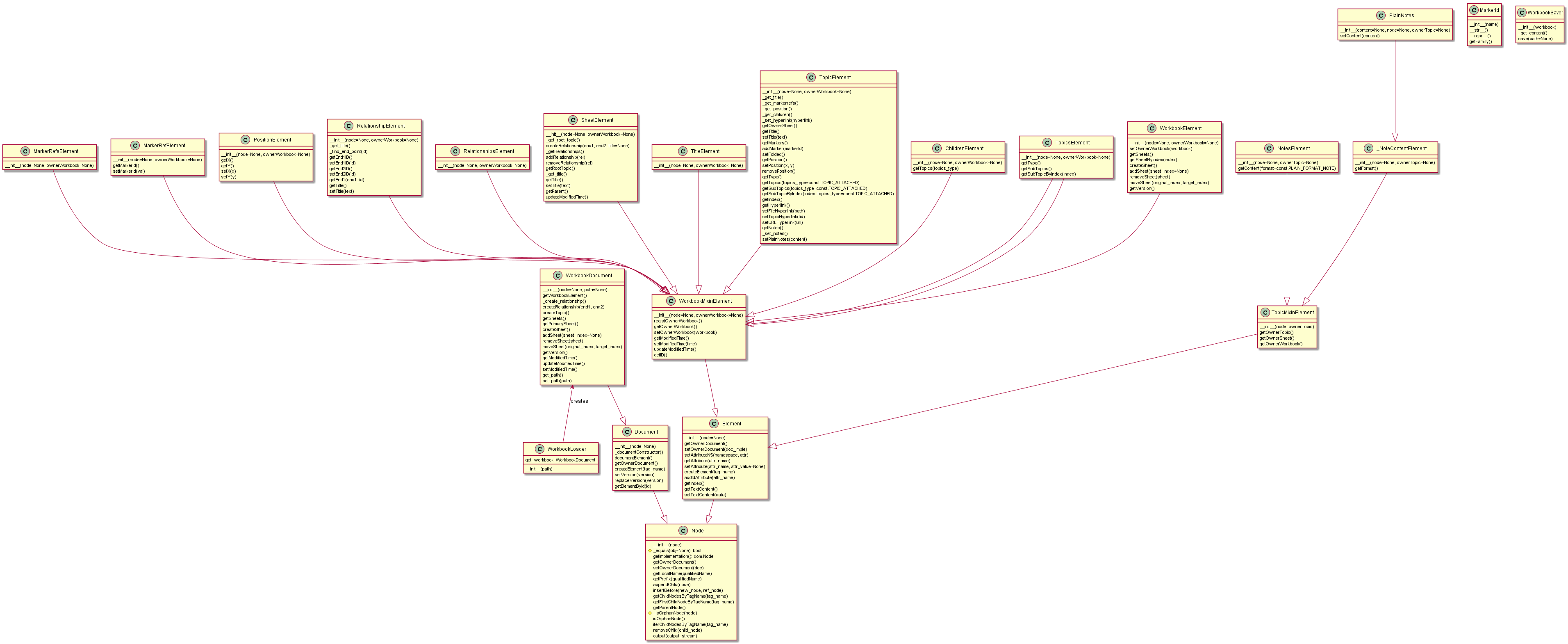
UML diagram
----
Diagram
Tests
---
From root directory run
> `python test.py`
Get coverage report
---
Install coverage package
> `pip install coverage`
Run tests under coverage
> `coverage run --source=xmind.core test.py`
Check coverage report
> `coverage report`
or
> `coverage html -d coverage_html`
to have rich visualisation
LICENSE
---
The MIT License (MIT)
Copyright (c) 2013 XMind, Ltd
Permission is hereby granted, free of charge, to any person obtaining a copy of
this software and associated documentation files (the "Software"), to deal in
the Software without restriction, including without limitation the rights to
use, copy, modify, merge, publish, distribute, sublicense, and/or sell copies of
the Software, and to permit persons to whom the Software is furnished to do so,
subject to the following conditions:
The above copyright notice and this permission notice shall be included in all
copies or substantial portions of the Software.
THE SOFTWARE IS PROVIDED "AS IS", WITHOUT WARRANTY OF ANY KIND, EXPRESS OR
IMPLIED, INCLUDING BUT NOT LIMITED TO THE WARRANTIES OF MERCHANTABILITY, FITNESS
FOR A PARTICULAR PURPOSE AND NONINFRINGEMENT. IN NO EVENT SHALL THE AUTHORS OR
COPYRIGHT HOLDERS BE LIABLE FOR ANY CLAIM, DAMAGES OR OTHER LIABILITY, WHETHER
IN AN ACTION OF CONTRACT, TORT OR OTHERWISE, ARISING FROM, OUT OF OR IN
CONNECTION WITH THE SOFTWARE OR THE USE OR OTHER DEALINGS IN THE SOFTWARE.
=====
**XMind SDK for python** to help Python developers to easily work with XMind files and build XMind extensions.
Install XMind SDK for python
---
Clone the repository to a local working directory
> `git clone https://github.com/xmindltd/xmind-sdk-python.git`
Now there will be a directory named `xmind-sdk-python` under the current directory. Change to the directory `xmind-sdk-python` and install **XMind SDK for python**.
> `python setup.py install`
*It is highly recommended to install __XMind SDK for python__ under an isolated python environment using [virtualenv](https://pypi.python.org/pypi/virtualenv)*
Usage
----
Open an existing XMind file or create a new XMind file and place it into a given path
> `import xmind`
>
> `workbook = xmind.load(/path/to/file/) # Requires '.xmind' extension`
Save XMind file to a path.
If the path is not given then the API will save to the path set in the workbook
> `xmind.save(workbook)`
or:
> `xmind.save(workbook, /save/file/to/path)`
UML diagram
----
Diagram

Tests
---
From root directory run
> `python test.py`
Get coverage report
---
Install coverage package
> `pip install coverage`
Run tests under coverage
> `coverage run --source=xmind.core test.py`
Check coverage report
> `coverage report`
or
> `coverage html -d coverage_html`
to have rich visualisation
LICENSE
---
The MIT License (MIT)
Copyright (c) 2013 XMind, Ltd
Permission is hereby granted, free of charge, to any person obtaining a copy of
this software and associated documentation files (the "Software"), to deal in
the Software without restriction, including without limitation the rights to
use, copy, modify, merge, publish, distribute, sublicense, and/or sell copies of
the Software, and to permit persons to whom the Software is furnished to do so,
subject to the following conditions:
The above copyright notice and this permission notice shall be included in all
copies or substantial portions of the Software.
THE SOFTWARE IS PROVIDED "AS IS", WITHOUT WARRANTY OF ANY KIND, EXPRESS OR
IMPLIED, INCLUDING BUT NOT LIMITED TO THE WARRANTIES OF MERCHANTABILITY, FITNESS
FOR A PARTICULAR PURPOSE AND NONINFRINGEMENT. IN NO EVENT SHALL THE AUTHORS OR
COPYRIGHT HOLDERS BE LIABLE FOR ANY CLAIM, DAMAGES OR OTHER LIABILITY, WHETHER
IN AN ACTION OF CONTRACT, TORT OR OTHERWISE, ARISING FROM, OUT OF OR IN
CONNECTION WITH THE SOFTWARE OR THE USE OR OTHER DEALINGS IN THE SOFTWARE.
1 maintainer

Metadata
1 maintainer
Release files for xmind-sdk 1.1a0
For a detailed explanation of source distributions (sdists) and built distributions (wheels), please see the package formats documentation.
Source distribution (sdist)
| File | Size | Uploaded | |
|---|---|---|---|
| xmind-sdk-1.1a0.tar.gz | 47.0 kB | Details |
Built distribution (wheel)
| File | Interpreter | ABI | Platform | Reset |
|---|---|---|---|---|
| xmind_sdk-1.1a0-py3-none-any.whl | Python 3 | none | any | Details |
Total release size: 115.8 kB
Release files / xmind-sdk-1.1a0.tar.gz
| Download URL | xmind-sdk-1.1a0.tar.gz |
|---|---|
| Size | 47.0 kB |
| Tags | Source |
|
SHA-256 checksum How to use checksums |
9d9e9f8dd7d18f223a36386bc37cec883487dd65a51e0e1cfc3cf28ea3c1eee1
|
|
BLAKE2b-256 checksum How to use checksums |
623f465651b1aa07aa9a3a40bd8aee268e5c5a266335ca0ded88b179faa605df
|
| Upload date | |
|
Uploaded using Trusted Publishing? What is trusted publishing? |
No |
| Uploaded via |
twine/1.12.1 pkginfo/1.4.2 requests/2.20.0 setuptools/39.0.1 requests-toolbelt/0.8.0 tqdm/4.28.1 CPython/3.7.0
|
Release files / xmind_sdk-1.1a0-py3-none-any.whl
| Download URL | xmind_sdk-1.1a0-py3-none-any.whl |
|---|---|
| Size | 68.8 kB |
| Tags | Python 3 |
|
SHA-256 checksum How to use checksums |
c35ff05bd870204e42e191ef5073dd60905aee05c57e33c57fbc13b765dad95f
|
|
BLAKE2b-256 checksum How to use checksums |
b568d5c283fde5f79d9de07e458477d008fefe3c652435d05e2a24f6a09a9b6e
|
| Upload date | |
|
Uploaded using Trusted Publishing? What is trusted publishing? |
No |
| Uploaded via |
twine/1.12.1 pkginfo/1.4.2 requests/2.20.0 setuptools/39.0.1 requests-toolbelt/0.8.0 tqdm/4.28.1 CPython/3.7.0
|














