
yapCAD
yet another procedural CAD and computational geometry system written in python 3, featuring a parametric DSL, BREP modeling via OpenCascade, and comprehensive STL/STEP/DXF export
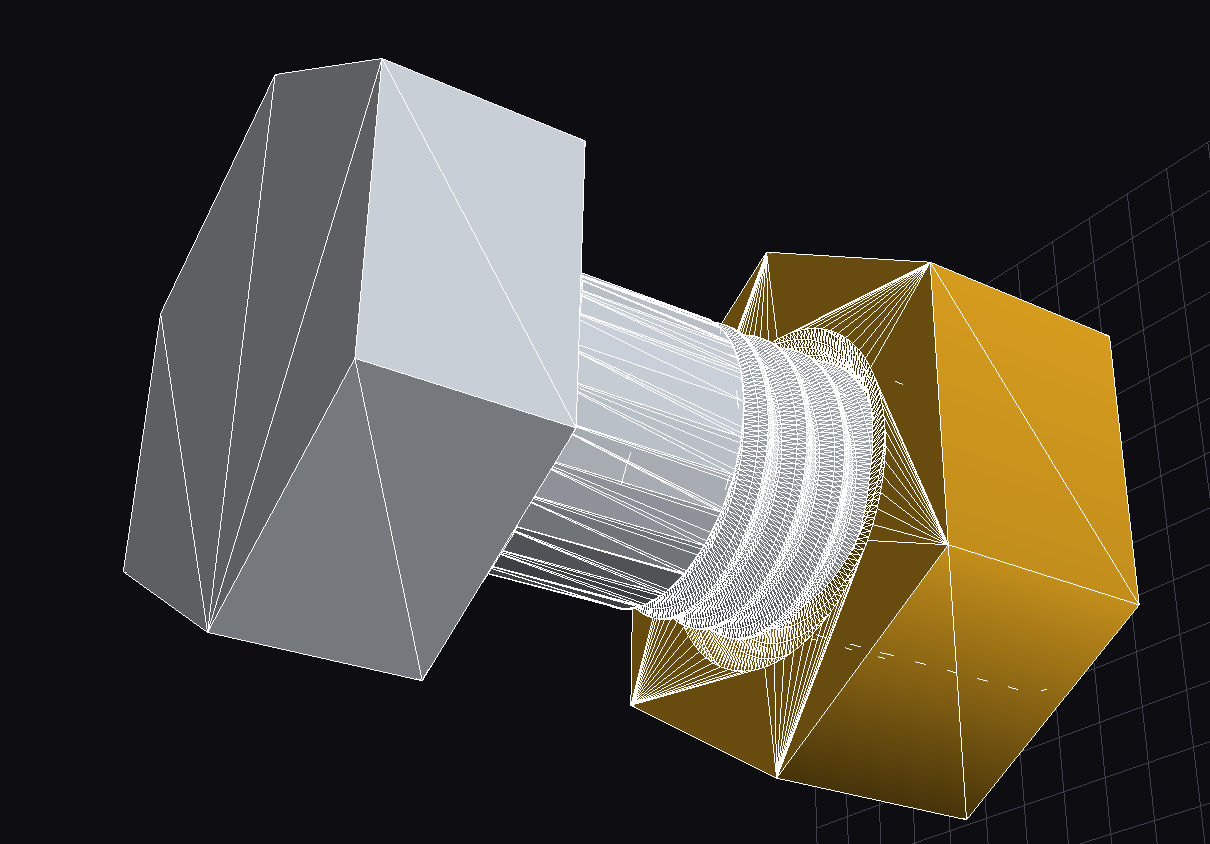
M10 hex-cap screw and nut pair demonstrating yapCAD’s threaded fastener generation and material properties support, rendered with zinc (left) and brass (right) finishes.
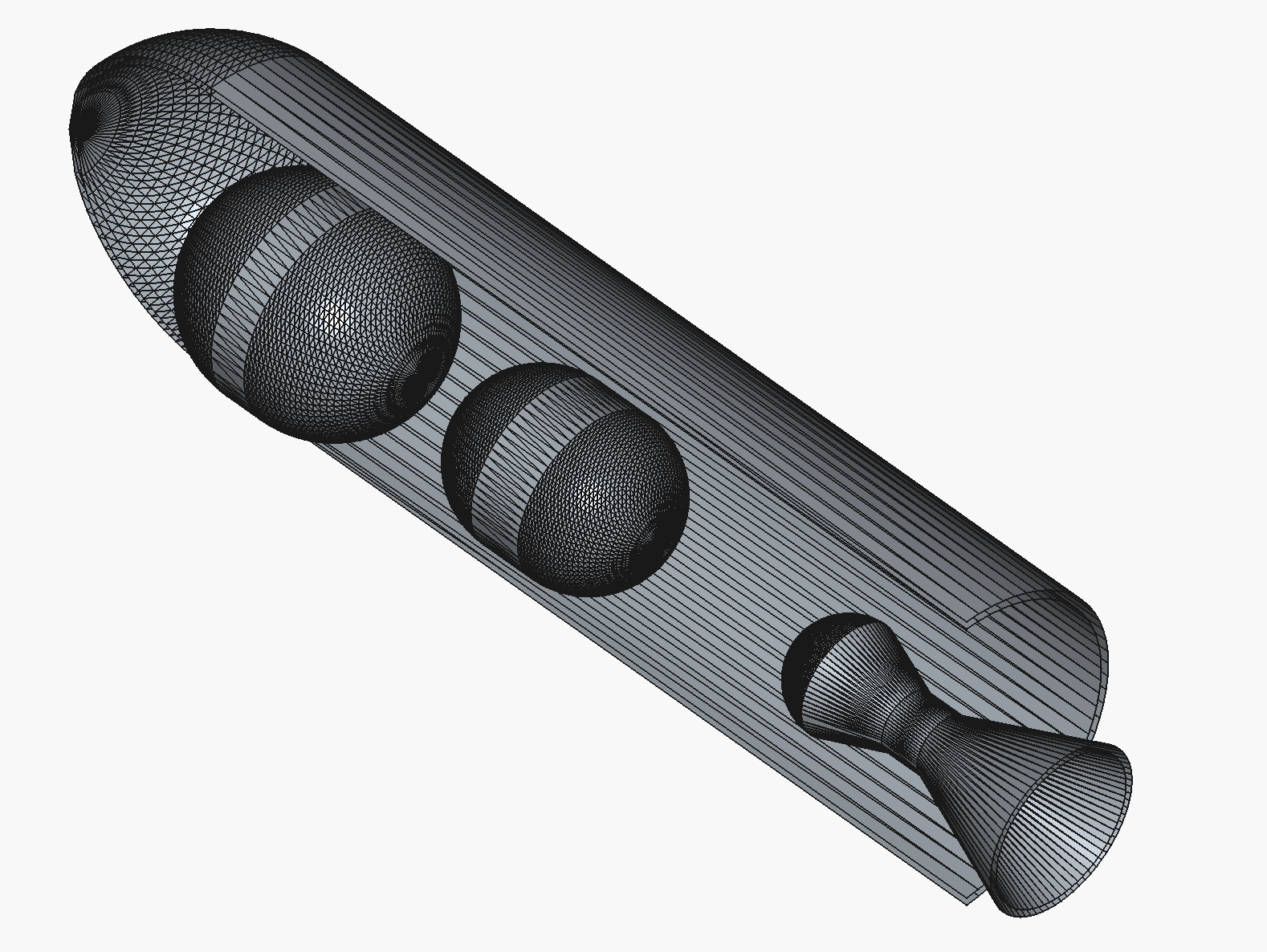
Internal layout generated with examples/rocket_cutaway_internal.py and rendered from the exported STEP file in FreeCAD.
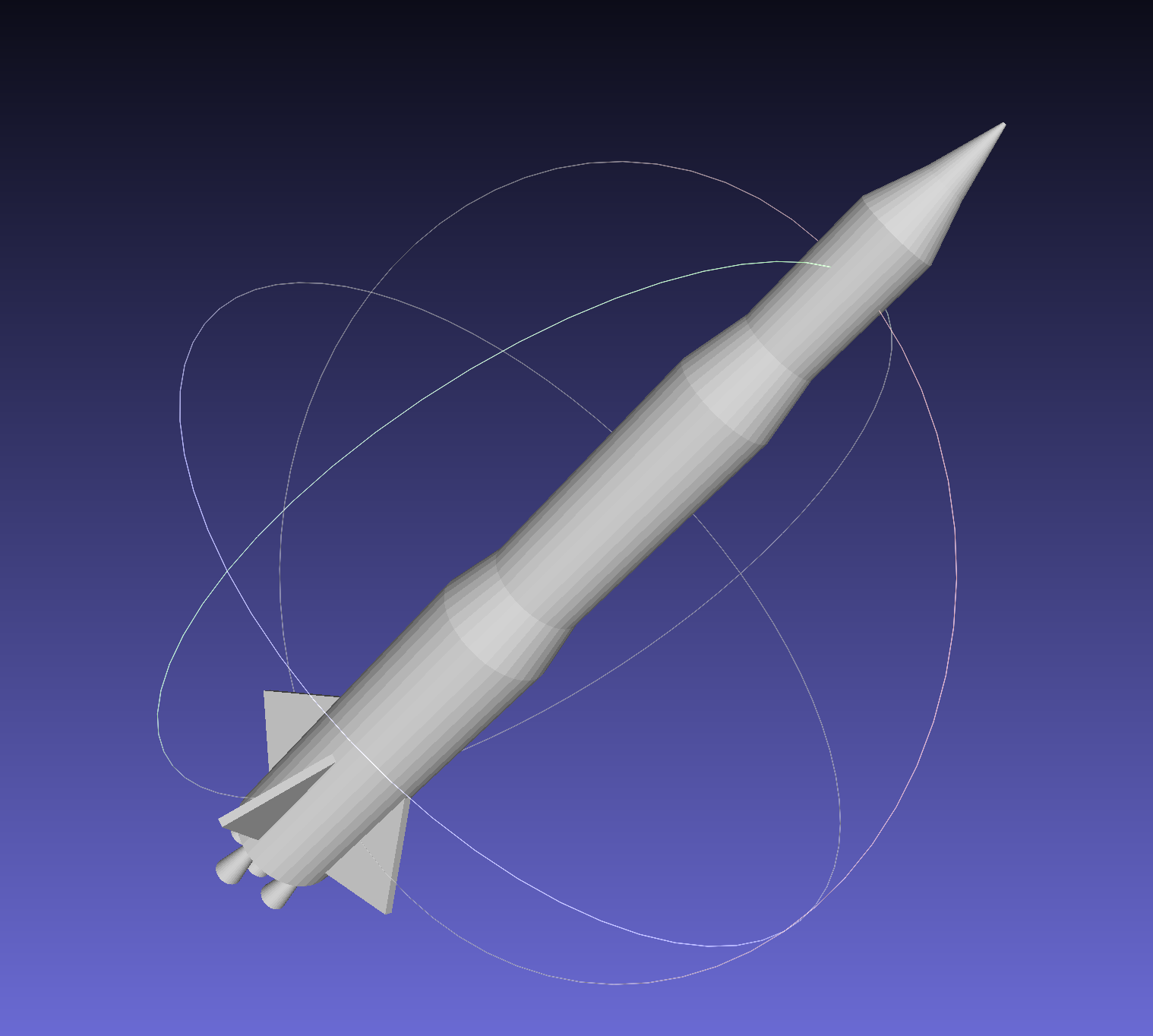
Multi-stage rocket assembly generated with examples/rocket_demo.py.
what’s yapCAD for?
First and foremost, yapCAD is a framework for creating parametric, procedural, and generative design systems. Starting with the 0.5 release, the emphasis has shifted toward 3D solid workflows, including STL export for downstream slicing and simulation, while retaining support for DXF generation and computational geometry experiments.
software status (version 1.1.0, July 2026)
yapCAD is in active development and already powers production design pipelines. Highlights from the 1.0 release cycle include:
Parametric DSL: Full domain-specific language with lexer, parser, type checker, and runtime interpreter. CLI supports check, run, list commands with DXF/STEP/STL export via --output and package creation via --package.
OCC BREP Kernel: Full OpenCascade Technology integration via pythonocc-core for analytic solid modeling, STEP import/export, and exact boolean operations.
2D Geometry: Ellipses, Catmull-Rom splines, NURBS curves, 2D boolean operations (union, difference, intersection) with DXF export for visualization.
Materials & Fasteners: Material property schema with visual rendering support (density, color, finish) and complete metric/unified fastener catalogs with proper threading geometry.
Adaptive Sweeps: sweep_adaptive() with tangent-tracking profile orientation for complex path sweeps.
3D Text: text3d.py module with text_solid() for extruded text and engrave_text() for cut-in text. Supports TrueType fonts (via freetype-py) with automatic system font detection (Arial, Helvetica) and built-in block font fallback.
Fillets and Chamfers: brep.py edge treatment operations via fillet_all_edges() and chamfer_all_edges() for rounding or beveling edges on BREP solids.
Helical Extrusion: helical_extrude() creates smooth twisted extrusions with true helical surfaces for gears, columns, and spiral features.
Pattern Generation: radial_pattern() and linear_pattern() functions for creating circular and linear arrays of 2D/3D geometry, solids, and surfaces.
Assembly System: Datum-driven multi-body assembly definitions with mate constraints, kinematic chains, collision checks, and optional VTK visualization.
Manufacturing Post-Processing: Beam segmentation helpers for splitting swept structures into printable segments with connector specifications and assembly manifests.
Edge Selection DSL: select_*_edges(), union_edges(), intersect_edges(), subtract_edges(), fillet_edges(), and chamfer_edges() builtins for selective BREP edge treatment.
.ycpkg project packaging with manifest, geometry JSON, exports, and metadata.
Package signing with GPG and SSH key support for cryptographic verification.
Validation schemas for test definitions and solver integration.
YAML-based fastener catalogs with ISO metric and ASME unified thread specifications.
Emacs major mode for DSL syntax highlighting (editors/yapcad-dsl-mode.el).
600+ regression tests covering geometry, DSL, import/export, packaging, and validation.
Upcoming work (tracked in docs/yapCADone.rst) focuses on solver adapter hardening, provenance/security extensions, and migration tooling.
If you are using yapCAD in interesting ways, feel free to let us know in the yapCAD discussions forum
yapCAD installation, documentation, and examples
installation
yapCAD ships in two functionality tiers. Pick the one that matches your work:
Tier 1 — pip (pure-Python core)
Use pip to install the core into your environment:
pip install yapcad
Or clone the repository and install from source (PEP 517 build):
git clone https://github.com/rdevaul/yapCAD.git
cd yapCAD
pip install .
Optional extras are declared for BREP and mesh tooling, but note that the brep/full extras pull pythonocc-core from PyPI, which is not reliable across platforms — the supported channel for OCC is conda-forge (see Tier 2):
pip install "yapcad[meshcheck]" # trimesh + pymeshfix mesh repair (pip-safe)
Tier 2 — conda (full functionality, recommended for solid modeling)
To set up the OCC BREP environment:
# Create and activate the yapcad-brep environment
conda env create -f environment.yml
conda activate yapcad-brep

# Verify OCC is available
python -c "from OCC.Core.BRepPrimAPI import BRepPrimAPI_MakeBox; print('OCC available')"
Once activated, all BREP features are available:
--engine occ for exact boolean operations on analytic solids
STEP import via yapcad.io.step_importer.import_step()
Round-trip BREP serialization in .ycpkg geometry JSON
Bidirectional Native↔OCC BREP conversion
See docs/yapBREP.rst for detailed architecture documentation.
Without OCC (pip-only install)
Without pythonocc-core, yapCAD operates in reduced functionality mode:
Available:
2D geometry (lines, arcs, ellipses, splines, polygons)
DXF export for 2D geometry
STL export (tessellated solids)
Tessellated solid primitives
Mesh-based boolean operations (lower fidelity)
DSL interpreter (2D features, tessellated 3D)
Package creation and validation
Not available (requires the conda / pythonocc-core install):
STEP import/export
OCC-backed boolean operations
Adaptive sweep operations
Analytic solid modeling
When OCC is absent, importing yapCAD emits a one-time YapcadBrepUnavailableWarning (a UserWarning subclass) documenting the limitation and the conda upgrade path. It is non-fatal and can be silenced with the standard warnings filters. For solid-modeling workflows, the conda / pythonocc-core install (Tier 2 above) is strongly recommended.
examples
Clone the repository (or install the package) and ensure PYTHONPATH includes the top-level src directory. Example entry points:
DSL Examples (run with python -m yapcad.dsl run <file> <command>):
examples/new_2d_features.dsl - 2D curves, splines, ellipses, and boolean operations.
examples/spur_gears.dsl - parametric spur gear generation.
examples/figgear.dsl - involute gear profiles using figgear integration.
examples/fasteners.dsl - metric and unified hex bolts and nuts with DSL builtins.
Python Examples:
examples/boxcut - parametric 2D joinery workflow (DXF output).
examples/rocket_demo.py - generative multi-stage rocket with viewer + STL export.
examples/rocket_cutaway_internal.py - subsystem layout/cutaway demo exporting STEP.
examples/involute_gear_package - canonical gear library packaged as .ycpkg.
examples/threaded_fastener_package.py - generates .ycpkg packages for metric/unified screws, nuts, and washers with proper thread geometry and material properties.
examples/import_demo.py - STEP/STL import demo showcasing the OCC BREP integration.
editor support
Emacs: A major mode for yapCAD DSL files is available in editors/yapcad-dsl-mode.el. Features include syntax highlighting for keywords, types, and builtins, Python-style indentation, and comment support. To install:
;; In your init.el or .emacs
(add-to-list 'load-path "/path/to/yapCAD/editors")
(require 'yapcad-dsl-mode)

;; Or with use-package
(use-package yapcad-dsl-mode
  :load-path "/path/to/yapCAD/editors"
  :mode "\\.dsl\\'")
For Doom Emacs, add to ~/.doom.d/config.el and run doom sync.
documentation
Online yapCAD documentation is available at https://yapcad.readthedocs.io/en/latest/ - key references:
docs/dsl_reference.md - DSL language reference: syntax, types, builtins, and CLI usage.
docs/dsl_spec.rst - DSL design specification and architecture.
docs/yapBREP.rst - OCC BREP implementation guide (installation, API, examples).
docs/assembly_system.rst - datum/mate assembly, kinematics, collision, and viewer workflow.
docs/manufacturing_postprocessing.rst - beam segmentation and connector post-processing framework.
docs/ycpkg_spec.rst - .ycpkg manifest schema, packaging workflow, CLI usage.
docs/geometry_json_schema.md - geometry JSON interchange format.
docs/metadata_namespace.rst - standard metadata blocks for materials, manufacturing, and analysis annotations.
Module references for yapcad.geom, yapcad.geom3d, yapcad.geom3d_util, yapcad.brep, and yapcad.dsl.
Mesh validation workflow (docs/mesh_validation.md, tools/validate_mesh.py).
DSL Quick Start:
# examples/spur_gears.dsl - parametric spur gear
module = 2.0
teeth = 20
pressure_angle = 20.0
thickness = 8.0

profile = involute_gear_profile(module, teeth, pressure_angle)
gear = extrude(profile, thickness)
export gear
Run with: python -m yapcad.dsl run examples/spur_gears.dsl --output gear.step
To build the HTML yapCAD documentation locally, install the documentation dependencies and run Sphinx from the project root:
python3 -m pip install -r docs/requirements.txt
make -C docs html
This will build the HTML documents in the build/sphinx/html directory. You can also build documentation in the other formats supported by Sphinx. See the Sphinx documentation for more information.
project packages & CLI
The preferred interchange format is the .ycpkg project package:
my_design.ycpkg/
├── manifest.yaml
├── geometry/primary.json
├── exports/
├── validation/
└── ...
Helper commands:
# Validate package structure / hashes
python tools/ycpkg_validate.py path/to/design.ycpkg

# Export STEP/STL/DXF from a package
python tools/ycpkg_export.py path/to/design.ycpkg --format step --format stl --output exports/
See docs/ycpkg_spec.rst for details.
running tests
The repository includes a comprehensive pytest suite that exercises both core geometry primitives and visual rendering capabilities. First, set up the testing environment:
# Create and activate virtual environment
pyenv local 3.12  # or use python3.12 directly
python3 -m venv v_312
source v_312/bin/activate

# Install dependencies
pip install -r requirements.txt
pip install pytest pytest-cov
Non-Visual Tests (Automated/CI-friendly)
Run the core computational geometry tests (including triangle, metadata, validation, and STL exporter checks) without interactive displays:
# Run all non-visual tests
PYTHONPATH=./src pytest tests/ -m "not visual"

# With coverage reporting (default)
PYTHONPATH=./src pytest tests/ -m "not visual" --cov=src

# Skip coverage for faster execution
PYTHONPATH=./src pytest tests/ -m "not visual" --override-ini addopts=
Visual Tests (Interactive)
yapCAD includes visual tests that create interactive 3D renderings to verify geometry generation and display functionality (for example, tests/test_mesh_view.py::test_mesh_view_visual_normals). These require a display and user interaction:
# Run all visual tests (opens interactive windows)
./run_visual_tests_venv.sh

# Run specific visual tests by pattern
./run_visual_tests_venv.sh test_geom      # Only test_geom* visual tests
./run_visual_tests_venv.sh surface        # Tests matching "surface"
./run_visual_tests_venv.sh Face           # Face-related tests

# Alternative: Manual pytest execution
VISUALTEST=true PYTHONPATH=./src pytest tests/ -m visual

# Or run individual visual tests
VISUALTEST=true PYTHONPATH=./src pytest tests/test_geom3d.py::TestSurface::test_surface -s
Note: Visual tests require closing each interactive window to proceed to the next test. Use the dedicated run_visual_tests_venv.sh script for the best experience, as it runs each test in an isolated subprocess to prevent early termination.
yapCAD goals
yapCAD provides a comprehensive framework for computational geometry and CAD operations in Python, supporting both 2D and 3D workflows:
Output Formats:
AutoCAD DXF for 2D drawings (via ezdxf)
STL export for 3D printing and mesh workflows
STEP export for CAD interchange (requires OCC environment)
OpenGL visualization for interactive 2D/3D preview (via pyglet)
Geometry Engine:
Native 2D geometry: lines, arcs, ellipses, splines, NURBS curves
Parametric DSL for declarative geometry definition
Projective (homogeneous) coordinate representation enabling affine transforms
Boolean operations: native engine plus optional trimesh backends (Manifold/Blender)
BREP Modeling (with OCC):
Full OpenCascade Technology integration for exact solid modeling
Primitive solids: box, sphere, cylinder, cone with analytic representation
Sweep operations: extrude, revolve, adaptive sweep with tangent tracking
STEP import/export with topology preservation
The architecture is designed to make simple 2D drawings easy while enabling advanced computational geometry and GPU-accelerated systems. See docs/yapCADone.rst for the current implementation status and roadmap.
yapCAD examples
(for a more complete list, see the examples folder)
It’s pretty easy to make a DXF drawing or a 3D model with yapCAD. Here is a DXF example:
from yapcad.ezdxf_drawable import *
from yapcad.geom import *

#set up DXF rendering
dd=ezdxfDraw()
dd.filename = "example1-out"

## make dxf-renderable geometry

# make a point located at 10,10 in the x-y plane, rendered as a small
# red cross and circle
dd.pointstyle = 'xo' # also valid are 'x' or 'o'
dd.linecolor = 1 # set color to red (DXF index color 1)
dd.draw(point(10,10))

# make a line segment between the points -5,10 and 10,-5 in the x-y plane
# and draw it in white

dd.linecolor='white' # set color by name
dd.draw(line(point(-5,10),
             point(10,-5)))

# make an arc with a center at 0,3 with a radius of 3, from 45 degrees
# to 135 degrees, and draw it in aqua

dd.linecolor=[0,255,255] # RGB tripple, corresponds to 'aqua'
dd.draw(arc(point(0,3),3,45,135))

# write out the geometry as example1-out.dxf
dd.display()
For a 3D example that generates a complete rocket assembly and exports STL and STEP:
from pathlib import Path
from examples.rocket_demo import build_rocket, export_stl
from yapcad.io.step import write_step

components, assembly = build_rocket()
export_stl(assembly, Path("rocket_demo.stl"))
write_step(assembly, Path("rocket_demo.step"))
There is also an advanced rocket_grid_demo.py example featuring grid fins, a linear exploded view, and simultaneous STL/STEP export.
The yapCAD system isn’t just about rendering, of course, it’s about computational geometry. For example, if you want to calculate the intersection of lines and arcs in a plane, we have you covered:
from yapcad.geom import *

# define some points
a = point(5,0)
b = point(0,5)
c = point(-3,0)
d = point(10,10)

# make a couple of lines
l1 = line(a,b)
l2 = line(c,d)

# define a semicircular arc centered at 2.5, 2,5 with a radius of 2.5
# extending from 90 degrees to 135 degrees

arc1=arc(point(2.5,2.5),2.5,90.0,270.0)

# calculate the intersection of lines l1 and l2
int0 = intersectXY(l1,l2)

# calculate the intersection of the line l1 and the arc arc1
int1 = intersectXY(l1,arc1)

print("intersection of l1 and l2:",vstr(int0))
print("intersection of l1 and arc1:",vstr(int1))
And of course yapCAD supports calculating intersections between any simple and compound, or compound and compound geometry object.
There are lots more examples available to demonstrate the various computational geometry and rendering capabilities of yapCAD, including 3D geometry and OpenGL rendering.
yapCAD geometry
yapCAD distinguishes between “pure” geometric elements, such as lines, arcs, etc., and drawn representations of those things, which might have attributes like line color, line weight, drawing layer, etc. This distinction is important, because the pure geometry exists independent of these attributes, which are themselves rendering-system dependent.
More importantly, for every geometric element you decide to draw, there will typically be many more - perhaps dozens - that should not be in the final rendering. By separating these two elements - computation and rendering - yapCAD makes them both more intentional and reduces the likelihood of certain type of drawing-quality issues, such as redundant or spurious drawing elements, that can cause confusion problems for computer-aided manufacturing (CAM).
For example, you might construct a finished drawing that includes a drill pattern that consists of circles (drill holes with centers) that follow a complex, geometrically constrained pattern. This pattern is itself the result of numerous computational geometry operations, perhaps driven by parameters relating to the size and shape of other parts.
In a program like Autodesk’s Fusion360, you would typically use construction lines and constraints to create the underlying geometric pattern. These additional construction elements would have to be removed in order to make a clean DXF export of your drawing. On more than one occasion yapCAD’s author has created headaches by failing to remove some of these elements, confusing CAM technicians, causing delays, and sometimes resulting in expensive part fabrication errors.
Thus, yapCAD allows you to work freely with computational geometry without cluttering up your drawing page, since you specifically decide what to draw. It also means you can do computational geometry in yapCAD without ever invoking a rendering system, which can be useful when incorporating these geometry operations as part of a larger computational system, such as a tool-path generator.
As a rule, in yapCAD pure geometry representations capture only the minimum necessary to perform computational geometry, and the rest gets dealt with by the rendering system, which are subclasses of Drawable that actually make images, CAD drawings, etc.
vector representation in yapCAD
For the sake of uniformity, all yapCAD vectors are stored as projective geometry 4-vectors. (see discussion in architecture, below) However, most of the time you will work with them as though they are 3-vectors or 2-vectors.
It would be annoying to have to specify the redundant coordinates you aren’t using every time you specify a vector, so yapCAD provides you with the vect function. It fills in defaults for the z and w parameters you may not want to specify. e.g.
>>> from yapcad.geom import *
>>> vect(10,4)
[10, 4, 0, 1]
>>> add(vect(10,4),vect(10,9))  ## add operates in 3-space
[20, 13, 0, 1.0]
Of course, you can specify all three (or even four) coordinates using vect.
Since it gets ugly to look at a bunch of [x, y, z, w] lists that all end in 0, 1] when you are doing 2D stuff, yapCAD provides a convenience function vstr that intelligently converts yapCAD vectors (and lists that contain vectors, such as lines, triangles, and polygons) to strings, assuming that as long as z = 0 and w = 1, you don’t need to see those coordinates.
>>> from yapcad.geom import *
>>> a = sub(vect(10,4),vect(10,9)) ## subtract a couple of vectors
>>> a
[0, -5, 0, 1.0]
>>> print(vstr(a)) ## pretty printing, elide the z and w coordinates
>>> [0, -5]
pure geometry
Pure geometric elements in yapCAD form the basis for computational geometry operations, including intersection and inside-outside testing. Pure geometry can also be drawn, of course - see drawable geometry below.
In general, yapCAD pure geometry supports the operations of parametric sampling, intersection calculation, inside-outside testing (for closed figures), “unsampling” (going from a point on the figure to the sampling parameter that would produce it), and bounding box calculation. yapCAD geometry is based on projective or homogeneous coordinates, thus supporting generalized affine transformations; See the discussion in architecture, below.
simple (non-compound) pure geometric elements
Simple, which is to say non-compound, geometry includes vectors, points, and lines. A vector is a list of exactly four numbers, each of which is a float or integer. A point is a vector that lies in a w > 0 hyperplane; Points are used to represent transformable coordinates in yapCAD geometry. A line is a list of two points.
Simple geometry also includes arcs. An arc is a list of a point and a vector, followed optionally by another point. The first list element is the center of the arc, the second is a vector in the w=-1 hyperplane (for right-handed arcs) whose first three elements are the scalar parameters [r, s, e]: the radius, the start angle in degrees, and the end angle in degrees. The third element (if it exists) is the normal for the plane of the arc, which is assumed to be [0, 0, 1] (the x-y plane) if it is not specified. Arcs are by default right-handed, but left-handed arcs are also supported, with parameter vectors lying in the w=-2 hyperplane.
compound figures
A list of more than two points represents a multi-vertex polylines. If there are at least four points in the list and the last point is the same as the first, the polyline figure is closed. (We sometimes refer to these point-list polygons or polylines as poly() entities.) Closed coplanar polylines are drawn as polygons and may be subject to inside-outside testing. Like other elements of pure geometry, polylines are subject to sampling, unsampling, intersection calculation, etc.
If instead of sharp corners you want closed or open figures with rounded corners, you should use Polyline or Polygon instances. Instances of these classes are used for representing compound geometric elements in an XY plane with C0 continuity. They differ from the point-list-based poly() representation in that the elements of a Polyline or Polygon can include lines and arcs as well as points. These elements need not be contiguous, as successive elements will be automatically joined by straight lines. Polygons are special in that they are always closed, and that any full circle elements are interpreted as “rounded corners,” with the actual span of the arc calculated after tangent lines are drawn.
The Polygon class supports boolean operations, as described below, and also supports the grow() operation that makes generating a derived figure that is bigger by a fixed amount easy. This grow feature is very useful for many engineering operations, such as creating an offset path for drill holes, CAM paths, etc.
boolean operations on Polygon instances
yapCAD supports boolean set operations on Polygon instances, allowing you to construct more complex two-dimensional figures from union, intersection, and difference operations. Note that the difference operation can result in the creation of disjoint geometry in the form of two or more closed figures with positive area (see below), or closed figures with holes.
See Example 11 for a relatively simple example of boolean operations, and Example 12 for a more complex example.
yapCAD employs the convention that closed figures with right-handed geometry (increasing the sampling parameter corresponds to points that trace a counter-clockwise path) represent “positive” area, and that closed figures with left-handed geometry represent holes. This distinction is currently not operational, but will be important for future development such as turning polygons into rendered surfaces and extruding these surfaces into 3D.
disjoint compound geometry
Boolean difference operations can result in disjoint figures. It is also possible to combine yapCAD geometric elements in geometry lists, which is to say a list of zero or more elements of yapCAD pure geometry, which enforce no continuity constraints. Geometry lists provide the basis for yapCAD rendering.
drawable geometry
The idea is that you will do your computational geometry with “pure” geometry, and then generate rendered previews or output with one or more Drawable instances.
In yapCAD, geometry is rendered with instances of subclasses of Drawable, which at present include ezdxfDrawable, a class for producing DXF renderings using the awesome ezdxf package, and pygletDrawable, a class for interactive 2D and 3D OpenGL rendering.
To setup a drawing environment, you create an instance of the Drawable base class corresponding to the rendering system you want to use.
To draw, create the pure geometry and then pass that to the drawbles’s draw() method. To display or write out the results you will invoke the display method of the drawable instance.
supported rendering systems
DXF rendering using ezdxf and interactive OpenGL rendering using pyglet are currently supported, and the design of yapCAD makes it easy to support other rendering backends.
yapCAD architecture
Under the hood, yapCAD is using projective coordinates, sometimes called homogeneous coordinates, to represent points as 3D coordinates in the w=1 hyperplane. If that sounds complicated, its because it is. :P But it does allow for a wide range of geometry operations, specifically affine transforms to be represented as composable transformation matrices. The benefits of this conceptual complexity is an architectural elegance and generality.
Support for affine transforms is at present rudimentary, but once a proper matrix transform stack is implemented it will allow for the seamless implementation and relatively easy use of a wide range of transformation and projection operations.
What does that buy you? It means that under the hood, yapCAD uses the same type of geometry engine that advanced CAD and GPU-based rendering systems use, and should allow for a wide range of computational geometry systems, possibly hardware-accelerated, to be built on top of it.
The good news is that you don’t need to know about homogeneous coordinates, affine transforms, etc., to use yapCAD. And most of the time you can pretend that your vectors are just two-dimensional if everything you are doing happens to lie in the x-y plane.
So, if you want to do simple 2D drawings, we have you covered. If you want to build a GPU-accelerated constructive solid geometry system, you can do that, too.
Third-party credits
The involute gear helper is derived from the MIT-licensed figgear project. The vendored implementation lives in yapcad.contrib.figgear and its original license text is preserved in third_party/figgear_LICENSE.
Note
This project has been set up using PyScaffold 3.2.3. For details and usage information on PyScaffold see https://pyscaffold.org/.
1 maintainer

Metadata
1 maintainer
Release files for yapCAD 1.1.0
For a detailed explanation of source distributions (sdists) and built distributions (wheels), please see the package formats documentation.
Source distribution (sdist)
| File | Size | Uploaded | Provenance | Actions |
|---|---|---|---|---|
| yapcad-1.1.0.tar.gz | 749.9 kB | Without provenance | Details for yapcad-1.1.0.tar.gz |
Built distribution (wheel)
| File | Interpreter | ABI | Platform | Actions Reset |
|---|---|---|---|---|
| yapcad-1.1.0-py3-none-any.whl | Python 3 | none | any | Details for yapcad-1.1.0-py3-none-any.whl |
Total release size: 1.4 MB
Release files / yapcad-1.1.0.tar.gz
| Download URL | yapcad-1.1.0.tar.gz |
|---|---|
| Size | 749.9 kB |
| Tags | Source |
|
SHA-256 checksum How to use checksums |
eeaf8b4ee4a2fb6572fe48fadbac7e0b32e93f04f990a20ea6f10c7c6befc06c
|
|
BLAKE2b-256 checksum How to use checksums |
3ff2eb4b729fc65b4990c34d6f403a082510c17bf8cd714c6da05c1c79c29305
|
| Upload date | |
|
Uploaded using Trusted Publishing? What is trusted publishing? |
No |
| Uploaded via |
twine/6.2.0 CPython/3.12.12
|
Release files / yapcad-1.1.0-py3-none-any.whl
| Download URL | yapcad-1.1.0-py3-none-any.whl |
|---|---|
| Size | 658.4 kB |
| Tags | Python 3 |
|
SHA-256 checksum How to use checksums |
243f4423528919f7d9deb839961948c7c336fd7dd0cebddb79a3625ce3ef8e46
|
|
BLAKE2b-256 checksum How to use checksums |
821a783f27d4822eb387bf389bc2787d754aaa795271bcee985cf3aedd52365b
|
| Upload date | |
|
Uploaded using Trusted Publishing? What is trusted publishing? |
No |
| Uploaded via |
twine/6.2.0 CPython/3.12.12
|
Security for yapCAD 1.1.0
Provenance
Provenance describes where a file came from. On PyPI, provenance is shared via attestations, which provide a verifiable record of the build or publishing details. View details, limitations and caveats.
No provenance found
None of the files in this release were uploaded with provenance metadata.
A note on package security
PyPI is a repository for distributing packages, not a service for auditing them. While third-party security researchers and our staff do their best to detect and remove malicious packages, PyPI cannot guarantee the quality, security or suitability of any given package.
To learn more about protecting yourself from malicious actors, visit our package security documentation.














