

zahner_analysis is a Python package which uses the Zahner Analysis to evaluate measured electrochemical data.
The Python package zahner_analysis is a client for the REST interface of the Zahner Analysis module Remote Evaluation. This module is optional and must be selected for installation when installing the Zahner Analysis.
A equivalent electrical circuit model for an impedance measurement can be easily developed with the graphical interface of the Zahner Analysis. The Magic Wand Preset Element Tool tool is available to determine appropriate initial values for the fit.
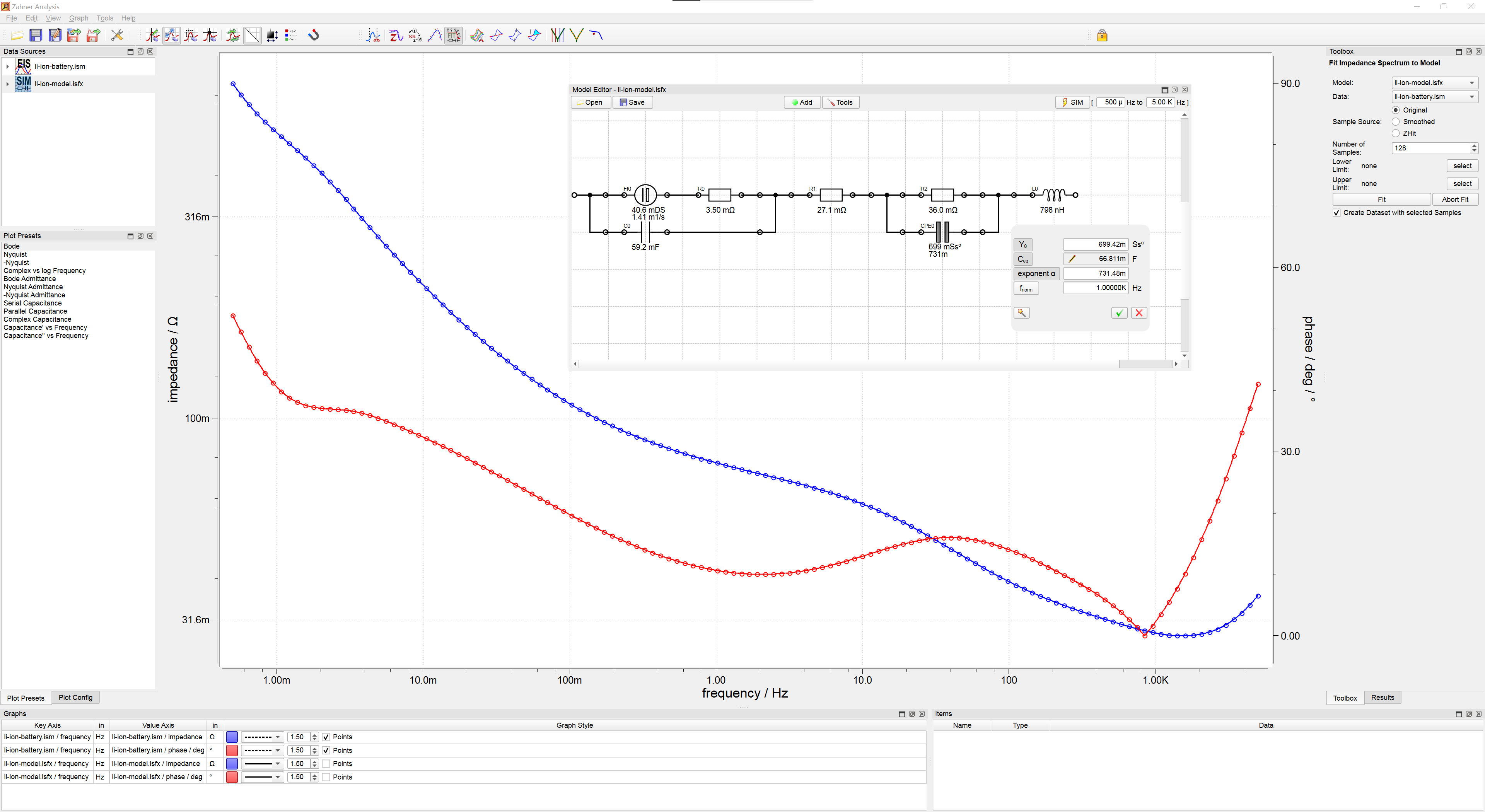
With Python the equivalent electrical circuit models, which have been created with the GUI, can be fitted to impedance spectra. The elements and parameters of the model can be read and processed with Python.
With the Python package thales_remote as a supplement, EIS measurements can be performed with a Zennium and immediately evaluated. The Zahner Analysis is not required for importing and plotting data with Python.
Additional features are the import of measurement data for CV and I/E measurements (isc and iss files). For this the Zahner Analysis is not necessary.
📚 Documentation
Python Package
The complete documentation of the individual functions can be found on the API documentation website.
REST-API
The REST-API was documented using OpenAPI. The configuration file is in the repository and the generated html page can be found at the following url.
🔧 Installation
The package can be installed via pip.
pip install zahner_analysis
The Zahner Analysis must be downloaded from the Zahner-Elektrik website in order to be installed.
🔨 Basic Usage
The Jupyter notebook BasicIntroduction.ipynb explains the fundamentals of using the library.
"""
Load data and model
"""
impedanceCircuitModel = IsfxModelImport("li-ion-model.isfx")
impedanceData = IsmImport("li-ion-battery.ism")

"""
Create the EisFitting object
"""
fitting = EisFitting()

"""
Fit the equivalent electrical circuit model to the data
"""
fittingResult = fitting.fit(impedanceCircuitModel, impedanceData)

"""
Plot the result
"""
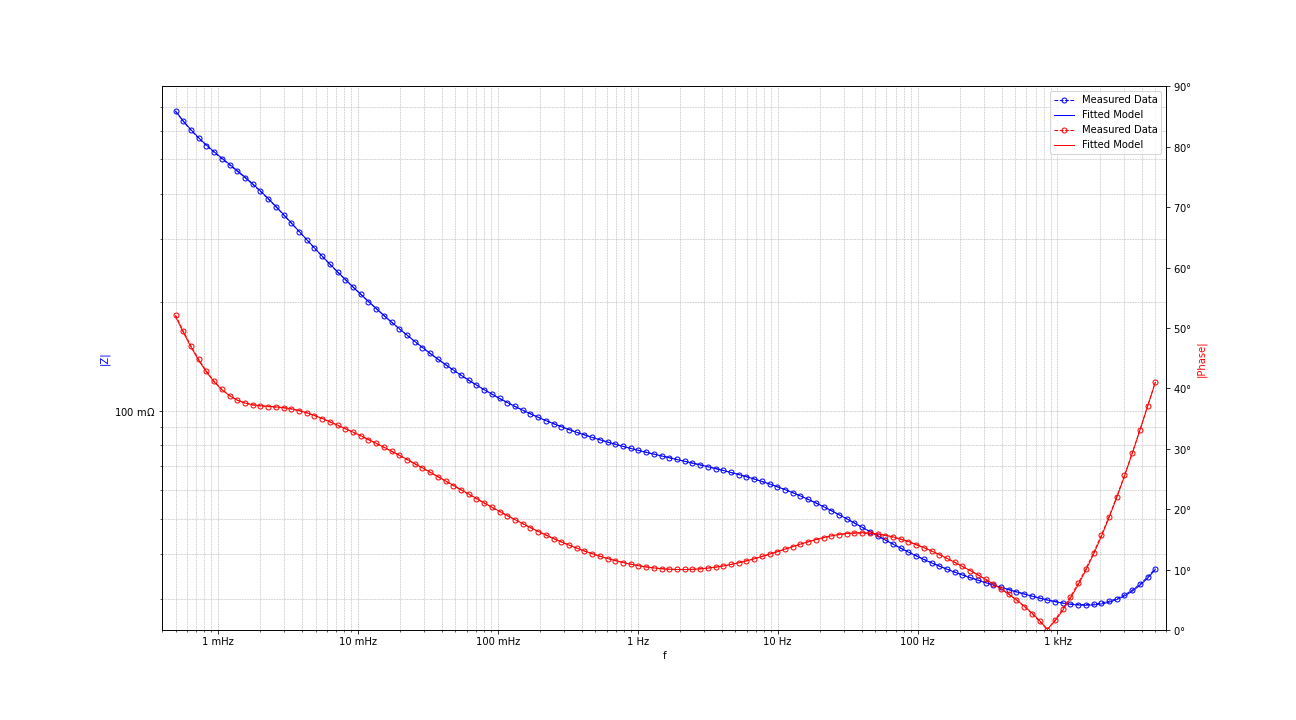
EisFittingPlotter.plotBode(fittingResult)
📖 Examples
The following examples are build on each other, you should read and understand them in sequence.
If measurement data are saved from the examples, they are located in the corresponding directory of the example.
BasicIntroduction.ipynb
- Load the data and the model
- Fit the model to the data
- Plot the result
ComplexFitConfigurations.ipynb
- Showing all configuration options
- Customize the connection to Zahner Analysis Software
- Optional fit and simulation parameters
- Optional plotting parameters
ImpedanceVsVoltageSeriesFit.ipynb
- EIS series fit
- Load all files from a directory
- Plot circuit element vs series parameter
ZHIT.ipynb
- Fit the model to the data
- Load the data and the model
- Perform ZHIT evaluation
- Plot the result
SetupCompensation.ipynb
- Apply Short-Open-Load correction to EIS data
📧 Having a question?
Send an mail to our support team.
⁉️ Found a bug or missing a specific feature?
Feel free to create a new issue with a respective title and description on the the Zahner-Analysis-Python repository.
If you already found a solution to your problem, we would love to review your pull request!
✅ Requirements
Programming is done with the latest Python version at the time of commit.
If you work with equivalent circuits and you need the fit and simulate functions, you need the Zahner Analysis with its REST interface. To use the REST interface, you need a licensed Zahner Analysis with at least version 3.2.1. The Zahner Analysis Software is not required for importing and plotting data.
The packages matplotlib, SciPy and NumPy are used to display the measurement results. The requests package is necessary to communicate with the Zahner Analysis. Jupyter is not necessary, each example is also available as a Python file.
1 maintainer

Release files for zahner-analysis 1.1.5
For a detailed explanation of source distributions (sdists) and built distributions (wheels), please see the package formats documentation.
Source distribution (sdist)
| File | Size | Uploaded | |
|---|---|---|---|
| zahner_analysis-1.1.5.tar.gz | 2.2 MB | Details |
Built distribution (wheel)
| File | Interpreter | ABI | Platform | Reset |
|---|---|---|---|---|
| zahner_analysis-1.1.5-py3-none-any.whl | Python 3 | none | any | Details |
Total release size: 2.2 MB
Release files / zahner_analysis-1.1.5.tar.gz
| Download URL | zahner_analysis-1.1.5.tar.gz |
|---|---|
| Size | 2.2 MB |
| Tags | Source |
|
SHA-256 checksum How to use checksums |
bcac690373de8a5bd314f5fffa9069a6300e5aa0ddb2b66323cbd4eb2662da52
|
|
BLAKE2b-256 checksum How to use checksums |
2b8959cf81e4aedbcb544f61661a2d8d61acbbaf8f3885742a59a61d3adc7da8
|
| Upload date | |
|
Uploaded using Trusted Publishing? What is trusted publishing? |
No |
| Uploaded via |
twine/5.1.1 CPython/3.12.7
|
Release files / zahner_analysis-1.1.5-py3-none-any.whl
| Download URL | zahner_analysis-1.1.5-py3-none-any.whl |
|---|---|
| Size | 46.4 kB |
| Tags | Python 3 |
|
SHA-256 checksum How to use checksums |
999093dfce2f569faa1fbff49d124cdcd3038e693c3159f84a0b2da03c467bc6
|
|
BLAKE2b-256 checksum How to use checksums |
9736949e6a02f931917d590eaff181d41e4ffe6e265c04520edf762528886155
|
| Upload date | |
|
Uploaded using Trusted Publishing? What is trusted publishing? |
No |
| Uploaded via |
twine/5.1.1 CPython/3.12.7
|














