
Zipped Album Player (ZAP)
A simple Python-based cross-platform player for the Zipped Album format
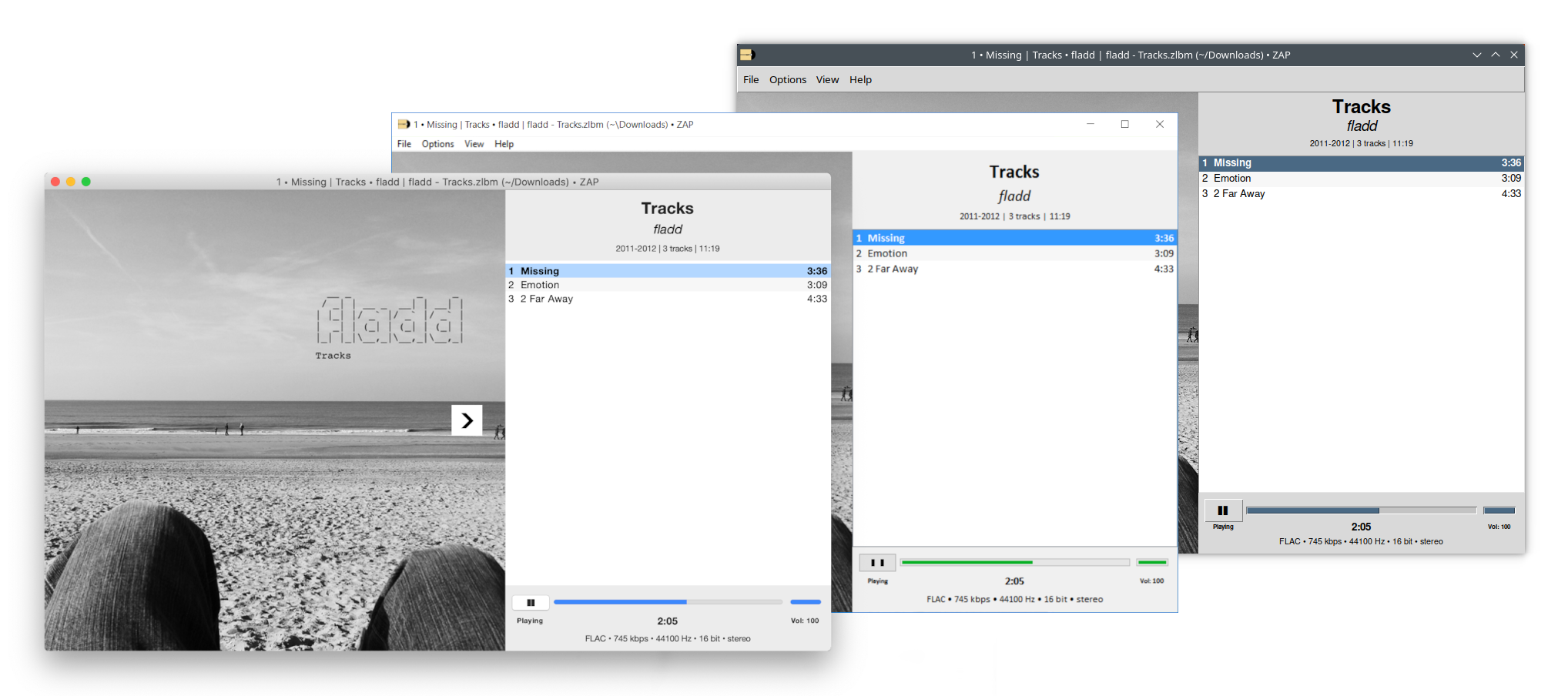
Features
- MacOS, Windows and Linux support
- Digital booklet slideshow
- Keyboard navigation (with Vi-like alternatives)
- View presets
- Fullscreen mode
- Zipped Album creation
Installation
ZAP can be installed with pipx:
pipx install Zipped-Album-Player
Note:
ZAP relies on FFmpeg to decode audio. If FFmpeg cannot be found on the system, ZAP will attempt to download a local copy the first time it is started.
Windows
-
Make sure you have Python 3 with Tkinter support installed
If not, install it. For instance with this installer: https://www.python.org/ftp/python/3.13.3/python-3.13.3-amd64.exe
-
Install pipx
python3 -m pip install --user pipx python3 -m pipx ensurepath -
Install ZAP
pipx install Zipped-Album-Player
MacOS
-
Make sure you have Python 3 with Tkinter support installed
If not, install it. For instance with this installer: https://www.python.org/ftp/python/3.13.3/python-3.13.3-macos11.pkg
-
Install pipx
python3 -m pip install --user pipx python3 -m pipx ensurepath -
Install ZAP
pipx install Zipped-Album-Player
Linux
-
Make sure you have Python 3 with Tkinter support installed
If not, install it. For instance, on Debian-based distros:
sudo apt install python3 python3-venv python3-pip python3-tk -
Make sure OpenAL is installed
If not, install it. For instance, on Debian-based distros:
sudo apt install libopenal1 -
Make sure PyMuPDF and ImageTk are installed
If not, install them. For instance, on Debian-based distros:
sudo apt install python3-fitz python3-pil.imagetk -
Install pipx
python3 -m pip install --user pipx python3 -m pipx ensurepath -
Install ZAP
pipx install --system-site-packages Zipped-Album-Player
Usage
After successful installation, ZAP can be started with either
zap [--exact] [--create] [PATH]
or
zipped-album-player [--exact] [--create] [PATH]
where the optional PATH is a Zipped Album file or a directory, and --exact
and --create are options.
If PATH is a Zipped Album file and no option is given, ZAP will attempt to
open it.
If PATH is a Zipped Album file and --exact is given, ZAP will attempt to open
the file in "exact mode", which means ZAP will show all booklets and images in
alphabetic order, will not attempt to try alternative encodings of wrongly
encoded filenames in the ZIP file to match filenames in a playlist, and will
not apply any fixes to track numbering or date tags.
The option --create has no effect when PATH is a Zipped Album File.
If PATH is a directory and --create is given, ZAP will attempt to create a
Zipped Album file from the content in that directory (see
specification for what
is valid content) and then open the resulting file (in "exact mode" if
--exact is also given).
If PATH is a directory and no option is given, ZAP will set the initial
directory of the "Open..." dialogue to that directory.
Keyboard navigation
Play/Pause: ............................. Space ......... or ... Return
Select next track: ...................... Down .......... or ........ j
Select previous track: .................. Up ............ or ........ k
Select first track: ..................... Home .......... or ....... gg
Select last track: ...................... End ........... or ........ G
Seek forward: ........................... Right ......... or ........ l
Seek backward: .......................... Left .......... or ........ h
Seek to beginning: ...................... w ............. or ........ 0
Show next slide: ........................ Shift+Right ... or ........ L
Show previous slide: .................... Shift+Left .... or ........ H
Show first slide: ....................... W ............. or ........ )
Decrease volume: ........................ Shift+Down .... or ........ J
Increase volume: ........................ Shift+Up....... or ........ K
FAQ
-
Where can I find music in a format ZAP plays?
ZAP plays Zipped Albums, a simple one-file format for digital audio. Basically, these are ZIP archives of FLAC or Opus files with an optional digital booklet and playlist. Albums downloaded from Bandcamp (in FLAC format) or Mirlo (in FLAC or Opus format), for instance, are compatible, but you can also easily create them yourself from your existing music (using ZAP!).
-
Couldn't you provide simple one-click installers/executables for ZAP?
Yes, I could use something like PyInstaller, and I might do that at some point. For now, however, I think pipx is a good enough solution.
-
Why do I not hear any sound when playing an album in ZAP?
ZAP might be set to use the "Silent" audio system. ZAP relies on either Xaudio2 (Windows), DirectSound (Windows), PulseAudio (Linux), or OpenAL (MacOS, Linux, Windows) to play back audio. On Windows, XAudio2 and DirectSound should both be available by default. On MacOS, OpenAL should be available by default. On Linux, PulseAudio or OpenAL might not be available by default. Install either with your package manager (for instance, install OpenAL on Debian-based distros with
apt install libopenal1). -
Why is the bit depth of my tracks reported as "24→16 bit" even though the sample format setting in ZAP is "Automatic"?
When the audio system ZAP is set to use (e.g. OpenAL) does not support sample formats other than "16-bit", ZAP will automatically resample to 16 bit during playback for tracks with bit depths higher than that. This process will involve dithering (with moderate noise shaping) to prevent quantization noise. However, since distribution/listening formats do not benefit from bit depths higher than 16, I suggest to obtain properly mastered 16 bit sources when available.
-
Why is the channel count on my 5.1 surround track reported as "6ch→stereo"?
There is currently no mutli-channel support and everything with more than 2 channels is down-mixed to stereo (or dual-mono or mono, depending on the channel mode setting).
-
Why is fullscreen mode only working on the first display in a multi-display setup?
Because Tkinter is not really aware of multiple displays, unfortunately.
1 maintainer

Metadata
1 maintainer
Release files for Zipped-Album-Player 0.7.1
For a detailed explanation of source distributions (sdists) and built distributions (wheels), please see the package formats documentation.
Source distribution (sdist)
| File | Size | Uploaded | |
|---|---|---|---|
| zipped_album_player-0.7.1.tar.gz | 227.9 kB | Details |
Built distribution (wheel)
| File | Interpreter | ABI | Platform | Reset |
|---|---|---|---|---|
| zipped_album_player-0.7.1-py3-none-any.whl | Python 3 | none | any | Details |
Total release size: 468.4 kB
Release files / zipped_album_player-0.7.1.tar.gz
| Download URL | zipped_album_player-0.7.1.tar.gz |
|---|---|
| Size | 227.9 kB |
| Tags | Source |
|
SHA-256 checksum How to use checksums |
af5b1ff14703607d3afad5b45a66f348f39c36b9ea2f19e81aa4e61d02f868c2
|
|
BLAKE2b-256 checksum How to use checksums |
226503406fe91845b73f9f667737ef28e357b3753ef9de55583ce0c0f37c5cc6
|
| Upload date | |
|
Uploaded using Trusted Publishing? What is trusted publishing? |
Yes |
| Uploaded via |
twine/7.0.0 CPython/3.13.14
|
Provenance
Provenance describes where a file came from. On PyPI, provenance is shared via attestations, which provide a verifiable record of the build or publishing details. View details, limitations and caveats.


PyPI Publish Attestation
PyPI verified that this artifact, at this checksum, originated from the publisher listed below.
Signed by GitHub Actions, verified by PyPI on Aug 5, 2026.
Transparency logRelease files / zipped_album_player-0.7.1-py3-none-any.whl
| Download URL | zipped_album_player-0.7.1-py3-none-any.whl |
|---|---|
| Size | 240.5 kB |
| Tags | Python 3 |
|
SHA-256 checksum How to use checksums |
e67e5d70fd9bebfc37d719203a216a8d08c5d75d3847fd93d90ad1779fa2584c
|
|
BLAKE2b-256 checksum How to use checksums |
04731d66e83f251085cac9cb8e580d4757ea25407a81b8fd6a434955ef05ff95
|
| Upload date | |
|
Uploaded using Trusted Publishing? What is trusted publishing? |
Yes |
| Uploaded via |
twine/7.0.0 CPython/3.13.14
|
Provenance
Provenance describes where a file came from. On PyPI, provenance is shared via attestations, which provide a verifiable record of the build or publishing details. View details, limitations and caveats.
PyPI Publish Attestation
PyPI verified that this artifact, at this checksum, originated from the publisher listed below.
Signed by GitHub Actions, verified by PyPI on Aug 5, 2026.
Transparency log













