
zoDIAq
Introduction
Uses an MIT License
zoDIAq (derived from "csodiaq" acronym, Cosine Similarity Optimization for DIA qualitative and quantitative analysis) is a software tool for the analysis of direct infusion shotgun proteome analysis (DISPA) data and data independent acquisition (DIA) data.
Click here for the paper published in Analytical Chemistry.

Instructions
Installation
All installation instructions are done from the command line. Download and use of zoDIAq requires access to the git and pip packages. For system-specific instructions on using the command line or installing these packages, see the wiki page.
Accessing the GUI
From the command line enter zodiaq gui to start the GUI. All instructions in this README file pertain to use of the GUI.
Instructions for use from the command line can be accessed by entering zodiaq -h.
Peptide Identification
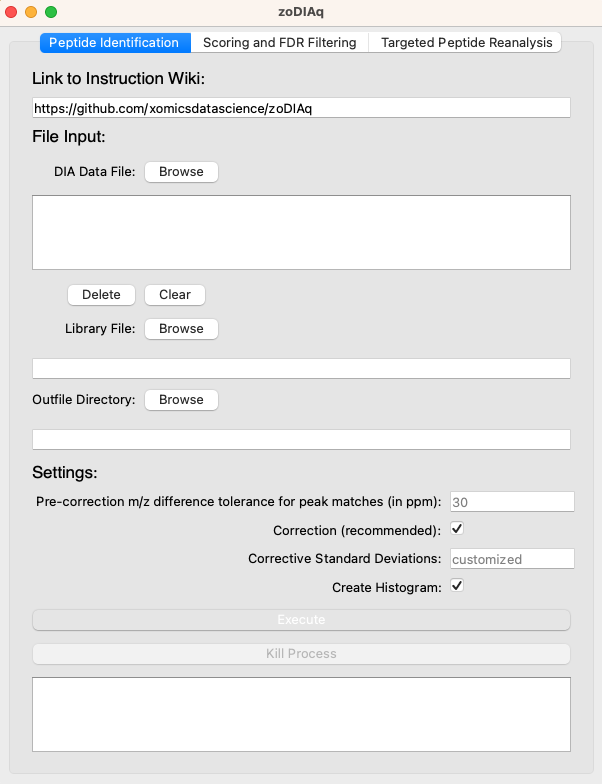
Files:
DIA Data File: This is a required field. Choose at least one data file from a DISPA or DIA data run.Library File: This is a required field. Choose a reference library file that is in TraML (.tsv or .csv) or MGF format. zoDIAq treats .tsv files as tab-deliminated and .csv as comma-deliminated. Some library formats do not follow this standard (ie, .csv files that are tab-deliminated) and will require adjustment by the end user.Outfile Directory: This is a required field. Choose a folder that the output files should go into.
Settings:
Note that it is recommended that the default value is used for each of these settings.
Pre-correction m/z difference tolerance for peak matches (in ppm): Default value is 30. If you're not sure what would make an ideal setting, go ahead and leave this blank, but check the histogram box below. If the resulting histogram doesn't have a normal distribution (a peak), consider using a wider tolerance.Correction: Default is checked. This value resets the PPM tolerance range based on an initial scan. It reduces the liklihood of identifying false positives.Corrective Standard Deviations: Only available if the correction box is checked. Default is to customize the corrected tolerance to the distribution of the histogram, excluding noise around the peak. Entering a value here instead sets the tolerance to a standard deviation of the distribution.Create Histogram: Only available if the correction box is checked. Default is checked. Generates a histogram to visualize the corrective PPM tolerance used in the corrected analysis.
Scoring and FDR Filtering
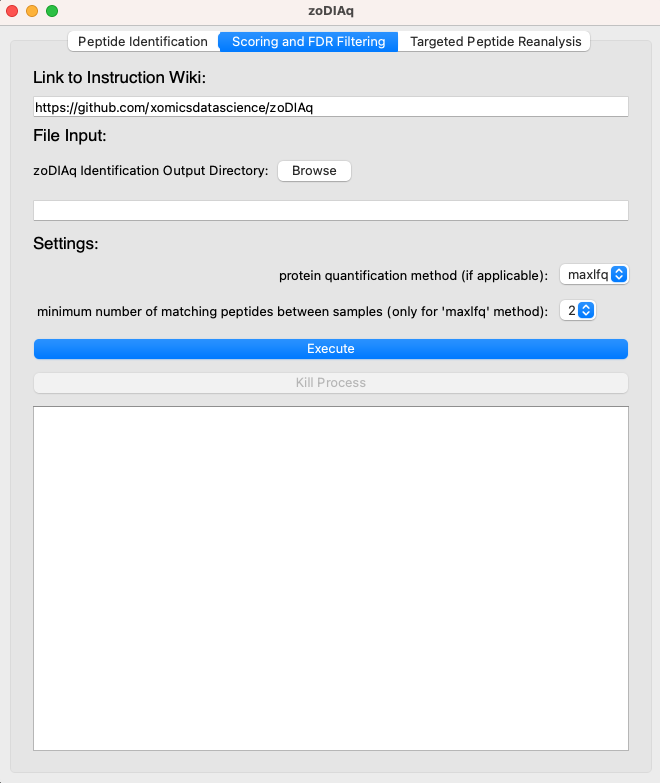
Files:
zoDIAq Scoring Output Directory: This is a required field. Choose the directory created by thePeptide Identificationoutput of zoDIAq.
Settings:
Note that it is recommended that the default value is used for each of these settings.
protein quantification method (if applicable): Two protein quantification methods are available. The first default option,maxlfq, is based on the maxLFQ method. The second option,sum, is a simplified method that quantifies proteins by summing relevant peptides identified in all samples. More details regarding the implementation of these methods can be found on the wiki.minimum number of matching peptides between samples (only for 'maxlfq' method): The maxLFQ method requires comparing each sample to every other sample. This variable dictates how many matching quantified peptides need to have been found between two samples for them to be considered a match.
Targeted Peptide Reanalysis
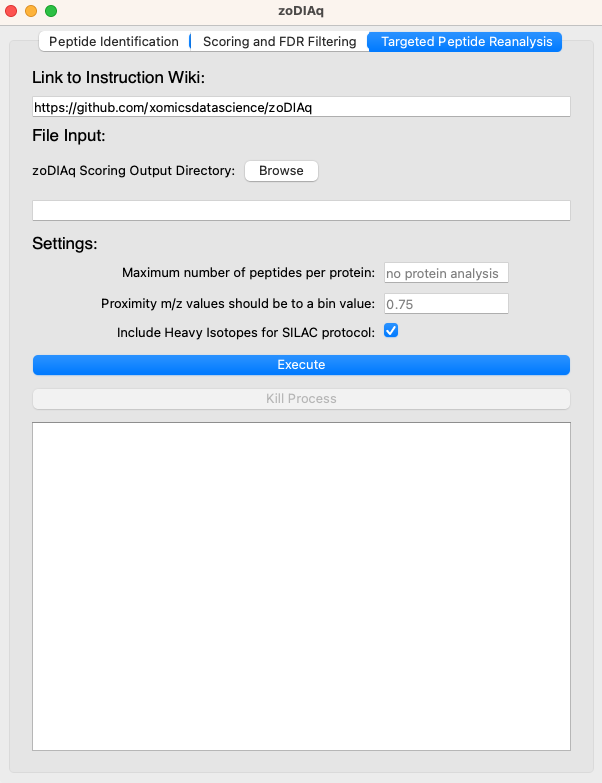
Files:
- zoDIAq Identification Output Directory: This is a required field. Choose the directory created by the
Scoring and FDR Filteringoutput of zoDIAq.
Settings:
Maximum Number of peptides per protein: By default, no protein analysis is completed. If a number is provided, the program will provide a mass spectrometer file targetting the given number of peptides for each protein.Proximity m/z values should be to a bin value: To avoid increased cost for targetting every peptide individually, specific m/z bins are targeted for overlapping peptides. This setting indicates how close a peptide's m/z value should be to the "center" of a bin.Include Heavy Isotopes for SILAC protocol: For targeted reanalysis of peptides using a SILAC protocol, the heavy isotopes for chosen peptides will be included as well.
Citations
1 maintainer

Metadata
1 maintainer
Release files for zoDIAq 2.1.2
For a detailed explanation of source distributions (sdists) and built distributions (wheels), please see the package formats documentation.
Source distribution (sdist)
| File | Size | Uploaded | Provenance | |
|---|---|---|---|---|
| zodiaq-2.1.2.tar.gz | 54.4 MB | Without provenance | Details |
Built distribution (wheel)
| File | Interpreter | ABI | Platform | Reset |
|---|---|---|---|---|
| zoDIAq-2.1.2-py3-none-any.whl | Python 3 | none | any | Details |
Total release size: 54.5 MB
Release files / zodiaq-2.1.2.tar.gz
| Download URL | zodiaq-2.1.2.tar.gz |
|---|---|
| Size | 54.4 MB |
| Tags | Source |
|
SHA-256 checksum How to use checksums |
1a3141e05b11331f9b796a3a7b56b716ab9ec8d3db7457340a42def2f9b2d083
|
|
BLAKE2b-256 checksum How to use checksums |
6e5c6f00b7489aeb65789beddf6ebc07f555b2ab6479e5ee76b2f52bbfc905ac
|
| Upload date | |
|
Uploaded using Trusted Publishing? What is trusted publishing? |
No |
| Uploaded via |
twine/5.1.0 CPython/3.9.6
|
Release files / zoDIAq-2.1.2-py3-none-any.whl
| Download URL | zoDIAq-2.1.2-py3-none-any.whl |
|---|---|
| Size | 67.3 kB |
| Tags | Python 3 |
|
SHA-256 checksum How to use checksums |
c424307b4f42965ae2d39858e909b3eba6db2e0fb0f6cc9736e51a3e4f8dbcf7
|
|
BLAKE2b-256 checksum How to use checksums |
51e60545441661c9bae6e08418c5d87d65129b3aee132f359d8086bd08441ce6
|
| Upload date | |
|
Uploaded using Trusted Publishing? What is trusted publishing? |
No |
| Uploaded via |
twine/5.1.0 CPython/3.9.6
|
Security for zoDIAq 2.1.2
Provenance
Provenance describes where a file came from. On PyPI, provenance is shared via attestations, which provide a verifiable record of the build or publishing details. View details, limitations and caveats.
No provenance found
None of the files in this release were uploaded with provenance metadata.
A note on package security
PyPI is a repository for distributing packages, not a service for auditing them. While third-party security researchers and our staff do their best to detect and remove malicious packages, PyPI cannot guarantee the quality, security or suitability of any given package.













