
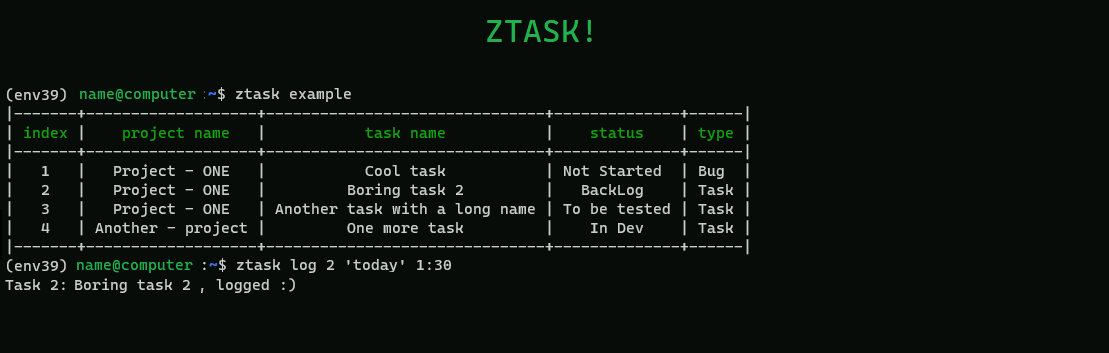
Ztask
Ztask helps to log task in zohoprojects and complete the damned timesheets from the terminal using a Taskwarrior inspired syntax.
This little program is made by and for terminal enthusiasts, enjoy it!
Requirements
You only need a distribution of python3 installed.
⚙️Installation:
You can install the requirements (preferably in an environment) using:
pip install ztask
Download directly the script and set the variables at your user path in .ztask/env_variables.py, more details about these variables bellow.
If you install "ztask" in a environment you will need to initialize the environment before using ztask, for so sometimes is convenient to use an alias like:
alias eztask='conda activate <env_name> && ztask'
Usage:
Ztask, as it should be, is a terminal user interface that can be run with command "ztask":
For printing your zoho task:
ztask
Shows all the table, without truncating the table:
ztask long
Log the task in zoho:
ztask log number_of_task 'date' hh:mm
Ztask date suports natural language such as: 'today', 'yesterday' etc
Examples:
Log the task 4, two days ago with a duration of 7:30 hours:
ztask log 4 '2 days ago' 07:30
Log the taks 12 today 8 hours:
ztask log 12 'today' 08:00
💾 env variables
The first time you execute the program will create a file in your user directory, and will ask you to fill the content using a terminal interface.
If something fails in the process the file should look like:
C:\Users\YOUR USER NAME\.ztask\ztask.ini
Or in Unix based systems:
/home/YOUR USER NAME/.ztask/ztask.ini
Set the following env variables in the env_variables.py file (copy paste and fill):
[variables]
client_id = <YOUR CLIENT ID>
client_secret = <YOUR CLIENT SECRET>
refresh_token = <YOUR REFRESH TOKEN>
user_id = <YOUR USER ID>
These variables can be found at https://api-console.zoho.eu after creating a self client.
You can get your refresh_token after getting first the grant token. Go to self client same web and generate the grant token using the scope:
ZohoProjects.tasks.ALL,ZohoProjects.timesheets.ALL,ZohoProjects.projects.ALL,ZohoProjects.portals.READ,ZohoProjects.bugs.ALL
If you couldn't get the config file done you can get your refresh token using the grant_token:
ztask get_refresh_token "YOUR GRANT TOKEN"
The user_id can be found at zoho projects, clicking in the right corner (user icon)
1 maintainer

Release files for ztask 0.1.5
For a detailed explanation of source distributions (sdists) and built distributions (wheels), please see the package formats documentation.
Source distribution (sdist)
| File | Size | Uploaded | |
|---|---|---|---|
| ztask-0.1.5.tar.gz | 6.8 kB | Details |
Built distribution (wheel)
| File | Interpreter | ABI | Platform | Reset |
|---|---|---|---|---|
| ztask-0.1.5-py3-none-any.whl | Python 3 | none | any | Details |
Total release size: 13.4 kB
Release files / ztask-0.1.5.tar.gz
| Download URL | ztask-0.1.5.tar.gz |
|---|---|
| Size | 6.8 kB |
| Tags | Source |
|
SHA-256 checksum How to use checksums |
2feb7bfce6ee52c1fcd43831a035c10504d31aa6c0aef3a9e06b02fe2cdcbd25
|
|
BLAKE2b-256 checksum How to use checksums |
0c677bb9dd973efc5e0ea9eeba695527c8b27a4ab417bf5e1f69be902a249961
|
| Upload date | |
|
Uploaded using Trusted Publishing? What is trusted publishing? |
No |
| Uploaded via |
poetry/1.1.12 CPython/3.8.10 Linux/4.4.0-19041-Microsoft
|
Release files / ztask-0.1.5-py3-none-any.whl
| Download URL | ztask-0.1.5-py3-none-any.whl |
|---|---|
| Size | 6.6 kB |
| Tags | Python 3 |
|
SHA-256 checksum How to use checksums |
de6755ea7b4c33c6925858236bd2f8da9bbc94ad6a4019753e062d65e319d786
|
|
BLAKE2b-256 checksum How to use checksums |
7550d3940a6d8ab25459c9e3c2a5905b01b600bacea9d4000f83181335d13a36
|
| Upload date | |
|
Uploaded using Trusted Publishing? What is trusted publishing? |
No |
| Uploaded via |
poetry/1.1.12 CPython/3.8.10 Linux/4.4.0-19041-Microsoft
|














