
Wagtailmedium is a Medium Editor integration for the Wagtail CMS.
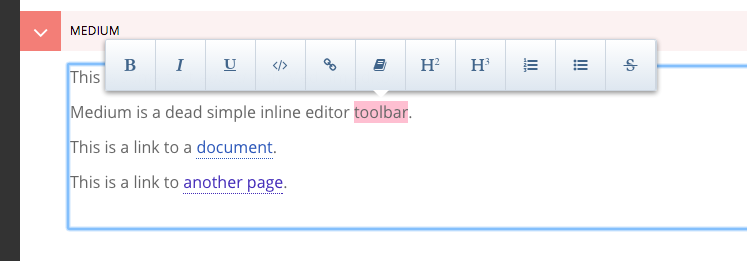
Note: A more detailed documentation is available in .codestory format, along with a sample project to fiddle with.
Install
Install from pip:
pip install django-wagtailmedium
Add wagtailmedium to your apps:
INSTALLED_APPS = [
  ...
  'wagtailmedium',
]
3. Add a wagtailmedium widget to ``WAGTAILADMIN_RICH_TEXT_EDITORS`` (implemented by wagtail, undocumented yet)
WAGTAILADMIN_RICH_TEXT_EDITORS = {
     'default': {
         'WIDGET': 'wagtail.wagtailadmin.rich_text.HalloRichTextArea'
     },
     'medium': {
         'WIDGET': 'wagtailmedium.rich_text.MediumRichTextArea',
         'OPTIONS': {
             'custom_buttons': {
                 'code': {
                   'contentDefault': '<b>Code</b>',
                   'contentFA': '<i class="fa fa-code"></i>',
                   'tag': 'code',
                   'className': 'code',  # optional
                 },
                 'test': {
                     'contentDefault': '<b>Test</b>',
                     'contentFA': '<i class="fa fa-code"></i>',
                     'tag': 'span',
                     'className': 'test',  # optional
                 },
             },
             'medium': {  # https://github.com/yabwe/medium-editor#options-example
                 # 'buttonLabels': 'fontawesome',
                 'toolbar': {
                     'buttons': [  # https://github.com/yabwe/medium-editor#all-buttons
                         'bold', 'italic', 'underline',
                         'code',
                         'test',
                         'link',
                         'linkdoc',
                         'h2', 'h3', 'orderedlist', 'unorderedlist', 'strikethrough'
                     ]
                 },
             },
         },
     },
 }
Register whitelister element rules
This wagtail hook defines which HTML elements are allowed in rich text areas.
wagtail_hooks.py:
from wagtail.wagtailcore import hooks
from wagtail.wagtailcore.whitelist import attribute_rule, allow_without_attributes


# http://docs.wagtail.io/en/v1.7/reference/hooks.html#construct-whitelister-element-rules
@hooks.register('construct_whitelister_element_rules')  # #7bFcf#
def whitelister_element_rules():
    return {
        'u': allow_without_attributes,
        'span': attribute_rule({'class': True}),
        'code': allow_without_attributes,
        'blockquote': allow_without_attributes,
    }
Use wagtailmedium in a RichTextField of your model
models.py:
from wagtail.wagtailcore.models import Page, StreamField, RichTextField

class HomePage(Page):
    # a default, Hallo editor
    hallo = RichTextField(blank=True)
    # a medium editor
    medium = RichTextField(editor='medium', blank=True)
1 maintainer

Metadata
1 maintainer
Release files for django_wagtailmedium 0.1
For a detailed explanation of source distributions (sdists) and built distributions (wheels), please see the package formats documentation.
Source distribution (sdist)
| File | Size | Uploaded | Provenance | |
|---|---|---|---|---|
| django_wagtailmedium-0.1.tar.gz | 811.9 kB | Without provenance | Details |
Release files / django_wagtailmedium-0.1.tar.gz
| Download URL | django_wagtailmedium-0.1.tar.gz |
|---|---|
| Size | 811.9 kB |
| Tags | Source |
|
SHA-256 checksum How to use checksums |
96f7130fcdfdb34c739c31737bdcd78452d4579206e07f4148fa92e24ee72421
|
|
BLAKE2b-256 checksum How to use checksums |
ebb5b97974d151bafa452610eb8bf6cb5cd365f7291062afad10cbf49b6b4742
|
| Upload date | |
|
Uploaded using Trusted Publishing? What is trusted publishing? |
No |
Security for django_wagtailmedium 0.1
Provenance
Provenance describes where a file came from. On PyPI, provenance is shared via attestations, which provide a verifiable record of the build or publishing details. View details, limitations and caveats.
No provenance found
None of the files in this release were uploaded with provenance metadata.
A note on package security
PyPI is a repository for distributing packages, not a service for auditing them. While third-party security researchers and our staff do their best to detect and remove malicious packages, PyPI cannot guarantee the quality, security or suitability of any given package.













