
Requirementz
Checks requirements.txt against installed packages, or latest versions available on PyPi.
Shows latest package information from PyPi (for requirements.txt or any package).
Searches requirements.txt for text/regex patterns.
Sorts requirements.txt lines in place.
Finds duplicate entries in requirements.txt.
Installation
This tool is installable with pip:
pip install requirementzThe command is called requirementz.
Dependencies
Requirementz has several python dependencies, all installable with pip. A requirements.txt is provided, for easy installation.
colr - Terminal colors.
docopt - Argument parsing.
formatblock - Text wrapping (like textwrap).
printdebug - Easily disabled debug printing.
requirements-parser - Parses requirements.txt.
If you’ve cloned the repo, you can run pip install -r requirements.txt to install all of them. Otherwise, pip install requirementz should install all dependencies for you.
Usage
Usage:
    requirementz (-h | -v) [-D] [-n]
    requirementz [-c | -C] [-e] [-L | -r] [-f file] [-D] [-n]
    requirementz [-a line... | -d]        [-f file] [-D] [-n]
    requirementz -l [-L | -r]             [-f file] [-D] [-n]
    requirementz (-P | -S)                [-f file] [-D] [-n]
    requirementz -p [-L]                            [-D] [-n]
    requirementz -s pat [-i]              [-f file] [-D] [-n]
    requirementz PACKAGE...                         [-D] [-n]

Options:
    PACKAGE              : Show pypi info for package names.
    -a line,--add line   : Add a requirement line to the file.
                           The -a flag can be used multiple times.
    -C,--checklatest     : Check installed packages and latest versions
                           from PyPi against requirements.
    -c,--check           : Check installed packages against requirements.
    -D,--debug           : Print some debug info while running.
    -d,--duplicates      : List any duplicate entries.
    -e,--errors          : Only show packages with errors when checking.
    -f file,--file file  : Requirements file to parse.
                           Default: ./requirements.txt
    -h,--help            : Show this help message.
    -i,--ignorecase      : Case insensitive when searching.
    -L,--location        : When listing, sort by location instead of name.
                           When checking, show the package location.
    -l,--list            : List all requirements.
    -n,--nocolor         : Force plain text, with no color codes.
    -P,--pypi            : Show pypi info for all packages in
                           requirements.txt.
    -p,--packages        : List all installed packages.
    -r,--requirement     : Print name and version requirement only for -c.
                           Useful for use with -e, to get a list of
                           packages to install or upgrade.
    -S,--sort            : Sort the requirements file by package name.
    -s pat,--search pat  : Search requirements for text/regex pattern.
    -v,--version         : Show version.
Examples
Check (installed packages)
Check requirements.txt against installed package versions.
requirementzHere you can see that the colr >= 0.7.6 requirement was not satisfied, because 0.7.5 is installed:

Output
Show package location while checking:
requirementz -L
Output
Check (latest pypi version)
Check requirements.txt against installed package versions, and the latest pypi version.
requirementz -C
Output
Show package location while checking:
requirementz -C -L
Output
Show pypi info for packages.
-P will show pypi information for all packages in requirements.txt:
requirementz -P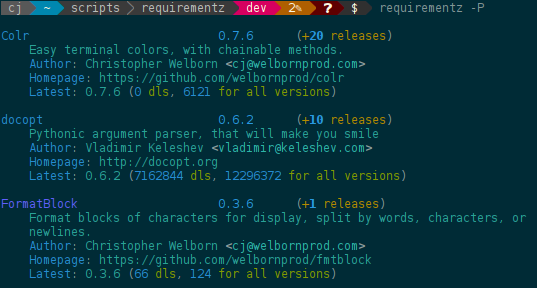
Output
You can do this for any package, whether it’s installed or not:
requirementz antigravity
Output
You can use more than one package name.
Find duplicate requirements
Any duplicate entries will be listed by name, with a count of duplicates.
requirementz -dNotes
This hasn’t been tested very well with CVS or local requirements. Any help in that area would be appreciated, as I haven’t had to use those requirement types.
Contributions
File an issue or create a pull request. Contributions are welcome.
1 maintainer

Metadata
1 maintainer
Release files for Requirementz 0.3.5
For a detailed explanation of source distributions (sdists) and built distributions (wheels), please see the package formats documentation.
Source distribution (sdist)
| File | Size | Uploaded | |
|---|---|---|---|
| Requirementz-0.3.5.tar.gz | 19.9 kB | Details |
Release files / Requirementz-0.3.5.tar.gz
| Download URL | Requirementz-0.3.5.tar.gz |
|---|---|
| Size | 19.9 kB |
| Tags | Source |
|
SHA-256 checksum How to use checksums |
9ed2347c05407fc03cb1582b4dee7af267aa06416cb90fbe355fabb78c75ea09
|
|
BLAKE2b-256 checksum How to use checksums |
2d3577b3d8dcb32c3cb109abd10d85011104500fcf793cb6060408c7bcc1d899
|
| Upload date | |
|
Uploaded using Trusted Publishing? What is trusted publishing? |
No |
| Uploaded via |
Python-urllib/3.6
|














