
aiomonitor





aiomonitor is a module that adds monitor and cli capabilities for asyncio applications. Idea and code were borrowed from curio project. Task monitor that runs concurrently to the asyncio loop (or fast drop-in replacement uvloop) in a separate thread as result monitor will work even if the event loop is blocked for some reason.
This library provides a python console using aioconsole module. It is possible to execute asynchronous commands inside your running application. Extensible with you own commands, in the style of the standard library’s cmd module
Installation
Installation process is simple, just:
$ pip install aiomonitor
Example
Monitor has context manager interface:
import aiomonitor

async def main():
    loop = asyncio.get_running_loop()
    run_forever = loop.create_future()
    with aiomonitor.start_monitor(loop):
        await run_forever

try:
    asyncio.run(main())
except KeyboardInterrupt:
    pass
Now from separate terminal it is possible to connect to the application:
$ telnet localhost 20101
or the included python client:
$ python -m aiomonitor.cli
Tutorial
Let’s create a simple aiohttp application, and see how aiomonitor can be integrated with it.
import asyncio

import aiomonitor
from aiohttp import web

# Simple handler that returns response after 100s
async def simple(request):
    print('Start sleeping')
    await asyncio.sleep(100)
    return web.Response(text="Simple answer")

loop = asyncio.get_event_loop()
# create application and register route
app = web.Application()
app.router.add_get('/simple', simple)

# it is possible to pass a dictionary with local variables
# to the python console environment
host, port = "localhost", 8090
locals_ = {"port": port, "host": host}
# init monitor just before run_app
with aiomonitor.start_monitor(loop=loop, locals=locals_):
    # run application with built-in aiohttp run_app function
    web.run_app(app, port=port, host=host, loop=loop)
Let’s save this code in file simple_srv.py, so we can run it with the following command:
$ python simple_srv.py
======== Running on http://localhost:8090 ========
(Press CTRL+C to quit)
And now one can connect to a running application from a separate terminal, with the telnet command, and aiomonitor will immediately respond with prompt:
$ telnet localhost 20101
Asyncio Monitor: 1 tasks running
Type help for commands
monitor >>>
Now you can type commands, for instance, help:
monitor >>> help
Usage: help [OPTIONS] COMMAND [ARGS]...

  To see the usage of each command, run them with "--help" option.

Commands:
  cancel                  Cancel an indicated task
  console                 Switch to async Python REPL
  exit (q,quit)           Leave the monitor client session
  help (?,h)              Show the list of commands
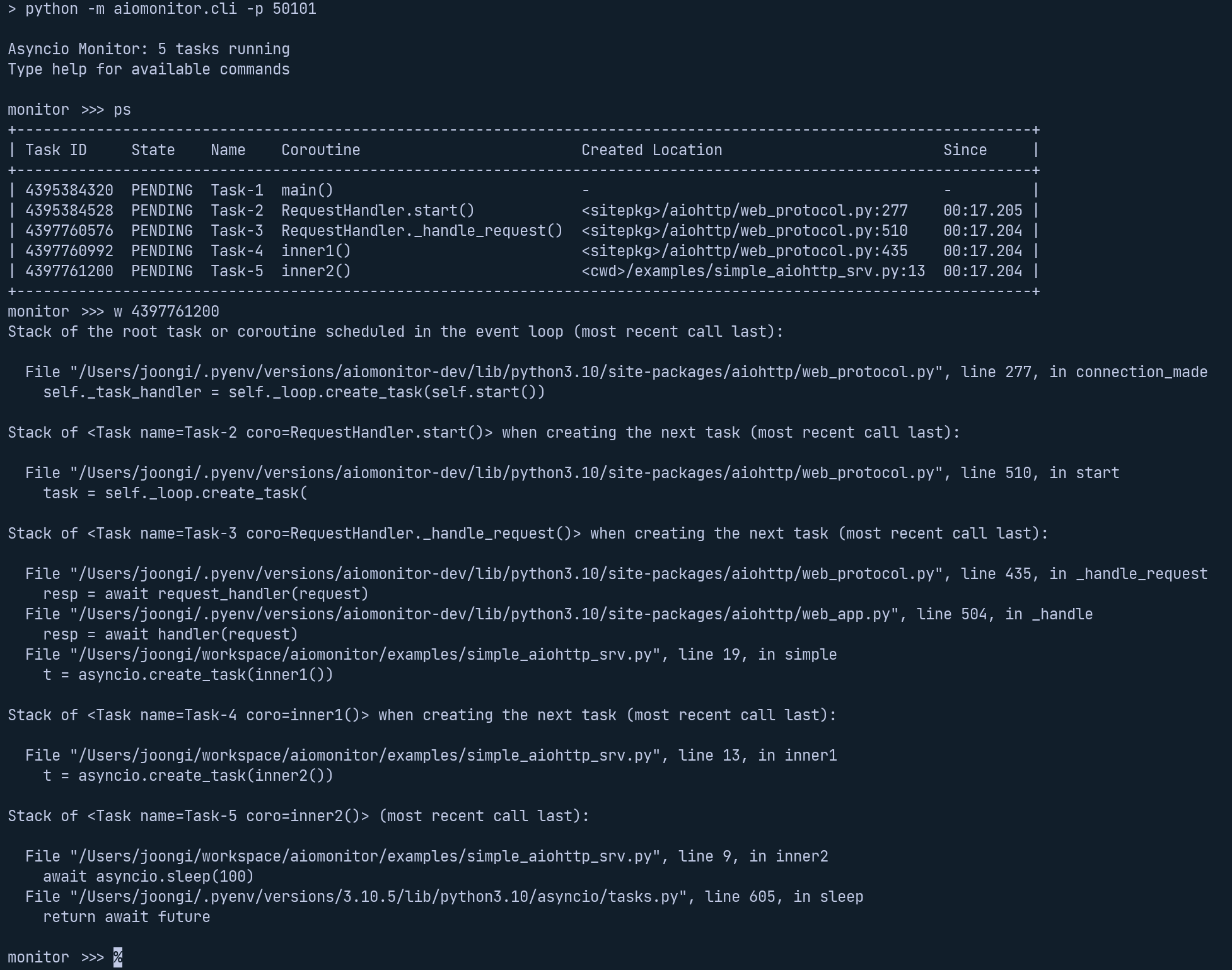
  ps (p)                  Show task table
  ps-terminated (pst,pt)  List recently terminated/cancelled tasks
  signal                  Send a Unix signal
  stacktrace (st,stack)   Print a stack trace from the event loop thread
  where (w)               Show stack frames and the task creation chain of a task
  where-terminated (wt)   Show stack frames and the termination/cancellation chain of a task
aiomonitor also supports async python console inside a running event loop so you can explore the state of your application:
monitor >>> console
Python 3.10.7 (main, Sep  9 2022, 12:31:20) [Clang 13.1.6 (clang-1316.0.21.2.5)] on darwin
Type "help", "copyright", "credits" or "license" for more information.
---
This console is running in an asyncio event loop.
It allows you to wait for coroutines using the 'await' syntax.
Try: await asyncio.sleep(1, result=3)
---
>>> await asyncio.sleep(1, result=3)
3
>>>
To leave the console type exit() or press Ctrl+D:
>>> exit()

✓ The console session is closed.
monitor >>>
Extension
Additional console variables
You may add more variables that can be directly referenced in the console command. Refer the console-variables example code
Custom console commands
aiomonitor is very easy to extend with your own console commands. Refer the extension example code
Requirements
CHANGES
0.7.1 (2024-11-12)
Added Python 3.13 support by replacing telnetlib with telnetlib3 and dropped Python 3.8 support (#411)
0.7.0 (2023-12-21)
Overhauled the documentation (#393)
Adopted ruff to replace black, flake8 and isort (#391)
Added a new demo example to show various features of aiomonitor, especially using the GUI (also for PyCon APAC 2023 talk) (#385)
Relaxed our direct dependnecy version range of aiohttp (“3.8.5 only” to “3.8.5 and higher”) to enable installation on Python 3.12 (#389)
Updated the README example to conform with the latest API and convention (#383)
0.6.0 (2023-08-27)
Add the web-based monitoring user interface to list, inspect, and cancel running/terminated tasks, with refactoring the monitor business logic and presentation layers (termui and webui) (#84)
Replace the default port numbers for the terminal UI, the web UI, and the console access (50101, 50201, 50102 -> 20101, 20102, 20103 respectively) (#374)
Adopt towncrier to auto-generate the changelog (#375)
0.5.0 (2023-07-21)
Fix a regression in Python 3.10 due to #10 (#11)
Support Python 3.11 properly by allowing the optional (name and context kwargs passed to asyncio.create_task() in the hooked task factory function #10)
Update development dependencies
Selective persistent termination logs (#9)
Implement cancellation chain tracker (#8)
Trigger auto-completion only when Tab is pressed
Support auto-completion of commands and arguments (#7)
Add missing explicit dependency to Click
Promote console_locals as public attr
Reimplement console command (#6)
Migrate to Click-based command line interface (#5)
Adopt (prompt_toolkit and support concurrent clients #4)
Show the total number of tasks when executing (ps #3)
Apply black, isort, mypy, flake8 and automate CI workflows using GitHub Actions
Fix the task creation location in the ‘ps’ command output
Remove loop=loop from all asynchronous calls to support newer Python versions (#329)
Added the task creation stack chain display to the ‘where’ command by setting a custom task factory (#1)
These are the backported changes from [aiomonitor-ng](https://github.com/achimnol/aiomonitor-ng). As the version bumps have gone far away in the fork, all those extra releases are squashed into the v0.5.0 release.
0.4.5 (2019-11-03)
Fixed endless loop on EOF (thanks @apatrushev)
0.4.4 (2019-03-23)
Simplified python console start end #175
Added python 3.7 compatibility #176
0.4.3 (2019-02-02)
Reworked console server start/close logic #169
0.4.2 (2019-01-13)
Fixed issue with type annotations from 0.4.1 release #164
0.4.1 (2019-01-10)
Fixed Python 3.5 support #161 (thanks @bmerry)
0.4.0 (2019-01-04)
Added support for custom commands #133 (thanks @yggdr)
Fixed OptLocals being passed as the default value for “locals” #122 (thanks @agronholm)
Added an API inspired by the standard library’s cmd module #135 (thanks @yggdr)
Correctly report the port running aioconsole #124 (thanks @bmerry)
0.3.1 (2018-07-03)
Added the stacktrace command #120 (thanks @agronholm)
0.3.0 (2017-09-08)
Added _locals_ parameter for passing environment to python REPL
0.2.1 (2016-01-03)
Fixed import in telnet cli in #12 (thanks @hellysmile)
0.2.0 (2016-01-01)
Added basic documentation
Most of methods of Monitor class are not not private api
0.1.0 (2016-12-14)
Added missed LICENSE file
Updated API, added start_monitor() function
0.0.3 (2016-12-11)
Fixed README.rst
0.0.2 (2016-12-11)
Tests more stable now
Added simple tutorial to README.rst
0.0.1 (2016-12-10)
Initial release.
4 maintainers


Metadata
4 maintainers
Release files for aiomonitor 0.7.1
For a detailed explanation of source distributions (sdists) and built distributions (wheels), please see the package formats documentation.
Source distribution (sdist)
| File | Size | Uploaded | |
|---|---|---|---|
| aiomonitor-0.7.1.tar.gz | 2.9 MB | Details |
Built distribution (wheel)
| File | Interpreter | ABI | Platform | Reset |
|---|---|---|---|---|
| aiomonitor-0.7.1-py3-none-any.whl | Python 3 | none | any | Details |
Total release size: 3.1 MB
Release files / aiomonitor-0.7.1.tar.gz
| Download URL | aiomonitor-0.7.1.tar.gz |
|---|---|
| Size | 2.9 MB |
| Tags | Source |
|
SHA-256 checksum How to use checksums |
beb1f14429bc4a3135bbac32381d242fe2019d74fcf9c86d3f4bd7405dc562e4
|
|
BLAKE2b-256 checksum How to use checksums |
280a805797608db4e30ab588b283137b5b2a735655c20df72f2f9bac41da789e
|
| Upload date | |
|
Uploaded using Trusted Publishing? What is trusted publishing? |
Yes |
| Uploaded via |
twine/5.1.1 CPython/3.12.7
|
Provenance
Provenance describes where a file came from. On PyPI, provenance is shared via attestations, which provide a verifiable record of the build or publishing details. View details, limitations and caveats.


PyPI Publish Attestation
PyPI verified that this artifact, at this checksum, originated from the publisher listed below.
Signed by GitHub Actions, verified by PyPI on Nov 11, 2024.
Transparency logRelease files / aiomonitor-0.7.1-py3-none-any.whl
| Download URL | aiomonitor-0.7.1-py3-none-any.whl |
|---|---|
| Size | 189.6 kB |
| Tags | Python 3 |
|
SHA-256 checksum How to use checksums |
10f50418ef8e60cd4b57efb3d2b984f62e01b3a7272772c6916e54f26877fd09
|
|
BLAKE2b-256 checksum How to use checksums |
45346ba9084fc6baf43860dd943ca7650fd2bb709ba62bace5723e193208bc4c
|
| Upload date | |
|
Uploaded using Trusted Publishing? What is trusted publishing? |
Yes |
| Uploaded via |
twine/5.1.1 CPython/3.12.7
|
Provenance
Provenance describes where a file came from. On PyPI, provenance is shared via attestations, which provide a verifiable record of the build or publishing details. View details, limitations and caveats.
PyPI Publish Attestation
PyPI verified that this artifact, at this checksum, originated from the publisher listed below.
Signed by GitHub Actions, verified by PyPI on Nov 11, 2024.
Transparency log













