


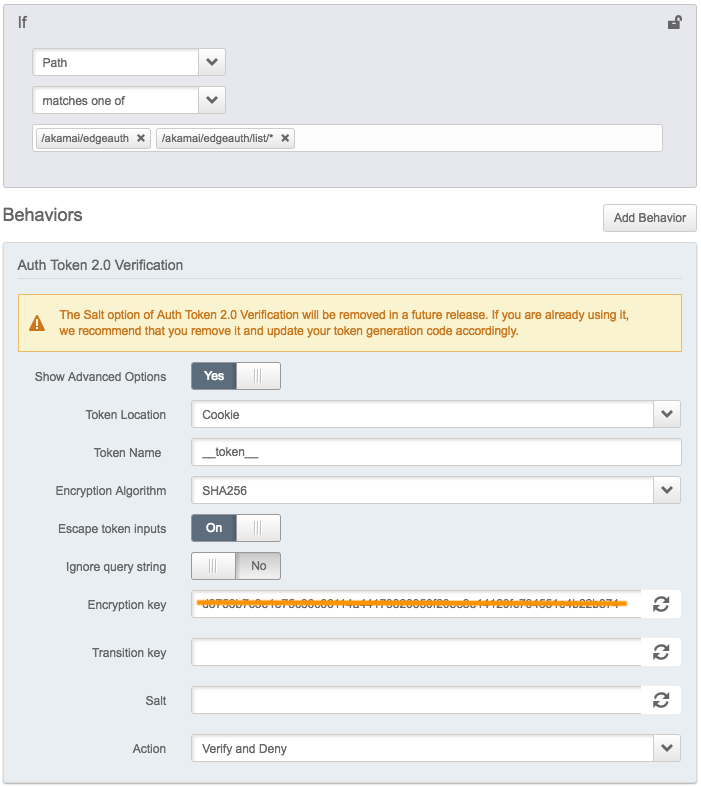
EdgeAuth-Token-Python is Akamai Edge Authorization Token in the HTTP Cookie, Query String, and Header for a client. You can configure it in the Property Manager at https://control.akamai.com. It’s a behavior which is Auth Token 2.0 Verification.
EdgeAuth-Token-Python supports Python 2.6–2.7 & 3.3–3.6 and runs great on PyPy.
Installation
To install Akamai Edge Authorization Token for Python:
$ pip install akamai-edgeauthExample
from akamai.edgeauth import EdgeAuth, EdgeAuthError
import requests # just for this example

ET_HOSTNAME = 'edgeauth.akamaized.net'
ET_ENCRYPTION_KEY = 'YourEncryptionKey'
DURATION = 500 # seconds
ET_ENCRYPTION_KEY must be hexadecimal digit string with even-length.
Don’t expose ET_ENCRYPTION_KEY on the public repository.
URL parameter option
# 1) Cookie
et = EdgeAuth(**{'key': ET_ENCRYPTION_KEY,
                  'window_seconds': DEFAULT_WINDOW_SECONDS})
token = et.generate_url_token("/akamai/edgeauth")
url = "http://{0}{1}".format(ET_HOSTNAME, "/akamai/edgeauth")
response = requests.get(url, cookies={et.token_name: token})
print(response) # Maybe not 403

# 2) Query string
token = et.generate_url_token("/akamai/edgeauth")
url = "http://{0}{1}?{2}={3}".format(ET_HOSTNAME, "/akamai/edgeauth", et.token_name, token)
response = requests.get(url)
print(response)- ‘Escape token input’ option in the Property Manager corresponds to ‘escape_early’ in the code.
- Escape token input (on) == escape_early (True)Escape token input (off) == escape_early (False)
In [Example 2] for Query String, it’s only okay for ‘Ignore query string’ option (on).
If you want to ‘Ignore query string’ option (off) using query string as your token, Please contact your Akamai representative.
ACL(Access Control List) parameter option
# 1) Header using *
et = EdgeAuth((**{'key': ET_ENCRYPTION_KEY,
                  'window_seconds': DEFAULT_WINDOW_SECONDS})
token = et.generate_acl_token("/akamai/edgeauth/list/*")
url = "http://{0}{1}".format(ET_HOSTNAME, "/akamai/edgeauth/list/something")
response = requests.get(url, headers={et.token_name: token})
print(response)

# 2) Cookie Delimited by '!'
acl_path = ["/akamai/edgeauth", "/akamai/edgeauth/list/*"]
token = at.generate_acl_token(acl_path)
# url = "http://{0}{1}".format(ET_HOSTNAME, "/akamai/edgeauth")
url = "http://{0}{1}".format(ET_HOSTNAME, "/akamai/edgeauth/list/something2")
response = requests.get(url, cookies={at.token_name: token})
print(response)
ACL can use the wildcard(*, ?) in the path.
Don’t use ‘!’ in your path because it’s ACL Delimiter.
Use ‘escape_early=False’ as default setting but it doesn’t matter turning on/off ‘Escape token input’ option in the Property Manager
Usage
EdgeAuth Class
class EdgeAuth(token_type=None, token_name='__token__', key=None, algorithm='sha256',
               salt=None, ip=None, payload=None, session_id=None,
               start_time=None, end_time=None, window_seconds=None,
               field_delimiter='~', acl_delimiter='!', escape_early=False, verbose=False)
Parameter |
Description |
|---|---|
token_type |
Select a preset. (Not Supported Yet) |
token_name |
Parameter name for the new token. [Default: ‘__token__’] |
key |
Secret required to generate the token. It must be hexadecimal digit string with even-length. |
algorithm |
Algorithm to use to generate the token. (‘sha1’, ‘sha256’, or ‘md5’) [Default: ‘sha256’] |
salt |
Additional data validated by the token but NOT included in the token body. (It will be deprecated) |
ip |
IP Address to restrict this token to. (Troublesome in many cases (roaming, NAT, etc) so not often used) |
payload |
Additional text added to the calculated digest. |
session_id |
The session identifier for single use tokens or other advanced cases. |
start_time |
What is the start time? (Use string ‘now’ for the current time) |
end_time |
When does this token expire? end_time overrides window_seconds |
window_seconds |
How long is this token valid for? |
field_delimiter |
Character used to delimit token body fields. [Default: ~] |
acl_delimiter |
Character used to delimit acl. [ Default: ! ] |
escape_early |
Causes strings to be ‘url’ encoded before being used. |
verbose |
Print all parameters. |
EdgeAuth’s Method
def generate_url_token(url)
def generate_acl_token(acl)

# Returns the authorization token string.
Parameter |
Description |
|---|---|
url |
Single URL path (String) |
acl |
Access Control List can use the wildcard(*, ?). It can be String (single path) or Array (multi paths) |
Test
“/test” directory is only for the internal test.
Others
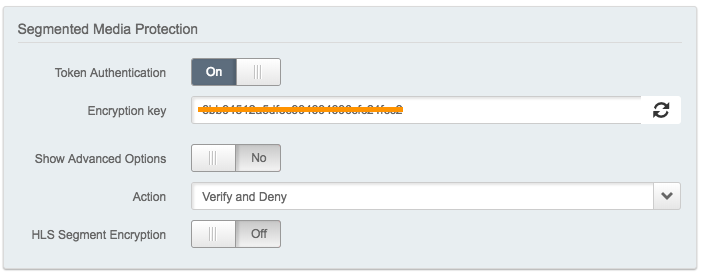
If you use the Segmented Media Protection behavior in AMD(Adaptive Media Delivery) Product, token_name should be ‘hdnts’.
Command
$ python cms_edgeauth.py -k YourEncryptionKey -w 5000 -u /hello/world -xUse -h or –help option for the detail.
1 maintainer

Metadata
1 maintainer
Release files for akamai-edgeauth 0.3.2
For a detailed explanation of source distributions (sdists) and built distributions (wheels), please see the package formats documentation.
Source distribution (sdist)
| File | Size | Uploaded | Provenance | |
|---|---|---|---|---|
| akamai-edgeauth-0.3.2.tar.gz | 9.3 kB | Without provenance | Details |
Release files / akamai-edgeauth-0.3.2.tar.gz
| Download URL | akamai-edgeauth-0.3.2.tar.gz |
|---|---|
| Size | 9.3 kB |
| Tags | Source |
|
SHA-256 checksum How to use checksums |
dfd087b16f02220f392131433aa50b6280a490908b911317b90b294344a42bb9
|
|
BLAKE2b-256 checksum How to use checksums |
15081e01d4b2e1751c71b6677a796964eec236a3a3d6361572d32720ddaadc13
|
| Upload date | |
|
Uploaded using Trusted Publishing? What is trusted publishing? |
No |
Security for akamai-edgeauth 0.3.2
Provenance
Provenance describes where a file came from. On PyPI, provenance is shared via attestations, which provide a verifiable record of the build or publishing details. View details, limitations and caveats.
No provenance found
None of the files in this release were uploaded with provenance metadata.
A note on package security
PyPI is a repository for distributing packages, not a service for auditing them. While third-party security researchers and our staff do their best to detect and remove malicious packages, PyPI cannot guarantee the quality, security or suitability of any given package.














