
Akimous



Akimous is a Python IDE with unique features boosting developers' productivity.
Features
- Machine-learning-assisted/NLP-assisted context-aware auto completion
- Beautifully rendered function documentation
- Layered keyboard control (a more intuitive key binding than vim and Emacs)
- Real-time code formatter
- Interactive console (integration with IPython kernel)
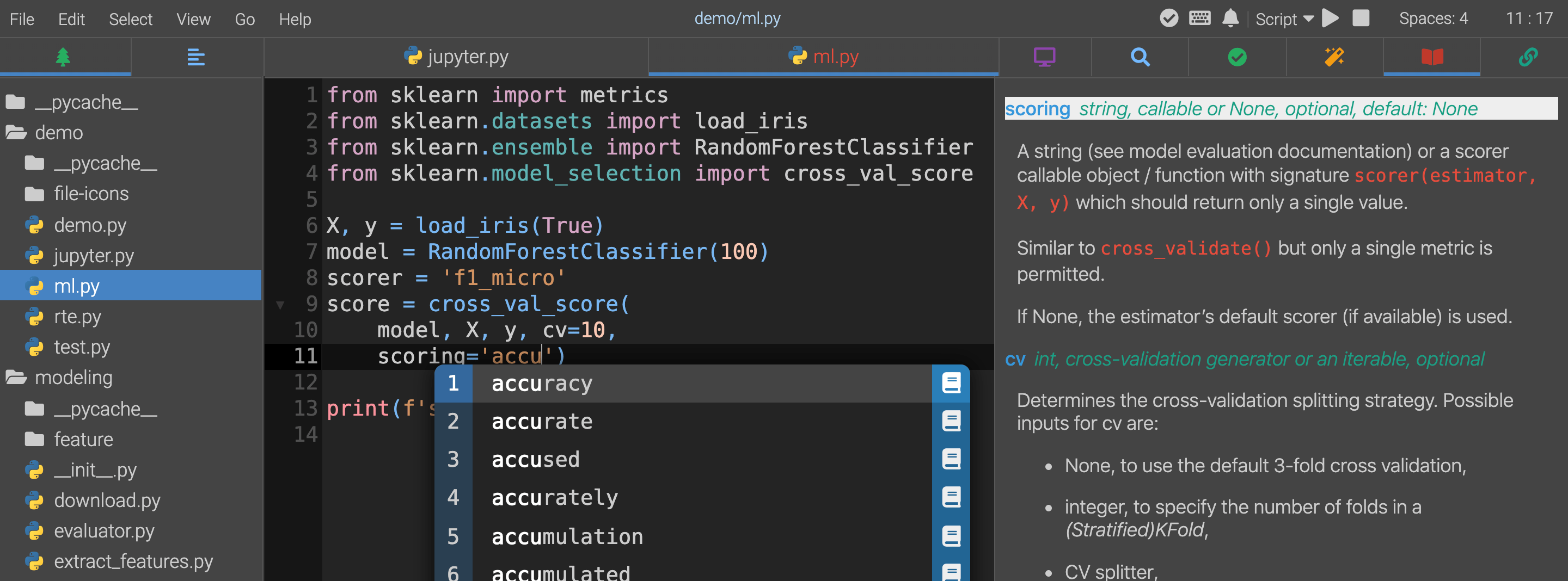
For more information and documentation, visit the official website.
Installation
Prerequisite
- Python 3.7 or 3.8 (with pip)
- Git (for version control integration)
- C/C++ compiler (may be required by some dependencies during installation)
- A modern browser
Installing From PyPI
The recommended way for installing Akimous is through PyPI.
pip install -U akimous
Starting Application
Start it in the terminal. The browser should be automatically opened.
akimous
- To see available arguments, do
akimous --help.
Using Docker Image
If you have difficulty installing, or you are running in a cloud environment, try the prebuilt docker image.
docker run --mount type=bind,source=$HOME,target=/home/user -p 127.0.0.1:3179:3179 -it red8012/akimous akimous
Commands
Start the app by typing in the terminal (the browser will automatically open if available):
akimous
Options
--help: show help message and exit.--host HOST: specify the host for Akimous server to listen on. (default to 0.0.0.0 if inside docker, otherwise 127.0.0.1)--port PORT: The port number for Akimous server to listen on. (default=3179)--no-browser: Do not open the IDE in a browser after startup.--verbose: Print extra debug messages.
Development
Make sure you have recent version of the following build dependencies installed.
Run the following commands according to your need.
make # build everything
make test # run tests
make lint # run linters
make install # (re)install the package
Running make will install all Python and Javascript dependencies listed in pyproject.toml and ui/package.json automatically.
Contributing
This program is at pre-alpha stage. Please do report issues if you run into some problems. Contributions of any kind are welcome, including feature requests or pull requests (can be as small as correcting spelling errors) .
License
Links
1 maintainer

Metadata
1 maintainer
Release files for akimous 0.9.0
For a detailed explanation of source distributions (sdists) and built distributions (wheels), please see the package formats documentation.
Source distribution (sdist)
| File | Size | Uploaded | Provenance | |
|---|---|---|---|---|
| akimous-0.9.0.tar.gz | 2.7 MB | Without provenance | Details |
Built distribution (wheel)
| File | Interpreter | ABI | Platform | Reset |
|---|---|---|---|---|
| akimous-0.9.0-py3-none-any.whl | Python 3 | none | any | Details |
Total release size: 5.3 MB
Release files / akimous-0.9.0.tar.gz
| Download URL | akimous-0.9.0.tar.gz |
|---|---|
| Size | 2.7 MB |
| Tags | Source |
|
SHA-256 checksum How to use checksums |
d35ae46864b138c43829e341298ffa9702232cd9386198411d29174cfdb5c255
|
|
BLAKE2b-256 checksum How to use checksums |
fbd3807d91e6fa847706b6818f5e6e1c4150c2044902668802f01b12855dfc59
|
| Upload date | |
|
Uploaded using Trusted Publishing? What is trusted publishing? |
No |
| Uploaded via |
poetry/1.1.4 CPython/3.9.0 Darwin/19.6.0
|
Release files / akimous-0.9.0-py3-none-any.whl
| Download URL | akimous-0.9.0-py3-none-any.whl |
|---|---|
| Size | 2.7 MB |
| Tags | Python 3 |
|
SHA-256 checksum How to use checksums |
777aecbbe6004764c1c2c5f635ca20105d91e50d3ff94d2f3c83daa0a730c25f
|
|
BLAKE2b-256 checksum How to use checksums |
48178a1e177856b5c14a9745a4f1b5fcf73910c77f5c9136bc33847d4e60cee2
|
| Upload date | |
|
Uploaded using Trusted Publishing? What is trusted publishing? |
No |
| Uploaded via |
poetry/1.1.4 CPython/3.9.0 Darwin/19.6.0
|
Security for akimous 0.9.0
Provenance
Provenance describes where a file came from. On PyPI, provenance is shared via attestations, which provide a verifiable record of the build or publishing details. View details, limitations and caveats.
No provenance found
None of the files in this release were uploaded with provenance metadata.
A note on package security
PyPI is a repository for distributing packages, not a service for auditing them. While third-party security researchers and our staff do their best to detect and remove malicious packages, PyPI cannot guarantee the quality, security or suitability of any given package.














