



AMIRA: Automated Malware Incident Response & Analysis
AMIRA is a service for automatically running the analysis on the OSXCollector output files. The automated analysis is performed via OSXCollector Output Filters, in particular The One Filter to Rule Them All: the Analyze Filter. AMIRA takes care of retrieving the output files from an S3 bucket, running the Analyze Filter and then uploading the results of the analysis back to S3 (although one could envision as well attaching them to the related JIRA ticket).
Prerequisites
tox
The following steps assume you have tox installed on your machine.
If this is not the case, please run:
$ sudo pip install tox
OSXCollector Output Filters configuration file
AMIRA uses OSXCollector Output Filters to do the actual analysis,
so you will need to have a valid osxcollector.yaml
configuration file in the working directory.
The example configuration file can be found in the
OSXCollector Output Filters.
The configuration file mentions the location of the file hash and the domain blacklists. Make sure that the blacklist locations mentioned in the configuration file are also available when running AMIRA.
AWS credentials
AMIRA uses boto3 to interface with AWS. You can supply credentials using either of the possible configuration options.
The credentials should allow reading and deleting SQS messages from the SQS queue specified in the AMIRA config as well as the read access to the objects in the S3 bucket where the OSXCollector output files are stored. To be able to upload the analysis results back to the S3 bucket specified in the AMIRA configuration file, the credentials should also allow write access to this bucket.
AMIRA Architecture
The service uses the
S3 bucket event notifications
to trigger the analysis.
You will need to configure an S3 bucket for the OSXCollector output files,
so that when a file is added there the notification will be sent to an SQS queue
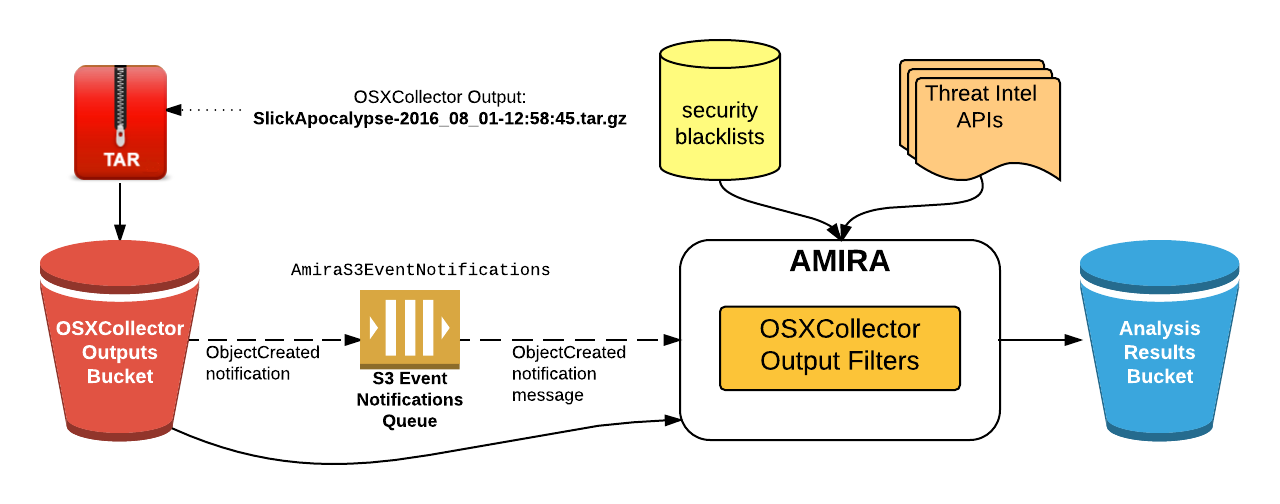
(AmiraS3EventNotifications in the picture below).
AMIRA periodically checks the queue for any new messages
and upon receiving one it will fetch the OSXCollector output file from the S3
bucket.
It will then run the Analyze Filter on the retrieved file.
The Analyze Filter runs all the filters contained in the OSXCollector Output Filters package sequentially. Some of them communicate with the external resources, like domain and hashes blacklists (or whitelists) and threat intel APIs, e.g. VirusTotal, OpenDNS Investigate or ShadowServer. The original OSXCollector output is extended with all of this information and the very last filter run by the Analyze Filter summarizes all of the findings into a human-readable form. After the filter finishes running, the results of the analysis will be uploaded to the Analysis Results S3 bucket.
The overview of the whole process and the system components involved in it are depicted below:
Using AMIRA
The main entry point to AMIRA is in the amira/amira.py module.
You will first need to create an instance of AMIRA class by providing the AWS
region name, where the SQS queue with the event notifications for the
OSXCollector output bucket is, and the SQS queue name:
from amira.amira import AMIRA

amira = AMIRA('us-west-1', 'AmiraS3EventNotifications')
Then you can register the analysis results uploader, e.g. the S3 results uploader:
from amira.s3 import S3ResultsUploader

s3_results_uploader = S3ResultsUploader('amira-results-bucket')
amira.register_results_uploader(s3_results_uploader)
Finally, run AMIRA:
amira.run()
Go get some coffee, sit back, relax and wait till the analysis results pop up in the S3 bucket!


Release files for amira 3.0.0
For a detailed explanation of source distributions (sdists) and built distributions (wheels), please see the package formats documentation.
Source distribution (sdist)
| File | Size | Uploaded | Provenance | |
|---|---|---|---|---|
| amira-3.0.0.tar.gz | 11.5 kB | Without provenance | Details |
Built distribution (wheel)
| File | Interpreter | ABI | Platform | Reset |
|---|---|---|---|---|
| amira-3.0.0-py3-none-any.whl | Python 3 | none | any | Details |
Total release size: 22.3 kB
Release files / amira-3.0.0.tar.gz
| Download URL | amira-3.0.0.tar.gz |
|---|---|
| Size | 11.5 kB |
| Tags | Source |
|
SHA-256 checksum How to use checksums |
c21e9fdd8abb10a6ce940cca5f378142e622acf48c5c3568a84c76617f8f4d9d
|
|
BLAKE2b-256 checksum How to use checksums |
566d57dca2e2a7972dda086973f48b12af6836fe7a4ccc283e65c4170c74e5a1
|
| Upload date | |
|
Uploaded using Trusted Publishing? What is trusted publishing? |
No |
| Uploaded via |
twine/6.1.0 CPython/3.13.12
|
Release files / amira-3.0.0-py3-none-any.whl
| Download URL | amira-3.0.0-py3-none-any.whl |
|---|---|
| Size | 10.8 kB |
| Tags | Python 3 |
|
SHA-256 checksum How to use checksums |
bae44f0d9dbb88351a871369b772cc613ac513264269ce8160da726616287a05
|
|
BLAKE2b-256 checksum How to use checksums |
58a25a2ae88264d1080da4ff5134ce90dee0eea159e78906e46a5e1a94c59c4c
|
| Upload date | |
|
Uploaded using Trusted Publishing? What is trusted publishing? |
No |
| Uploaded via |
twine/6.1.0 CPython/3.13.12
|
Security for amira 3.0.0
Provenance
Provenance describes where a file came from. On PyPI, provenance is shared via attestations, which provide a verifiable record of the build or publishing details. View details, limitations and caveats.
No provenance found
None of the files in this release were uploaded with provenance metadata.
A note on package security
PyPI is a repository for distributing packages, not a service for auditing them. While third-party security researchers and our staff do their best to detect and remove malicious packages, PyPI cannot guarantee the quality, security or suitability of any given package.














