

The go-to CLI tool for competitive programmers and setters.


Table of Contents
Overview



Codefreaker is a CLI tool and library that aims to help contestants and setters from the competitive programming community to have an easier time.
Although trying to solve the issues of these two audiences seems to be too much for a single tool to handle, we exploit the fact that the journeys of contestants and setters have a lot in common.
Features
For contestants
- 🤖 Parsing: provides an entrypoint for contests and problems to be parsed through Competitive Companion.
- 🔨 Testing: provides commands for automatically running your problems against both downloaded and manually added testcases, and shows a clear report.
- 📤 Submit: provides the option of submiting your solution for a few supported online judges from the command line.
- 🧱 Structure: provides an opinionated structure for the file tree of both parsed and manually created problems.
- ⚙️ Flexibility: still gives enough flexibility for you to extend your problem. Add testcases, set a custom checker, write a generator.
For setters
🔜 Still coming up!
Getting Started
System Requirements: the tool was developed for Unix systems and was tested only in Ubuntu.
If you want to use the parsing feature, you also have to install Competitive Companion.
Installation
From pip
$ pip install codefreaker

From code
Go to the cloned folder and run:
$ pip install .
In Poetry venv (while developing)
Run the following when in the Poetry venv.
$ poetry install
Usage
0. Be familiar with Competitive Companion
Make sure you're familiarized with Competitive Companion -- a helper that facilitates parsing tasks directly from your browser.
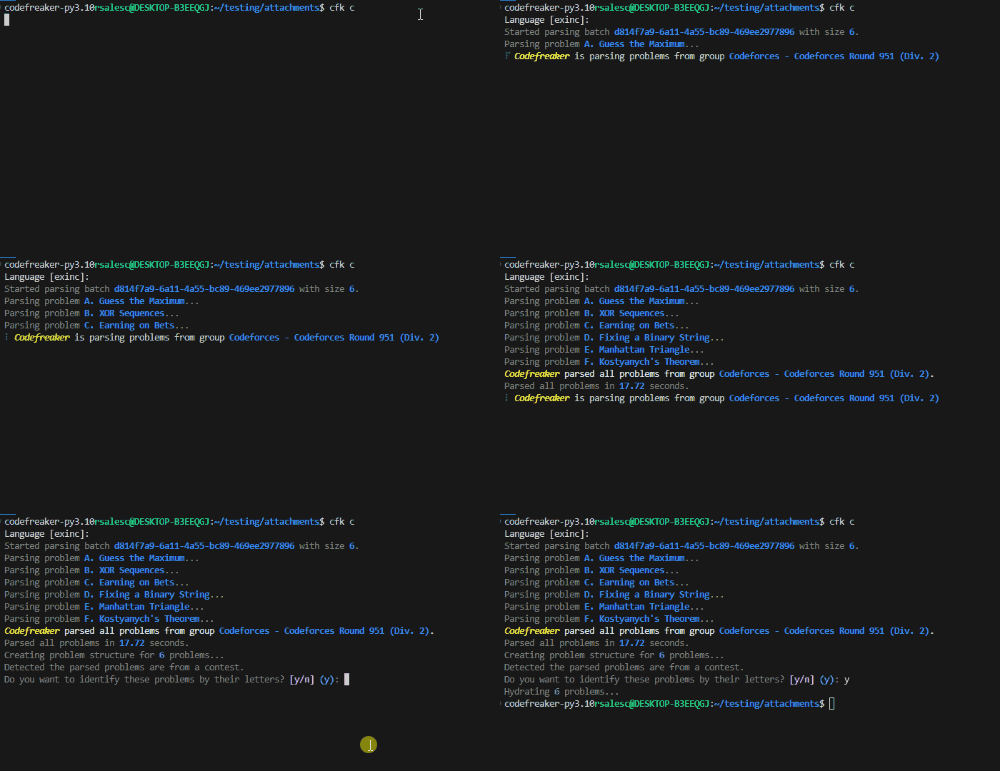
1. Clone a contest or a single problem
$ # Or simply `cfk c`
$ cfk clone
After running the command above, hit the ➕ (plus) icon in Competitive Companion, and you should start seeing parsing logs in the command line.
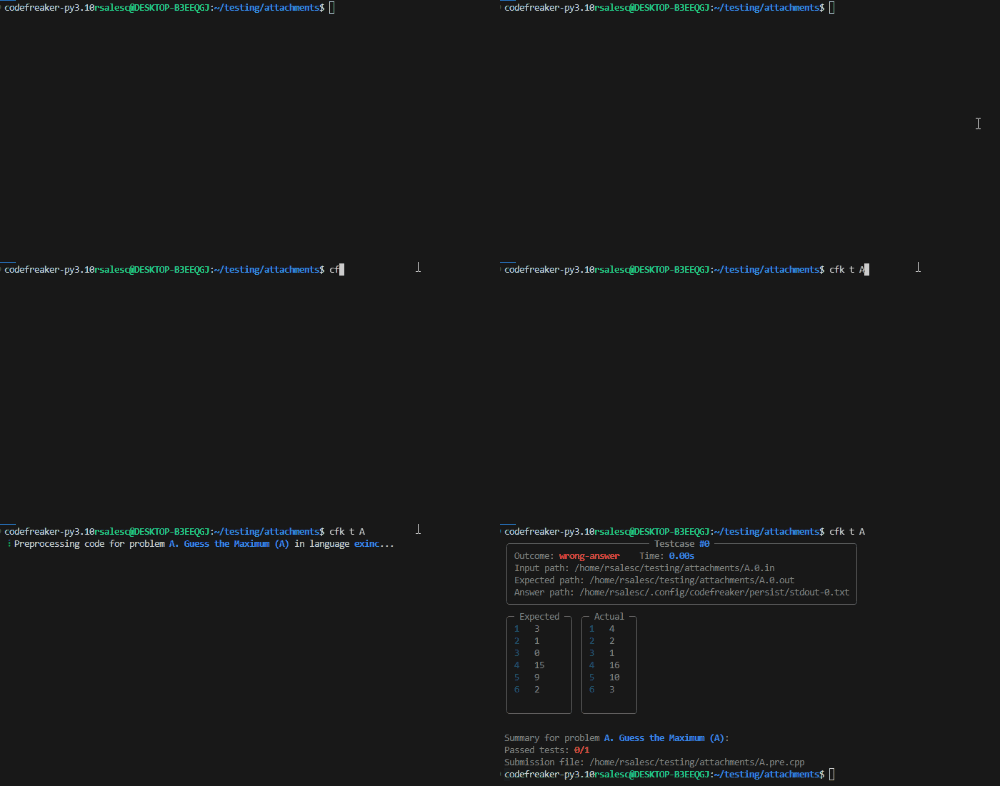
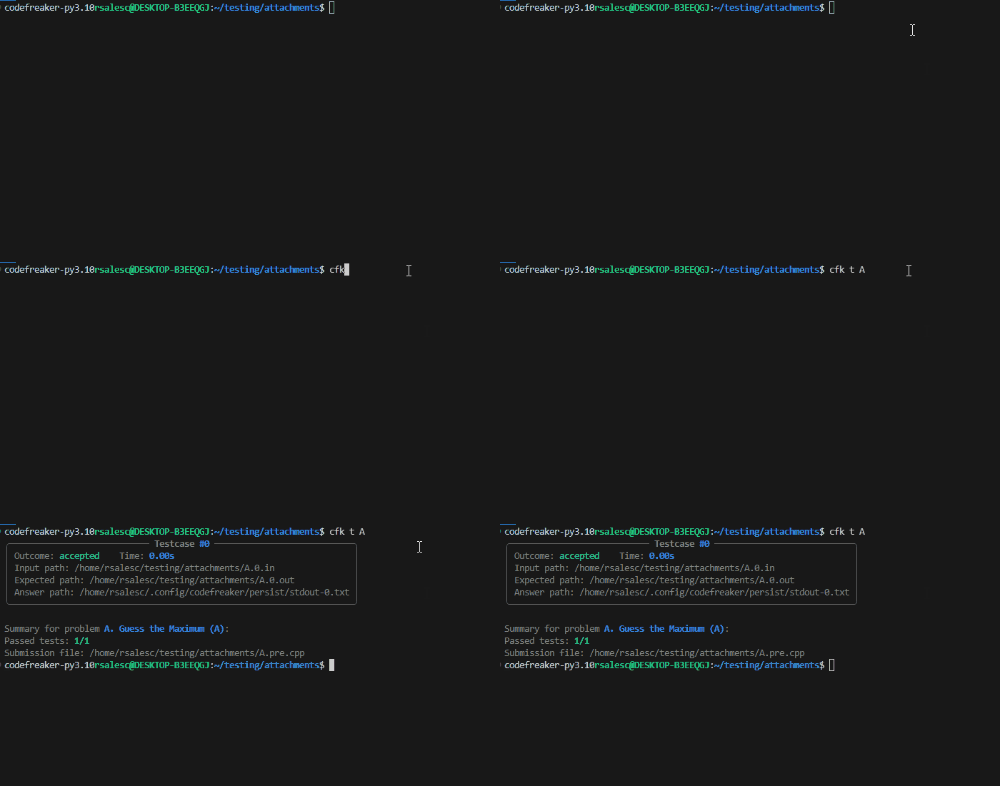
2. Implement a solution and run testcases
$ # Or simply `cfk test A`
$ cfk test A
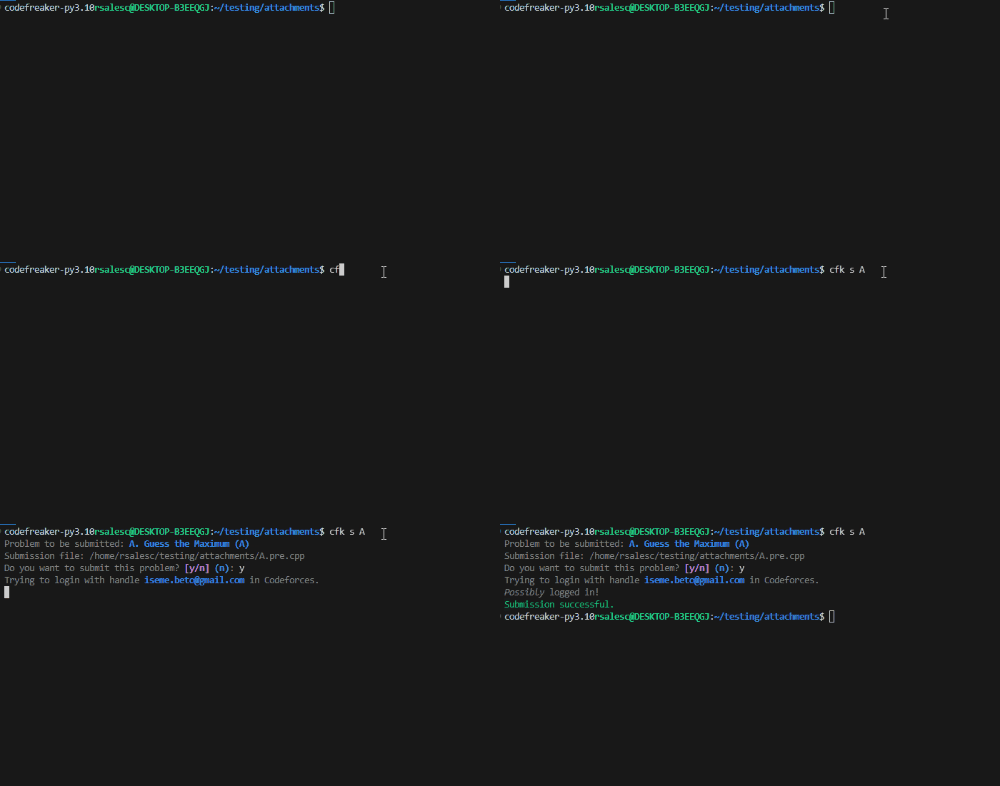
3. Submit your solution
$ # Or simply `cfk s A`
$ cfk submit A
Advanced usages
View auto-generated CLI reference here.
Tests
TODO
Project Roadmap
TODO
Contributing
Contributions are welcome! Here are several ways you can contribute:
- Report Issues: Submit bugs found or log feature requests for the
.project. - Submit Pull Requests: Review open PRs, and submit your own PRs.
- Join the Discussions: Share your insights, provide feedback, or ask questions.
Contributing Guidelines
- Fork the Repository: Start by forking the project repository to your local account.
- Clone Locally: Clone the forked repository to your local machine using a git client.
git clone ../.
- Create a New Branch: Always work on a new branch, giving it a descriptive name.
git checkout -b new-feature-x
- Make Your Changes: Develop and test your changes locally.
- Commit Your Changes: Commit with a clear message describing your updates.
git commit -m 'Implemented new feature x.'
- Push to local: Push the changes to your forked repository.
git push origin new-feature-x
- Submit a Pull Request: Create a PR against the original project repository. Clearly describe the changes and their motivations.
- Review: Once your PR is reviewed and approved, it will be merged into the main branch. Congratulations on your contribution!
Contributor Graph

License
This project is protected under the Apache License 2.0 License. For more details, refer to the LICENSE file.
1 maintainer

Metadata
1 maintainer
Release files for codefreaker 0.1.3
For a detailed explanation of source distributions (sdists) and built distributions (wheels), please see the package formats documentation.
Source distribution (sdist)
| File | Size | Uploaded | |
|---|---|---|---|
| codefreaker-0.1.3.tar.gz | 40.6 kB | Details |
Built distribution (wheel)
| File | Interpreter | ABI | Platform | Reset |
|---|---|---|---|---|
| codefreaker-0.1.3-py3-none-any.whl | Python 3 | none | any | Details |
Total release size: 90.2 kB
Release files / codefreaker-0.1.3.tar.gz
| Download URL | codefreaker-0.1.3.tar.gz |
|---|---|
| Size | 40.6 kB |
| Tags | Source |
|
SHA-256 checksum How to use checksums |
eb3e045ef7130a071b1df83a5e5a506f96c4742436faa4c9886ecc401e78a74d
|
|
BLAKE2b-256 checksum How to use checksums |
618632044e5386d34322e3924f78daa9bf1b2e4b33bae016095dbafc54a772cc
|
| Upload date | |
|
Uploaded using Trusted Publishing? What is trusted publishing? |
No |
| Uploaded via |
poetry/1.8.3 CPython/3.10.12 Linux/5.15.146.1-microsoft-standard-WSL2
|
Release files / codefreaker-0.1.3-py3-none-any.whl
| Download URL | codefreaker-0.1.3-py3-none-any.whl |
|---|---|
| Size | 49.6 kB |
| Tags | Python 3 |
|
SHA-256 checksum How to use checksums |
7367ed817c013c6ec729f12154ea53ab39f4b2e9238f41a0225c143214f87936
|
|
BLAKE2b-256 checksum How to use checksums |
1c2e29629331ef337261cb64318cfcd8677483fbd8a945dd68726f315ce5f3b8
|
| Upload date | |
|
Uploaded using Trusted Publishing? What is trusted publishing? |
No |
| Uploaded via |
poetry/1.8.3 CPython/3.10.12 Linux/5.15.146.1-microsoft-standard-WSL2
|














