
colorclass
Yet another ANSI color text library for Python. Provides "auto colors" for dark/light terminals. Works on Linux, OS X,
and Windows. For Windows support you just need to call Windows.enable() in your application.
On Linux/OS X autocolors are toggled by calling set_light_background() and set_dark_background(). On Windows
this can be done automatically if you call Windows.enable(auto_colors=True). Even though the latest Windows 10 does
support ANSI color codes natively, you still need to run Windows.enable() to take advantage of automatically detecting
the console's background color.
In Python2.x this library subclasses unicode, while on Python3.x it subclasses str.
- Python 2.6, 2.7, PyPy, PyPy3, 3.3, 3.4, and 3.5 supported on Linux and OS X.
- Python 2.6, 2.7, 3.3, 3.4, and 3.5 supported on Windows (both 32 and 64 bit versions of Python).
Quickstart
Install:
pip install colorclass
Piped Command Line
It is possible to pipe curly-bracket tagged (or regular ANSI coded) text to Python in the command line to produce color text. Some examples:
    echo "{red}Red{/red}" |python -m colorclass  # Red colored text.
    echo -e "\033[31mRed\033[0m" | COLOR_DISABLE=true python -m colorclass  # Strip colors
    echo -e "\033[31mRed\033[0m" | COLOR_ENABLE=true python -m colorclass &> file.txt  # Force colors.
Export these environment variables as "true" to enable/disable some features:
=============== ============================================
Env Variable    Description
=============== ============================================
COLOR_ENABLE    Force colors even when piping to a file.
COLOR_DISABLE   Strip all colors from incoming text.
COLOR_LIGHT     Use light colored text for dark backgrounds.
COLOR_DARK      Use dark colored text for light backgrounds.
=============== ============================================
Example Implementation
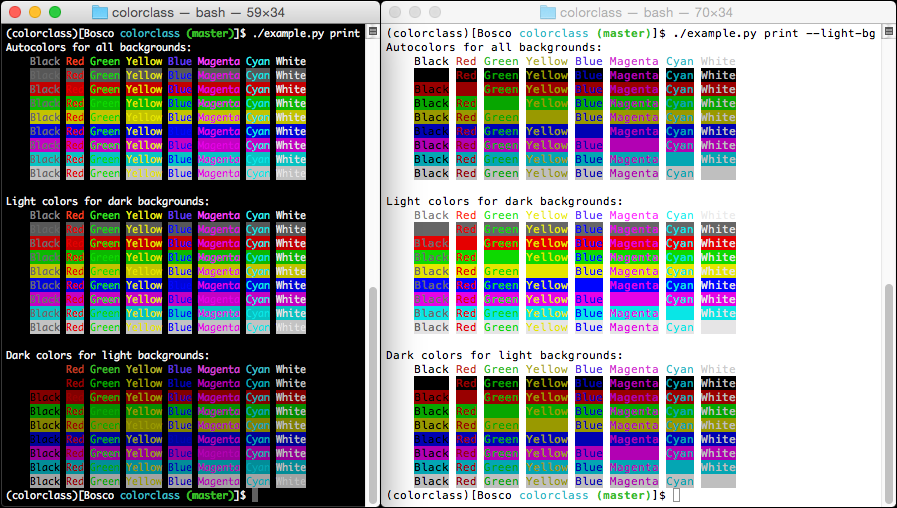
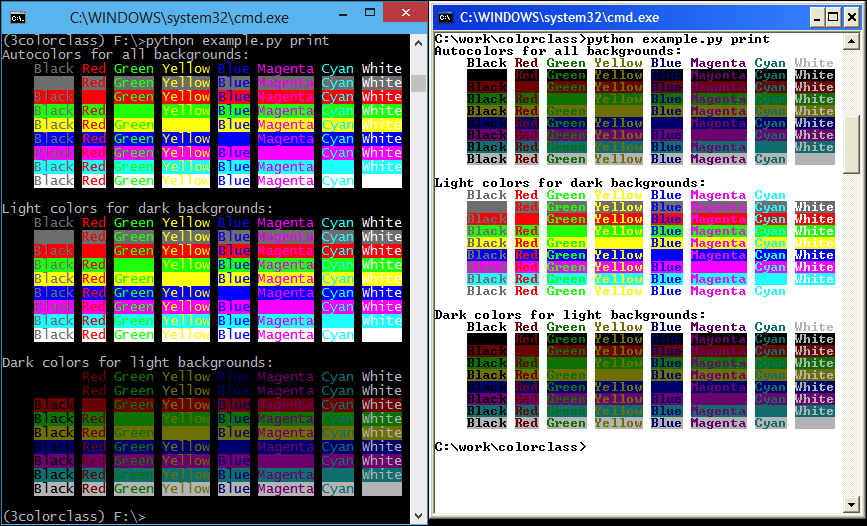
Source code for the example code is: example.py
Usage
Different colors are chosen using curly-bracket tags, such as {red}{/red}. For a list of available colors, call
colorclass.list_tags().
The available "auto colors" tags are:
- autoblack
- autored
- autogreen
- autoyellow
- autoblue
- automagenta
- autocyan
- autowhite
- autobgblack
- autobgred
- autobggreen
- autobgyellow
- autobgblue
- autobgmagenta
- autobgcyan
- autobgwhite
Methods of Class instances try to return sane data, such as:
    from colorclass import Color
    color_string = Color('{red}Test{/red}')

    >>> color_string
    u'\x1b[31mTest\x1b[39m'

    >>> len(color_string)
    4

    >>> color_string.istitle()
    True
There are also a couple of helper attributes for all Color instances:
    >>> color_string.value_colors
    '\x1b[31mTest\x1b[39m'

    >>> color_string.value_no_colors
    'Test'
1 maintainer

Metadata
1 maintainer
Release files for colorclass 2.2.2
For a detailed explanation of source distributions (sdists) and built distributions (wheels), please see the package formats documentation.
Source distribution (sdist)
| File | Size | Uploaded | Provenance | Actions |
|---|---|---|---|---|
| colorclass-2.2.2.tar.gz | 16.7 kB | Without provenance | Details for colorclass-2.2.2.tar.gz |
Built distribution (wheel)
| File | Interpreter | ABI | Platform | Actions Reset |
|---|---|---|---|---|
| colorclass-2.2.2-py2.py3-none-any.whl | Python 3, Python 2 | none | any | Details for colorclass-2.2.2-py2.py3-none-any.whl |
Total release size: 35.7 kB
Release files / colorclass-2.2.2.tar.gz
| Download URL | colorclass-2.2.2.tar.gz |
|---|---|
| Size | 16.7 kB |
| Tags | Source |
|
SHA-256 checksum How to use checksums |
6d4fe287766166a98ca7bc6f6312daf04a0481b1eda43e7173484051c0ab4366
|
|
BLAKE2b-256 checksum How to use checksums |
d71a31ff00a33569a3b59d65bbdc445c73e12f92ad28195b7ace299f68b9af70
|
| Upload date | |
|
Uploaded using Trusted Publishing? What is trusted publishing? |
No |
| Uploaded via |
twine/3.6.0 importlib_metadata/4.8.1 pkginfo/1.7.1 requests/2.26.0 requests-toolbelt/0.9.1 tqdm/4.62.2 CPython/3.8.7
|
Release files / colorclass-2.2.2-py2.py3-none-any.whl
| Download URL | colorclass-2.2.2-py2.py3-none-any.whl |
|---|---|
| Size | 19.0 kB |
| Tags | Python 2 Python 3 |
|
SHA-256 checksum How to use checksums |
6f10c273a0ef7a1150b1120b6095cbdd68e5cf36dfd5d0fc957a2500bbf99a55
|
|
BLAKE2b-256 checksum How to use checksums |
30b6daf3e2976932da4ed3579cff7a30a53d22ea9323ee4f0d8e43be60454897
|
| Upload date | |
|
Uploaded using Trusted Publishing? What is trusted publishing? |
No |
| Uploaded via |
twine/3.6.0 importlib_metadata/4.8.1 pkginfo/1.7.1 requests/2.26.0 requests-toolbelt/0.9.1 tqdm/4.62.2 CPython/3.8.7
|
Security for colorclass 2.2.2
Provenance
Provenance describes where a file came from. On PyPI, provenance is shared via attestations, which provide a verifiable record of the build or publishing details. View details, limitations and caveats.
No provenance found
None of the files in this release were uploaded with provenance metadata.
A note on package security
PyPI is a repository for distributing packages, not a service for auditing them. While third-party security researchers and our staff do their best to detect and remove malicious packages, PyPI cannot guarantee the quality, security or suitability of any given package.
To learn more about protecting yourself from malicious actors, visit our package security documentation.














