



Graph theory and evolutionary algorithm applied to city district heating network design.
Motivation
This project belongs to a series of numerical tools developed by the CREM (https://www.crem.ch/) in the perspective of a better energy distribution and consumption at the city scale.
Description
The design of a district heating network is closely related to the problem of finding the Terminal Steiner Tree (TST) of a graph. Indeed for a given connected graph and a given subset of nodes, called terminals, the TST is the network of smallest weight connecting all terminals only once. This is the exact structure needed for a district heating network connecting heat sinks (buildings) to a heating source via a streets network.
This package implement a systematic way of finding the best possible network within a given amount of numerical computation. Indeed the TST problem being NP complete, an heuristic evolutive algorithm is used.
The heating load of the buildings is then distributed throughout all the pipelines belonging to the district heating network.
Additional tools are available to download city geometries from the Open Street Map (OSM) dataset, modify their content, reshape their structure or visualize them as well as for obtaining information on the network characteristics.
Package structure
The package is organized in modules as represented on the figure below. The information on the city geometries and the district heating network is stored in dataframes (streets, sinks, sources, terminals, vertices, tst, pipelines, …) which evolve along with the design process.
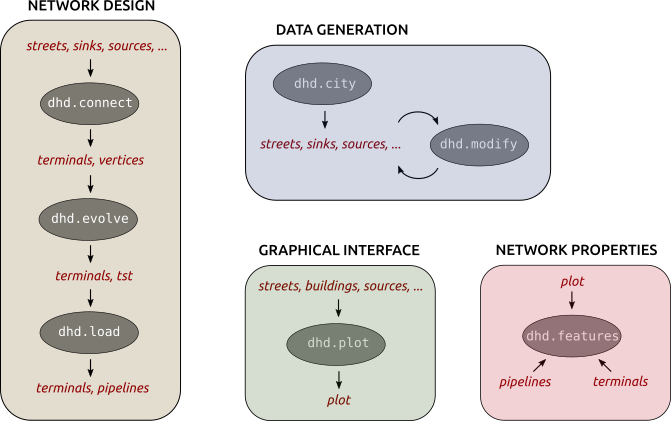
Network Design: This is the core of the package. It takes the streets, sinks and source(s) as input and returns the district heating network.
The first module, dhd.connect, connects the terminals (sinks and source(s)) to the streets and store the updated network in the dataframe vertices. The multiple possible connections of each terminal are stored in the dataframe terminals.
The second module, dhd.evolve, implements the evolutive algorithm which seeks the best connection network and store it into the data frame tst.
The last module, dhd.load, spreads the sinks heating loads throughout the heating network and merge neighbor pipes of equal load into single pipelines, which are stored in the dataframe pipelines.
Data Generation: This set allows to download any city geometries from the OSM dataset and to modify some of its data.
The module dhd.city defines a class associated to any given city. It automatically loads the geometries of its streets and buildings. Additional information such as the source location or the presence of natural barriers may be provided. All this information is organized into dataframes.
The module dhd.modify allows to easily select and modify rows and columns of the previously defined dataframes. Note that despite its being in the same set as dhd.city it may naturally be applied to dataframes of different origins.
Graphical Interface The module dhd.plot is used to define a background interface displaying the provided streets, buildings, source(s) and natural barrier(s). The different geometries constructed along the design process can be plotted over the background.
Network Properties The module dhd.features computes and displays properties of the designed network.
Installation
Assuming you have Python 3.X installed, you can simply install DHD with pip:
$ pip install dhdIf you prefer to install it from source (git is required) run the following commands:
$ git clone https://gitlab.com/crem-repository/dhd.git
$ pip install -r requirements.txt
$ pip install .
We recommend to use a virtual environment for the installation. Also jupyter notebooks (Jupyter Notebook) are necessary to run the learning examples and are practical when using the package.
The spatial indexing in Python requires the ctypes Python wrapper Rtree. Please follow the installation instructions on the previous link.
How to use ?
Import the package modules:
from dhd import city, connect, evolve, load
      from shapely.geometry import Point
Load the geometries of the city of Vevey in Switzerland:
vevey = city.City('Vevey, Switzerland', sources=Point(333795, 5147530))
streets = vevey.get_streets()
sinks = vevey.select_sinks(min_load=300)
sources = vevey.get_sources()
Connect the selected buildings (sinks) and the source to the streets network:
vertices, terminals = connect.connect_terminals(streets, sinks, sources)Run the evolutive algorithm to seek the best possible heating network within five generations:
N = 5
evolution = evolve.run_evolution(vertices, terminals, N)
tst = evolve.get_best_terminal_steiner_tree(vertices, terminals, evolution)
Spread the buildings load over the district heating pipelines:
pipelines = load.load_the_pipelines(tst, terminals)More detailed examples are provided in the GitLab repository.
Reference
Click the following link to access the full documentation.
Further developments
Here is a list of features eager to be implemented. Please refer to the CONTRIBUTING file if you either want to append or pop this list.
dhd.city
Function to easily add a street to the streets network, accounting for the different connection options: street node, street edge, no street.
dhd.connect
Treat the source(s) and sinks separately when connecting them.
So far the natural barriers completely forbid any connection crossing them. This criterion could be adjusted to a connection weight enhancement.
License
Free software: Apache Software License 2.0
Credits
Research and implementation work for this tool has been carried out within the project IntegrCiTy (ERA-NET Cofund Smart Cities and Communities call). In Switzerland, it is funded by the Swiss Federal Office of Energy (contract SI/501404-2), as well as by the industrial and institutional partners of the project .
This package was created with Cookiecutter and the audreyr/cookiecutter-pypackage project template.
1 maintainer

Metadata
1 maintainer
Release files for dhd 0.1.3
For a detailed explanation of source distributions (sdists) and built distributions (wheels), please see the package formats documentation.
Source distribution (sdist)
| File | Size | Uploaded | Provenance | Actions |
|---|---|---|---|---|
| dhd-0.1.3.tar.gz | 466.7 kB | Without provenance | Details for dhd-0.1.3.tar.gz |
Built distribution (wheel)
| File | Interpreter | ABI | Platform | Actions Reset |
|---|---|---|---|---|
| dhd-0.1.3-py2.py3-none-any.whl | Python 2, Python 3 | none | any | Details for dhd-0.1.3-py2.py3-none-any.whl |
Total release size: 502.5 kB
Release files / dhd-0.1.3.tar.gz
| Download URL | dhd-0.1.3.tar.gz |
|---|---|
| Size | 466.7 kB |
| Tags | Source |
|
SHA-256 checksum How to use checksums |
56e9931c1b69723df443857fdfc48e8c984600f193685688c03f5e3be4f5208a
|
|
BLAKE2b-256 checksum How to use checksums |
9296c5c783140aa815949bea93fba2f601a69d282299722bf184295dacc779bb
|
| Upload date | |
|
Uploaded using Trusted Publishing? What is trusted publishing? |
No |
| Uploaded via |
twine/1.13.0 pkginfo/1.5.0.1 requests/2.21.0 setuptools/41.0.1 requests-toolbelt/0.9.1 tqdm/4.31.1 CPython/3.6.7
|
Release files / dhd-0.1.3-py2.py3-none-any.whl
| Download URL | dhd-0.1.3-py2.py3-none-any.whl |
|---|---|
| Size | 35.8 kB |
| Tags | Python 2 Python 3 |
|
SHA-256 checksum How to use checksums |
372ba09d3c5a1de708df9e60d1d2bbf732582072a7114c2811e41ef6c24e65c5
|
|
BLAKE2b-256 checksum How to use checksums |
e2a31753f2cb4baef922d4b3c0f6e3c43b38a5c167700ea82de05382b26dd1ae
|
| Upload date | |
|
Uploaded using Trusted Publishing? What is trusted publishing? |
No |
| Uploaded via |
twine/1.13.0 pkginfo/1.5.0.1 requests/2.21.0 setuptools/41.0.1 requests-toolbelt/0.9.1 tqdm/4.31.1 CPython/3.6.7
|
Security for dhd 0.1.3
Provenance
Provenance describes where a file came from. On PyPI, provenance is shared via attestations, which provide a verifiable record of the build or publishing details. View details, limitations and caveats.
No provenance found
None of the files in this release were uploaded with provenance metadata.
A note on package security
PyPI is a repository for distributing packages, not a service for auditing them. While third-party security researchers and our staff do their best to detect and remove malicious packages, PyPI cannot guarantee the quality, security or suitability of any given package.
To learn more about protecting yourself from malicious actors, visit our package security documentation.














