
django-admin-timeline
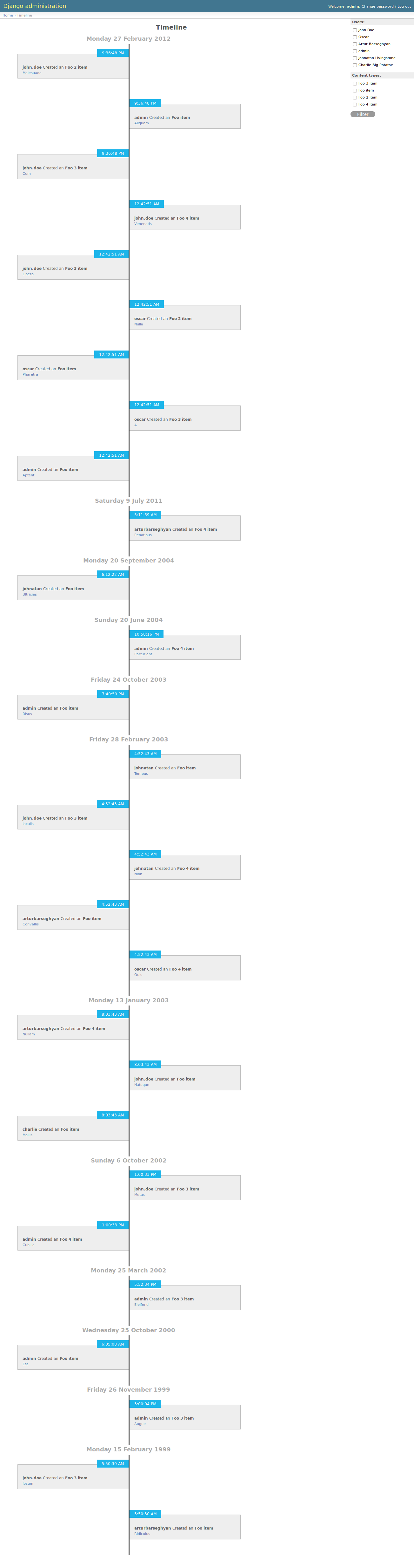
A Facebook-like timeline app for Django admin. It’s very similar to built-in feature Daily progress, but has nicer templates and infinite scroll. Actions are broken up by day, then by action. It’s possible to filter actions by user (multiple select) and content type (multiple select).





Prerequisites
Present
Starting from django-admin-timeline 1.8:
Django 2.2, 3.0 and 3.1
Python 3.6, 3.7 and 3.8
Past
In past, as of version 1.7.x, django-admin-timeline still worked on:
Django 1.11, 2.0
Python 2.7, 3.5
Installation
Install in your virtual environment
Latest stable version from PyPI:
pip install django-admin-timelineLatest stable version from BitBucket:
pip install https://bitbucket.org/barseghyanartur/django-admin-timeline/get/stable.tar.gzLatest stable version from GitHub:
pip install https://github.com/barseghyanartur/django-admin-timeline/archive/stable.tar.gzAdd admin_timeline to your INSTALLED_APPS in the global settings.py.
INSTALLED_APPS = (
    # ...
    'admin_timeline',
   # ...
)
Collect the static files by running (see the Troubleshooting section in case of problems):
./manage.py collectstaticOverride app settings in your global settings module (see the apps.admin_timeline.defaults for the list of settings). As for now, most important of those is NUMBER_OF_ENTRIES_PER_PAGE - number of entries displayed per page (for both non-AJAX and AJAX requests).
Add the following lines to the global urls module:
# Admin timeline URLs. Should be placed BEFORE the Django admin URLs.
url(r'^admin/timeline/', include('admin_timeline.urls')),
url(r'^admin/', include(admin.site.urls)),
Demo
Live demo
See the live demo app on Heroku.
Credentials:
username: admin
password: test
Run demo locally
In order to be able to quickly evaluate the django-admin-timeline, a demo app (with a quick installer) has been created (works on Ubuntu/Debian, may work on other Linux systems as well, although not guaranteed). Follow the instructions below for having the demo running within a minute.
Grab and run the latest django_admin_timeline_example_app_installer.sh:
wget -O - https://raw.github.com/barseghyanartur/django-admin-timeline/stable/examples/django_admin_timeline_example_app_installer.sh | bashOpen your browser and test the app.
Admin username: admin
Admin password: test
If quick installer doesn’t work for you, see the manual steps on running the example project.
Troubleshooting
If somehow static files are not collected properly (missing admin_timeline.js and admin_timeline.css files), install the latest stable version from source.
pip install https://github.com/barseghyanartur/django-admin-timeline/archive/stable.tar.gzUsage
After following all installation steps, you should be able to access the django-admin-timeline by:
http://127.0.0.1:8000/admin/timeline/An example application is available. See the example directory.
Configuration and tweaks
If you have way to many log entries and fetching all content types and users isn’t an option, set the ADMIN_TIMELINE_SIMPLE_FILTER_FORM to True in your settings. It will then change your multiple choice widgets into plain char fields (comma separated ids are allowed).
Testing
Project is covered by test (functional- and browser-tests). To test with all supported Python/Django versions type:
toxTo test against specific environment, type:
tox -e py36-django111To test just your working environment type:
./runtests.pyIt’s assumed that you have all the requirements installed. If not, first install the test requirements:
pip install -r examples/requirements/testing.txtBrowser tests
For browser tests you may choose between Firefox, headless Firefox and PhantomJS. PhantomJS is faster, headless Firefox is fast as well, but normal Firefox tests tell you more (as you see what exactly happens on the screen). Both cases require some effort and both have disadvantages regarding the installation (although once you have them installed they work perfect).
Latest versions of Firefox are often not supported by Selenium. Current version of the Selenium for Python (2.53.6) works fine with Firefox 47. Thus, instead of using system Firefox you could better use a custom one.
For PhantomJS you need to have NodeJS installed.
Set up Firefox 47
Download Firefox 47 from this location and unzip it into /usr/lib/firefox47/
Specify the full path to your Firefox in FIREFOX_BIN_PATH setting. Example:
FIREFOX_BIN_PATH = '/usr/lib/firefox47/firefox'If you set to use system Firefox, remove or comment-out the FIREFOX_BIN_PATH setting.
After that your Selenium tests would work.
Set up headless Firefox
Install xvfb package which is used to start Firefox in headless mode.
sudo apt-get install xvfbRun the tests using headless Firefox.
./scripts/runtests.shOr run tox tests using headless Firefox.
./scripts/tox.sh
Setup PhantomJS
You could also run tests in headless mode (faster). For that you will need PhantomJS.
Install PhantomJS and dependencies.
curl -sL https://deb.nodesource.com/setup_6.x -o nodesource_setup.sh
sudo bash nodesource_setup.sh
sudo apt-get install nodejs
sudo apt-get install build-essential libssl-dev
sudo npm -g install phantomjs-prebuilt
Specify the PHANTOM_JS_EXECUTABLE_PATH setting. Example:
PHANTOM_JS_EXECUTABLE_PATH = ""If you want to use Firefox for testing, remove or comment-out the PHANTOM_JS_EXECUTABLE_PATH setting.
License
GPL-2.0-only OR LGPL-2.1-or-later
Support
For any issues contact me at the e-mail given in the Author section.
Screenshots
1 maintainer

Metadata
1 maintainer
Release files for django-admin-timeline 1.8
For a detailed explanation of source distributions (sdists) and built distributions (wheels), please see the package formats documentation.
Source distribution (sdist)
| File | Size | Uploaded | Provenance | |
|---|---|---|---|---|
| django-admin-timeline-1.8.tar.gz | 91.0 kB | Without provenance | Details |
Built distribution (wheel)
| File | Interpreter | ABI | Platform | Reset |
|---|---|---|---|---|
| django_admin_timeline-1.8-py2.py3-none-any.whl | Python 2, Python 3 | none | any | Details |
Total release size: 198.6 kB
Release files / django-admin-timeline-1.8.tar.gz
| Download URL | django-admin-timeline-1.8.tar.gz |
|---|---|
| Size | 91.0 kB |
| Tags | Source |
|
SHA-256 checksum How to use checksums |
5b77a444d563d40aaeb0bdbc66696ce0597d299c31b504402a7f0dfb6063b4ad
|
|
BLAKE2b-256 checksum How to use checksums |
bc6f31cba422e3ef2aeebdc65ff83ff5ecac699693f21b0fde743fbe0b06829b
|
| Upload date | |
|
Uploaded using Trusted Publishing? What is trusted publishing? |
No |
| Uploaded via |
Python-urllib/3.8
|
Release files / django_admin_timeline-1.8-py2.py3-none-any.whl
| Download URL | django_admin_timeline-1.8-py2.py3-none-any.whl |
|---|---|
| Size | 107.6 kB |
| Tags | Python 2 Python 3 |
|
SHA-256 checksum How to use checksums |
5e1d2caef71410afa06ed1f95e225746e24afc5c069604266f1700bc9bb036eb
|
|
BLAKE2b-256 checksum How to use checksums |
ecba1feb8c96e98a0cacaa61e9bd44a81148174264bde56cb2bfd6f2bdee4169
|
| Upload date | |
|
Uploaded using Trusted Publishing? What is trusted publishing? |
No |
| Uploaded via |
Python-urllib/3.8
|
Security for django-admin-timeline 1.8
Provenance
Provenance describes where a file came from. On PyPI, provenance is shared via attestations, which provide a verifiable record of the build or publishing details. View details, limitations and caveats.
No provenance found
None of the files in this release were uploaded with provenance metadata.
A note on package security
PyPI is a repository for distributing packages, not a service for auditing them. While third-party security researchers and our staff do their best to detect and remove malicious packages, PyPI cannot guarantee the quality, security or suitability of any given package.














