
Overview
While “the admin is not your app”, it is often useful to be able to easily add a bit of functionality to the admin for internal staff or other internal users that are tech savvy enough to use the admin.
There are several third party project such as AdminPlus, but they require the user to redefine the Admin.site object. This is fine for developers who are setting up a Django project, but not ideal for developers who are writing third party tools for other developers to use in their projects.
django-admin-views attempts to solve this by simply overriding the admin templates to provide two features:
Easily define custom admin views and link them on the admin pages
Easily add in external URL links
Installation Steps
pip install django-admin-views
Add admin_views to INSTALLED_APPS in your settings.py before admin site, i.e. django.contrib.admin
If you are using a custom Admin Site, you’ll need to configure the ADMIN_VIEWS_SITE setting to point to your admin site instance:
ADMIN_VIEWS_SITE = 'myproject.admin.admin_site'
Usage
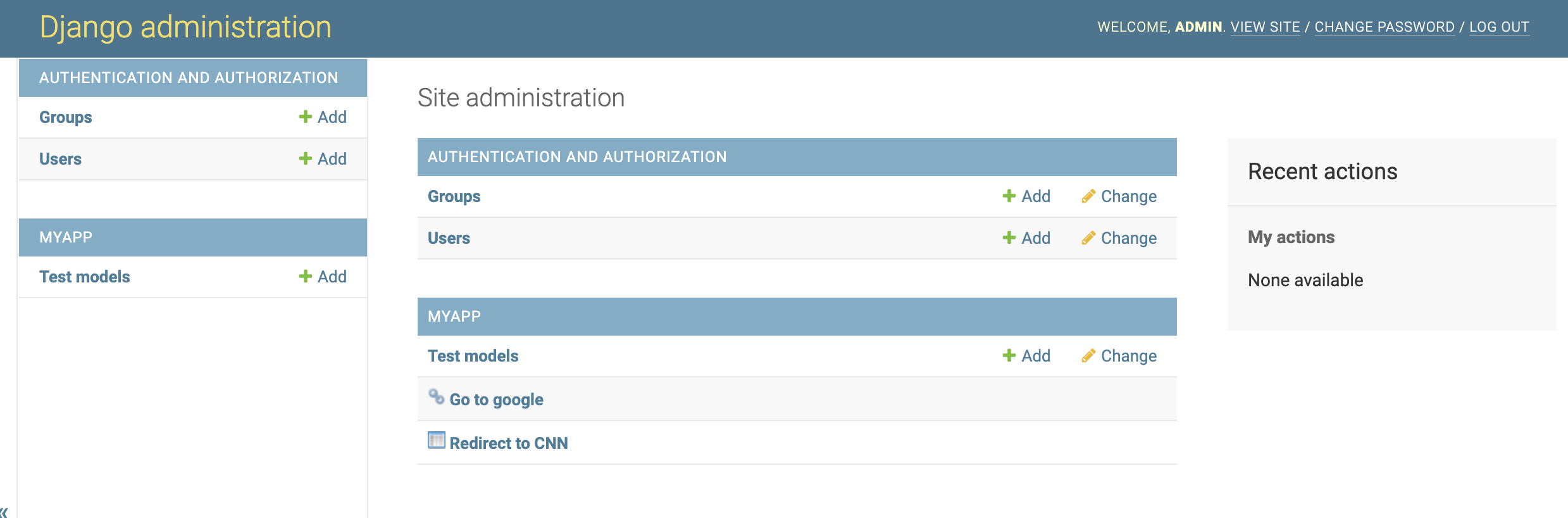
All of this magic happens in your model’s admin definition. You simply subclass your admin from AdminViews instead of the standard admin.ModelAdmin. In this example we have a custom view that does nothing but redirect the user to CNN and a direct URL link that goes to my company’s homepage:
from django.contrib import admin
from django.shortcuts import redirect

from admin_views.admin import AdminViews

from example_app.models import TestModel

class TestAdmin(AdminViews):
    admin_views = (
                    ('Redirect to CNN', 'redirect_to_cnn'),
                    ('Go to google.com', 'https:/google.com'),
        )

    def redirect_to_cnn(self, *args, **kwargs):
        return redirect('https://www.cnn.com')

admin.site.register(TestModel, TestAdmin)
These will now show up in the admin below the usual Django admin model CRUD interfaces for example_app with a couple of different icons to distinquish between custom admin views and a direct URL link.
With this third-party developers need only instruct their users to install their app and django-admin-views.
Hope you find it useful and as always feedback is certainly welcome.
Screenshot
Maintainer
Hugo Defrance defrance.hugo@gmail.com
1 maintainer

Metadata
1 maintainer
Release files for django-admin-views 1.0.3
For a detailed explanation of source distributions (sdists) and built distributions (wheels), please see the package formats documentation.
Source distribution (sdist)
| File | Size | Uploaded | Provenance | Actions |
|---|---|---|---|---|
| django-admin-views-1.0.3.tar.gz | 13.8 kB | Without provenance | Details for django-admin-views-1.0.3.tar.gz |
Built distribution (wheel)
| File | Interpreter | ABI | Platform | Actions Reset |
|---|---|---|---|---|
| django_admin_views-1.0.3-py3-none-any.whl | Python 3 | none | any | Details for django_admin_views-1.0.3-py3-none-any.whl |
Total release size: 29.5 kB
Release files / django-admin-views-1.0.3.tar.gz
| Download URL | django-admin-views-1.0.3.tar.gz |
|---|---|
| Size | 13.8 kB |
| Tags | Source |
|
SHA-256 checksum How to use checksums |
52a8a67b25c3b246dcef75175e354afb8555212c94776a87aaaae042e0db4e60
|
|
BLAKE2b-256 checksum How to use checksums |
22ddbac77daf42bb0dc493229debc4ea3bd27e822e3701619ff1afa8da48e2a8
|
| Upload date | |
|
Uploaded using Trusted Publishing? What is trusted publishing? |
No |
| Uploaded via |
twine/4.0.1 CPython/3.9.15
|
Release files / django_admin_views-1.0.3-py3-none-any.whl
| Download URL | django_admin_views-1.0.3-py3-none-any.whl |
|---|---|
| Size | 15.6 kB |
| Tags | Python 3 |
|
SHA-256 checksum How to use checksums |
84b36b62fc56c9f5e9b256320bc7bddcafc92d0616001aab67648243c3a6df26
|
|
BLAKE2b-256 checksum How to use checksums |
8c1feacbdef623e20e59beb98203b871c2bb2263787c804c75a3b2c9d81f0831
|
| Upload date | |
|
Uploaded using Trusted Publishing? What is trusted publishing? |
No |
| Uploaded via |
twine/4.0.1 CPython/3.9.15
|
Security for django-admin-views 1.0.3
Provenance
Provenance describes where a file came from. On PyPI, provenance is shared via attestations, which provide a verifiable record of the build or publishing details. View details, limitations and caveats.
No provenance found
None of the files in this release were uploaded with provenance metadata.
A note on package security
PyPI is a repository for distributing packages, not a service for auditing them. While third-party security researchers and our staff do their best to detect and remove malicious packages, PyPI cannot guarantee the quality, security or suitability of any given package.
To learn more about protecting yourself from malicious actors, visit our package security documentation.














