
What is Associations?
Associations is a small app created to help Django developers.
What does it do?
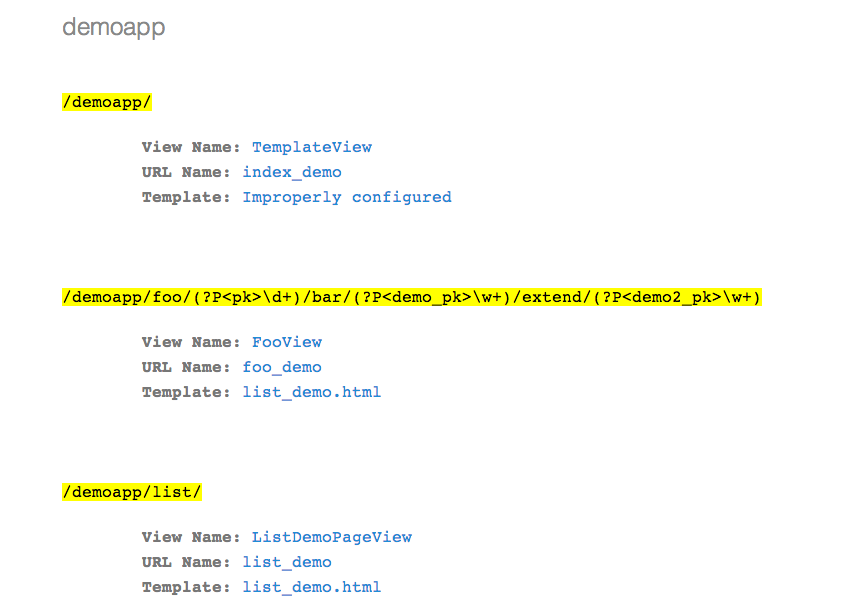
It lists urls in an app along with the names of templates, views and urls associated with it
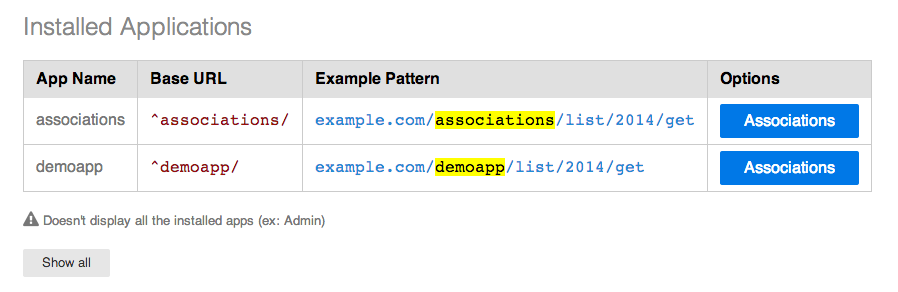
Why was it created?
- When working on a View, the common method of debugging or back tracing an issue is usually this:
Look at the URL in the browser’s address bar
Decipher the app name from the URL
Open the app project tree in your IDE (if not already open)
Open the app’s urls.py and locate the URL
Look for the corresponding view
Locate the view
Locate the template name and subsequently the template itself.
Associations on the other hand lists all of them on a single page, thereby decreasing the some times frustrating trace back.
Great, but what’s the catch?
The catch is that right now it’s shown to be compatible with Class Based Views. It may or may not work with traditional Function Based Views. Furthermore it has been tested on Django 1.4+ and Python 2.7.x. There are plans to support Python 3. Django 1.3 won’t be supported due to change in URL structures.
Like to help out?
You can find the Github repository here:
https://github.com/DarkSector/django-associations
Log issues or start developing. The documentation is currently being written.
Requirements
Currently works with Django 1.4 above and Python 2.7.x. Currently the docs and tests are being written and aren’t complete
Quick start
Add “associations” to your INSTALLED_APPS setting like this:
INSTALLED_APPS = (
    ...
    'associations',
)
Include the BASE_DIR in your project settings like this:
BASE_DIR = os.path.dirname(os.path.dirname(__file__))
If the ‘BASE_DIR’ is defined as some other variable, define BASE_DIR = <variable name>
Include the Associations URLconf in your project urls.py like this:
url(r'^associations/', include('associations.urls')),Start the development server and visit http://127.0.0.1:8000/associations/ and you’re ready to go.
1 maintainer

Metadata
1 maintainer
Release files for django-associations 0.1.7
For a detailed explanation of source distributions (sdists) and built distributions (wheels), please see the package formats documentation.
Source distributions (sdists)
| File | Size | Uploaded | Provenance | Actions |
|---|---|---|---|---|
| django-associations-0.1.7.zip | 405.8 kB | Without provenance | Details for django-associations-0.1.7.zip | |
| django-associations-0.1.7.tar.gz | 395.7 kB | Without provenance | Details for django-associations-0.1.7.tar.gz |
Release files / django-associations-0.1.7.zip
| Download URL | django-associations-0.1.7.zip |
|---|---|
| Size | 405.8 kB |
| Tags | Source |
|
SHA-256 checksum How to use checksums |
c30340fbb440b843bc522bce61598062118f607a9feb32675b32c1163b787727
|
|
BLAKE2b-256 checksum How to use checksums |
b32a34b5f918ac98f925c8d95dca241143dee1233d496d37b221657f3b1cd4e3
|
| Upload date | |
|
Uploaded using Trusted Publishing? What is trusted publishing? |
No |
Release files / django-associations-0.1.7.tar.gz
| Download URL | django-associations-0.1.7.tar.gz |
|---|---|
| Size | 395.7 kB |
| Tags | Source |
|
SHA-256 checksum How to use checksums |
02a0bff9949fc0272c3c636f94009ce8e0332c3d4adfa2d6cd0106d813300e3f
|
|
BLAKE2b-256 checksum How to use checksums |
e47871da2c8beb0571dfa83b10e71437533ea7803a832cdeedfae7b640087531
|
| Upload date | |
|
Uploaded using Trusted Publishing? What is trusted publishing? |
No |
Security for django-associations 0.1.7
Provenance
Provenance describes where a file came from. On PyPI, provenance is shared via attestations, which provide a verifiable record of the build or publishing details. View details, limitations and caveats.
No provenance found
None of the files in this release were uploaded with provenance metadata.
A note on package security
PyPI is a repository for distributing packages, not a service for auditing them. While third-party security researchers and our staff do their best to detect and remove malicious packages, PyPI cannot guarantee the quality, security or suitability of any given package.
To learn more about protecting yourself from malicious actors, visit our package security documentation.














