
Django Chatterbox: Social listening made easy


Django Chatterbox is an Apache2 Licensed Social aggregation tool written with modularity in mind.
Aggregating content from multiple social networks is not so much fun. First you have to handle OAuth, then acquiring keys, managing keys, writing api’s to get data out of each social network, and then once you have it all, each social activity looks different.
This is a pain…a huge pain.
Enter Django Chatterbox. Chatterbox handles all of the oauth, keys, job creation, api’s, response iteration, and normalizing for you. All you have to provide is a social network key/secret, and Django Chatterbox does the rest.
Installation
Install using pip…
pip install django-chatterboxAdd ‘chatterbox’ to your INSTALLED_APPS setting.
INSTALLED_APPS = (

    'chatterbox',
)
Append urls to urls.py
urlpatterns = patterns(
    (r'^chatterbox/', include('chatterbox.urls', namespace="chatterbox")),
)
EXAMPLE TIME!!
Video demo here.
or:
Go to instagram: https://instagram.com/developer/clients/manage/ and register an App
Once you have the app created, go here: /admin/chatterbox/client/add/
Fill out all Client model info using key/secret from instagram.com
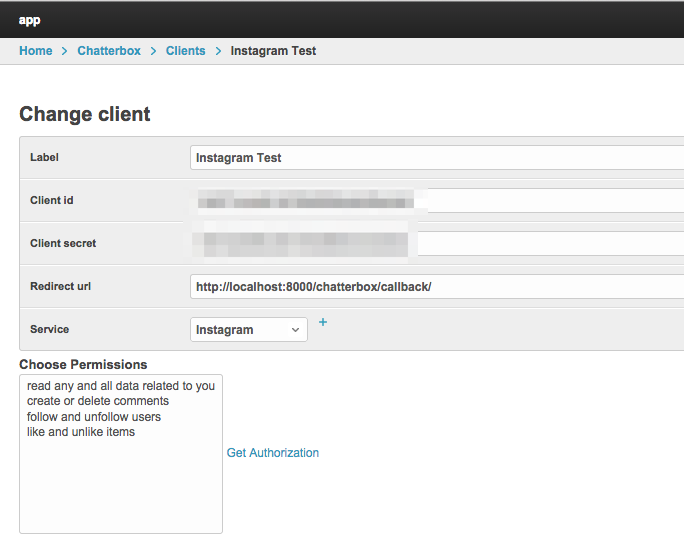
- Once the Model is created, click on it in the admin. Should look like this:
Select the permissions you require (most likely just read permissions)
Click ‘get authorization’
Follow the prompts redirecting you back to the admin
You now have a key model added to the admin
Next lets create a job, go here: /admin/chatterbox/job/add/
Select Instagram, Instagram tag search, highlight your key, add a search term
You now have everything you need to run a job. Lets execute it!
./manage.py shell
from chatterbox.models import Job
jobs = Job.objects.all()
job = jobs[0]
job.run()
# you will see...lots of stuff happen :)
How does it work?
Chatterbox comes with a few built in models and features. Here is a quick run down of what you all get…
Services
A service is basically a social network and it’s associated interactions. Chatterbox ships with 4 services out the box: Facebook, Twitter, Instagram, and YouTube. Additional services will likely be added but this is what comes for free atm.
Each service has an associated driver which is the underlying code used to interact with that social nework.
Clients
If you have ever worked with any of the social networks you know that to interact with it, you need to go grab a key/secret for that social network. Chatterbox clients are the model representation of that key and secret.
Keys
Keys are the result of a client and a user. Once a Client is created, you use that client to authenticate a user and create a key. This key has an access token attribute on it used to make outgoing requests.
Collectors
Chatterbox ships with a few built in collectors. Think of collectors as the thing that goes out, collects the social activites, and then saves them. For every social networks possible collection point, we have build out a collector. ex: i want to search instagram for all activites flagged with the hash #cheese. This would use the collector ‘Instagram Tag Search’
Jobs
A job is everything you need to go out, grab data, and bring it back. A job holds a collector, key, and any associated arguments needed to query that social network.
Activities
Activities are what is returned from each social network. It holds a normalized ‘blob’ object on it (among other things) that can be used to access all associated social response
Release History
0.0.5 (2016-01-19)
Added Tumblr support Added Twitter user search
0.0.1 (2014-01-20)
API Changes Bugfixes
1 maintainer

Metadata
1 maintainer
Release files for django-chatterbox 0.0.8
For a detailed explanation of source distributions (sdists) and built distributions (wheels), please see the package formats documentation.
Source distribution (sdist)
| File | Size | Uploaded | Provenance | |
|---|---|---|---|---|
| django-chatterbox-0.0.8.tar.gz | 739.9 kB | Without provenance | Details |
Release files / django-chatterbox-0.0.8.tar.gz
| Download URL | django-chatterbox-0.0.8.tar.gz |
|---|---|
| Size | 739.9 kB |
| Tags | Source |
|
SHA-256 checksum How to use checksums |
215cdd85ae7e8b883ef7ad0b2edda3411a9f825beaab269fe9fb94d9e161a991
|
|
BLAKE2b-256 checksum How to use checksums |
3e9e6c195a9425660ccce6f451c93fde42d519d1c73beb2d1749cb594b8522f6
|
| Upload date | |
|
Uploaded using Trusted Publishing? What is trusted publishing? |
No |
Security for django-chatterbox 0.0.8
Provenance
Provenance describes where a file came from. On PyPI, provenance is shared via attestations, which provide a verifiable record of the build or publishing details. View details, limitations and caveats.
No provenance found
None of the files in this release were uploaded with provenance metadata.
A note on package security
PyPI is a repository for distributing packages, not a service for auditing them. While third-party security researchers and our staff do their best to detect and remove malicious packages, PyPI cannot guarantee the quality, security or suitability of any given package.
To learn more about protecting yourself from malicious actors, visit our package security documentation.














