

- Version:
0.4
- Docs:
- Download:
- Source:
Change Log
- 0.4*
Django 1.9/1.10/1.11 compatibility
Cleaner error messages
Form within a form fixes
- 0.3
Django 1.6/1.7/1.8 compatibility
Python 3.4 compatibility
Form argument can now be dynamic
- 0.2
Fix Django 1.5 install issue
- 0.1.3
Fixed bug when a form’s initial value evaludated to False
pep8 related fixes
Getting Started
django-formfield is a form field that accepts a django form as its first argument, and validates as well as render’s each form field as expected. Yes a form within a form, within a dream? There are two types of fields available, FormField and ModelFormField. For ModelFormField the data is stored in json. For FormField data is simply returned as a python dictionary (form.cleaned_data)
Installation
Installation is easy using pip or easy_install.
pip install django-formfield
or
easy_install django-formfield
Add to installed apps
INSTALLED_APPS = (
    ...
    'formfield',
    ...
)
Example
from django.db import models
from django import forms

from formfield import ModelFormField

class PersonMetaForm(forms.Form):
    age = forms.IntegerField()
    sex = forms.ChoiceField(choices=((1, 'male'), (2, 'female')), required=False)


class Person(models.Model):
    name = CharField(max_length=200)

    meta_info = ModelFormField(form=PersonMetaForm)
Which will result in something like this (using the admin)
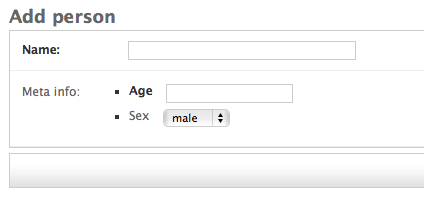
The ModelFormField is automatically set to null=True, blank=True, this is because validation is done on the inner form. As a result you will see something like the following if we hit save on the change form:
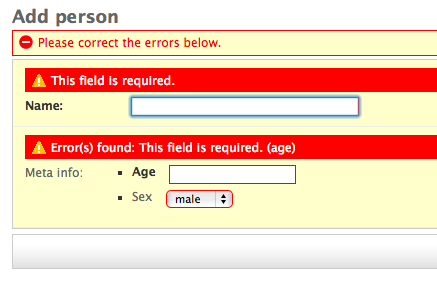
If we supply the change for valid data you should get a python dictionary when retrieving the data:
>>> person = Person.objects.get(pk=1)
>>> person.meta_info
{u'age': 12, u'sex': u'1'}
The form is the only thing forcing valid input, behind the scenes the data is being serialized into json. Therefore on the python level we can supply meta_info any valid json::
>>> from sample_app.models import Person
>>> data = {'some': 'thing', 'is': 'wrong', 'here': 'help!'}
>>> p = Person.objects.create(name="Joan", meta_info=data)
>>> p.meta_info
{'is': 'wrong', 'some': 'thing', 'here': 'help!'}


Release files for django-formfield 0.4
For a detailed explanation of source distributions (sdists) and built distributions (wheels), please see the package formats documentation.
Source distribution (sdist)
| File | Size | Uploaded | Provenance | |
|---|---|---|---|---|
| django-formfield-0.4.tar.gz | 807.2 kB | Without provenance | Details |
Release files / django-formfield-0.4.tar.gz
| Download URL | django-formfield-0.4.tar.gz |
|---|---|
| Size | 807.2 kB |
| Tags | Source |
|
SHA-256 checksum How to use checksums |
b63aa33c03e3cb1082ce74d680c440c726025bbe4e65d24c2f828645e8643fb1
|
|
BLAKE2b-256 checksum How to use checksums |
88bd99ef29f54cc4898bf53c8b30cc147c3188c05af5a02b0d10e26a51c63b96
|
| Upload date | |
|
Uploaded using Trusted Publishing? What is trusted publishing? |
No |
Security for django-formfield 0.4
Provenance
Provenance describes where a file came from. On PyPI, provenance is shared via attestations, which provide a verifiable record of the build or publishing details. View details, limitations and caveats.
No provenance found
None of the files in this release were uploaded with provenance metadata.
A note on package security
PyPI is a repository for distributing packages, not a service for auditing them. While third-party security researchers and our staff do their best to detect and remove malicious packages, PyPI cannot guarantee the quality, security or suitability of any given package.
To learn more about protecting yourself from malicious actors, visit our package security documentation.














