
This project has been archived by its maintainers, and is no longer receiving any updates.


Help Scout integration for Django.
Introduction
If you are using Help Scout to handle support tickets for your Django web application, you can use Help Scout’s custom app feature to provide additional information on the user, such as the following:
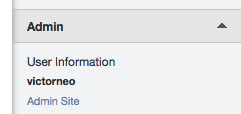
This project provides a Django app which allows you to integrate Help Scout Custom App into your Django web application and easily customize the output.
Installation
You can install this library via pip:
pip install django-helpscout
Once installed, add django_helpscout to your INSTALLED_APPS:
INSTALLED_APPS = (
    ...,
    'django_helpscout'
    ...,
)
Add Help Scout’s secret key to your settings file:
HELPSCOUT_SECRET = '<helpscout custom app secret key>'
Getting Started
A Django view is provided to make it easy for you to get started. First, add the view to your urls.py:
from django_helpscout.views import helpscout_user

urlpatterns = patterns('',
    # Your URL definitions
    url(r'^helpscout-user/$', helpscout_user),
)
Once done, deploy your web application to production and point your Help Scout Custom App URL to the url you have configured above and you should see a simple HTML output on the side bar of a support ticket with the user’s username and join date.
Customizing the HTML Output
You will want to customize the HTML output to add in additional information related to the user. You can do so by overriding the templates that are included.
In your templates folder, create the following structure:
templates/
    |- django_helpscout
             |- 404.html
             |- helpscout.html
Details on the two templates:
- 404.html
Used when a user with the given email address is not found
- helpscout.html
Used when a user is found
By overriding the library’s built-in templates, you can customize the output to suit your needs.
Further Customizations
You might want to use select_related to prefetch related models for a particular user, or you have additional data sources to query when loading a user. A helper decorator is available if you wish to use your own view.
The decorator helps you deal with verifying Help Scout’s signature when a request is made from their side. You can use the decorator in the following manner:
from django_helpscout.helpers import helpscout_request

# your view
@helpscout_request
def load_user_for_helpscout(request):
    ... code here ...
License
Copyright 2014 Victor Neo
Licensed under the Apache License, Version 2.0 (the “License”); you may not use this file except in compliance with the License. You may obtain a copy of the License at
http://www.apache.org/licenses/LICENSE-2.0
Unless required by applicable law or agreed to in writing, software distributed under the License is distributed on an “AS IS” BASIS, WITHOUT WARRANTIES OR CONDITIONS OF ANY KIND, either express or implied. See the License for the specific language governing permissions and limitations under the License.
History
0.6.3 (2015-05-21)
Added csrf_exempt decorator to helpscout_user view.
Fixed failing bytes conversion on Python < 3 in helpscout_request decorator.
0.6.2 (2014-12-04)
Updated documentation with previously missing configuration option.
0.6.1 (2014-11-20)
Fixed bug with Django’s HTTP header names (Thanks @Fizzadar!)
0.6.0 (2014-09-29)
Preliminary Python 3.4 support.
0.5.0 (2014-08-06)
PyPI release.
0.0.1 (2014-08-01)
Initial release on GitHub.
1 maintainer

Metadata
1 maintainer
Release files for django-helpscout 0.6.3
For a detailed explanation of source distributions (sdists) and built distributions (wheels), please see the package formats documentation.
Source distribution (sdist)
| File | Size | Uploaded | Provenance | Actions |
|---|---|---|---|---|
| django-helpscout-0.6.3.tar.gz | 6.6 kB | Without provenance | Details for django-helpscout-0.6.3.tar.gz |
Release files / django-helpscout-0.6.3.tar.gz
| Download URL | django-helpscout-0.6.3.tar.gz |
|---|---|
| Size | 6.6 kB |
| Tags | Source |
|
SHA-256 checksum How to use checksums |
142720188d269e021314c53348c9ac814638f4e06dae994bd15c01972050dbaf
|
|
BLAKE2b-256 checksum How to use checksums |
7c0f5e50dd6221931d569e86d9c3a597934933a96727e9520ab091dc4b68dea8
|
| Upload date | |
|
Uploaded using Trusted Publishing? What is trusted publishing? |
No |
Security for django-helpscout 0.6.3
Provenance
Provenance describes where a file came from. On PyPI, provenance is shared via attestations, which provide a verifiable record of the build or publishing details. View details, limitations and caveats.
No provenance found
None of the files in this release were uploaded with provenance metadata.
A note on package security
PyPI is a repository for distributing packages, not a service for auditing them. While third-party security researchers and our staff do their best to detect and remove malicious packages, PyPI cannot guarantee the quality, security or suitability of any given package.
To learn more about protecting yourself from malicious actors, visit our package security documentation.














