








Allow everybody to unsubscribe your messages, user accounts are not required.
Free software: MIT license
Documentation: https://django-opt-out.readthedocs.io.
Features
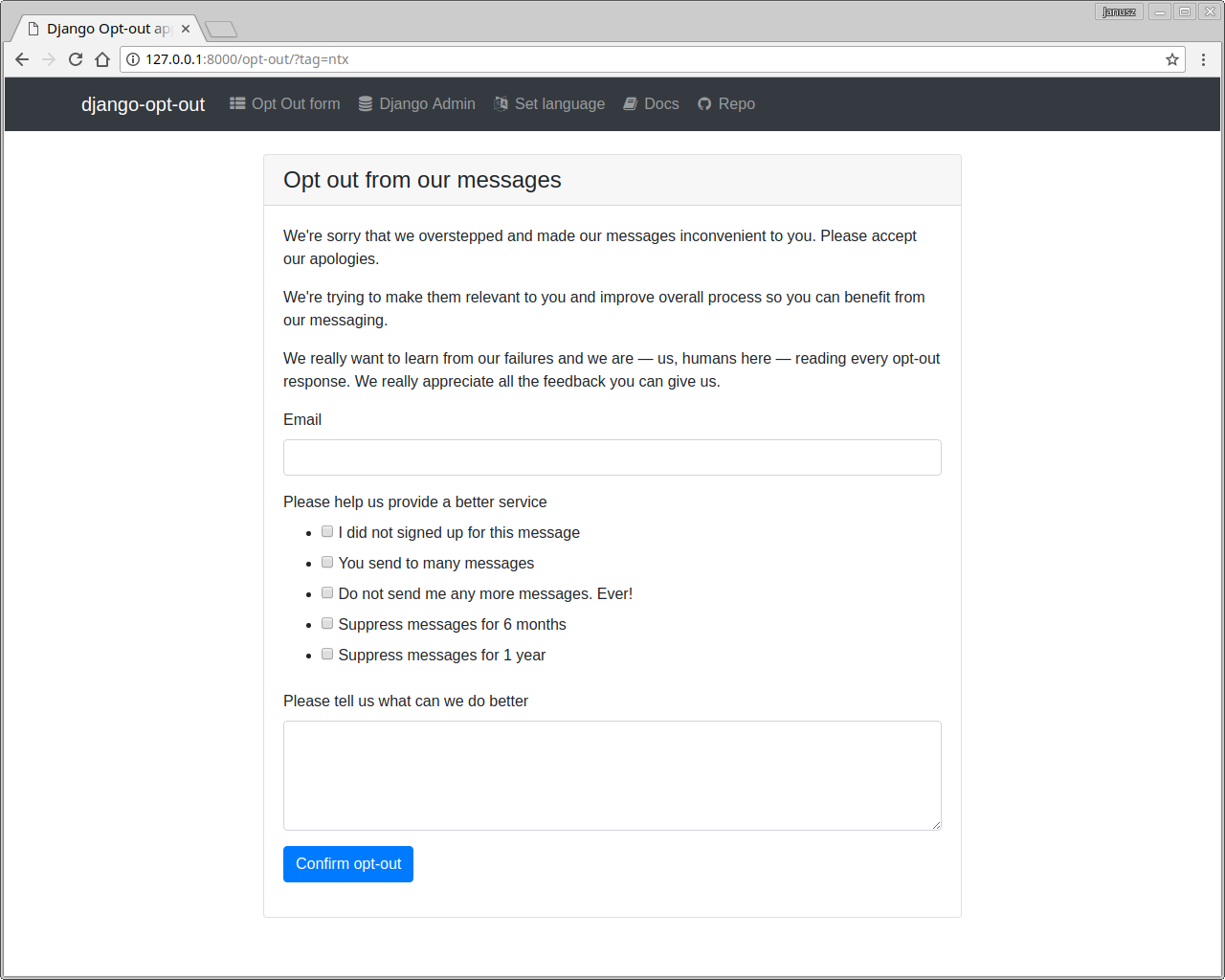
A single page form for opt-out feedback submission
Feedback options text controlled from django admin
Predefined feedback defaults available from django manage command
Feedback translations done in django admin
Feedback options selection based on tags supplied to the opt-out url
Ability to preselect a feedback option
Ability to change selected feedback options after submission
Ability to set tag:value pair on opt-out url and store them on submission with user feedback
Signal to modify opt-out form before rendering
Signal on opt-out feedback submission
Easily overridable thank you / goodbye view
Opt-out form with a easily overridable base template
Demo
To run an example project for this django reusable app, click the button below and start a demo serwer on Heroku

Quickstart
Install Django Opt-out application:
pip install django-opt-out
Add it to your INSTALLED_APPS:
INSTALLED_APPS = (
    ...
    'django_opt_out.apps.DjangoOptOutConfig',
    ...
)
Add Django Opt-out application’s URL patterns:
from django_opt_out import urls as django_opt_out_urls


urlpatterns = [
    ...
    url(r'^', include(django_opt_out_urls)),
    ...
]
Add unsubscribe links to your emails:
from django_opt_out.utils import get_opt_out_path
email='Django Opt-out <django-opt-out@niepodam.pl>'
unsubscribe = get_opt_out_path(email, 'some', 'tags', 'controlling', 'questionnaire')

# unsubscribe link will not have a domain name and scheme
# you can build prefix from request, but I prefer to set it in settings
from django.conf import settings
unsubscribe = settings.BASE_URL + unsubscribe
body = 'Hello, Regards\n\nUnsubscribe: ' + unsubscribe

from django.core import mail
message = mail.EmailMultiAlternatives(body=body, to=[email])
message.extra_headers['List-Unsubscribe'] = "<{}>".format(unsubscribe)
message.send()
Running Tests
Does the code actually work?
source <YOURVIRTUALENV>/bin/activate
(myenv) $ pip install tox
(myenv) $ tox
Credits
This package was created with Cookiecutter and the wooyek/cookiecutter-django-app project template.
History
0.1.0 (2017-11-03)
First release on PyPI.
1 maintainer

Metadata
1 maintainer
Release files for django-opt-out 0.9.6
For a detailed explanation of source distributions (sdists) and built distributions (wheels), please see the package formats documentation.
Source distribution (sdist)
| File | Size | Uploaded | Provenance | Actions |
|---|---|---|---|---|
| django-opt-out-0.9.6.tar.gz | 197.6 kB | Without provenance | Details for django-opt-out-0.9.6.tar.gz |
Built distribution (wheel)
| File | Interpreter | ABI | Platform | Actions Reset |
|---|---|---|---|---|
| django_opt_out-0.9.6-py2.py3-none-any.whl | Python 3, Python 2 | none | any | Details for django_opt_out-0.9.6-py2.py3-none-any.whl |
Total release size: 231.3 kB
Release files / django-opt-out-0.9.6.tar.gz
| Download URL | django-opt-out-0.9.6.tar.gz |
|---|---|
| Size | 197.6 kB |
| Tags | Source |
|
SHA-256 checksum How to use checksums |
e18cb74549f26f48edcdfce426dde5dd07d70e916295a61280fdb57726fc4e21
|
|
BLAKE2b-256 checksum How to use checksums |
750ce106e2749e9fe6dd789e47d072f3540bf54e15582327bf1d47b5e1119fee
|
| Upload date | |
|
Uploaded using Trusted Publishing? What is trusted publishing? |
No |
| Uploaded via |
Python-urllib/3.6
|
Release files / django_opt_out-0.9.6-py2.py3-none-any.whl
| Download URL | django_opt_out-0.9.6-py2.py3-none-any.whl |
|---|---|
| Size | 33.7 kB |
| Tags | Python 2 Python 3 |
|
SHA-256 checksum How to use checksums |
f58230c7c6ecc46e8137c730c92b03dd64ed7f35411e412f467e81d6f11911df
|
|
BLAKE2b-256 checksum How to use checksums |
2b22e9fb0489a2c44ae0191a0845916eceb0de123c0dc99f7ddbeb4328849885
|
| Upload date | |
|
Uploaded using Trusted Publishing? What is trusted publishing? |
No |
| Uploaded via |
Python-urllib/3.6
|
Security for django-opt-out 0.9.6
Provenance
Provenance describes where a file came from. On PyPI, provenance is shared via attestations, which provide a verifiable record of the build or publishing details. View details, limitations and caveats.
No provenance found
None of the files in this release were uploaded with provenance metadata.
A note on package security
PyPI is a repository for distributing packages, not a service for auditing them. While third-party security researchers and our staff do their best to detect and remove malicious packages, PyPI cannot guarantee the quality, security or suitability of any given package.
To learn more about protecting yourself from malicious actors, visit our package security documentation.














