


django-staff-toolbar
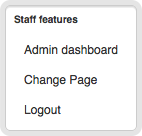
Displaying staff-only controls at a webpage.
Features:
Linking to the admin page of the current object.
Full configuration of the displayed toolbar items.
API for adding custom menu items.
Installation
First install the module, preferably in a virtual environment:
pip install django-staff-toolbarConfiguration
Add the application to settings.py:
INSTALLED_APPS += (
    'staff_toolbar',
)
Make sure the django.core.context_processors.request is included in TEMPLATE_CONTEXT_PROCESSORS.
Add the HTML widget to the template:
{% load staff_toolbar_tags %}

{% staff_toolbar %}
Make sure the layout is loaded in the template:
<link rel="stylesheet" type="text/css" href="{{ STATIC_URL }}staff_toolbar/staff_toolbar.css" />Layout
By default, a simple layout is included. You can change this layout to your own liking.
The source SASS file is included, making it easier to integrate this into your project stylesheets when needed.
Customizing the admin URL
The admin URL is auto-detected using:
The object variable in the template.
The view.object variable in the template.
In some cases, this is not sufficient. When the auto-detected “Change object” link does not point to the right page, this can be resolved using two methods:
Using the view
When your class-based-view implements staff_toolbar.views.StaffUrlMixin, that information will be used to render the proper “Change object” link.
This requires Django 1.5, which exports the view variable to the template.
Using the template
In the template, you can include:
{% set_staff_object page %}When needed, the URL can also be set:
{% set_staff_url %}{% url 'dashboard:catalogue-product' object.id %}{% end_set_staff_url %}Caveats
For HTTPS sites with SESSION_COOKIE_SECURE = True the toolbar obviously won’t show up in the standard pages that are served by HTTP.
Either display all pages on HTTPS (which is the Right Way™ after all), or please provide a good pull request that solves this nicely for mixed sites.
Contributing
This module is designed to be generic, and easy to plug into your site. Pull requests and improvements are welcome!
If you have any other valuable contribution, suggestion or idea, please let us know as well!
1 maintainer

Metadata
1 maintainer
Release files for django-staff-toolbar 2.0
For a detailed explanation of source distributions (sdists) and built distributions (wheels), please see the package formats documentation.
Source distribution (sdist)
| File | Size | Uploaded | Provenance | Actions |
|---|---|---|---|---|
| django-staff-toolbar-2.0.tar.gz | 14.8 kB | Without provenance | Details for django-staff-toolbar-2.0.tar.gz |
Built distribution (wheel)
| File | Interpreter | ABI | Platform | Actions Reset |
|---|---|---|---|---|
| django_staff_toolbar-2.0-py3-none-any.whl | Python 3 | none | any | Details for django_staff_toolbar-2.0-py3-none-any.whl |
Total release size: 31.8 kB
Release files / django-staff-toolbar-2.0.tar.gz
| Download URL | django-staff-toolbar-2.0.tar.gz |
|---|---|
| Size | 14.8 kB |
| Tags | Source |
|
SHA-256 checksum How to use checksums |
99fa1b031f79d86adcd9809f42321ef057e16cc7ea73338879b6d29f70eacb8a
|
|
BLAKE2b-256 checksum How to use checksums |
860c9eeabe6ca9c8f489963ad9e95fa9d63b1cef0fedde490fbf1f480e07f97b
|
| Upload date | |
|
Uploaded using Trusted Publishing? What is trusted publishing? |
No |
| Uploaded via |
twine/3.4.2 importlib_metadata/4.8.1 pkginfo/1.7.1 requests/2.26.0 requests-toolbelt/0.9.1 tqdm/4.62.3 CPython/3.9.6
|
Release files / django_staff_toolbar-2.0-py3-none-any.whl
| Download URL | django_staff_toolbar-2.0-py3-none-any.whl |
|---|---|
| Size | 17.0 kB |
| Tags | Python 3 |
|
SHA-256 checksum How to use checksums |
91783776f11ac2f41eb982fa9503b3a7a3ff97a44854d4ece6dc006e8d41cb35
|
|
BLAKE2b-256 checksum How to use checksums |
43220afd9988f3e0f53f03f285e7b837d07f3a01062f6bbca52055d2311b76ff
|
| Upload date | |
|
Uploaded using Trusted Publishing? What is trusted publishing? |
No |
| Uploaded via |
twine/3.4.2 importlib_metadata/4.8.1 pkginfo/1.7.1 requests/2.26.0 requests-toolbelt/0.9.1 tqdm/4.62.3 CPython/3.9.6
|
Security for django-staff-toolbar 2.0
Provenance
Provenance describes where a file came from. On PyPI, provenance is shared via attestations, which provide a verifiable record of the build or publishing details. View details, limitations and caveats.
No provenance found
None of the files in this release were uploaded with provenance metadata.
A note on package security
PyPI is a repository for distributing packages, not a service for auditing them. While third-party security researchers and our staff do their best to detect and remove malicious packages, PyPI cannot guarantee the quality, security or suitability of any given package.
To learn more about protecting yourself from malicious actors, visit our package security documentation.














