
Display django permissions in a user friendly, translatable and customizable widget .
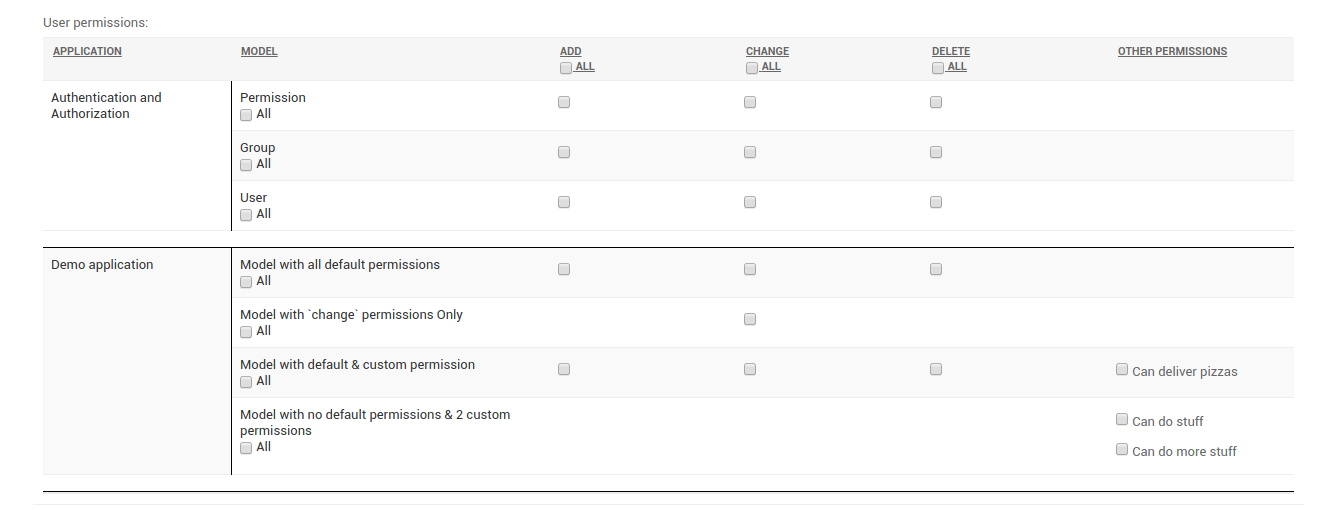
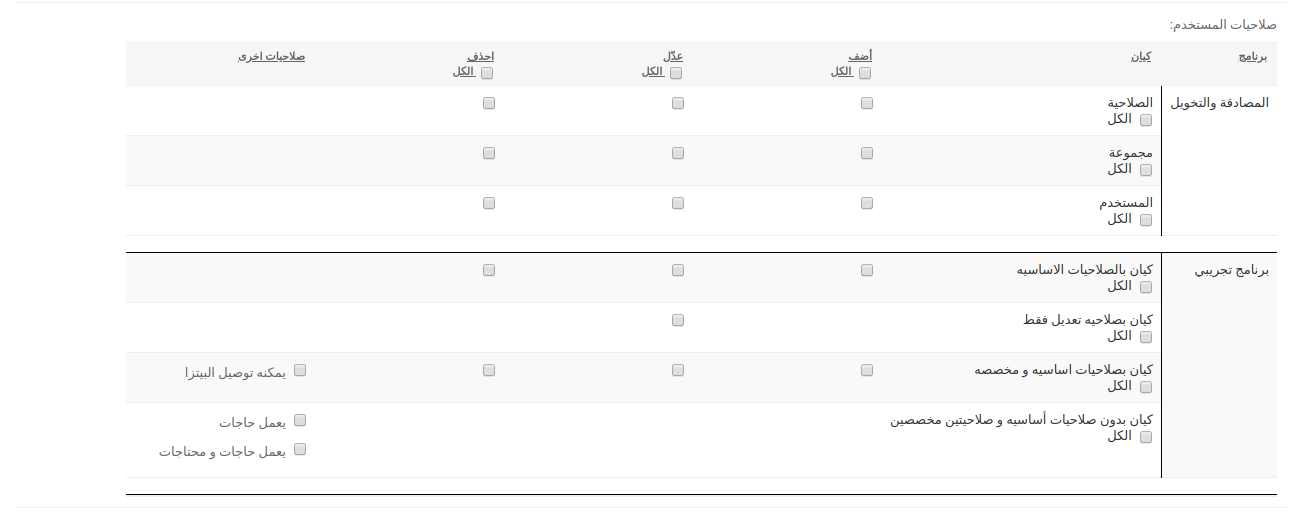
RTL and localized
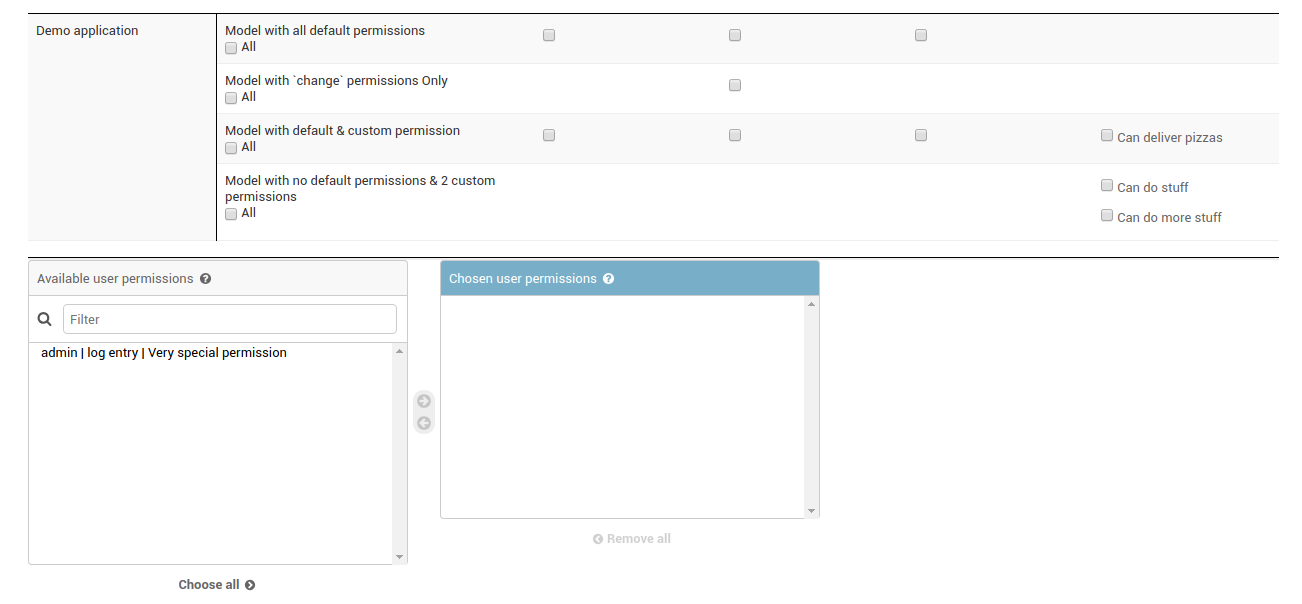
With Custom permission behaviour
Version
2.9.1 (June 7 2022)
Features:
Permissions and their relevant app and models names are displayed in the active language.
Permissions are displayed in a table that contain the default model permissions plus any custom permissions.
Supports view permission (started with Django 2).
Customize which apps, models to show in the permissions table. You can also set a exclude function for high-end customization.
RTL ready, Bootstrap ready.
Easy customize-able look.
Python 2.7, 3.6, 3.7, 3.8, 3.9 , 3.10. Django 1.11, 2.1, 2.2, 3.0, 3.1, 3.2 , 4.0, 4.1, 4.2
Default FilteredSelectMultiple widget will appear only if you have custom permissions that are not model related (ie directly created by code or hand)
Installation
You can install django-tabular-permissions via Pypi:
pip install django-tabular-permissions
and add “tabular_permissions” to your INSTALLED_APPS setting (at any place after django.contrib.auth)
INSTALLED_APPS = [
    'django.contrib.auth',
     ....
    'tabular_permissions',
]
Finally, execute:
python manage.py collectstatic
then navigate to User and/or Group change form to see tabular_permissions in action.
Configuration:
Tabular permissions possible configurations and their default:
TABULAR_PERMISSIONS_CONFIG = {
    'template': 'tabular_permissions/admin/tabular_permissions.html',
    'exclude': {
        'override': False,
        'apps': [],
        'models': [],
        'function':'tabular_permissions.helpers.dummy_permissions_exclude'
    },
    'auto_implement': True,
    'use_for_concrete': False,
    'custom_permission_translation': 'tabular_permissions.helpers.custom_permissions_translator',
    'apps_customization_func': 'tabular_permissions.helpers.apps_customization_func',
    'custom_permissions_customization_func': 'tabular_permissions.helpers.custom_permissions_customization_func',
}
- template
the template which contains the permissions table, you can always customize this template by extending or overriding. Notice that there is a style block which you can override to easily edit the css.
- exclude
Control which apps, models to show in the permissions table.
By default tabular_permissions exclude sessions , contenttypes and admin apps from showing their models in the permissions table. If you want to show them you can switch override to False.
apps & models lists would contain the names of the apps and models you wish to exclude.
function is a dotted path of a custom function which receive the model as a parameter to decide either to exclude it or not, default to a dummy function that always return False (ie do not exclude)
- auto_implement
By default, just by including tabular_permissions in your installed_apps, the django.contrib.admin.UserAdmin (and GroupAdmin) are “patched” to include the tabular_permissions widget. If you have a custom UserAdmin, then set this option to False and make sure you either:
Inherit from tabular_permissions.admin.TabularPermissionsUserAdmin and tabular_permissions.admin.TabularPermissionsGroupAdmin for User & Group ModelAdmin.
Or for a more direct and compact way, inherit your ModelAdmin from tabular_permissions.admin.UserTabularPermissionsMixin and tabular_permissions.admin.GroupTabularPermissionsMixin (comes before admin.ModelAdmin in the mro),
Set the user_permissions widget to tabular_permissions.widgets.TabularPermissionsWidget and remember to send a 3rd argument ‘permissions’ for Group Model Admin. See tabular_permissions.admin for information.
- use_for_concrete
Default: False (new in version 2.8)
There was an inconsistency with proxy models permissions (Django ticket 11154) which got fixed in Django 2.1 In case you’re on an django <2.1 and you have proxy models and you created their permissions by hand (via this gist maybe), then turn off this option in order to correctly assign your newly created permissions. For django > 2.1, leave it as is you should be good.
- custom_permission_translation
A dotted path function to translate the custom permission. This function gets passed the permissions codename, verbose_name and its relevant content_type_id. The function will try to translate the permission verbose_name.
- apps_customization_func
A dotted path function to control the whole permissions objects passed to the widget. Sometimes you use custom menu where apps and models are ordered in a more “user friendly” manner and not necessarily in the “actual programmatic” apps & models order. You can use this option to get a hold of the whole ordered dict and shuffle its content around moving models from one app to the other and do all kind of crazy stuff to get just the right table of permissions.
- custom_permissions_customization_func
A dotted path function to control the “extra” permissions which will be displayed on the default django widget. Suppose a model is removed, or an app is commented out of INSTALLED_APPS; its permissions are still in the permissions table, and it will be picked up. Use this function to manipulate and order those permissions and return them . The permissions are passed a list of tuples , like this [(perm_id, perm_name), (perm_id, perm_name), ...]
JavaScript:
Located at ‘static/tabular_permissions/tabular_permissions.js’, it have 2 responsibilities:
Upon form submit, the checked permissions in the table are dynamically appended to the form default permission input so the backend can carry on its functionality normally and correctly.
Add handlers for column and row select-all checkboxes.
Compatibility:
Current version support from Python 2.7 and up to Python 3.10, and Django from 1.11 to 4.1 For Django < 1.11, use django-tabular-permissions 1.0.9.
Demo:
To run the demo project in the repo on your local you need
Clone the repo;
Create a virtualenv
pip install django-tabular-permissions
python manage.py migrate
python manage.py runserver
Tests
To run the tests, you need to install the test requirements:
cd tests
pip install -r requirements.txt
Then run:
python runtests.py
With Coverage
coverage run runtests.py
coverage html
Cross Reference
If you like this package, chances are you may like those packages too!
Django Slick Reporting Powerful and Efficient reporting engine with Charting capabilities.
Django Ra ERP Framework A framework to build business solutions with ease.
1 maintainer

Metadata
1 maintainer
Release files for django-tabular-permissions 2.9.3
For a detailed explanation of source distributions (sdists) and built distributions (wheels), please see the package formats documentation.
Source distribution (sdist)
| File | Size | Uploaded | Provenance | |
|---|---|---|---|---|
| django-tabular-permissions-2.9.3.tar.gz | 12.1 kB | Without provenance | Details |
Release files / django-tabular-permissions-2.9.3.tar.gz
| Download URL | django-tabular-permissions-2.9.3.tar.gz |
|---|---|
| Size | 12.1 kB |
| Tags | Source |
|
SHA-256 checksum How to use checksums |
71e953716c807467a38cf834cbf92781a1e236095dfdbe6458ed090a53285012
|
|
BLAKE2b-256 checksum How to use checksums |
4067385987d9d9b3d17bfd52ccba7cc2ba12cfe6af55d0c2990826ef4538db04
|
| Upload date | |
|
Uploaded using Trusted Publishing? What is trusted publishing? |
No |
| Uploaded via |
twine/5.0.0 CPython/3.10.12
|
Security for django-tabular-permissions 2.9.3
Provenance
Provenance describes where a file came from. On PyPI, provenance is shared via attestations, which provide a verifiable record of the build or publishing details. View details, limitations and caveats.
No provenance found
None of the files in this release were uploaded with provenance metadata.
A note on package security
PyPI is a repository for distributing packages, not a service for auditing them. While third-party security researchers and our staff do their best to detect and remove malicious packages, PyPI cannot guarantee the quality, security or suitability of any given package.














