
Compatibility
- Django 1.8+
- Python 3.x +
- Python 2.x +
- Support OS : Ubuntu (Debian Derivatives)
- Centos (not yet)
You should check this package.
Installations
sudo apt-get install python-pip
sudo apt-get install python3-pip
sudo apt-get install virtualenv
Package
pip install djeasy
#or
pip3 install djeasy
Configuration
This is important this project. Because your project doesn't match this directory doesn't work.
- You must add requirements.txt
# Example Project ;
DjangoBlog
├── DjangoBlog
│   ├── __init__.py
│   ├── settings.py
│   └── urls.py
│   └── wsgi.py
├── Blog
│    ├── __init__.py
│    └── admin.py
│    └── apps.py
│    └── tests.py
│    └── views.py
requirements.txt ---> Add!!
Example requirements.txt : https://goo.gl/0Y9yCB
-
Do not forget to add the requirements.txt file.
-
Django Settings.py ALLOWED_HOSTS = [] server ip or domain add.
DjEasy
djeasy
Output :
--create                      Create a new site.
--nginx                       Nginx restart
Site Publishing Steps
- You must create virtualenv for your project and this package.
- NOT : You should know virtualenv name to use djeasy.
You can follow this;
cd /home/ # as you wish. My recommended in your /home/ directory.

virtualenv -p python3 DjangoEnv # example name : DjangoEnv
- Upload or clone your project in server directory like /home/
Example :
cd /home/
git clone https://github.com/AliYmn/aliyaman.org
mv aliyaman.org DjangoBlog # to change name
- Let's run the package.
We'll finish the process in four steps.
djeasy --create
- You can give any name you want for nginx and gunicorn name. But you should don't keep in mind names, because you'll use this for restart nginx and gunicorn.
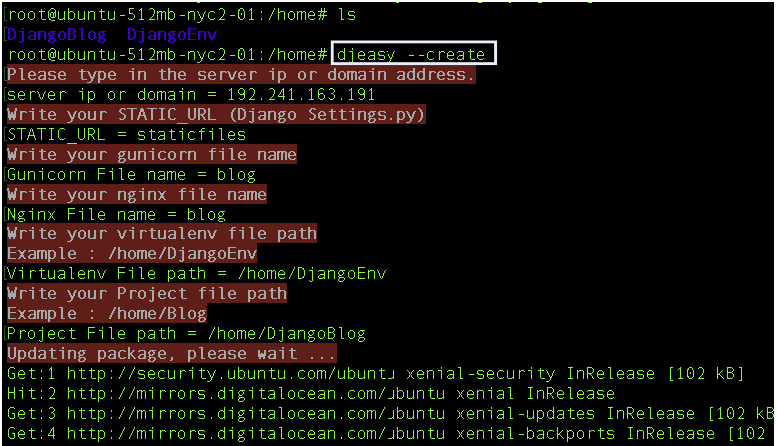
NOT : You can write multiple site. For example, example1.com example2.com
Example;
server ip or domain = 192.241.163.191 example.com blog.example.com
- Restart the server
Commands used ;
--nginx                        Nginx restart
gunicorn_name --gunicorn       Gunicorn restart
Example;
djeasy --nginx
djeasy DjangoBlog --gunicorn
Output;

Process completed successfully.
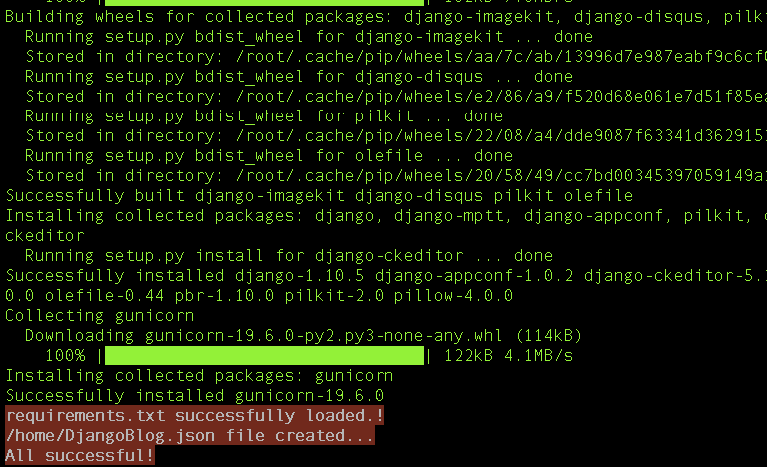
NOT : The Json file is saved in the home directory, please do not delete it.
1 maintainer

Metadata
1 maintainer
Release files for djeasy 2.0.3
For a detailed explanation of source distributions (sdists) and built distributions (wheels), please see the package formats documentation.
Source distribution (sdist)
| File | Size | Uploaded | Provenance | |
|---|---|---|---|---|
| djeasy-2.0.3.tar.gz | 8.2 kB | Without provenance | Details |
Release files / djeasy-2.0.3.tar.gz
| Download URL | djeasy-2.0.3.tar.gz |
|---|---|
| Size | 8.2 kB |
| Tags | Source |
|
SHA-256 checksum How to use checksums |
303bd4dbbddf83b25c39cea533f93a64145245914474bcced29b7964ec5a4818
|
|
BLAKE2b-256 checksum How to use checksums |
62149de114726e7bf51b3b2828c5bd245db1c6c4214cbe65e621260f8a66d991
|
| Upload date | |
|
Uploaded using Trusted Publishing? What is trusted publishing? |
No |
| Uploaded via |
twine/4.0.1 CPython/3.8.13
|
Security for djeasy 2.0.3
Provenance
Provenance describes where a file came from. On PyPI, provenance is shared via attestations, which provide a verifiable record of the build or publishing details. View details, limitations and caveats.
No provenance found
None of the files in this release were uploaded with provenance metadata.
A note on package security
PyPI is a repository for distributing packages, not a service for auditing them. While third-party security researchers and our staff do their best to detect and remove malicious packages, PyPI cannot guarantee the quality, security or suitability of any given package.














