
drawnmr
What is drawnmr?
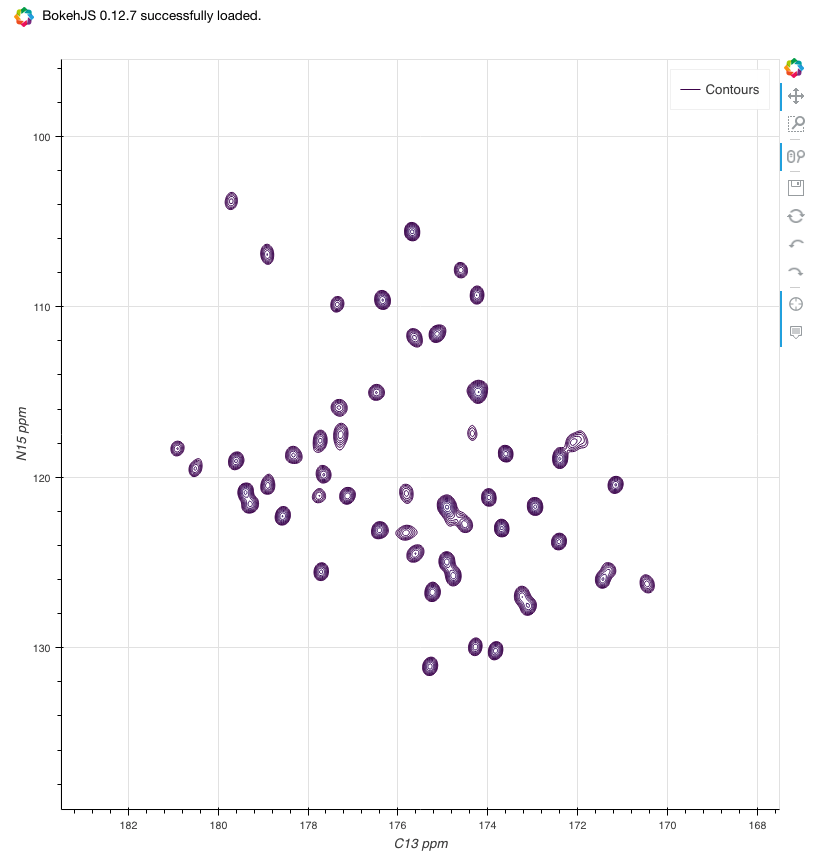
drawnmr is a module for viewing NMR data in Python. When used with the nmrglue and bokeh packages, drawnmr provides functions to view and interact with NMR data.
drawnmr is a wrapper around nmrglue capabilities and provide helper functions to show the data in bokeh, which is an interactive visualisation library.
The main purpose is to show NMR data in a Jupyter Notebook. If a Jupyter Notebook installation is not running, bokeh allow the output to be saved to static HTML files.
nmrglue is used for processing nmrdata, and bokeh is used for showing and interacting. The function get_contour_widget() create ipywidgets to easily control contour levels. The function get_peakpick() calls nmrglue peakpick.pick() to find peaks, convert from data point to ppm coordinates, store in a pandas dataframe for easy inspection and add the peaks to the bokeh plot.
Important links
Source code: https://github.com/tlinnet/drawnmr
PyPI package: https://pypi.python.org/pypi/drawnmr
Link to nmrglue: https://www.nmrglue.com and https://github.com/jjhelmus/nmrglue
Link to bokeh: https://bokeh.pydata.org and https://github.com/bokeh/bokeh
See examples
Use nbviewer.jupyter.org to:
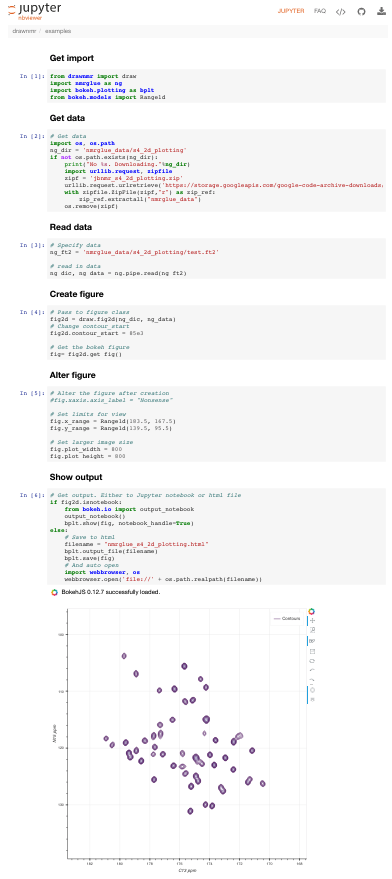
See default Notebook 15N/13C 2D contour: nmrglue_s4_2d_plotting.ipynb
See how to use widgets to alter contour levels: contour_widget.ipynb
See how to use nmrglue peak pick, print table and show: contour_find_peaks.ipynb
Launch interactive Jupyter Notebook mybinder.org to try examples:

How to install?
If using conda, these steps will install an environment
# With pip from https://pypi.python.org/pypi/drawnmr
pip install drawnmr
Developer install for local conda environment:
# Create environment
conda env create -f environment.yml

# Activate environment
conda env list
source activate drawnmr

# Enable ipywidgets
jupyter nbextension list
jupyter nbextension enable --py widgetsnbextension --sys-prefix

# Start jupyter
jupyter notebook
Or manual install in root environment:
# Manually install package
python setup.py install --force

#  Manually uninstall
python setup.py install --record files.txt
PACK=`dirname $(head -n 1 files.txt)`
rm -rf $PACK
#cat files.txt | xargs rm -rf
Developer
Guide for upload: http://peterdowns.com/posts/first-time-with-pypi.html
Updated info: https://packaging.python.org/guides/migrating-to-pypi-org/#uploading
PyPI test account: http://testpypi.python.org/pypi?%3Aaction=register_form
PyPI Live account: http://pypi.python.org/pypi?%3Aaction=register_form
# Modify version in: drawnmr/__init__.py

# Create tag
VERS=`python -c "from drawnmr import __version__; print(__version__)"`
# Adds a tag so that we can put this on PyPI
git tag $VERS -m ""
git push --tags origin master

# Upload your package to PyPI Test
python setup.py sdist upload -r pypitest
open https://testpypi.python.org/pypi/drawnmr

# Upload to PyPI Live
# Once you've successfully uploaded to PyPI Test, perform the same steps but point to the live PyPI server instead.
python setup.py sdist upload -r pypi
open https://pypi.python.org/pypi/drawnmr1 maintainer

Metadata
1 maintainer
Release files for drawnmr 0.24
For a detailed explanation of source distributions (sdists) and built distributions (wheels), please see the package formats documentation.
Source distribution (sdist)
| File | Size | Uploaded | Provenance | Actions |
|---|---|---|---|---|
| drawnmr-0.24.tar.gz | 18.4 kB | Without provenance | Details for drawnmr-0.24.tar.gz |
Release files / drawnmr-0.24.tar.gz
| Download URL | drawnmr-0.24.tar.gz |
|---|---|
| Size | 18.4 kB |
| Tags | Source |
|
SHA-256 checksum How to use checksums |
4bdac558de8992fad07339a360aba3e6b9e731ed071855539f837e2634b9b7ce
|
|
BLAKE2b-256 checksum How to use checksums |
f0f3ca6b83250097819f23a8d3b1d1e19bf6f795cc6f0c548abf1ff65b98a097
|
| Upload date | |
|
Uploaded using Trusted Publishing? What is trusted publishing? |
No |
Security for drawnmr 0.24
Provenance
Provenance describes where a file came from. On PyPI, provenance is shared via attestations, which provide a verifiable record of the build or publishing details. View details, limitations and caveats.
No provenance found
None of the files in this release were uploaded with provenance metadata.
A note on package security
PyPI is a repository for distributing packages, not a service for auditing them. While third-party security researchers and our staff do their best to detect and remove malicious packages, PyPI cannot guarantee the quality, security or suitability of any given package.
To learn more about protecting yourself from malicious actors, visit our package security documentation.














