
1 file was added to this release more than 14 days after its initial publication. Inspect the release files before installing.
Overview
Eye provides a browser-based UI to browse the contents of a ZODB database.
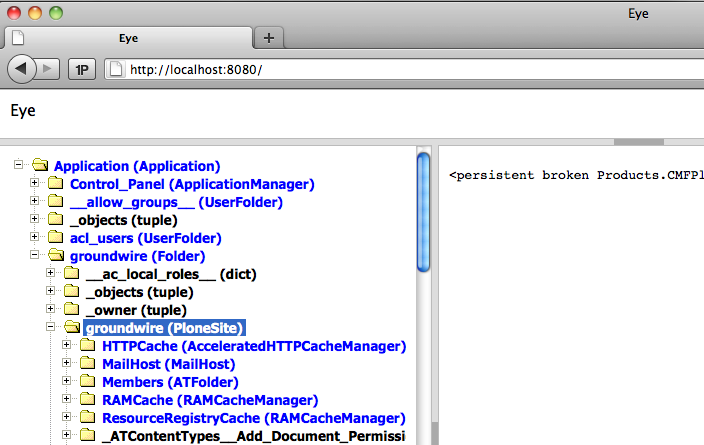
It can browse “broken” ZODB objects, so you don’t have to have your application code present in the Python environment to use the tool.
It can also be used as a generic Python object browser.
Installation
At this point Eye has been tested on Python 2.6.
Eye has a few dependencies. Therefore it’s recommended to install it in a virtualenv or buildout to keep it isolated from other software on your system.
Assuming you have virtualenv installed, the following commands will install Eye:
$ virtualenv --no-site-packages eye
$ cd eye
$ bin/pip install eye
This creates a new virtualenv in the eye directory, and installs the eye console script into the bin subdirectory.
Basic usage
Inspect a ZODB filestorage
$ bin/eye [path to Data.fs]
Then open your browser to http://localhost:8080/
Persistent objects are shown in blue; other objects included in the pickles of persistent objects are shown in black.
Inspect an arbitrary object
>>> from datetime import datetime
>>> foo = datetime.now()
>>> import eye; eye.eye(foo)
Similar tools
zope2.zodbbrowser: Runs in Zope 2; provides a bit more app-specific info.
zodbbrowser: Based on the Zope 3.4.0 KGS; displays historical object revisions.
z3c.zodbbrowser: An apparently unfinished GSOC project; based on wxPython.
Credits
Thanks to:
Roberto Allende and menttes. The initial inspiration and code is from their zope2.zodbbrowser.
Jim Fulton for creating the ZODB.
The creators of the WSGI tools used by Eye.
The creators of the JQuery, JQuery UI, and Dynatree libraries.
Elizabeth Leddy
Hanno Schlichting
Changelog
1.0 - 2011-11-05
Only serve on local network interface. [davisagli]
Remove non-functional paste.app_factory entry point. [davisagli]
Do our own traversal and rendering rather than depending on Pyramid. [davisagli]
Provide better representation of persistent BTree structures. [hannosch]
1.0b2 - 2011-03-19
Work around issue with traversing objects with slashes in their key. [davisagli]
Handle case where objects providing interfaces not present in the Python environment can’t be unpickled even into Broken objects. [davisagli]
Cast non-string dict keys into strings for the sake of traversal. [davisagli]
Handle case where inspect.getmembers hits an AttributeError. [davisagli]
Handle case where ZODB state is not a mapping. [davisagli]
Make it possible to browse ZODB BTrees (as long as they’re not too big, anyway). [davisagli]
1.0b1 - 2011-03-19
Initial release. [davisagli]
1 maintainer

Metadata
1 maintainer
Release files for eye 1.0
For a detailed explanation of source distributions (sdists) and built distributions (wheels), please see the package formats documentation.
File added late
1 file was uploaded more than 14 days after the first file in this release.
While project maintainers occasionally add legitimate files to an existing release, late additions can also indicate a security compromise.
We recommend inspecting the release files before installing.
Source distribution (sdist)
| File | Size | Uploaded | Provenance | |
|---|---|---|---|---|
| eye-1.0.zip | 216.7 kB | Without provenance | Details |
Release files / eye-1.0.zip
File added late
This file was uploaded more than 14 days after the first file in this release.
While project maintainers occasionally add legitimate files to an existing release, late additions can also indicate a security compromise.
We recommend inspecting the release file before installing.
| Download URL | eye-1.0.zip |
|---|---|
| Size | 216.7 kB |
| Tags | Source |
|
SHA-256 checksum How to use checksums |
1ca76b3da69d45dd7a78b55e77bffb7cb93e507de90667ffc781f4aca2c14da9
|
|
BLAKE2b-256 checksum How to use checksums |
498960990af1bc2a279a5a3ed9d6beaab29e13d52c9d805bf5ef86b03937b93b
|
| Upload date | |
|
Uploaded using Trusted Publishing? What is trusted publishing? |
No |
Security for eye 1.0
Upload timing
File added late
1 file was uploaded more than 14 days after the first file in this release.
While project maintainers occasionally add legitimate files to an existing release, late additions can also indicate a security compromise.
Provenance
Provenance describes where a file came from. On PyPI, provenance is shared via attestations, which provide a verifiable record of the build or publishing details. View details, limitations and caveats.
No provenance found
None of the files in this release were uploaded with provenance metadata.
A note on package security
PyPI is a repository for distributing packages, not a service for auditing them. While third-party security researchers and our staff do their best to detect and remove malicious packages, PyPI cannot guarantee the quality, security or suitability of any given package.














