
Git Browse






Open git repositories, commits, directories, and files in the browser. See also, git-reviewers.
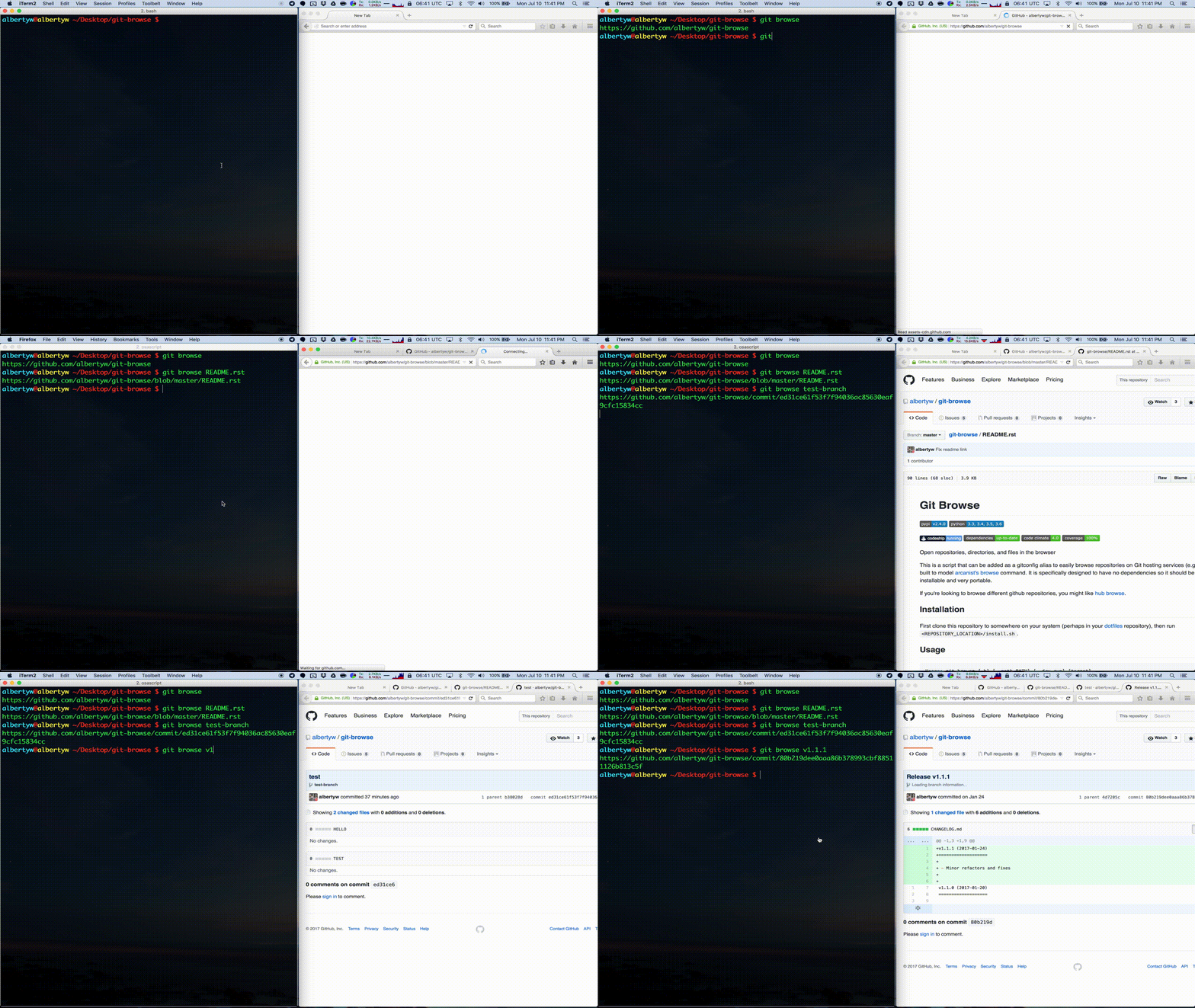
This script can be added as a gitconfig alias to easily browse repositories on Git hosting services (e.g. github). It is built to model arcanist's browse command. It is specifically designed to have no dependencies so it should be easily installable and very portable.
Git Browse supports opening git repositories, commits, directories, and files:
Installation
HomeBrew (preferred for MacOS)
If you use Homebrew, you can install git-browse through the homebrew-albertyw tap:
brew install albertyw/albertyw/git-browse
Manual
If you don't use Homebrew, first clone this repository to somewhere on
your system (perhaps in your dotfiles repository), then run
<REPOSITORY_LOCATION>/install.sh.
Usage
$ git browse -h
'browse' is aliased to '!~/.dotfiles/scripts/git/git-browse/git_browse/browse.py --path=${GIT_PREFIX:-./}'
usage: browse.py [-h] [--path PATH] [-d] [-c] [-s] [-g] [-v] [target]

Open repositories, directories, and files in the browser. https://github.com/albertyw/git-browse

positional arguments:
  target             file, directory, git hash, or git branch you wish to browse

optional arguments:
  -h, --help         show this help message and exit
  --path PATH        relative path to the current git repository
  -d, --dry-run      Do not open the url in the brower, and only print to stdout
  -c, --copy         Copy url to clipboard, if available
  -s, --sourcegraph  Open objects in sourcegraph
  -g, --godocs       Open objects in godocs
  -v, --version      show program's version number and exit
Examples
| Command | Opens |
|---|---|
git browse |
https://github.com/albertyw/git-browse |
git browse README.md |
https://github.com/albertyw/git-browse/blob/master/README.md |
git browse git_browse |
https://github.com/albertyw/git-browse/tree/master/git_browse/ |
git browse v1.1.1 |
https://github.com/albertyw/git-browse/commit/80b219dee0aaa86b378993cbf88511126b813c5f |
git browse --sourcegraph |
https://sourcegraph.com/github.com/albertyw/git-browse |
git browse --godocs |
https://godocs.io/github.com/albertyw/git-browse |
git browse for Bitbucket |
https://bitbucket.org/albertyw/asdf |
git browse for Gitlab |
https://gitlab.com/albertyw/asdf |
git browse for Uber Phabricator |
https://code.uberinternal.com/diffusion/rASDF/repository/master/ |
Related Projects
Development
pip install -e .[test]
ruff check .
mypy .
coverage run -m unittest
coverage report
Publishing
- Update changelog and
__version__variable with a semantic version - Commit changes, create a version tag, and push both
- Update albertyw/homebrew-albertyw
1 maintainer

Metadata
1 maintainer
Release files for git-browse 2.15.1
For a detailed explanation of source distributions (sdists) and built distributions (wheels), please see the package formats documentation.
Source distribution (sdist)
| File | Size | Uploaded | Provenance | Actions |
|---|---|---|---|---|
| git_browse-2.15.1.tar.gz | 13.3 kB | Without provenance | Details for git_browse-2.15.1.tar.gz |
Built distribution (wheel)
| File | Interpreter | ABI | Platform | Actions Reset |
|---|---|---|---|---|
| git_browse-2.15.1-py3-none-any.whl | Python 3 | none | any | Details for git_browse-2.15.1-py3-none-any.whl |
Total release size: 26.8 kB
Release files / git_browse-2.15.1.tar.gz
| Download URL | git_browse-2.15.1.tar.gz |
|---|---|
| Size | 13.3 kB |
| Tags | Source |
|
SHA-256 checksum How to use checksums |
440b38f428d2fd3e20d667c18ae9f8cfa05f77748b4394bd418bfc391408f00c
|
|
BLAKE2b-256 checksum How to use checksums |
f7ae123a19b2d25908c85eb2cf376d91b5a501b9dc00479ede0efb396054fc34
|
| Upload date | |
|
Uploaded using Trusted Publishing? What is trusted publishing? |
No |
| Uploaded via |
twine/6.2.0 CPython/3.14.2
|
Release files / git_browse-2.15.1-py3-none-any.whl
| Download URL | git_browse-2.15.1-py3-none-any.whl |
|---|---|
| Size | 13.5 kB |
| Tags | Python 3 |
|
SHA-256 checksum How to use checksums |
4784ab3fde3259b6b738dddc401eaf2df5dbe1136d50c29a80eb20cc1476b3fb
|
|
BLAKE2b-256 checksum How to use checksums |
f51dd99b8c9b6aa096a2840aeb08c15b58edd7e9446d858082a9fbdd466a43cd
|
| Upload date | |
|
Uploaded using Trusted Publishing? What is trusted publishing? |
No |
| Uploaded via |
twine/6.2.0 CPython/3.14.2
|
Security for git-browse 2.15.1
Provenance
Provenance describes where a file came from. On PyPI, provenance is shared via attestations, which provide a verifiable record of the build or publishing details. View details, limitations and caveats.
No provenance found
None of the files in this release were uploaded with provenance metadata.
A note on package security
PyPI is a repository for distributing packages, not a service for auditing them. While third-party security researchers and our staff do their best to detect and remove malicious packages, PyPI cannot guarantee the quality, security or suitability of any given package.
To learn more about protecting yourself from malicious actors, visit our package security documentation.














