


Graphviz-Artist
You just become an artist in graph drawing once you start using Graphviz-Artist.
If you don’t have the demand of fine-grained controling upon generated graphs, the learning curve of graphviz-artist is actually horizontal.
This package provides a higher-level encapsulation for the python package graphviz, and you might want to have a try at the latter.
Installation
Install Graphviz.
pip install graphviz-artist
Quickstart
Undirected Graph
import graphviz_artist as ga

# make a graph
g = ga.Graph()

# make nodes
n1 = g.new()
n2 = g.new()
n3 = g.new()

# (>), (==) and (<) could create edges for graphs.
# n2 > n3 / n3 < n2 : there is an edge n2 -> n3
# (==) will be introduced later, as it's only meaningful to directed edges.
_ = n1 > n2 > n3 > n1

g.view()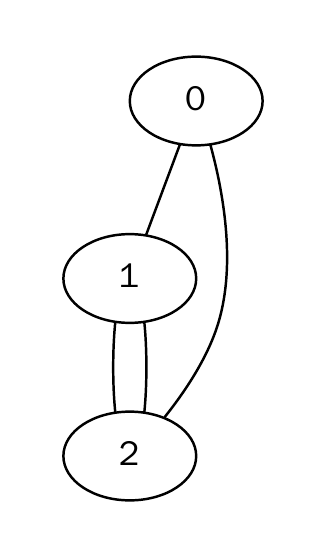
Directed Graph
import graphviz_artist as ga

# use attr module to see which Graphviz Attributes
# could be auto-completed.
import graphviz_artist.attr as attr

# use HorizontalGraph
g = ga.Graph(attr.HorizontalGraph)

# `attr.Shape("<name>")` to specify the shape of nodes.
n1 = g.new(attr.Label('hey'), attr.Shape.diamond)
n2 = g.new(attr.Label('hey'), attr.Shape.hexagon)
n3 = g.new(attr.Label('you'), attr.Shape.star)

# `attr.Directed()` makes a directed edge.
directed = attr.Directed()

# `attr.Label` to specify the text that edges display
edge_label = attr.Label("passed_here")

# `attr.Penwidth` to decide the width of edge glyph.
edge_size = attr.Penwidth(2.)

# in `a < b[b_to_c_attrs...] > c`, the edge `b -> c` will have attribute `b_to_c_attrs`.
_ = n3[directed, edge_label, edge_size] > n1[directed] == n2 > n3

g.view()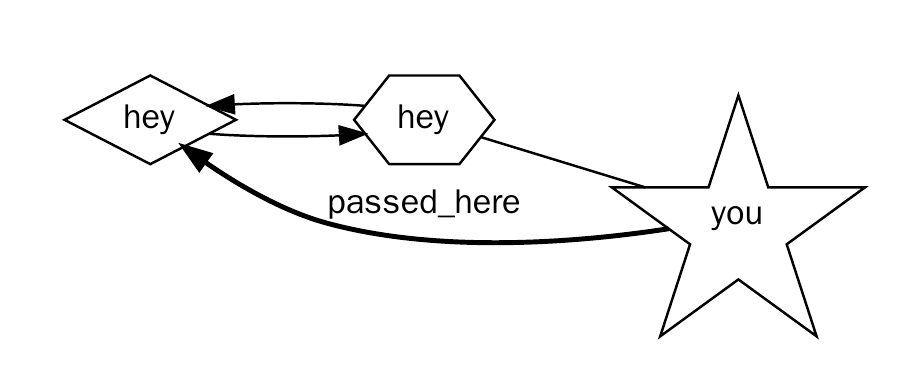
Expression Tree
import graphviz_artist as ga
import graphviz_artist.attr as attr

# make a graph
g = ga.Graph(directed=True)

new = g.new

# decl nodes
false = new(attr.Label("False"))
true = new(attr.Label("True"))
not_ = new(attr.Label("not"))
and_ = new(attr.Label("and"))

unary1 = new(attr.Label("unary"))
unary2 = new(attr.Label("unary"))
binary = new(attr.Label("binary"), attr.Width(2), attr.Shape.box)
expr = new(attr.Label("expr"))

# build graph
_ = false > unary1 < not_
_ = true > unary2

_ = and_[attr.Label('Op')] > binary

# XLabel: For edges, the label will be placed near the center of the edge.
_ = unary1[attr.XLabel("Left operand")] > binary
_ = unary2[attr.XLabel('Right operand')] > binary
_ = binary > expr

g.view()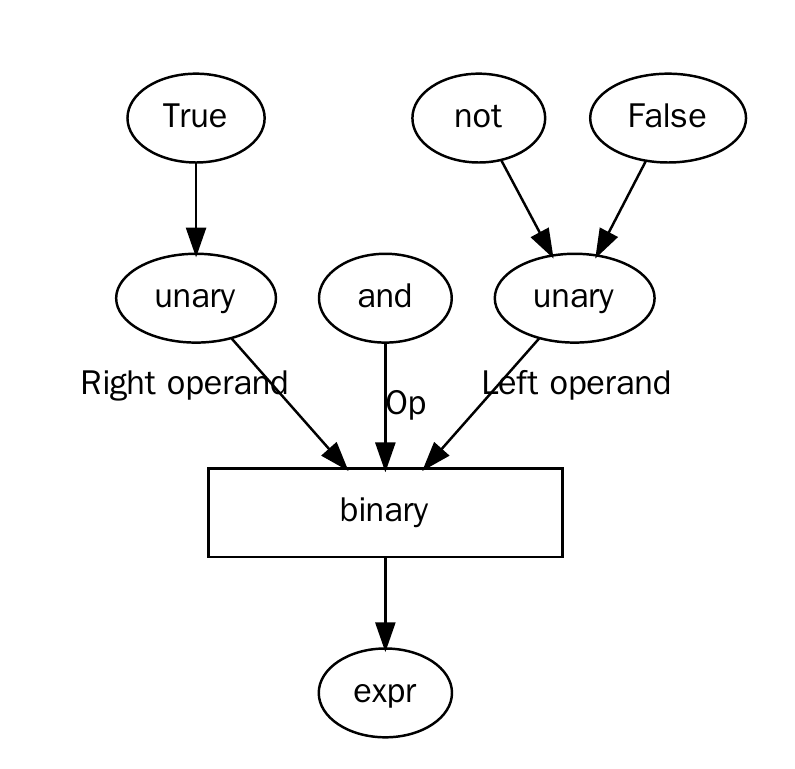
1 maintainer

Metadata
1 maintainer
Release files for graphviz-artist 0.2.1
For a detailed explanation of source distributions (sdists) and built distributions (wheels), please see the package formats documentation.
Built distribution (wheel)
| File | Interpreter | ABI | Platform | Actions Reset |
|---|---|---|---|---|
| graphviz_artist-0.2.1-py3-none-any.whl | Python 3 | none | any | Details for graphviz_artist-0.2.1-py3-none-any.whl |
Release files / graphviz_artist-0.2.1-py3-none-any.whl
| Download URL | graphviz_artist-0.2.1-py3-none-any.whl |
|---|---|
| Size | 5.9 kB |
| Tags | Python 3 |
|
SHA-256 checksum How to use checksums |
2bb51efed05cc2c57b3c7d0fc7f1a0ebd7945647ad16fa5f7ebbcc60273d386f
|
|
BLAKE2b-256 checksum How to use checksums |
c3a6ace0034307ecd922818300d4cab4492388c056fd1e3b5e45961ca80643a6
|
| Upload date | |
|
Uploaded using Trusted Publishing? What is trusted publishing? |
No |
| Uploaded via |
twine/4.0.0 CPython/3.9.1
|
Security for graphviz-artist 0.2.1
Provenance
Provenance describes where a file came from. On PyPI, provenance is shared via attestations, which provide a verifiable record of the build or publishing details. View details, limitations and caveats.
No provenance found
None of the files in this release were uploaded with provenance metadata.
A note on package security
PyPI is a repository for distributing packages, not a service for auditing them. While third-party security researchers and our staff do their best to detect and remove malicious packages, PyPI cannot guarantee the quality, security or suitability of any given package.
To learn more about protecting yourself from malicious actors, visit our package security documentation.














