


What is jawanndenn?
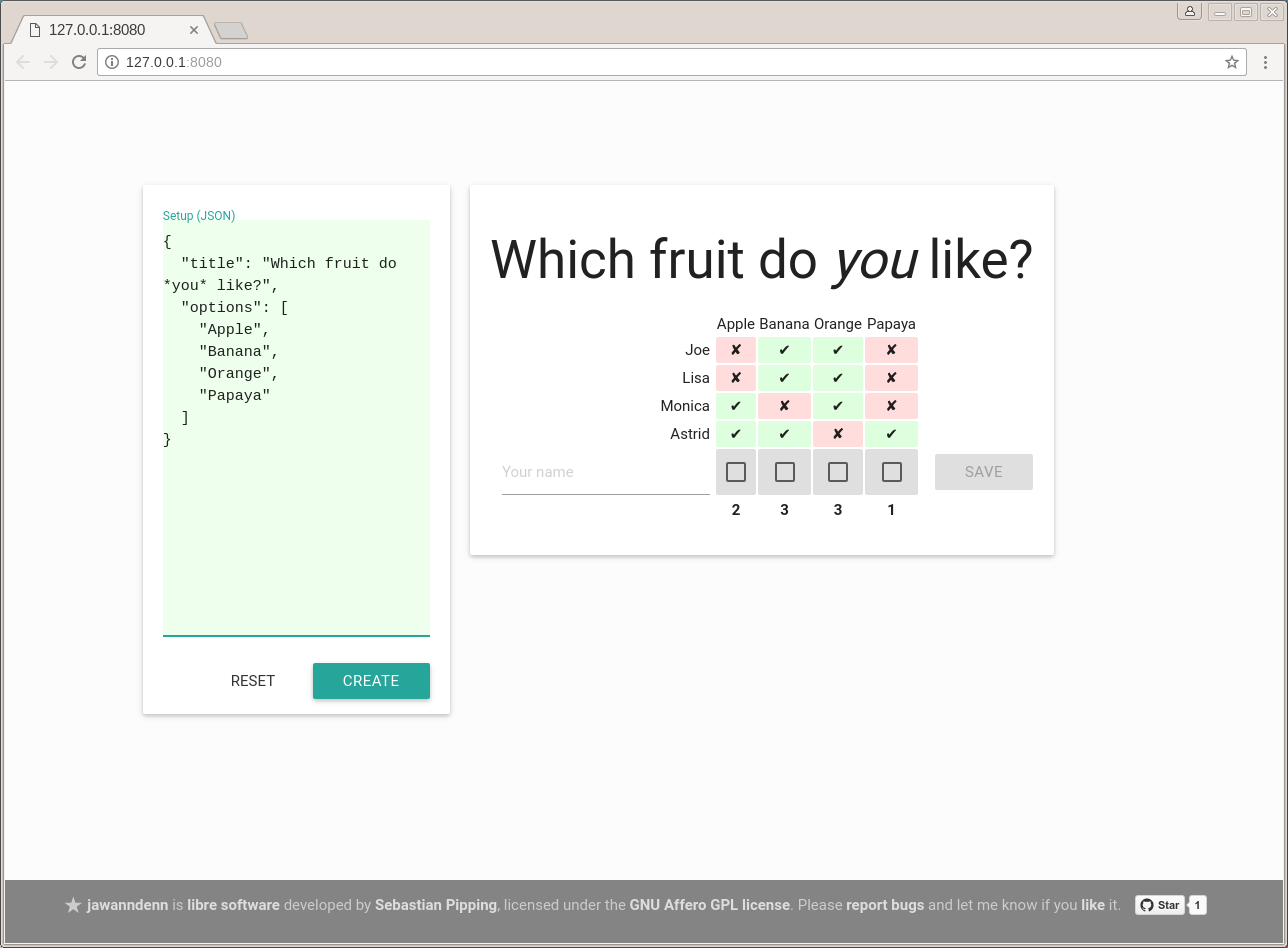
jawanndenn is a simple web application to schedule meetings and run polls, a libre alternative to Doodle. It is using the following technology:
-
Python
-
TypeScript / CSS / Fonts
-
Storage
-
Scheduling
jawanndenn is libre software developed by Sebastian Pipping. The code is licensed under the GNU Affero GPL license version 3 or later.
Please report bugs and let me know if you like it.
Poll Setup Format
The textarea titled "Setup (JSON)" uses a simple JSON-based format that knows the following keys:
lifetime— duration after which this poll will be deleted; can be"week"or"month"; an enum-like stringoptions— a list of strings, one for each option; supports Markdown-like syntax for: bold, italic, inline codetitle— the title or headline of the poll to run; supports Markdown-like syntax for: bold, italic, inline code
Installation
To install the latest release without cloning the Git repository:
# pip3 install jawanndenn --user
To install from a Git clone:
# ./setup.py install --user
Deployment with Docker Compose
Create a simple file .env like this one:
JAWANNDENN_POSTGRES_NAME=jawanndenn
JAWANNDENN_POSTGRES_USER=jawanndenn
JAWANNDENN_POSTGRES_PASSWORD=dEb2PIcinemA8poH
JAWANNDENN_SECRET_KEY=606ea88f183a27919d5c27ec7f948906d23fdd7821684eb59e8bcf7377e3853b
Make sure to adjust these values after copy and paste!
You can then build and run a docker image using
docker compose up --build.
The app is served on localhost:54080. PostgreSQL data is saved to
~/.jawanndenn-docker-pgdata/ on the host system. There is also an
instance of Redis used for cross-process rate limiting, and a "cron"
housekeeping container that will go delete polls that have exceeded
their configured lifetime, every 60 minutes.
(If you need a low-maintenance SSL reverse proxy in front of jawanndenn, docker-ssl-reverse-proxy could be of interest.)
There is a few more environment variables that you could want to adjust in your environment. Altogether, there are these variables:
Environment variables
| Variable | Function |
|---|---|
DJANGO_SETTINGS_MODULE |
Django settings module to use, leave as is, defaults to jawanndenn.settings (see docker-compose.yml) |
JAWANNDENN_ALLOWED_HOSTS |
Hostnames to serve jawanndenn at, list separated by comma, is set to jawanndenn.de,www.jawanndenn.de on the main production server, defaults to 127.0.0.1,0.0.0.0,localhost (see jawanndenn/settings.py) |
JAWANNDENN_DEBUG |
Debug mode, disabled for all values but True, disabled by default, should never be enabled in production for security (see jawanndenn/settings.py) |
JAWANNDENN_MAX_POLLS |
Maximum total number of polls to store, denial of service protection, defaults to 1000 (see jawanndenn/settings.py and docker-compose.yml) |
JAWANNDENN_MAX_VOTES_PER_POLL |
Maximum total number of polls to store, denial of service protection, defaults to 40 (see jawanndenn/settings.py) |
JAWANNDENN_POSTGRES_HOST |
Hostname of the PostgreSQL database to connect to; defaults to postgres (see docker-compose.yml) |
JAWANNDENN_POSTGRES_NAME |
Database name of the PostgreSQL database to connect to; no default, always required |
JAWANNDENN_POSTGRES_PASSWORD |
Password for log-in with the PostgreSQL database; no default, always required |
JAWANNDENN_POSTGRES_PORT |
Port of the PostgreSQL database to connect to; defaults to 5432 (see docker-compose.yml) |
JAWANNDENN_POSTGRES_USER |
Username for log-in with the PostgreSQL database; no default, always required |
JAWANNDENN_REDIS_HOST |
Hostname of the Redis database to connect to; defaults to redis (see docker-compose.yml) |
JAWANNDENN_REDIS_PORT |
Port of the Redis database to connect to; defaults to 6379 (see docker-compose.yml) |
JAWANNDENN_SECRET_KEY |
Django secret key; should be long, generated, not used elsewhere; no default, always required |
JAWANNDENN_SENTRY_DSN |
Data source name (DSN) for use with Sentry, disabled/empty by default (see jawanndenn/settings.py) |
JAWANNDENN_URL_PREFIX |
Prefix string to insert into URLs rather after the domain name to help with hosting multiple apps under the same domain side by side; e.g. prefix prefix123 will result in URLs like https://<domain>/prefix123/poll/<id>; empty by default (see jawanndenn/settings.py) |
Doing backups with Docker Compose
A simple way to create and apply backups of Django's view on the PostgreSQL poll data is the following.
Let's assume you add a docker-compose.override.yml like this:
services:
  jawanndenn:
    volumes:
     - ~/.jawanndenn-docker-backups/:/home/jawanndenn/backups/:rw
Now Django management command dumpdata can be used to backup the poll data to a JSON file like this:
# docker compose run jawanndenn python3 -m django dumpdata -v3 --format json -o "/home/jawanndenn/backups/data-$(date -I).json"
To reset the database to the state of a backup, Django management loaddata would do the job:
# docker compose run jawanndenn python3 -m django loaddata -v3 /home/jawanndenn/backups/data-2025-05-23.json
Command line usage
When installed, invocation is as simple as
# jawanndenn
During development, you may want to run jawanndenn from the Git clone using
# PYTHONPATH=. python3 -m jawanndenn --debug
Currently supported arguments are:
# COLUMNS=80 jawanndenn --help
usage: jawanndenn [-h] [--version] [--debug] [--host HOST] [--port PORT]
                  [--url-prefix PATH] [--database-sqlite3 FILE]
                  [--django-secret-key-file FILE] [--max-polls COUNT]
                  [--max-votes-per-poll COUNT] [--dumpdata]
                  [--loaddata FILE.json]

options:
  -h, --help            show this help message and exit
  --version             show program's version number and exit
  --debug               Enable debug mode (default: disabled)
  --host HOST           Hostname or IP address to listen at (default:
                        127.0.0.1)
  --port PORT           Port to listen at (default: 8080)
  --url-prefix PATH     Path to prepend to URLs (default: "")
  --database-sqlite3 FILE
                        File to write the database to (default:
                        ~/jawanndenn.sqlite3)
  --django-secret-key-file FILE
                        File to use for Django secret key data (default:
                        ~/jawanndenn.secret_key)

limit configuration:
  --max-polls COUNT     Maximum number of polls total (default: 1000)
  --max-votes-per-poll COUNT
                        Maximum number of votes per poll (default: 40)

data import/export arguments:
  --dumpdata            Dump a JSON export of the database to standard output,
                        then quit.
  --loaddata FILE.json  Load a JSON export of the database from FILE.json,
                        then quit.
Migrating data from jawanndenn 1.x to 2.x
Migration takes four steps:
-
Update to the latest version of jawanndenn 1.x, e.g. by running:
pip2 install --upgrade 'jawanndenn<2'; the JSON data export was first introduced with release 1.6.3. -
Export existing polls:
- If you're using the commend line app:
python2 -m jawanndenn --dumpdata > dump.json - If you're using Docker Compose:
docker compose run -T jawanndenn --database-pickle /data/polls.pickle --dumpdata > dump.json
- If you're using the commend line app:
-
Deploy latest jawanndenn 2.x somewhere (as described above) or just
pip3 install 'jawanndenn>=2'it somewhere -
Import the JSON dump created in step (2):
-
If you're using the commend line app:
python3 -m jawanndenn --loaddata dump.json -
If you're using Docker Compose:
docker compose run -T jawanndenn sh -c 'cat > /tmp/dump.json && DJANGO_SETTINGS_MODULE=jawanndenn.settings python3 -m django loaddata /tmp/dump.json' < dump.json
-
Goals
- Libre software to host yourself, unlike Doodle
- More simplistic, sexy and/or fun than
libre alternatives,
in alphabetic order:
- Bitpoll (ex. Dudel)
- Crab Fit
- Croodle
- Dudle
- (Drupal Date picker formatter)
- (Foodle (discontinued; on GitHub, ex. DFN scheduler, ex. DFN Terminplaner+))
- Framadata (Sources, ex. OpenSondage, ex. STUdS)
- JaWannDennJetzt
- Nextcloud Polls
- Noodle
- Nuages
- Pleft
- Rallly
- RDVz
- sowhenthen
- VoteOn.Date
- Keep things simple, usable, maintainable
- Support invocation from the command line, e.g. for spontaneous polls in a LAN
- Have security in mind
Please check out the list of upcoming features.
Non-goals
- Adding any new non-tiny features
- Read availability from calendars
Thanks
Special thanks to Arne Maier (@KordonDev) for reporting an XSS vulnerability, responsibly.
1 maintainer

Metadata
1 maintainer
Release files for jawanndenn 4.1.0
For a detailed explanation of source distributions (sdists) and built distributions (wheels), please see the package formats documentation.
Source distribution (sdist)
| File | Size | Uploaded | Provenance | |
|---|---|---|---|---|
| jawanndenn-4.1.0.tar.gz | 3.7 MB | Without provenance | Details |
Built distribution (wheel)
| File | Interpreter | ABI | Platform | Reset |
|---|---|---|---|---|
| jawanndenn-4.1.0-py3-none-any.whl | Python 3 | none | any | Details |
Total release size: 7.2 MB
Release files / jawanndenn-4.1.0.tar.gz
| Download URL | jawanndenn-4.1.0.tar.gz |
|---|---|
| Size | 3.7 MB |
| Tags | Source |
|
SHA-256 checksum How to use checksums |
0e55f7ec556d5c06a63c54e30d07e07108e0c535587cdee4f3254d5bd45cab13
|
|
BLAKE2b-256 checksum How to use checksums |
506de6a9a621fcd5e39586fc1ec342f2eaa01b87d858062f4f2a1590f2387834
|
| Upload date | |
|
Uploaded using Trusted Publishing? What is trusted publishing? |
No |
| Uploaded via |
twine/6.2.0 CPython/3.14.2
|
Release files / jawanndenn-4.1.0-py3-none-any.whl
| Download URL | jawanndenn-4.1.0-py3-none-any.whl |
|---|---|
| Size | 3.5 MB |
| Tags | Python 3 |
|
SHA-256 checksum How to use checksums |
533669aa7e42d204790d538a63c9687b98bbade9a3d8294e1abb814b7e1ff4ef
|
|
BLAKE2b-256 checksum How to use checksums |
cc14decb4c1d42c264bbb153609330f9818db4725a3c21f0ef76c26e5b11b638
|
| Upload date | |
|
Uploaded using Trusted Publishing? What is trusted publishing? |
No |
| Uploaded via |
twine/6.2.0 CPython/3.14.2
|
Security for jawanndenn 4.1.0
Provenance
Provenance describes where a file came from. On PyPI, provenance is shared via attestations, which provide a verifiable record of the build or publishing details. View details, limitations and caveats.
No provenance found
None of the files in this release were uploaded with provenance metadata.
A note on package security
PyPI is a repository for distributing packages, not a service for auditing them. While third-party security researchers and our staff do their best to detect and remove malicious packages, PyPI cannot guarantee the quality, security or suitability of any given package.
To learn more about protecting yourself from malicious actors, visit our package security documentation.














