
This project has been archived by its maintainers, and is no longer receiving any updates.
jupyterlab-heroku


JupyterLab extension to manage and deploy applications to Heroku.
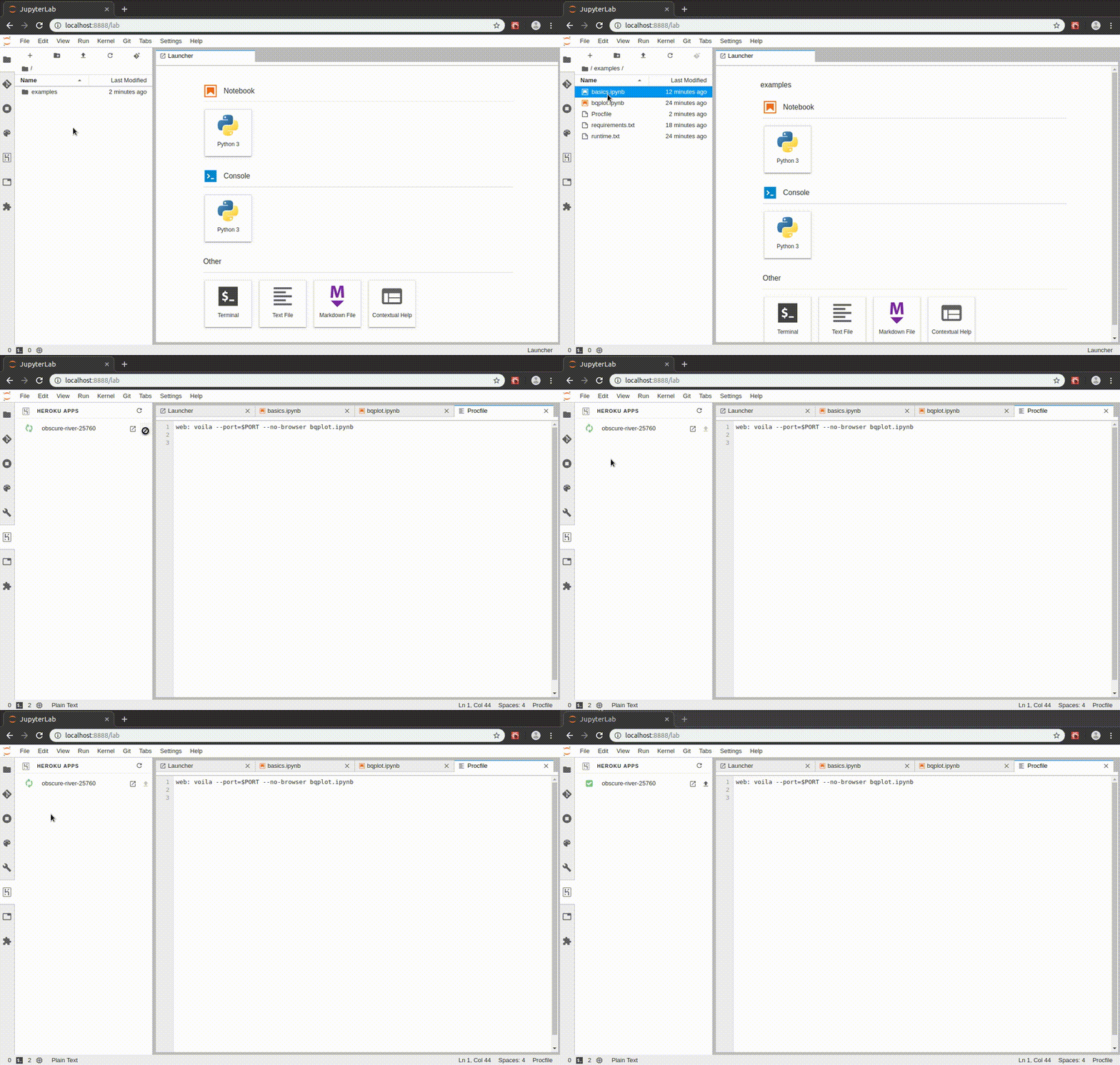
The extension enables 1-click deployments of voila dashboards.
Requirements
Create an Heroku account
If you already have an Heroku account, you can skip to the next section.
You can create a new Heroku account by following these instructions: https://signup.heroku.com/
Install the heroku client
You need the heroku client installed on your machine to be able to deploy applications. To set it up:
https://devcenter.heroku.com/articles/getting-started-with-python#set-up
Once the setup is complete, test the installation with:
$ heroku --version
heroku/7.26.2 linux-x64 node-v11.14.0
Login to Heroku
There are different ways to login to Heroku:
heroku loginwill open a new browser tab to log in with the email and password- create a
~/.netrcfile with the api token (see the documentation for more details) - set the
HEROKU_API_KEYenvironment variable
To test the authentication: heroku apps
Other Dependencies
This extension also requires:
- JupyterLab 1.0
git
Install
pip install jupyterlab-heroku
jupyter serverextension enable --sys-prefix --py jupyterlab_heroku
jupyter labextension install jupyterlab-heroku
Since Heroku uses git to deploy applications, it is also recommended to install the jupyterlab-git extension for JupyterLab:
pip install jupyterlab-git
jupyter serverextension enable --sys-prefix --py jupyterlab_git
jupyter labextension install @jupyterlab/git
Contributing
Install
# Clone the repo to your local environment
# Move to jupyterlab-heroku directory

# Create a new conda environment
conda create -n jupyterlab-heroku -c conda-forge jupyterlab nodejs

# Install the server extension
python -m pip install -e .
jupyter serverextension enable --sys-prefix --py jupyterlab_heroku

# Install dependencies
jlpm

# Build Typescript source
jlpm build

# Link your development version of the extension with JupyterLab
jupyter labextension link .

# Rebuild Typescript source after making changes
jlpm build

# Rebuild JupyterLab after making any changes
jupyter lab build
You can watch the source directory and run JupyterLab in watch mode to watch for changes in the extension's source and automatically rebuild the extension and application.
# Watch the source directory in another terminal tab
jlpm watch

# Run jupyterlab in watch mode in one terminal tab
jupyter lab --watch
Uninstall
jupyter labextension uninstall jupyterlab-heroku
Alternatives
To deploy Voila applications to Heroku using the command line: https://github.com/martinRenou/voila_heroku
1 maintainer

Metadata
1 maintainer
Release files for jupyterlab-heroku 0.2.1
For a detailed explanation of source distributions (sdists) and built distributions (wheels), please see the package formats documentation.
Source distribution (sdist)
| File | Size | Uploaded | Provenance | Actions |
|---|---|---|---|---|
| jupyterlab_heroku-0.2.1.tar.gz | 4.8 kB | Without provenance | Details for jupyterlab_heroku-0.2.1.tar.gz |
Built distribution (wheel)
| File | Interpreter | ABI | Platform | Actions Reset |
|---|---|---|---|---|
| jupyterlab_heroku-0.2.1-py3-none-any.whl | Python 3 | none | any | Details for jupyterlab_heroku-0.2.1-py3-none-any.whl |
Total release size: 11.0 kB
Release files / jupyterlab_heroku-0.2.1.tar.gz
| Download URL | jupyterlab_heroku-0.2.1.tar.gz |
|---|---|
| Size | 4.8 kB |
| Tags | Source |
|
SHA-256 checksum How to use checksums |
dd50327b87b282ef2c8bf4b725bb104b363f68bdff5311fbab35584f629df03c
|
|
BLAKE2b-256 checksum How to use checksums |
5f2e0c9fe9ca8ec08c37ba0ac4267618fae274e88862bc112c7d337390bbe573
|
| Upload date | |
|
Uploaded using Trusted Publishing? What is trusted publishing? |
No |
| Uploaded via |
twine/3.1.1 pkginfo/1.5.0.1 requests/2.22.0 setuptools/44.0.0.post20200102 requests-toolbelt/0.9.1 tqdm/4.41.1 CPython/3.8.1
|
Release files / jupyterlab_heroku-0.2.1-py3-none-any.whl
| Download URL | jupyterlab_heroku-0.2.1-py3-none-any.whl |
|---|---|
| Size | 6.2 kB |
| Tags | Python 3 |
|
SHA-256 checksum How to use checksums |
7f492470802a5d94331f7ca7440251b7ef3278977bc6d323b164cd890610f4c8
|
|
BLAKE2b-256 checksum How to use checksums |
59e8f3bc31b0740a5664fc384434b6dd61c5928a4683aa68dee1e04692e9c31d
|
| Upload date | |
|
Uploaded using Trusted Publishing? What is trusted publishing? |
No |
| Uploaded via |
twine/3.1.1 pkginfo/1.5.0.1 requests/2.22.0 setuptools/44.0.0.post20200102 requests-toolbelt/0.9.1 tqdm/4.41.1 CPython/3.8.1
|
Security for jupyterlab-heroku 0.2.1
Provenance
Provenance describes where a file came from. On PyPI, provenance is shared via attestations, which provide a verifiable record of the build or publishing details. View details, limitations and caveats.
No provenance found
None of the files in this release were uploaded with provenance metadata.
A note on package security
PyPI is a repository for distributing packages, not a service for auditing them. While third-party security researchers and our staff do their best to detect and remove malicious packages, PyPI cannot guarantee the quality, security or suitability of any given package.
To learn more about protecting yourself from malicious actors, visit our package security documentation.














