
jupyterlab_email
A jupyterlab extension to email notebooks from the browser.


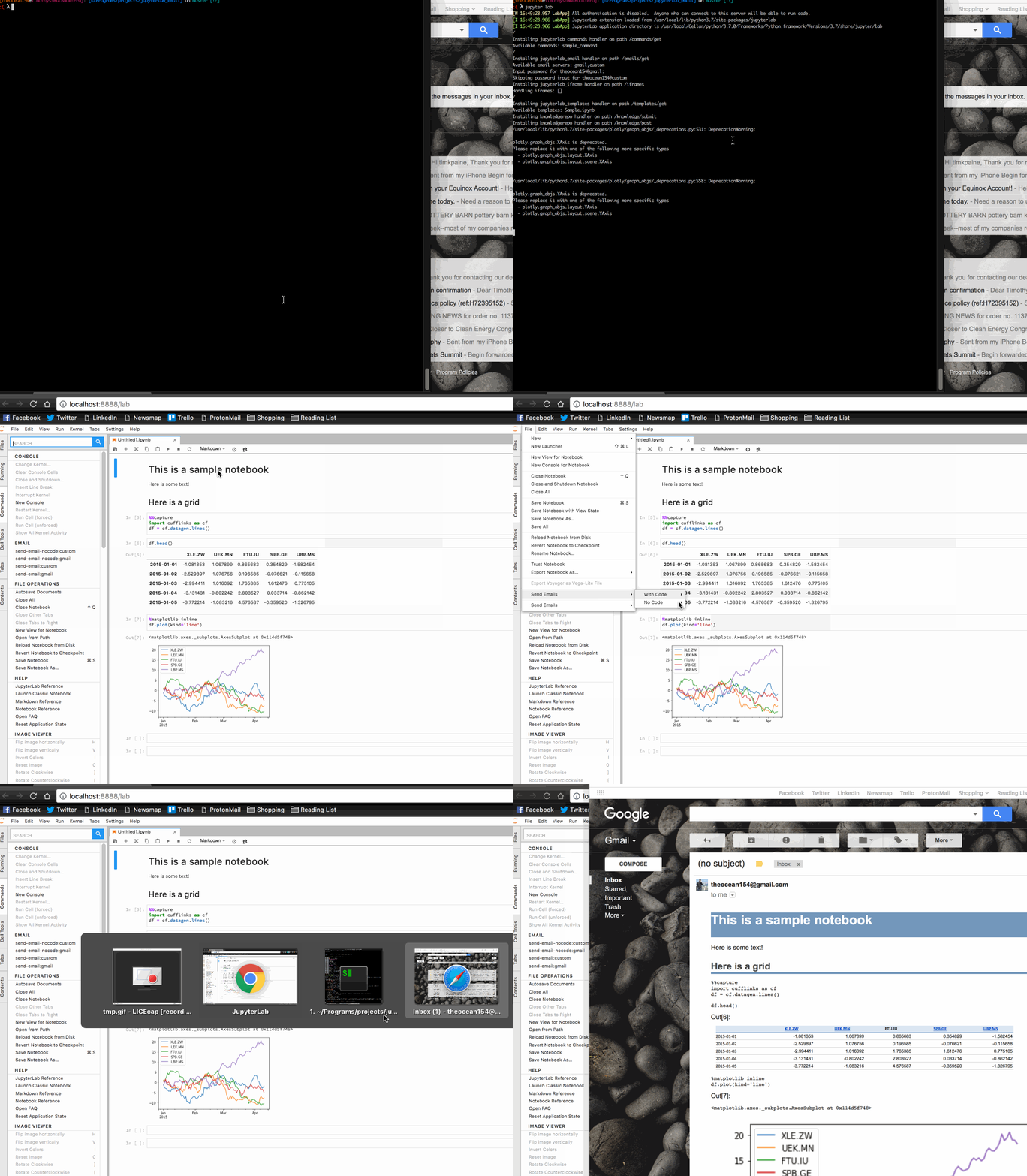
Options
- Inline notebook as email, with code
- Inline notebook as email, without code
- Send notebook as HTML attachment, with code
- Send notebook as HTML attachment, without code
- Send notebook as PDF attachment, with code
- Send notebook as PDF attachment, without code
- Attach output data as CSV, TSV, PDF, PNG, or Excel Spreadsheet
Install
pip install jupyterlab_email
jupyter labextension install jupyterlab_email
jupyter serverextension enable --py jupyterlab_email
Adding templates
install the server extension, and add the following to jupyter_notebook_config.py
c.JupyterLabEmail.smtp_servers = [{'name': 'gmail',
                                   'domain': 'gmail.com',
                                   'username': '<YOUR USERNAME>',
                                   'smtp': 'smtp.gmail.com',
                                   'port': 465}]
Create email from notebook:
Use the function in jupyterlab_email._email
def make_email(path, model, from_, type='email', template='', code=False, subject='',
               also_attach='none', also_attach_pdf_template='', also_attach_html_template=''):
    '''
        path        : path to notebook
        model       : notebook itself (in case deployment strips outputs or
                      notebook not available except through ContentsManager)
        from_       : address to send the email from
        type        : type to convert notebook to
        template    : template to use when converting notebook
        code        : include input cells in notebook
        subject     : subject of email
        also_attach : also attach pdf/html/both
    '''
Attach dataframe as csv or spreadsheet
In jupyterlab_email.attachments
def attach(data, filename, type):
Modify jupyterlab_email.attachments.EXCEL_ENGINE to use a different excel writer (defaults to xlsxwriter)
Inline LaTeX
In jupyterlab_email.attachments
def latex(expression):
    import matplotlib.pyplot as plt
    fig, ax = plt.subplots(figsize=(10, 1))
    ax.xaxis.set_visible(False)
    ax.yaxis.set_visible(False)
    ax.axis('off')
    plt.text(0, 0.6, r'$%s$' % expression, fontsize=25)
    plt.show()
1 maintainer

Metadata
1 maintainer
Release files for jupyterlab-email 0.3.1
For a detailed explanation of source distributions (sdists) and built distributions (wheels), please see the package formats documentation.
Source distribution (sdist)
| File | Size | Uploaded | Provenance | Actions |
|---|---|---|---|---|
| jupyterlab_email-0.3.1.tar.gz | 188.6 kB | Without provenance | Details for jupyterlab_email-0.3.1.tar.gz |
Built distribution (wheel)
| File | Interpreter | ABI | Platform | Actions Reset |
|---|---|---|---|---|
| jupyterlab_email-0.3.1-py3-none-any.whl | Python 3 | none | any | Details for jupyterlab_email-0.3.1-py3-none-any.whl |
Total release size: 253.8 kB
Release files / jupyterlab_email-0.3.1.tar.gz
| Download URL | jupyterlab_email-0.3.1.tar.gz |
|---|---|
| Size | 188.6 kB |
| Tags | Source |
|
SHA-256 checksum How to use checksums |
910faac580cbb5d5c912bfe87f4cfb663813efd3d68e57b676393e1f6cf16d32
|
|
BLAKE2b-256 checksum How to use checksums |
e8538eb1c1ca05533dee54771083ef1f0379b3a1e7c0a9a0fca03ac856cf2322
|
| Upload date | |
|
Uploaded using Trusted Publishing? What is trusted publishing? |
No |
| Uploaded via |
twine/4.0.2 CPython/3.11.4
|
Release files / jupyterlab_email-0.3.1-py3-none-any.whl
| Download URL | jupyterlab_email-0.3.1-py3-none-any.whl |
|---|---|
| Size | 65.2 kB |
| Tags | Python 3 |
|
SHA-256 checksum How to use checksums |
d110d1c975bb91a7622213f3b649891a0bfe5a0262d4c4e5893634e78161a148
|
|
BLAKE2b-256 checksum How to use checksums |
51bcc3a13d870f695257176902fd841074a238f0071db3c7984d5ea99930a7a9
|
| Upload date | |
|
Uploaded using Trusted Publishing? What is trusted publishing? |
No |
| Uploaded via |
twine/4.0.2 CPython/3.11.4
|
Security for jupyterlab-email 0.3.1
Provenance
Provenance describes where a file came from. On PyPI, provenance is shared via attestations, which provide a verifiable record of the build or publishing details. View details, limitations and caveats.
No provenance found
None of the files in this release were uploaded with provenance metadata.
A note on package security
PyPI is a repository for distributing packages, not a service for auditing them. While third-party security researchers and our staff do their best to detect and remove malicious packages, PyPI cannot guarantee the quality, security or suitability of any given package.
To learn more about protecting yourself from malicious actors, visit our package security documentation.














