



python-keyctl
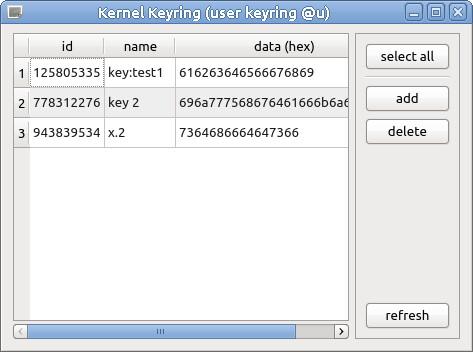
Basic management of keys in the Linux kernel keyring in Python. Also comes with a small gui.
Description
This is a small library to make use of some functions of the kernel keyring in Python. You can read, add and delete keys.
It simply uses the keyctl command (invoking it via subprocess), so this util must be installed.
Available functions:
- list (list all keys in keyring)
- describe (retrieve key name/description)
- read/pipe/print (retrieve key content)
- update (modify key content)
- add (add key)
- revoke/unlink (delete key)
- search/request (search for a key by name)
- clear (remove all keys from keyring)
There are many more functions with keys in the kernel keyring (e.g. permissions) that is needed for proper keymanagement. But for my usecase I just needed the given simple functionality.
⚠️ You might need to link your keyrings (e.g. for the testcases using the default keyring) to have proper permissions. E.g.:
$ keyctl link @u @s
Requirements
Python 3.9
$ sudo apt install python3.9
$ python --version
Python 3.9.18
pip
$ sudo apt install python3-pip
$ pip --version
pip 23.3.2 from .... (python 3.9)
The 'keyctl' command
$ sudo apt install keyutils
$ dpkg -s keyutils | grep Version
Version: 1.6.1
If you want to use the GUI, you also need PySide6
$ pip install pyside6
$ python3 -c "import PySide6; print(PySide6.__version__)"
6.6.1
Installation
$ pip install keyctl
Ready to use.
Usage
Module
Get all keys:
from keyctl import Key
keylist = Key.list()
for mykey in keylist:
    print(mykey.id)
Read existing key:
from keyctl import Key
mykey = Key(123)
print(mykey.name)
print(mykey.data)
print(mykey.data_hex)
Find key by name:
from keyctl import Key
mykey = Key.search('test key')
print(mykey.id)
Add key:
from keyctl import Key
mykey = Key.add('test key', 'test content')
print(mykey.id)
Delete key:
from keyctl import Key
mykey = Key(123)
mykey.delete()
Update key:
from keyctl import Key
mykey = Key(123)
mykey.update('new content')
GUI
To open the GUI, run the installed command.
$ keyctlgui
Development
Warning
If you run the integrated tests, your user keyring will be cleared. Don't do this when you have active keys e.g. for encryption.
Similar projects
Similar projects you might want to check out:
- https://github.com/sassoftware/python-keyutils (more complete, available in debian repo)
- https://github.com/jdukes/pykeyctl (more complete, direct library wrapper)
License
GPL-3.0
see LICENSE file
1 maintainer

Metadata
1 maintainer
Release files for keyctl 0.5
For a detailed explanation of source distributions (sdists) and built distributions (wheels), please see the package formats documentation.
Source distribution (sdist)
| File | Size | Uploaded | Provenance | |
|---|---|---|---|---|
| keyctl-0.5.tar.gz | 22.4 kB | Without provenance | Details |
Built distribution (wheel)
| File | Interpreter | ABI | Platform | Reset |
|---|---|---|---|---|
| keyctl-0.5-py3-none-any.whl | Python 3 | none | any | Details |
Total release size: 43.6 kB
Release files / keyctl-0.5.tar.gz
| Download URL | keyctl-0.5.tar.gz |
|---|---|
| Size | 22.4 kB |
| Tags | Source |
|
SHA-256 checksum How to use checksums |
1edd6e1b5b17982dbc40163833db8d6498006aa9dd60c847a669a690d8e2eeaf
|
|
BLAKE2b-256 checksum How to use checksums |
00bb576ce1e2a0fd9dc80f413f3dacb9f2b1756fbd7d11464cc96f6fd933d322
|
| Upload date | |
|
Uploaded using Trusted Publishing? What is trusted publishing? |
No |
| Uploaded via |
twine/4.0.2 CPython/3.9.18
|
Release files / keyctl-0.5-py3-none-any.whl
| Download URL | keyctl-0.5-py3-none-any.whl |
|---|---|
| Size | 21.2 kB |
| Tags | Python 3 |
|
SHA-256 checksum How to use checksums |
dce54fd6e2f5c4836001af039eb99ab282dd2f043ab23f8962e0474f99c7624f
|
|
BLAKE2b-256 checksum How to use checksums |
8a0ccc5d12d8acfabc3acab50a7eb1e05cad9c27604fb0ff7de44f015ea0f828
|
| Upload date | |
|
Uploaded using Trusted Publishing? What is trusted publishing? |
No |
| Uploaded via |
twine/4.0.2 CPython/3.9.18
|
Security for keyctl 0.5
Provenance
Provenance describes where a file came from. On PyPI, provenance is shared via attestations, which provide a verifiable record of the build or publishing details. View details, limitations and caveats.
No provenance found
None of the files in this release were uploaded with provenance metadata.
A note on package security
PyPI is a repository for distributing packages, not a service for auditing them. While third-party security researchers and our staff do their best to detect and remove malicious packages, PyPI cannot guarantee the quality, security or suitability of any given package.
To learn more about protecting yourself from malicious actors, visit our package security documentation.














