
█ kwbar – Print Keywords as a Bar Chart





Easily create a bar chart with kwbar; pass keyword arguments that can be converted to float.

I made this for fun, but then I thought other people might actually find it useful.
Features
kwbar several useful features:
- Plots bars showing the relative magnitide (absolute value) of kwargs.
- Prints the values of the passed keyword arguments in scientific notation.
- Pure Python and zero dependencies.
- Minimal implementation (<100 lines total) which can be audited in a few minutes.
- Prints the names of the passed keyword arguments.
- Plots any object that can be converted to float (SupportsFloat).
- Customizable width, the entire terminal width is used by default.
- Customizable significant figures, 3 by default.
- Shows value labels inside bars, making the output width predictable. If the bars are too small, the value labels appear outside of them.
- Handles inf and NaN values.
- Negative values are (ANSI) colored red and can be customized.
- Respects the
NO_COLORenvironment variable. - Has an ASCII mode, enabled on import when stdout is not TTY.
- Warns on stderr (can be disabled) if the output will have to overrun the configured width. Overflow can generally be avoided by configuting options such as
BEFORE=True. - Fixed output width. This can be done by either:
- Setting
BEFORE = True, or - setting
TRUNCATEandWIDTHto satisfy:WIDTH-TRUNCATE-SF- 17 >= 0.
- Setting
Options
kwbar supports the following options, which are set by modifying module variables:
import kwbar

kwbar.WIDTH = -1  # Set the output width, -1 = use the terminal width.
kwbar.SF = 2  # The number of sig figs to show.
kwbar.SHOW_VAL = True  # Show values inside the bars
kwbar.TRUNCATE = 0.25  # Truncate long keys (<=1 = % of WIDTH, >1 = columns).
kwbar.BAR_CHARS = " ▏▎▍▌▋▊▉█"  # Characters to use for the bars.
kwbar.POS = ""  # ANSI escape code for positive values.
kwbar.NEG = "\x1b[31m"  # ANSI escape code for negative values.
kwbar.WARN = True  # Show a warning if the output will overrun the configured width.
kwbar.PAD = " "  # Padding characters shown before finite and non-finite values.
kwbar.BEFORE = False  # Show the value labels before the bar instead of inside.
Convenience Functions
There are also a couple of functions to set multiple options at once:
ASCII Mode
Sets BAR_CHARS and PAD to ASCII characters. Also disables all ANSI escape codes and sets BEFORE true.
import kwbar
kwbar.WIDTH = 50
kwbar.ascii()
kwbar.kwbar(one=1, two=2, three=3, four=4)
  one +1.00e+00 XXXXXXXX
  two +2.00e+00 XXXXXXXXXXXXXXXXX
three +3.00e+00 XXXXXXXXXXXXXXXXXXXXXXXXX
 four +4.00e+00 XXXXXXXXXXXXXXXXXXXXXXXXXXXXXXXXXX
Hotdog Mode
import kwbar
kwbar.WIDTH = 33
kwbar.hotdog()
kwbar.kwbar(one=1, two=2, three=3, four=4)
  one 🌭🌭🌭🌭🌭🌭¾
  two 🌭🌭🌭🌭🌭🌭🌭🌭🌭🌭🌭🌭🌭½
three 🌭🌭🌭🌭🌭🌭🌭🌭🌭🌭🌭🌭🌭🌭🌭🌭🌭🌭🌭🌭¼
 four 🌭🌭🌭🌭🌭🌭🌭🌭🌭🌭🌭🌭🌭🌭🌭🌭🌭🌭🌭🌭🌭🌭🌭🌭🌭🌭🌭
How do I...?
Reset All Options
import kwbar

kwbar.ascii()

# Reset to defaults.
import importlib

importlib.reload(kwbar)
Use Keys That Are Not Valid Python Keywords
import kwbar

kwbar.ascii()
kwbar.kwbar(**{"one": 1, "-2": -2, "pi": 3.14})
one +1.00e+00 XXXXXX
 -2 -2.00e+00 XXXXXXXXXXXX
 pi +3.14e+00 XXXXXXXXXXXXXXXXXXX
Print Dogs Instead of Hotdogs
import kwbar
kwbar.hotdog()
kwbar.BAR_CHARS = kwbar.BAR_CHARS[:-1] + "🐶" # Replace the last character.
kwbar.kwbar(one=1, two=2, pi=3.14)
one 🐶🐶🐶🐶🐶🐶🐶🐶🐶¼
two 🐶🐶🐶🐶🐶🐶🐶🐶🐶🐶🐶🐶🐶🐶🐶🐶🐶🐶½
 pi 🐶🐶🐶🐶🐶🐶🐶🐶🐶🐶🐶🐶🐶🐶🐶🐶🐶🐶🐶🐶🐶🐶🐶🐶🐶🐶🐶🐶🐶
Themes
Just some ideas for how you could customize the output.
Lines
import kwbar
kwbar.hotdog()
kwbar.BAR_CHARS = "╸━"
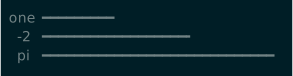
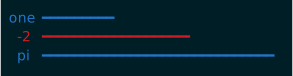
Blue Red Lines
import kwbar
kwbar.hotdog()
kwbar.BAR_CHARS = "╸━"
kwbar.POS = "\x1b[34m"
kwbar.NEG = "\x1b[31m"
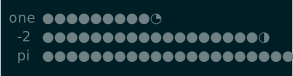
Slices
import kwbar
kwbar.hotdog()
kwbar.BAR_CHARS = "◔◑◕●"
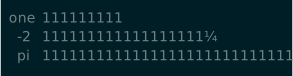
Quater Tally
import kwbar
kwbar.hotdog()
kwbar.BAR_CHARS = " ¼½¾1"
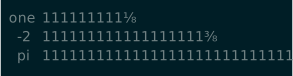
Eighths
kwbar.hotdog()
kwbar.BAR_CHARS = " ⅛¼⅜½⅝¾⅞1"
Hatching
kwbar.hotdog()
kwbar.BAR_CHARS = "🥚🐣🐥"

FAQs
These are questions that I frequently asked myself while making this.
Why did you make this?
For fun!
Why did you format the script to fill 80 characters on a line?
Because I could and it made me happy.
Why did you use module variables for configuration?
Because it kept the implementation simple/minimal. This also means that if you import kwbar in multiple places within a script, it will have a consistent style and does not need to be configured multiple times.
How do I have multiple kwbar copies with different configurations?
The configuration for kwbar affects all calls to kwbar.kwbar, becuase it is a static
function using module variables for configuration.
If you really want to do this, you can, but it feels like a hideous hack:
import sys
import importlib

SPEC_KWBAR = importlib.util.find_spec('kwbar')
kwbar2 = importlib.util.module_from_spec(SPEC_KWBAR)
SPEC_KWBAR.loader.exec_module(kwbar2)
sys.modules['kwbar2'] = kwbar2
Now you have another kwbar called kwbar2 with a completely seperate configuration.
>>> kwbar.WIDTH = 40
>>> kwbar2.WIDTH = 50
>>> print(kwbar.WIDTH)
40
>>> print(kwbar2.WIDTH)
50
Why didn't you just make the first argument a dictionary and use kwargs for configuration?
Becuase that was less fun that using only kwargs.
1 maintainer

Metadata
1 maintainer
Release files for kwbar 1.0.0
For a detailed explanation of source distributions (sdists) and built distributions (wheels), please see the package formats documentation.
Source distribution (sdist)
| File | Size | Uploaded | Provenance | Actions |
|---|---|---|---|---|
| kwbar-1.0.0.tar.gz | 6.5 kB | Without provenance | Details for kwbar-1.0.0.tar.gz |
Built distribution (wheel)
| File | Interpreter | ABI | Platform | Actions Reset |
|---|---|---|---|---|
| kwbar-1.0.0-py3-none-any.whl | Python 3 | none | any | Details for kwbar-1.0.0-py3-none-any.whl |
Total release size: 13.6 kB
Release files / kwbar-1.0.0.tar.gz
| Download URL | kwbar-1.0.0.tar.gz |
|---|---|
| Size | 6.5 kB |
| Tags | Source |
|
SHA-256 checksum How to use checksums |
f5443f9767fb4779831caf937e287b3817cda5ff672b493793daf54459dc1cc1
|
|
BLAKE2b-256 checksum How to use checksums |
274ede125117aacce5ee6f65ab1cfa58fdeed301bb8a4f9d233d92af6be9f6f1
|
| Upload date | |
|
Uploaded using Trusted Publishing? What is trusted publishing? |
Yes |
| Uploaded via |
twine/4.0.2 CPython/3.11.7
|
Release files / kwbar-1.0.0-py3-none-any.whl
| Download URL | kwbar-1.0.0-py3-none-any.whl |
|---|---|
| Size | 7.1 kB |
| Tags | Python 3 |
|
SHA-256 checksum How to use checksums |
bdcedaa1cb9dca06dc2e5fbe94de0c24fdf2ac22b44c2b18370e357094039281
|
|
BLAKE2b-256 checksum How to use checksums |
6857485bb9cf56e9cdaa2f09c664f54809294bfeffa9c2ee3736c6582761e25c
|
| Upload date | |
|
Uploaded using Trusted Publishing? What is trusted publishing? |
Yes |
| Uploaded via |
twine/4.0.2 CPython/3.11.7
|
Security for kwbar 1.0.0
Provenance
Provenance describes where a file came from. On PyPI, provenance is shared via attestations, which provide a verifiable record of the build or publishing details. View details, limitations and caveats.
No provenance found
None of the files in this release were uploaded with provenance metadata.
A note on package security
PyPI is a repository for distributing packages, not a service for auditing them. While third-party security researchers and our staff do their best to detect and remove malicious packages, PyPI cannot guarantee the quality, security or suitability of any given package.
To learn more about protecting yourself from malicious actors, visit our package security documentation.














