




ML
This module provides for the easiest way to implement Machine Learning algorithms. It also has in-built support for graphing and optimizers based in C.
Learn the module here:
This module uses a tensorflow backend.
Implemented Algorithms
- 2D CNN
ml.cnn - Basic MLP
ml.nn - K-Means
ml.k_means - Linear Regression
ml.linear_regression- optimized with C
- Logistic Regression
ml.logistic_regression - Graph Modules
ml.graph- Graph any function with or without data points -
from ml.graph import graph_function, graph_function_and_data
- Graph any function with or without data points -
- Nonlinear Regression
ml.regression - Optimizers -
ml.optimizeroptimized with C- GradientDescentOptimizer -
from ml.optimizer import GradientDescentOptimizer - AdamOptimizer -
from ml.optimizer import AdamOptimizer
- GradientDescentOptimizer -
- UNSTABLE - Character generating RNN -
ml.rnn
You can find examples for all of these in /examples
Pip installation
pip install ml-python
Python installation
git clone https://github.com/vivek3141/ml
cd ml
python setup.py install
Bash Installation
git clone https://github.com/vivek3141/ml
cd ml
sudo make install
Examples
Examples for all implemented structures can be found in /examples.
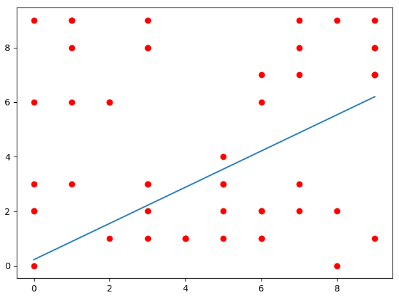
In this example, linear regression is used.
First, import the required modules.
import numpy as np
from ml.linear_regression import LinearRegression
Then make the required object
l = LinearRegression()
This code below randomly generates 50 data points from 0 to 10 for us to run linear regression on.
# Randomly generating the data and converting the list to int
x = np.array(list(map(int, 10*np.random.random(50))))
y = np.array(list(map(int, 10*np.random.random(50))))
Lastly, train it. Set graph=True to visualize the dataset and the model.
l.fit(data=x, labels=y, graph=True)
The full code can be found in /examples/linear_regression.py
Makefile
A Makefile is included for easy installation.
To install using make run
sudo make
Note: Superuser privileges are only required if python is installed at /usr/local/lib
License
All code is available under the MIT License
Contributing
Pull requests are always welcome, so feel free to create one. Please follow the pull request template, so your intention and additions are clear.
Contact
Feel free to contact me by:
- Email: vivnps.verma@gmail.com
- GitHub Issue: create issue
1 maintainer

Metadata
1 maintainer
Release files for ml-python 2.3.1
For a detailed explanation of source distributions (sdists) and built distributions (wheels), please see the package formats documentation.
Built distribution (wheel)
| File | Interpreter | ABI | Platform | Actions Reset |
|---|---|---|---|---|
| ml_python-2.3.1-cp37-cp37m-macosx_10_9_x86_64.whl | CPython 3.7 | CPython 3.7 pymalloc | macOS 10.9+ x86-64 | Details for ml_python-2.3.1-cp37-cp37m-macosx_10_9_x86_64.whl |
Release files / ml_python-2.3.1-cp37-cp37m-macosx_10_9_x86_64.whl
| Download URL | ml_python-2.3.1-cp37-cp37m-macosx_10_9_x86_64.whl |
|---|---|
| Size | 30.7 kB |
| Tags | CPython 3.7 CPython 3.7 pymalloc macOS 10.9+ x86-64 |
|
SHA-256 checksum How to use checksums |
ba0fea91020bd11ac053c4c9e7d4a156d2fc596641909062f9dfd9752b3c8d14
|
|
BLAKE2b-256 checksum How to use checksums |
7267a4c238bebac04b2e96c8e59a581343ed86041190c32fefe329a82d9ee0b5
|
| Upload date | |
|
Uploaded using Trusted Publishing? What is trusted publishing? |
No |
| Uploaded via |
twine/3.1.1 pkginfo/1.5.0.1 requests/2.22.0 setuptools/42.0.2 requests-toolbelt/0.9.1 tqdm/4.24.0 CPython/3.7.6
|
Security for ml-python 2.3.1
Provenance
Provenance describes where a file came from. On PyPI, provenance is shared via attestations, which provide a verifiable record of the build or publishing details. View details, limitations and caveats.
No provenance found
None of the files in this release were uploaded with provenance metadata.
A note on package security
PyPI is a repository for distributing packages, not a service for auditing them. While third-party security researchers and our staff do their best to detect and remove malicious packages, PyPI cannot guarantee the quality, security or suitability of any given package.
To learn more about protecting yourself from malicious actors, visit our package security documentation.














